Introduction
A table looks like a collection of rows and columns when we query it. It is natural to imagine those rows stored one after another on disk, with the database fetching each row individually.
In a typical page-based database, records are organized inside pages, and those pages belong to database files. This physical organization explains how the database reads, caches, and manages the data behind a table.
Files, Pages, and Records
Three terms describe the basic storage relationship:
Component | What it represents |
|---|---|
File | Persistent storage containing database pages |
Page | A fixed-size unit used to organize and manage data |
Record | A stored representation of a row |
A table may use one or more files, depending on the database and its storage configuration. Those files can contain data pages, index pages, and internal management information.
Within a data page, space is shared between records and information needed to manage them. A page may also contain free space for future changes.
A record therefore occupies space inside a page; it is not usually managed as a separate disk file.
This is a simplified model for page-based row storage. Other database storage formats can organize data differently.
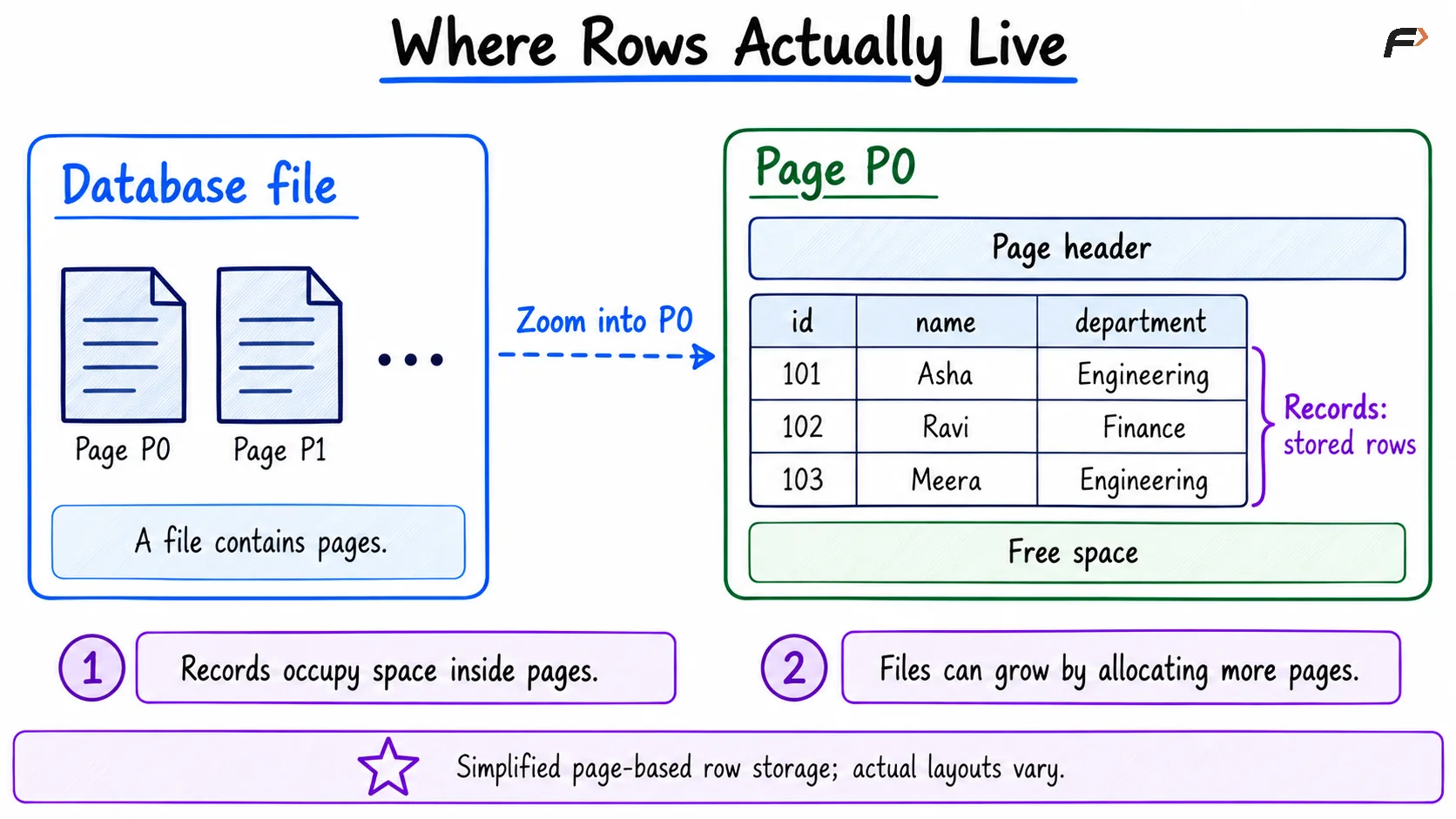
Where rows actually live
Why Reading One Row Can Load a Page
Suppose the employees table contains:
id | name | department |
|---|---|---|
101 | Asha | Engineering |
102 | Ravi | Finance |
103 | Meera | Engineering |
Assume all three records fit inside Page P0.
Now consider:
SELECT nameFROM employeesWHERE id = 102;After locating the required page, the database needs access to P0 to retrieve Ravi’s record.
If P0 is not already available in memory, the database generally loads the page rather than fetching only the bytes containing Ravi. Other records on that page become available at the same time.
Reading in pages supports organized storage, caching, and efficient access to nearby records. However, loading a page does not mean every record on it becomes part of the query result. The query still returns only the requested values.
Pages Have Fixed Sizes; Files Can Grow
A page has a defined size for the database’s storage configuration. That size does not expand whenever another record is inserted.
When an existing page has suitable free space, the database may place a new record there. When additional capacity is needed, it can allocate more pages.
The distinction is:
Page size: Remains fixed for the relevant storage configuration.
File size: Can increase as more space is allocated.
Record size: Can vary according to its columns, values, and storage format.
A file does not necessarily grow with every insert because previously allocated space may be reused. Similarly, deleting records does not necessarily shrink the file immediately.
There is no universal page size for all databases, so a specific size should not be assumed without checking the storage system.
Pages Also Have Copies in Memory
The database can keep pages in a memory area commonly called a buffer pool or buffer cache.
When a query needs a page:
The database checks whether it is already buffered.
If present, it uses the in-memory page.
If absent, it loads the page into a buffer.
These are commonly called a buffer hit and a buffer miss. Another caching layer may satisfy a miss without requiring a physical device read.
Once P0 is buffered, another query requesting Asha or Meera may reuse it. The benefit comes from caching the page, even though different queries request different records.
Memory is limited, so cached pages cannot stay indefinitely. The database manages replacement to make room for other pages.
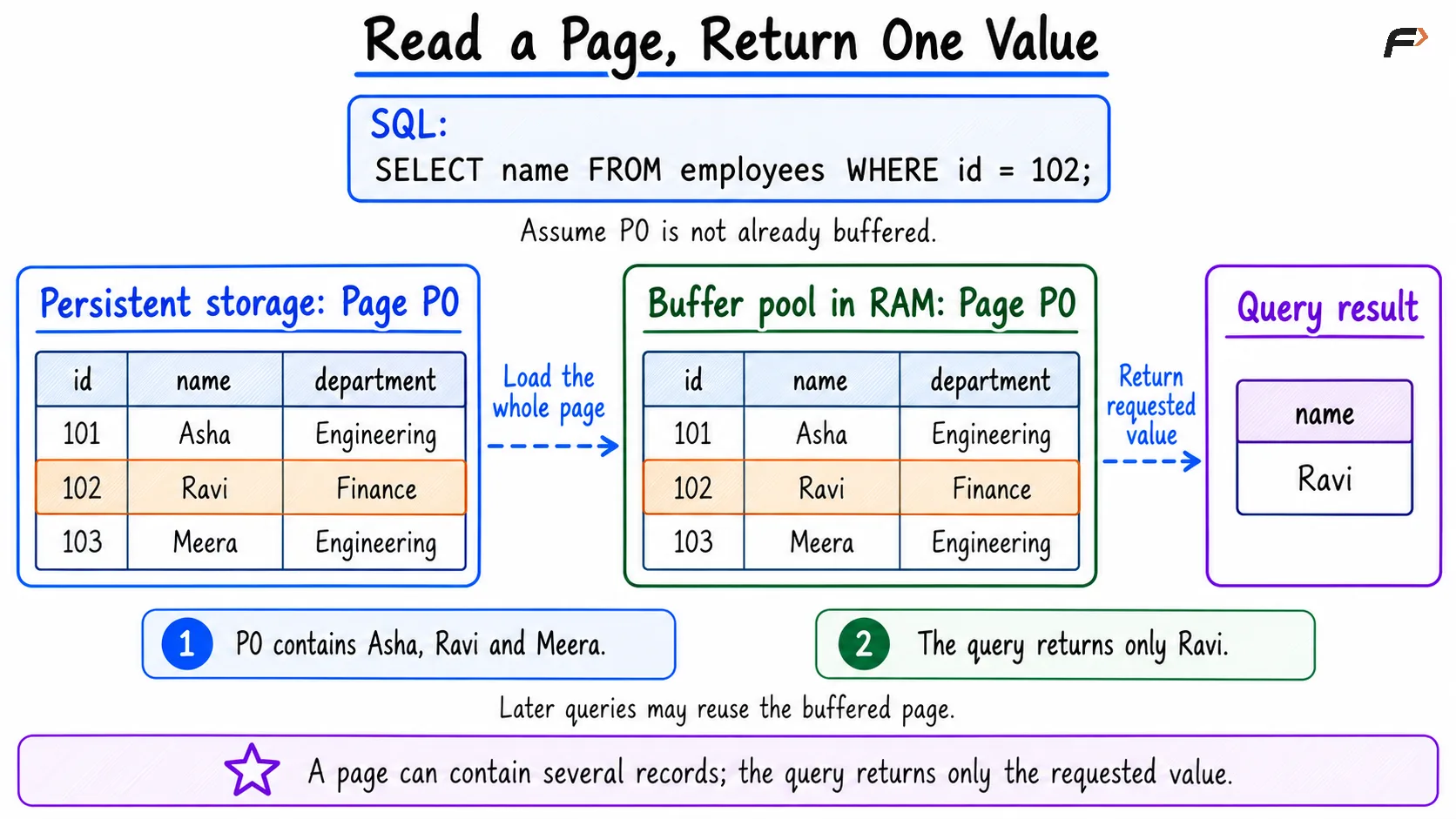
Read a page , return one value
What Happens When Values Are Too Large?
A fixed-size page cannot accommodate unlimited data inside one record.
Depending on the database and row format, large text or binary values may be stored partly or entirely in additional storage. The main record retains information that allows the database to locate that content.
For example, an employee record might contain a reference to separately stored document data rather than keeping the entire document alongside the employee’s name.
This introduces two considerations:
Reading the large value may require accessing additional pages.
Row-size limits still exist; external storage does not make every possible table definition valid.
The exact rules vary, so it is better to understand the principle than assume that every row must fit entirely inside one page.
Why This Matters for Performance
Page organization connects schema design to the work a query performs.
Wider records can reduce how many records fit on a page. A query that examines many records may therefore need to access more pages.
Nearby records may share a page, allowing one page load to support several accesses. Repeated queries can benefit when their required pages remain buffered.
An index helps locate relevant entries, but its own structure also occupies pages. Both data and index pages contribute to the workload’s storage and memory requirements.
The number of rows returned alone does not describe the cost of a query. The pages examined and reused also matter.
Summary
In a typical page-based database, rows are represented by records stored inside pages, and those pages belong to database files. Reading a record often means accessing its containing page.
Pages can also be cached in memory, allowing later queries to reuse them. Understanding this relationship provides a foundation for studying buffers, indexes, and query performance.
Be the first to add a comment.