Introduction
A database system serves more than one type of user. Administrators maintain it, developers build applications around it, analysts retrieve information, and application accounts perform controlled operations on behalf of many end users.
The system must determine who can connect, which actions each identity can perform, and how clients, applications, and database servers communicate.
Database users and roles address access control. Deployment architecture describes where the system’s components run and how requests move between them.
People, Accounts, and Roles
The word “user” can describe several different identities in a database environment.
Identity | Meaning | Example |
|---|---|---|
Human user | A person interacting with a system | Database administrator |
Application user | A person signed in to an application | Student using a portal |
Database account | An identity recognized by the DBMS |
|
Database role | A named set of privileges or membership relationships |
|
Service account | A non-human identity used by software |
|
These identities do not always have a one-to-one relationship.
A university portal may have thousands of application users while using a small pool of database connections authenticated as portal_app. The application identifies each student, applies business rules, and sends permitted database operations through that controlled account.
Types of Database Users
Database users can be grouped according to how they interact with the system.
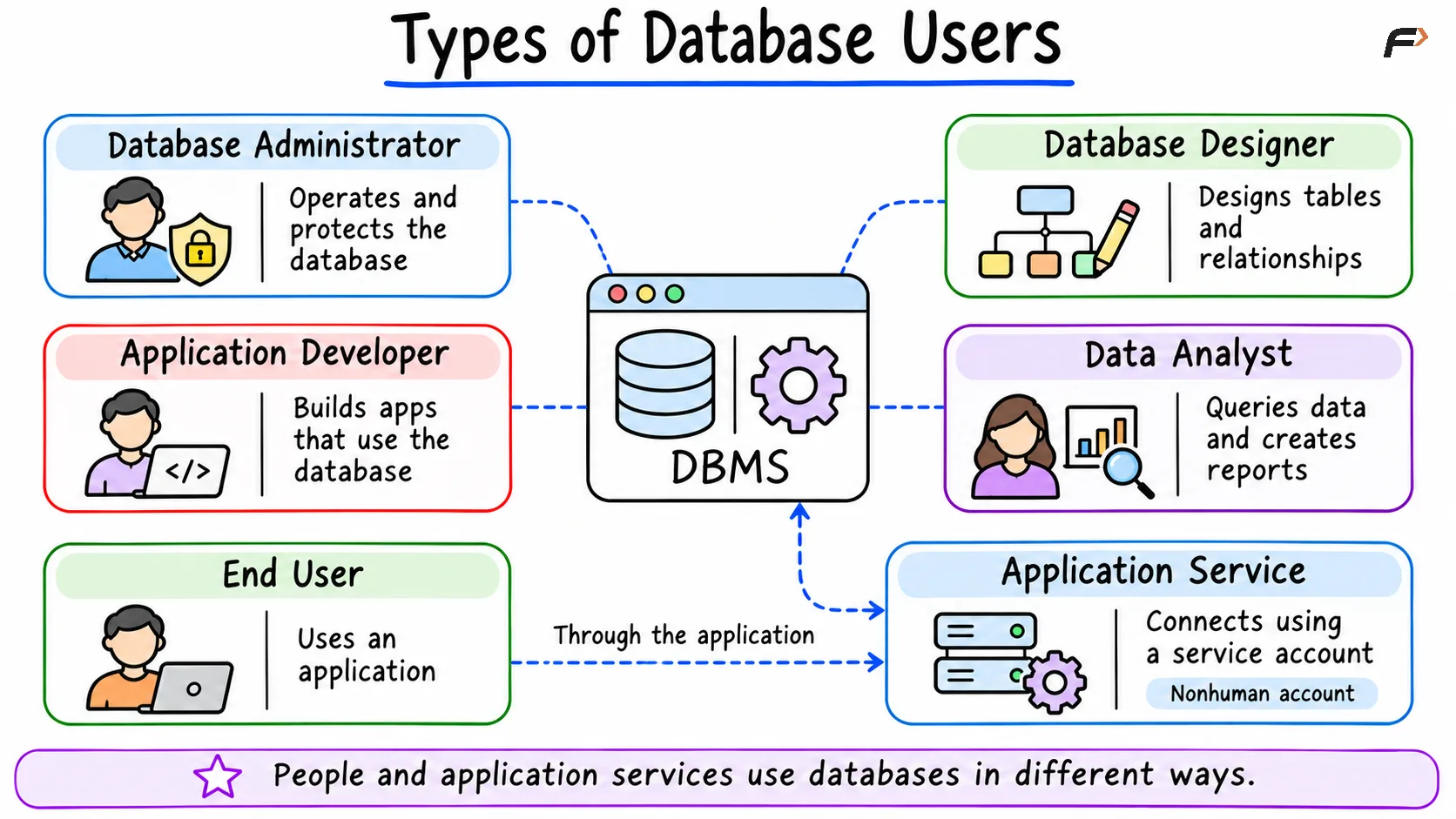
Types of Database Users
Database Administrator
A Database Administrator (DBA) manages the overall database environment by installing and configuring the DBMS, creating databases and storage structures, and managing user accounts and privileges. Ongoing operational duties also include monitoring performance, reviewing capacity and storage usage, planning backups and recovery, applying upgrades, investigating failures, and maintaining system availability. In large organizations, these responsibilities are often divided among multiple specialists.
Database Designer
A database designer studies information requirements and translates them into a structured database design by identifying entities and attributes, defining relationships, selecting keys, and designing constraints to reduce unnecessary duplication. The role also involves planning schemas and views while documenting data definitions, focusing primarily on how data should be represented rather than on low-level physical storage details.
Application Developer
An application developer builds software that reads and modifies database data by writing SQL statements, integrating database drivers, managing transactions, and handling query results. Developers also implement business rules, validate application input, prevent unsafe SQL construction, and monitor database-related application errors, typically working through approved schemas and accounts rather than unrestricted administrative access.
Data Analyst
A data analyst retrieves and interprets information by running read-only queries, calculating aggregates, exploring trends, using reporting views, creating reports, and exporting approved datasets. Analysts generally receive broad read access to selected reporting objects while having limited or no permission to modify operational data.
Application or Service Account
An application or service account is a non-human identity used directly by software such as a web application, background worker, reporting service, data-import process, monitoring system, or backup process rather than by a person. Each service should receive only the privileges required for its specific function; for instance, a reporting service may require SELECT permission without any permission to update or delete rows.
End User
An end user interacts with the database through an application interface, such as a student checking grades, a customer viewing an order, an employee updating a profile, or a manager approving a request. End users rarely connect directly to the DBMS; instead, the application authenticates the person and executes database operations on their behalf using a controlled application account.
Specialized Database Users
Larger or more complex environments also include data engineers, security administrators, site reliability engineers, machine-learning engineers, auditors, backup operators, support engineers, and integration services. Although exact job titles vary across organizations, the defining distinction is the set of database responsibilities and permissions assigned to each identity.
Authentication and Authorization
Authentication and authorization address two distinct access-control requirements.
Authentication
Authentication verifies the identity attempting to connect to the database using mechanisms such as passwords, operating-system identities, certificates, directory services, external identity providers, cloud identity systems, and security tokens. Successfully authenticating establishes an identity, but it does not automatically grant permission to access every database object.
Authorization
Authorization determines which operations an authenticated identity is permitted to perform, such as connecting to a database, using a schema, reading a table, inserting, updating, or deleting rows, executing functions, creating database objects, and managing other accounts. Because authentication and authorization are separate checks, an account can authenticate successfully and still receive a permission error when attempting to execute an unauthorized statement.
Database Privileges
A privilege permits a specific database operation.
Common SQL privileges include:
Privilege | Typical purpose |
|---|---|
| Read rows |
| Add rows |
| Modify rows |
| Remove rows |
| Run a function or procedure |
| Create certain foreign-key references |
| Create database objects |
| Access a schema, sequence, or other object depending on the DBMS |
| Connect to a database in systems that support this privilege |
Privileges can exist at different scopes.
A privilege may apply to the entire server, a database, a schema, a table, a column, a sequence, or a function or procedure.
The supported privilege hierarchy differs between database products.
Database Roles
A database role groups privileges or accounts into a reusable access-control unit.
Instead of granting the same permissions separately to ten reporting accounts, a student_reader role can receive the required privileges. Each reporting account can then become a member of that role.
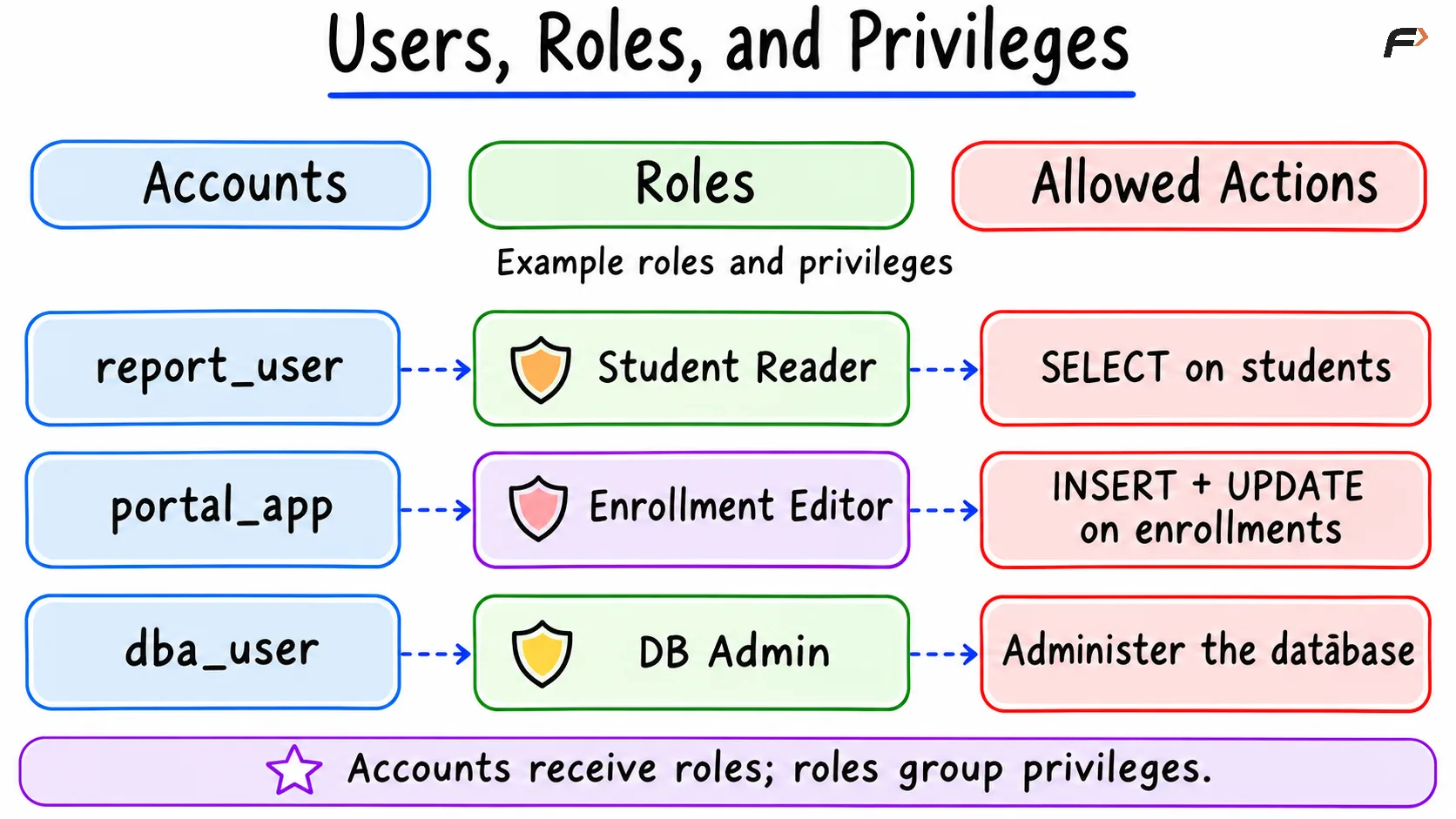
Users, Roles, and Privileges
MySQL Roles
In MySQL, users are accounts and roles are named collections of privileges. Account names can include both a user name and a host component.
The following example creates a read-only role.
CREATE ROLE 'student_reader';GRANT SELECTON university.studentsTO 'student_reader';A login account can then be created.
CREATE USER 'report_user'@'localhost'IDENTIFIED BY 'replace-with-a-strong-password';The role can be granted to the account.
GRANT 'student_reader'TO 'report_user'@'localhost';The role can be configured as a default role for the account.
SET DEFAULT ROLE 'student_reader'TO 'report_user'@'localhost';The password shown in this example is a placeholder and should not be used as a real credential.
PostgreSQL Roles
PostgreSQL uses a unified role model. A role can represent a login identity, a group of privileges, or both. A role requires the LOGIN attribute to connect as that identity. PostgreSQL documents roles as entities that can own objects, hold privileges, and participate in role membership.
The following example creates a group role that cannot log in directly.
CREATE ROLE student_reader NOLOGIN;The role can receive the permissions required to access the university database objects.
GRANT CONNECTON DATABASE universityTO student_reader;GRANT USAGEON SCHEMA publicTO student_reader;GRANT SELECTON TABLE public.studentsTO student_reader;A login role can then be created.
CREATE ROLE report_userLOGINPASSWORD 'replace-with-a-strong-password';The login role can become a member of the privilege role.
GRANT student_readerTO report_user;PostgreSQL also supports CREATE USER as an alternative form that creates a role with login capability. The password in this example is only a placeholder.
Granting and Revoking Access
GRANT adds privileges or role membership. REVOKE removes them.
Suppose the reporting account should no longer receive read access through the student_reader role.
REVOKE 'student_reader'FROM 'report_user'@'localhost';Revoking role membership does not necessarily remove privileges granted directly to the account through another path.
Effective access may come from direct privileges, role membership, nested role membership, object ownership, administrative attributes, public or default privileges, and external identity mappings.
Access reviews must consider every applicable path.
Principle of Least Privilege
The principle of least privilege grants each identity only the minimum permissions required for its role for example, giving a reporting account SELECT access without DELETE privileges. Restricting access in this way limits damage from bugs or compromised credentials, and permissions should be reviewed periodically as responsibilities change.
Separate Accounts for Separate Purposes
One application may need multiple database identities.
Account | Typical access |
|---|---|
| Read and update normal application data |
| Read reporting views |
| Alter approved database objects during deployment |
| Perform backups |
| Read operational metrics |
Separating these identities prevents one credential from automatically gaining every capability.
Application Users Versus Database Users
Application authentication and database authentication operate as separate layers. In a student portal, for example, the application verifies a student’s identity and permissions before querying the database through a shared service account, meaning the student does not need an individual database login. While internal staff such as employees, analysts, and administrators often receive dedicated database accounts, public-facing applications typically rely on service accounts alongside application-level access controls neither layer completely replaces the other.
Deployment Architecture in DBMS
Deployment architecture describes where database-related components run and how they communicate.
It can answer several different questions:
Whether the client connects directly to the DBMS
Whether an application server sits between the client and database
Whether data is stored at one location or several
Whether infrastructure is self-managed or provider-managed
Tier architecture and data distribution are separate dimensions. A three-tier application can use either a centralized database or a distributed database.
One-Tier Database Architecture
In a one-tier architecture, the interface, application logic, DBMS, and data operate within the same local environment.
A typical example is a developer running a SQL client and a local database on one computer.
User and Application
        |
     Local DBMS
        |
   Local Database
One-tier architectures are commonly used for learning SQL, local development, embedded applications, small standalone tools, and offline desktop software.
This approach provides a simple setup, direct local access, and little to no network dependency, though the limited separation between the application and database makes it less suitable for large multi-user systems. Rather than implying that the DBMS has only one internal component, the term one-tier describes deployment placement rather than internal DBMS design.
Two-Tier Database Architecture
In a two-tier architecture, a client application connects directly to a database server.
  Client Application
        |
   Database Server
The client handles the user interface, application logic, database driver, and SQL statements, while the server hosts the DBMS and stored data. This setup is commonly used for internal desktop applications, administrative tools, analyst connections, database development tools, and small organization systems.
While a two-tier design is straightforward and requires fewer moving components, direct database access introduces challenges such as storing credentials on client machines, duplicating business logic, coordinating client updates, handling high connection loads, and exposing the database network endpoint. As a result, this architecture remains most effective when clients and networks are tightly controlled.
Three-Tier Database Architecture
A three-tier architecture places an application server between the client and the database.
Presentation Tier
       |
Application Tier
       |
  Database Tier
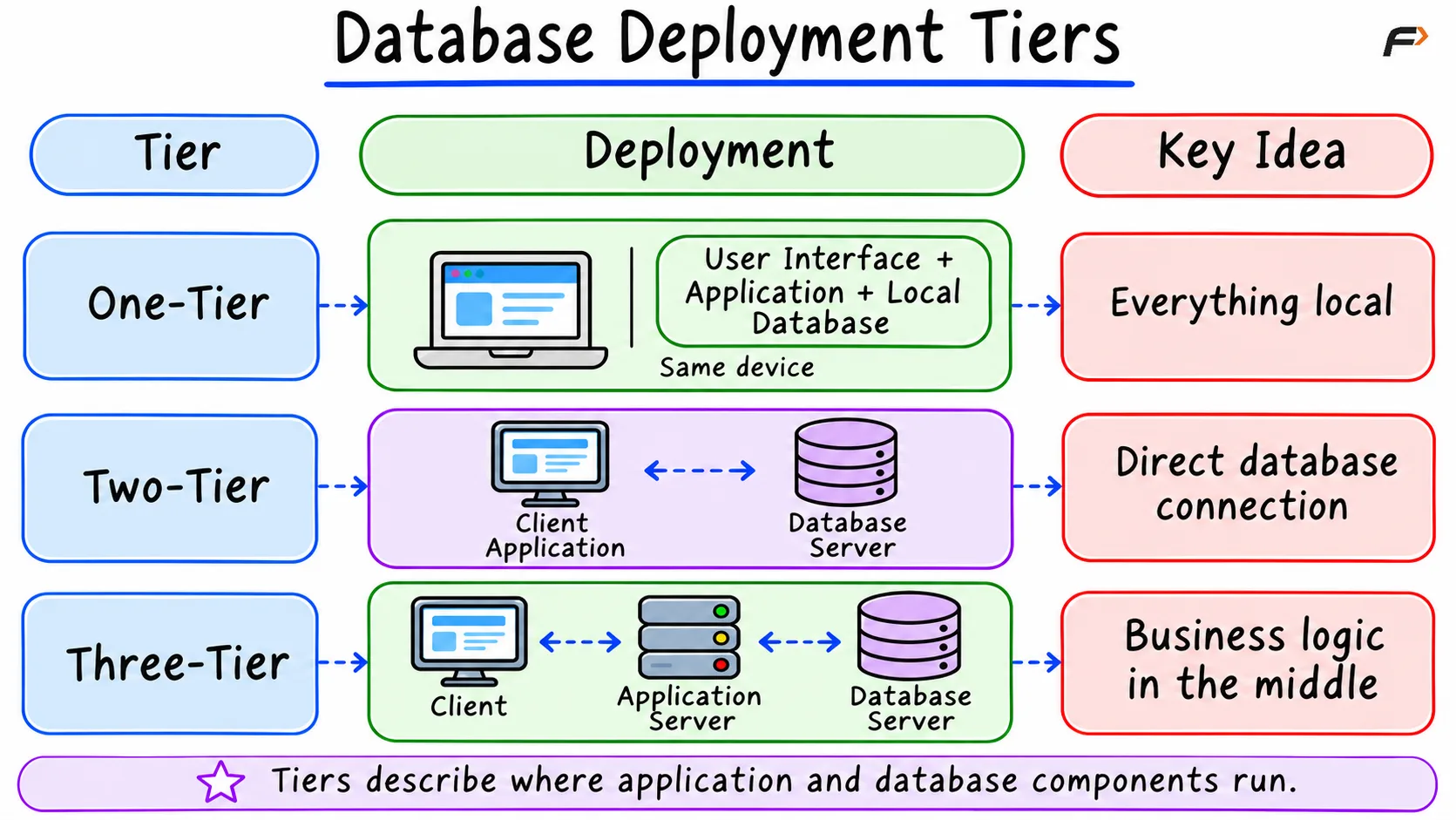
Database Deployment Tiers
Presentation Tier
The presentation tier provides the user interface.
Examples include a web browser, mobile application, desktop interface, and a point-of-sale terminal.
It sends requests to the application tier rather than directly executing database queries.
Application Tier
The application tier contains business logic.
It may handle application authentication, authorization rules, input validation, database connection pooling, transaction coordination, API endpoints, data transformation, caching, and logging.
This tier connects to the database through controlled service accounts.
Database Tier
The database tier contains DBMS software, schemas, tables and indexes, stored data, database constraints, and transaction and recovery mechanisms.
The database server usually accepts connections from the application tier rather than from every end-user device.
Advantages
Centralized business logic
Controlled database access
Reusable connection pools
Easier client updates
Better separation of responsibilities
Independent scaling of application and database resources
Limitations
More components to deploy
Additional monitoring requirements
More network communication
Application-tier failures can affect many users
Configuration and troubleshooting become more complex
Three-tier architecture is common in web and mobile applications.
N-Tier Architecture
N-tier architecture extends the same separation by adding more independently deployed services or layers.
A system may include:
Client
   |
API Gateway
   |
Application Services
   |
Caching or Messaging Layer
   |
Database Services
Not every technical component forms a meaningful architectural tier. A tier normally represents a separately deployed responsibility or boundary.
Additional tiers can improve separation and independent scaling, but they also increase operational complexity.
Centralized Database Deployment
A centralized deployment stores and manages the primary database through one central database environment.
Clients or application servers connect to that central system.
Client A ─┐
Client B ─┼── Central Database
Client C ─┘
Advantages
Central administration
Consistent access policies
Simpler data governance
One primary source of operational data
Easier coordination than a widely distributed system
Limitations
Dependence on connectivity to the central environment
Capacity concentrated in one system
Central failures can affect many consumers
Distant users may experience additional latency
A centralized database can still use multiple machines, replicas, or a clustered implementation. “Centralized” describes the logical deployment and control model, not necessarily a single physical computer.
Distributed Database Deployment
A distributed database stores or processes data across multiple networked nodes, where data may be replicated across nodes, partitioned between them, or distributed by geographic region while being coordinated through a distributed database system.
Database Node A
       |
Database Node B
       |
Database Node C
Replication
Replication maintains copies of data on multiple nodes to support availability, read scaling, disaster recovery, and geographically closer reads. At the same time, it introduces consistency, delay, conflict, and failover considerations.
Partitioning
Partitioning divides data into smaller portions and distributes them across different nodes based on criteria such as key ranges, hash values, customer or tenant, geographic region, or time period.
While distributed deployment improves availability and scalability, it introduces coordination, monitoring, failure-handling, and consistency challenges. It also does not dictate a specific data model, as both relational and non-relational systems can use distributed architectures.
Self-Managed and Managed-Cloud Databases
Infrastructure ownership is another deployment dimension.
Self-Managed Database
In a self-managed deployment, an organization operates the database environment on local hardware, rented infrastructure, or cloud virtual machines. This model requires the team to manage operational tasks directly, including server provisioning, DBMS installation, configuration, upgrades, backups, monitoring, replication, recovery testing, and security hardening.
Managed-Cloud Database
A managed cloud database service transfers routine operational tasks such as infrastructure provisioning, automated backups, software patching, basic monitoring, replication, and scaling to a cloud provider, with the exact level of management depending on the selected service. However, the customer remains responsible for data design, query behavior, account permissions, application security, network configuration, and data retention or recovery settings. Like self-managed systems, a managed database supports one-tier, two-tier, or three-tier access patterns, though production web applications typically place an application tier between clients and the database.
Comparing Deployment Architectures
Architecture | Communication path | Common use | Main trade-off |
|---|---|---|---|
One-tier | Local application to local DBMS | Learning and embedded systems | Simple but limited separation |
Two-tier | Client directly to database | Internal desktop systems | Direct access but more exposed database connections |
Three-tier | Client to application to database | Web and mobile applications | Better separation with added complexity |
N-tier | Client through several services to database | Large applications | Flexible scaling with greater operational complexity |
Centralized | Consumers use one central database environment | Organization-wide systems | Easier control with central dependency |
Distributed | Data spans multiple nodes | Large or geographically distributed systems | Scalability and resilience with coordination challenges |
Self-managed | Organization operates the DBMS | Custom or controlled environments | Greater control with more operational work |
Managed cloud | Provider manages selected operations | Rapidly provisioned applications | Reduced infrastructure work with provider constraints |
These categories can overlap.
A system can be:
Three-tier
Centrally controlled
Hosted as a managed cloud database
Replicated across several availability zones
Each label describes a different architectural dimension.
Choosing a Deployment Architecture
The appropriate architecture depends on technical and organizational requirements.
Important factors include the number of users, application type, security requirements, expected traffic, availability targets, geographic distribution, latency requirements, operational expertise, budget, regulatory obligations, backup and recovery needs, and scaling expectations.
A local learning environment does not need the same architecture as an international payment system.
Greater architectural complexity should address a clear requirement. Additional tiers, nodes, and services create more configuration, monitoring, and failure scenarios.
Common Confusions
A human user is not always a database user.
A person can use an application without having an individual DBMS login.A role and a job title are not the same concept.
“Database administrator” can describe a human responsibility, whiledb_adminmay be a technical role containing privileges.Authentication does not grant unlimited access.
Authentication establishes identity. Authorization controls permitted actions.A role is more than a label.
A database role can own privileges, receive membership, and control effective access.MySQL and PostgreSQL use different account models.
MySQL accounts can include a host component. PostgreSQL uses a unified role system in which roles may or may not have login capability.
Summary
Database users, accounts, and roles serve different purposes in managing responsibilities and access. Authentication establishes identity, authorization determines permitted actions, and least privilege limits access to what each identity needs. Application users may access the database through shared service accounts rather than individual database logins. Deployment architecture defines how clients, applications, and databases communicate. Tier structure, data distribution, and infrastructure management are separate choices that can overlap, and each should reflect the system’s security, availability, scale, cost, and operational requirements.
Be the first to add a comment.