Introduction
Database applications often need the same filtered records, joined information, or calculated summaries repeatedly. Writing the complete query everywhere makes applications harder to maintain, while repeatedly calculating expensive results can increase database workload.
Views and materialized views address these needs in different ways. A view provides a reusable query interface, while a materialized view stores the query’s result. Understanding their behavior helps determine the balance between data freshness, faster repeated reads, and the cost of maintaining stored results.
What Is a View?
A view is a named database object defined by a query. It behaves like a virtual table: users can select its columns and filter its rows, but an ordinary view does not independently store the rows produced by its query.
The tables from which a view obtains data are called base tables. A view can select certain columns, filter records, join tables, or calculate summaries. It can also refer to another view.
Consider the following Student relation, which will be used in this article’s examples. Each row represents a student; StudentID identifies the student, DeptID identifies their department, and Semester records their current semester.
Student : base table
StudentID | Name | DeptID | Semester |
|---|---|---|---|
101 | Asha | 10 | 2 |
102 | Ravi | 20 | 4 |
103 | Meera | 10 | 2 |
Suppose a view named SecondSemesterStudents is defined such that it retains these four columns but exposes only students whose semester equals 2. Querying the view produces the following result.
SecondSemesterStudents : view result
StudentID | Name | DeptID | Semester |
|---|---|---|---|
101 | Asha | 10 | 2 |
103 | Meera | 10 | 2 |
Asha and Meera appear because their semester is 2. Ravi remains in the base table but does not appear in this view because his semester is 4. Applications can query the view without repeating its filtering condition.
The second table above shows the query result, not a separately stored copy of the students. The database stores the view’s definition and uses it when the view is queried.
The result reflects the base-table data visible to that query under the transaction’s isolation rules. For example, once a change moving Ravi to semester 2 is visible to a subsequent query, he also appears in the view; the view does not require a separate data refresh.
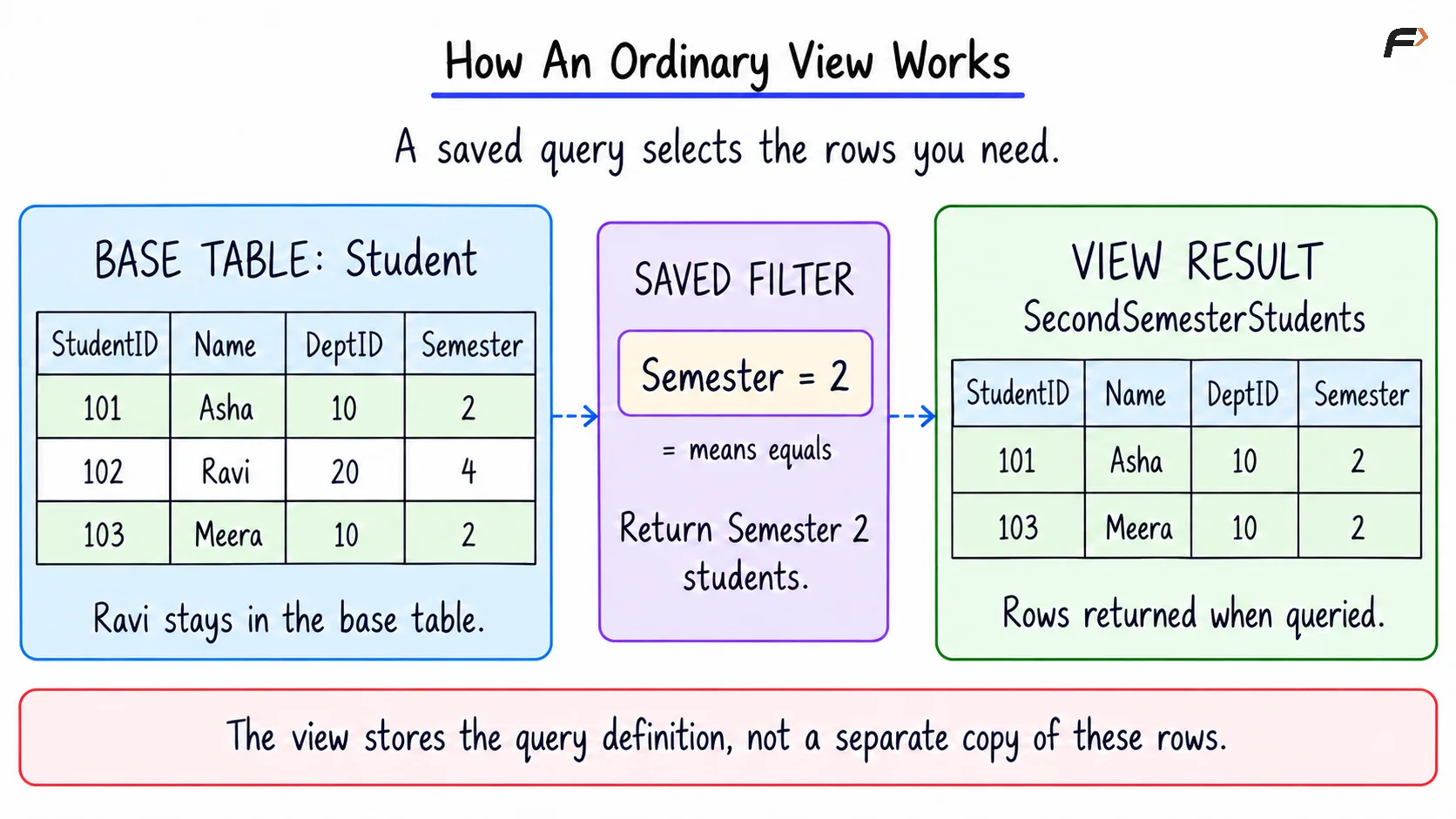
How an ordinary view works
Why Are Views Useful?
Views provide a convenient way to present database information according to an application’s needs.
Query reuse: A frequently used filter or join can be defined once and referenced through a meaningful name.
Simpler interfaces: Applications can work with selected columns and familiar names instead of repeating details of the underlying schema.
Controlled access: A view can expose selected rows or columns when combined with suitable database permissions.
Consistent calculations: Shared definitions help different reports apply the same business rules.
Logical independence: Some changes to the underlying design can be hidden by maintaining a stable view interface.
Access control depends on permissions as well as the view definition. Hiding a column in a view does not prevent someone from reading it if they still have access to the base table.
A view also does not automatically make a query faster. Its main benefit is a reusable logical interface; performance still depends on the query, indexes, and execution plan.
Simple, Complex, and Updatable Views
A simple view commonly selects columns and rows from one table without grouping or aggregation. A complex view commonly includes joins, aggregate calculations, grouping, or other operations.
These are useful descriptive categories, but whether a view accepts changes depends on the DBMS and its exact definition.
An updatable view allows supported changes through the view to be translated into changes to the base table. For example, changing a student’s name through a simple student view can update that student’s original record.
Grouped or aggregated results are usually not automatically updatable. If a view contains a department’s student count, changing that count alone does not identify which student records should be inserted or removed.
In PostgreSQL, simple views can be automatically updatable when they meet its rules. More complex views are read-only by default, although explicitly defined INSTEAD OF triggers can provide custom behavior.
Keeping changes inside the view’s filter
A filtered view does not necessarily prevent an update that makes a row disappear from that view. For example, changing a student’s semester from 2 to 4 could make the student stop matching SecondSemesterStudents.
WITH CHECK OPTION prevents inserts and updates made through an applicable updatable view from producing rows that fail its filtering condition. In this example, attempting to change a visible student’s semester to 4 through the view would be rejected.
For views built on other views, LOCAL checks the current view’s condition, while existing checks on underlying views still apply. CASCADED checks the conditions of the current view and its underlying views.
The check option governs changes made through the view. It does not replace constraints required on the base table itself.
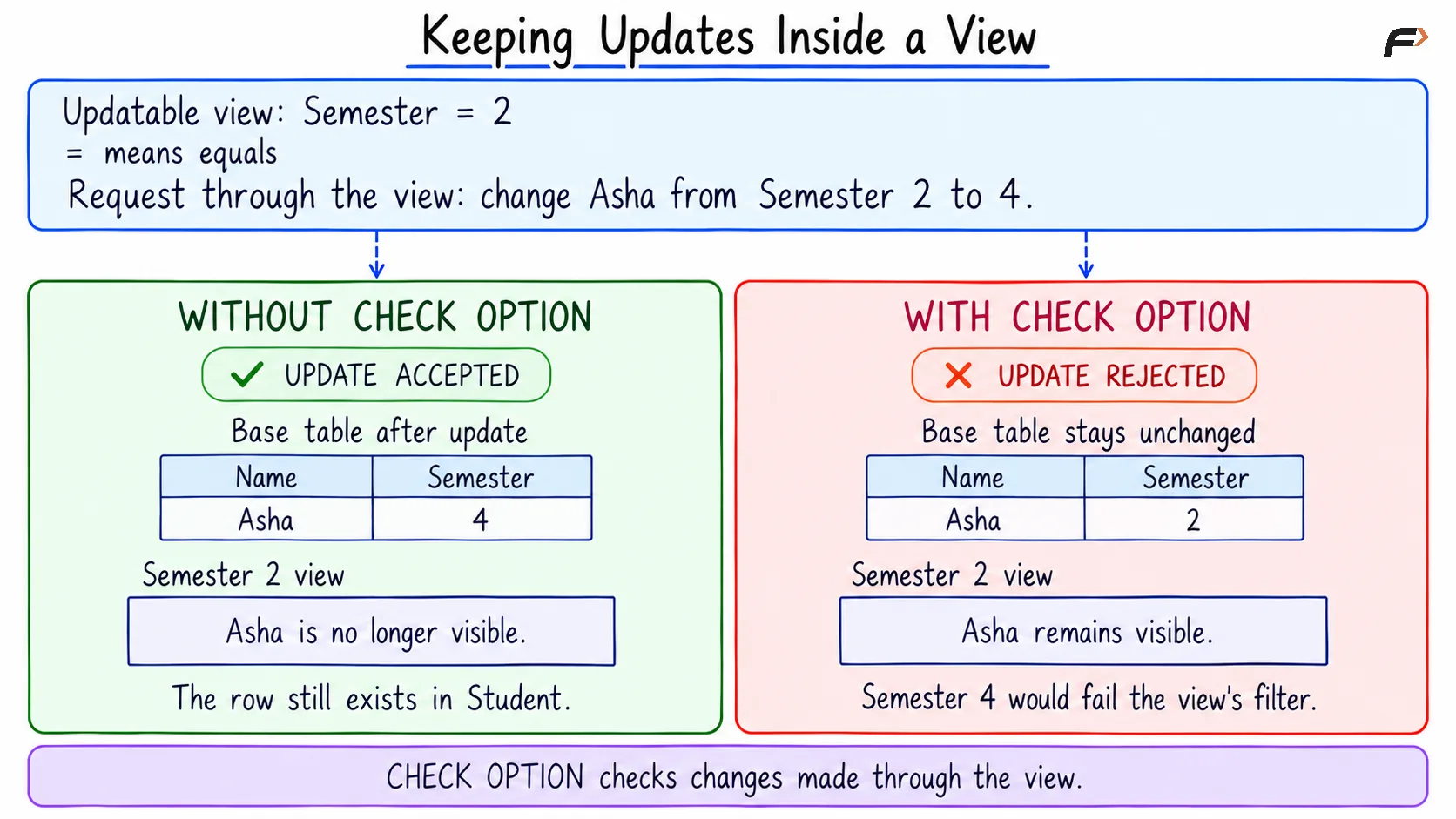
Keeping updates inside a view
What Is a Materialized View?
A materialized view stores both a query definition and the result produced by that query. Reading it accesses the stored result instead of recalculating the complete defining query each time.
For example, a materialized view can store the number of students in each department. A report can read those counts without grouping all student records for every request.
This can be useful for expensive joins, large aggregations, and frequently accessed reports. However, storing the result requires additional space, and changes to the base tables must be reflected through a maintenance or refresh mechanism.
A materialized view’s data may therefore become stale, meaning it no longer matches the result that its defining query would currently produce.
In PostgreSQL, materialized views are populated when created unless WITH NO DATA is specified. An unpopulated materialized view cannot be queried until it has been populated through a refresh.
How Are Materialized Views Refreshed?
A refresh brings a materialized view’s stored result into line with its source data. Two important refresh methods are:
Complete refresh: Recalculate the defining query and replace the stored result. This is straightforward but can require substantial work for large datasets.
Incremental refresh: Apply the effects of relevant source changes to the stored result. This can reduce work, but it requires DBMS support and may impose restrictions on the defining query.
Refresh method and refresh timing are separate decisions. A refresh may run on demand, on a schedule, or as part of committing source changes, depending on the database system.
More frequent maintenance improves freshness but consumes resources more often. Less frequent maintenance reduces that work while allowing results to remain outdated for longer.
PostgreSQL behavior
PostgreSQL’s built-in refresh recomputes the defining query. It does not automatically refresh a materialized view whenever a base table changes; an application or scheduled job must arrange the refresh.
An ordinary refresh can block reads of the materialized view. The CONCURRENTLY option allows reads to continue, but requires an already populated materialized view and a qualifying unique index covering all rows using ordinary columns. It does not turn the operation into incremental refresh.
Other systems differ. Oracle supports several refresh strategies, while SQL Server maintains qualifying indexed views as their base tables change.
Views vs Materialized Views :
Aspect | Ordinary view | Materialized view |
|---|---|---|
Stored information | Query definition | Query definition and result rows |
Reading data | Uses the defining query against its sources | Reads the stored result |
Freshness | Reflects source data visible to the query | Depends on its maintenance or refresh policy |
Additional storage | Definition and metadata; no persistent result copy | Result rows, metadata, and any indexes |
Repeated expensive calculations | May need to be performed again | Can be avoided when reading the stored result |
Data maintenance | No separate result refresh | Stored results must be maintained |
Changes through the object | Possible for supported updatable views | DBMS-dependent; PostgreSQL does not allow direct row changes |
Common uses | Reusable queries, application interfaces, controlled access | Reporting, dashboards, and repeated aggregations |
Neither option is universally faster or better. The choice depends on how often the result is read, how expensive it is to calculate, and how fresh it must be.
A Compact Example
Consider the existing Student table. StudentID uniquely identifies each student.
StudentID | Name | DeptID | Semester |
|---|---|---|---|
101 | Asha | 10 | 2 |
102 | Ravi | 20 | 4 |
103 | Meera | 10 | 2 |
A view of Semester 2 students and a separate stored summary counting all students in each department will be created.
1. Create and query an ordinary view
The condition Semester = 2 uses = to mean “equals.” WITH CHECK OPTION ensures that supported inserts and updates through this view keep the affected rows within that condition.
CREATE VIEW SecondSemesterStudents ASSELECT StudentID, Name, DeptID, SemesterFROM StudentWHERE Semester = 2WITH CHECK OPTION;SELECT StudentID, Name, DeptID, SemesterFROM SecondSemesterStudentsORDER BY StudentID;Both versions return Asha and Meera. ORDER BY StudentID requests increasing student-ID order; querying a view does not otherwise guarantee a particular row order.
2. Store the department counts
MySQL 8.4 does not provide native materialized views. A manually maintained summary table can demonstrate stored query results, but it is an ordinary table and does not remember its defining query for automatic refresh.
PostgreSQL provides a native materialized-view object. These examples produce the same initial counts, but their maintenance mechanisms differ.
CREATE TABLE DepartmentStudentCount ASSELECT DeptID, COUNT(*) AS StudentCountFROM StudentGROUP BY DeptID;SELECT DeptID, StudentCountFROM DepartmentStudentCountORDER BY DeptID;Here, GROUP BY DeptID forms one group per department. COUNT(*) counts every row in each group; the * inside this function means that the count is not restricted to non-NULL values of a particular column. AS StudentCount names the calculated output column.
Both stored results initially contain:
DeptID | StudentCount |
|---|---|
10 | 2 |
20 | 1 |
Only departments represented in Student appear. Showing departments with zero students would require a department table and an appropriate outer join.
What Happens When the Base Data Changes?
The following operation inserts Kabir into the Student table and commits the change.
START TRANSACTION;INSERT INTO Student (StudentID, Name, DeptID, Semester)VALUES (104, 'Kabir', 20, 2);COMMIT;A subsequent query of SecondSemesterStudents that can see this insertion includes Kabir. However, the summary table and PostgreSQL materialized view still contain their previously stored department counts until they are refreshed.
Result being read | Before Kabir is added | After insertion, before refresh | After refresh |
|---|---|---|---|
Names in | Asha, Meera | Asha, Meera, Kabir | Asha, Meera, Kabir |
Stored count for DeptID 20 | 1 | 1 | 2 |
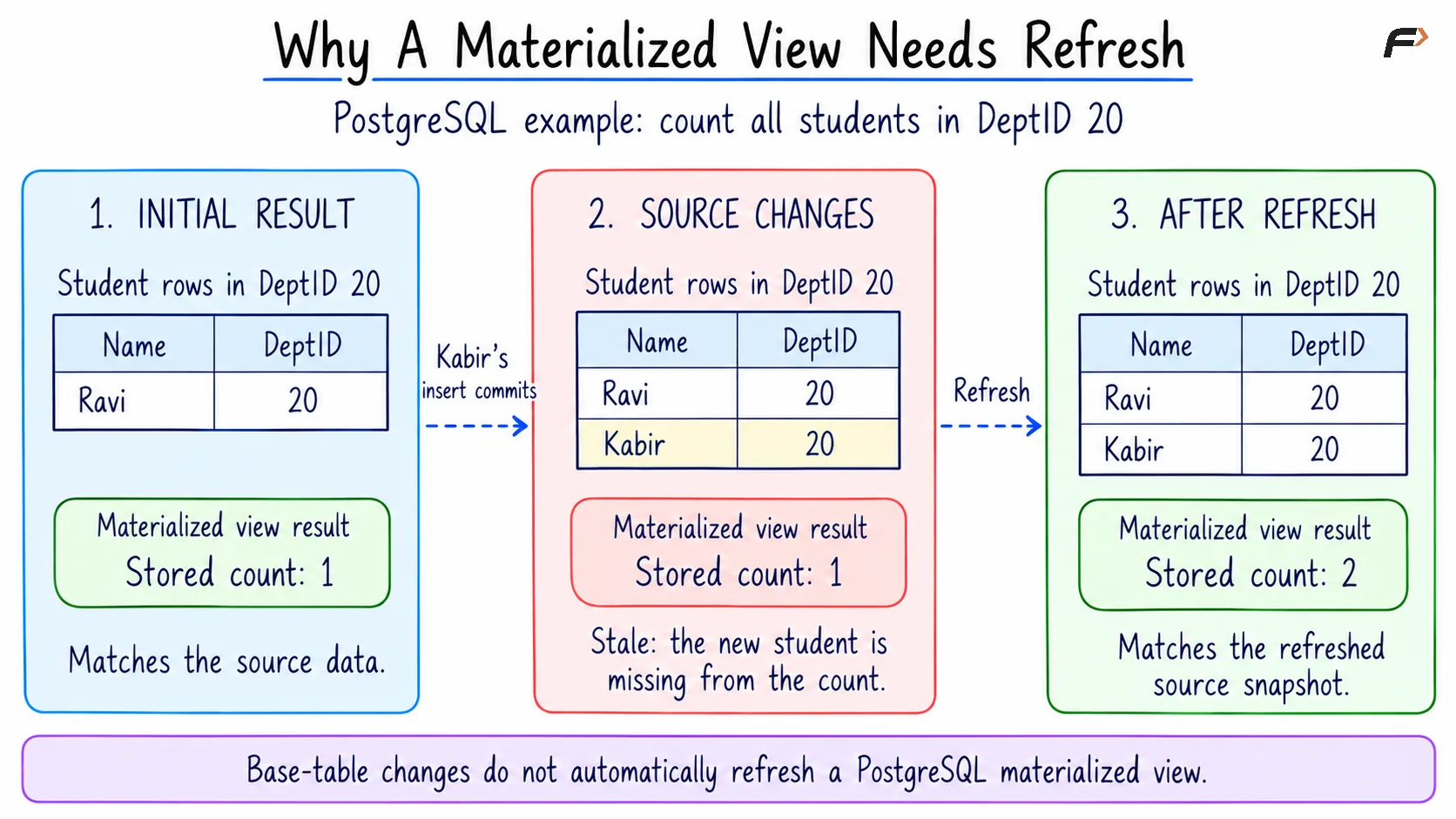
Why materialized views need refresh
For the MySQL alternative, the stored summary rows are explicitly replaced.
START TRANSACTION;DELETE FROM DepartmentStudentCount;INSERT INTO DepartmentStudentCount (DeptID, StudentCount)SELECT DeptID, COUNT(*)FROM StudentGROUP BY DeptID;COMMIT;SELECT DeptID, StudentCountFROM DepartmentStudentCountORDER BY DeptID;After the refresh, both department counts are 2. PostgreSQL can reuse the query stored with its materialized view, while the manually maintained table requires the refresh logic to be supplied separately.
Performance, Indexes, and Query Rewrite
Materialized views are most useful when many reads can reuse an expensive result. A department summary containing a few hundred rows may be much cheaper to read than repeatedly processing millions of student or enrollment records.
However, the result still occupies storage, and refresh operations consume processing time and database resources. A rarely used materialized view may cost more to maintain than it saves.
PostgreSQL allows indexes on materialized views because their result rows are stored. An ordinary PostgreSQL view has no independent stored rows to index, although queries through it can benefit from indexes on its base tables.
Some database systems also support query rewrite, where the optimizer recognizes that a suitable materialized result can answer a query written against the base tables. This depends on the DBMS, query, and configuration; the PostgreSQL example above explicitly reads the materialized view.
Changing Definitions and Managing Dependencies
Views and materialized views depend on their source objects. Changing a referenced column or removing a base table can affect dependent objects, so the DBMS may reject the change or leave a definition unusable, depending on its dependency rules.
Where supported, CREATE OR REPLACE VIEW can change an ordinary view’s definition. Replacement is subject to compatibility rules; PostgreSQL generally requires existing output columns to retain their names, order, and data types.
Changing a materialized view’s defining query may require recreating it. Refreshing updates its stored rows using the existing definition; it does not replace that definition.
Dropping an ordinary view removes its definition without deleting its base-table rows. Dropping a materialized view removes its stored result and associated object, while leaving the source data intact. Dependent objects may need separate handling.
When Should You Use Each?
The most useful choice follows the application’s workload and freshness requirements.
Choose an ordinary view: The main need is reusable query logic, a simpler application interface, or restricted access to selected data.
Choose a materialized view: An expensive result is read repeatedly, and its maintenance strategy can meet the application’s freshness requirements.
Query the base tables directly: The query is straightforward and does not benefit from an additional reusable interface or stored result.
Use a managed summary table when necessary: Native materialized views are unavailable, and the application can take responsibility for rebuilding or maintaining the summary.
For example, a student-facing page may need currently visible enrollment information, while a department dashboard may accept periodically refreshed totals. The acceptable delay should determine the refresh policy.
Summary
Views provide reusable query definitions that present data from underlying tables. They simplify access, support consistent query logic, and can participate in access control. Supported views may also accept changes, with WITH CHECK OPTION helping keep those changes within their filtering conditions.
Materialized views store query results to reduce repeated computation, at the cost of storage and maintenance. Their usefulness depends on query workload, freshness requirements, refresh methods, and DBMS support. PostgreSQL provides native materialized views, while systems such as MySQL may require a separately maintained summary table.
Be the first to add a comment.