Introduction
A database can do more than store and retrieve information. It can also execute calculations, record changes, and perform related operations close to the data. This helps applications share important rules instead of implementing them separately in every program.
Triggers, stored procedures, and stored functions are common ways to define this database-side logic. They differ in how they start, what they return, and how they interact with transactions. Choosing the right mechanism makes database behavior easier to understand and maintain.
What Is Database-Side Logic?
Database-side logic is processing that executes inside the database server. It may involve ordinary SQL statements, reusable routines, or actions that run automatically when a database event occurs.
This processing can validate changes, perform a sequence of operations, or record information about modifications. Applications can reuse operations defined in the database instead of implementing the same behavior separately.
Constraints also provide database-side enforcement. Requirements involving unique identifiers, mandatory values, permitted values, and valid references should normally use declarative features such as PRIMARY KEY, NOT NULL, UNIQUE, CHECK, or FOREIGN KEY.
These constraints describe conditions that stored data must satisfy. Procedural logic becomes useful when a requirement also involves actions or a sequence of operations that constraints do not express directly.
The following student database provides a common example for the concepts in this article. The Student table stores each student’s identifier, name, department, and current semester.
Student : initial data
StudentID | Name | DeptID | Semester |
|---|---|---|---|
101 | Asha | 10 | 2 |
102 | Ravi | 20 | 4 |
103 | Meera | 10 | 2 |
Here, StudentID is the primary key and uniquely identifies each student. DeptID identifies the student’s department. Assume that Semester cannot contain NULL, so every student has a recorded semester.
The example follows one change: moving Asha, whose StudentID is 101, from semester 2 to semester 3. Three database objects demonstrate different responsibilities:
Stored procedure: Performs the requested semester update.
Trigger: Automatically records the previous and new semester values when the value changes.
Function: Formats the semester number as a readable label, such as
Semester 3, when called in a separate read query.
The procedure initiates the update, the trigger responds to the change, and the function formats a value for display. These roles show how database-side logic can support a shared operation, automatic auditing, and reusable calculations.
What Is a Trigger?
A trigger defines an action that the database automatically executes when a specified event occurs. Common triggering events are INSERT, UPDATE, and DELETE, which belong to Data Manipulation Language, or DML.
A useful way to understand a trigger is through three parts:
Event: The operation that activates the trigger, such as updating a student record.
Condition: An optional test that determines whether a particular action is needed, such as checking whether the semester actually changed.
Action: The work performed, such as inserting the old and new semester values into an audit table.
An application does not normally call a trigger by name. It performs the database operation, and the database invokes the applicable trigger.
Some DBMSs also provide triggers for schema changes or database events such as logins. Their availability and rules differ, so these should not be assumed to work like ordinary table triggers.
Trigger Timing and Execution Frequency
Trigger timing describes where the trigger runs relative to the operation.
Timing | Meaning | Typical use |
|---|---|---|
| Runs before the relevant row change or statement | Validate or adjust proposed values |
| Runs after the relevant change or statement has been processed | Record changes or update related data |
| Performs an action in place of the requested operation | Implement supported changes through a view |
An AFTER trigger does not mean “after the transaction commits.” Its work can still be part of an unfinished transaction and may be rolled back.
Execution frequency is a separate property:
Row-level trigger: Runs once for each affected row. If an update affects 100 rows, a matching row-level trigger can run 100 times.
Statement-level trigger: Runs once for the statement, regardless of how many rows it affects. In PostgreSQL, an applicable statement-level trigger can run even when no rows are affected.
PostgreSQL supports both row-level and statement-level triggers. MySQL 8.4 supports row-level table triggers with BEFORE or AFTER timing; it does not provide the same statement-level or INSTEAD OF trigger options.
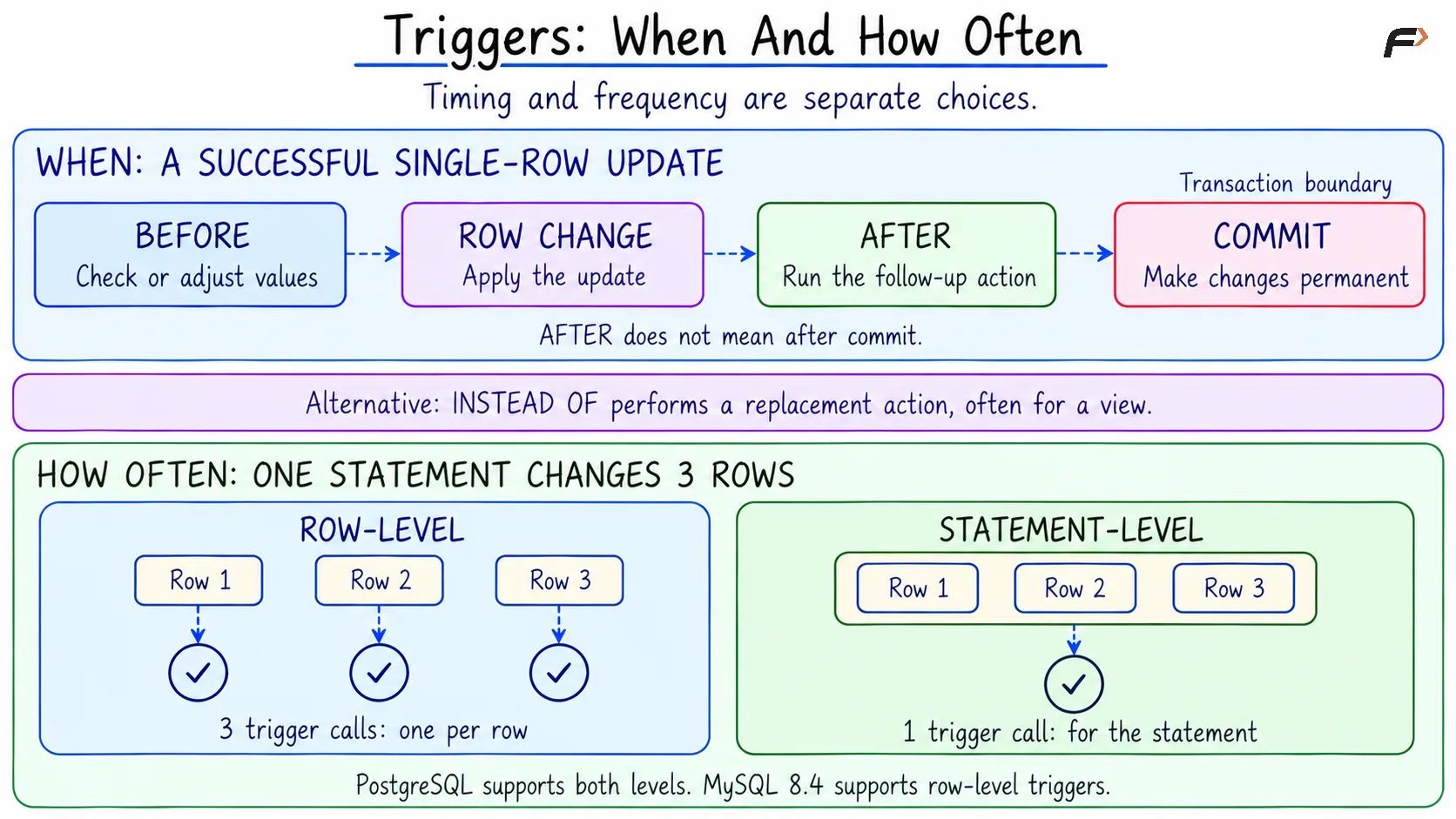
Triggers : when and how often
Understanding OLD and NEW Values
Row-level triggers often need to compare a record before and after a change. In MySQL and PostgreSQL, OLD and NEW provide access to those row values.
Triggering operation |
|
|
|---|---|---|
| No previous row | Newly inserted or proposed row |
| Row before the update | Updated or proposed row |
| Row being deleted | No replacement row |
For example, OLD.Semester refers to the earlier semester value, while NEW.Semester refers to the new value. The dot selects a column from the corresponding row record.
If Asha’s semester changes from 2 to 3, an update trigger can access both values and record the change. An update that sets the semester to its existing value may still activate an update trigger, so the trigger must compare values if it should record only actual changes.
In suitable BEFORE row triggers, the DBMS may allow modification of proposed NEW values. This behavior and its syntax depend on the database system.
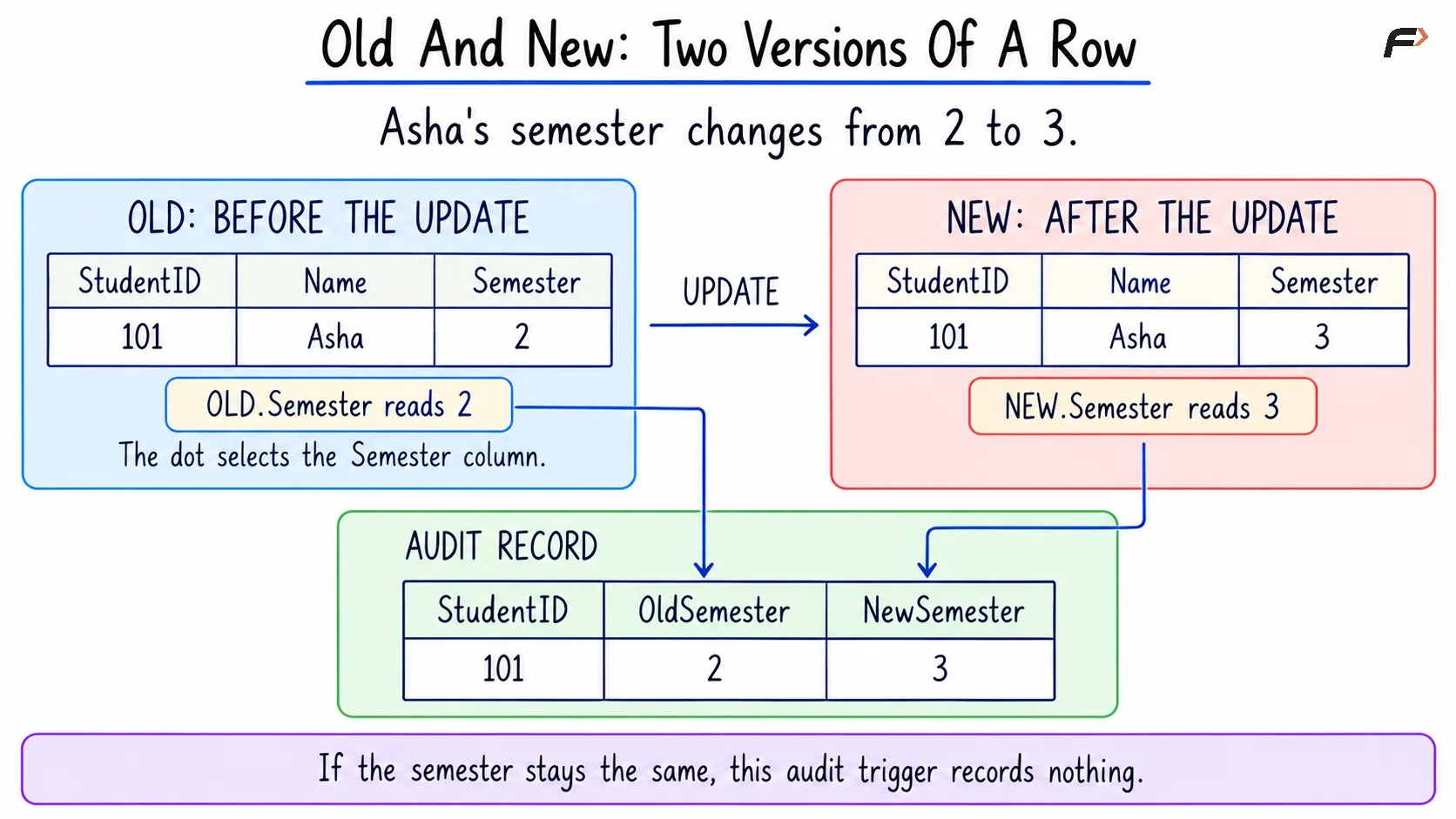
Old and New : Two versions of a row
What Is a Stored Procedure?
A stored procedure is a named routine stored in the database and invoked to perform an operation. It can contain one SQL statement or a sequence of statements with variables, conditions, and error handling.
For example, a procedure named ChangeSemester can accept a student ID and a new semester, then update the corresponding record. The application requests the operation without repeating its implementation.
MySQL and PostgreSQL invoke procedures using CALL. Other systems may provide different invocation syntax.
Procedure parameters commonly use these modes:
IN: Supplies an input value to the procedure.OUT: Returns a value to the caller.INOUT: Accepts an initial value and returns its modified value.
A procedure can return information through supported output mechanisms. However, it is not normally used as a value-producing expression in the same way as a function.
What Is a Stored Function?
A stored function is a reusable routine with a declared return type. It is commonly invoked from an expression or query to calculate or retrieve a result.
For example, a function named SemesterLabel could accept the number 3 and return the text Semester 3. Applications and reports could reuse that formatting rule.
Return capabilities vary. MySQL stored functions return a scalar value, while PostgreSQL functions can also return rows, sets of rows, or other supported types.
Functions are not universally read-only. Whether a function can modify data, and where such a function may be called, depends on the DBMS and its restrictions.
A function that always produces the same result for the same inputs is deterministic. A function that depends on changing table contents, time, or random values does not necessarily have that property.
Control Flow and Error Handling
Procedural SQL extends standard queries with local variables, conditional branches (IF and CASE), loops, and error handlers. While loops and cursors can process results row by row, a single set-based SQL statement is usually clearer and more efficient.
Built-in error-handling mechanisms allow routines to catch failures and clearly communicate why an operation could not complete. Additionally, a BEGIN ... END block only groups procedural statements together; it does not, by itself, create a transaction boundary.
Transactions and Concurrent Changes
A trigger normally runs within the same transaction as the statement that activated it. Rolling back a transaction also undoes any changes made by the trigger, which means audit records inserted during a failed operation will not be preserved if the transaction rolls back.
Stored procedures also require deliberate transaction design, as grouping multiple statements inside a routine does not automatically guarantee they execute as one indivisible transaction. Additionally, when multiple sessions run concurrently, another transaction can intervene between checking a condition and updating data. Database-side logic still needs proper constraints, locking, or isolation levels to enforce rules safely across concurrent operations.
A Compact Example
Consider the existing Student table:
StudentID | Name | DeptID | Semester |
|---|---|---|---|
101 | Asha | 10 | 2 |
102 | Ravi | 20 | 4 |
103 | Meera | 10 | 2 |
Using the Student data shown above, the following example changes Asha’s semester from 2 to 3. It also creates an initially empty StudentSemesterAudit table to record the student’s identifier and the semester values before and after each change.
Assume StudentID is the primary key and Semester is an integer column that does not allow NULL. The example uses three objects:
Procedure: Changes the semester of an existing student.
Trigger: Records the change only when the semester value differs.
Function: Converts a semester number into a readable label.
The SQL version below uses MySQL 8.4 syntax. PostgreSQL has its own version because stored-program syntax is not identical across database systems.
In the MySQL client, DELIMITER // temporarily changes the statement terminator so the trigger body can contain semicolons. The // marker is a client delimiter, not an arithmetic operator; DELIMITER ; restores the usual terminator.
Within the trigger, <> means “not equal.” The comparison works for this example because Semester cannot be NULL.
CREATE TABLE StudentSemesterAudit ( StudentID INT NOT NULL, OldSemester INT NOT NULL, NewSemester INT NOT NULL);CREATE FUNCTION SemesterLabel(p_semester INT)RETURNS VARCHAR(20)DETERMINISTICNO SQLRETURN CONCAT('Semester ', p_semester);CREATE PROCEDURE ChangeSemester( IN p_student_id INT, IN p_semester INT)UPDATE StudentSET Semester = p_semesterWHERE StudentID = p_student_id;DELIMITER //CREATE TRIGGER AuditSemesterChangeAFTER UPDATE ON StudentFOR EACH ROWBEGIN IF OLD.Semester <> NEW.Semester THEN INSERT INTO StudentSemesterAudit (StudentID, OldSemester, NewSemester) VALUES (NEW.StudentID, OLD.Semester, NEW.Semester); END IF;END//DELIMITER ;CALL ChangeSemester(101, 3);SELECT StudentID, SemesterLabel(Semester) AS SemesterTextFROM StudentWHERE StudentID = 101;SELECT StudentID, OldSemester, NewSemesterFROM StudentSemesterAudit;For transactional behavior, the existing Student table should also use InnoDB. The procedure has a single-statement body, so it does not require its own BEGIN ... END block.
CONCAT joins the text Semester with the supplied number. The function is declared DETERMINISTIC because its output depends only on that input, and NO SQL describes this function’s lack of SQL data-access work.
PostgreSQL
PostgreSQL’s $$ markers quote the routine body; they are not variables or operators. LANGUAGE sql specifies an SQL body, while LANGUAGE plpgsql enables procedural constructs such as IF.
CREATE TABLE StudentSemesterAudit ( StudentID INT NOT NULL, OldSemester INT NOT NULL, NewSemester INT NOT NULL);CREATE FUNCTION SemesterLabel(p_semester INT)RETURNS TEXTLANGUAGE sqlAS $$ SELECT CONCAT('Semester ', p_semester);$$;CREATE PROCEDURE ChangeSemester( IN p_student_id INT, IN p_semester INT)LANGUAGE sqlAS $$ UPDATE Student SET Semester = p_semester WHERE StudentID = p_student_id;$$;CREATE FUNCTION LogSemesterChange()RETURNS TRIGGERLANGUAGE plpgsqlAS $$BEGIN IF OLD.Semester <> NEW.Semester THEN INSERT INTO StudentSemesterAudit (StudentID, OldSemester, NewSemester) VALUES (NEW.StudentID, OLD.Semester, NEW.Semester); END IF; RETURN NULL;END;$$;CREATE TRIGGER AuditSemesterChangeAFTER UPDATE ON StudentFOR EACH ROWEXECUTE FUNCTION LogSemesterChange();CALL ChangeSemester(101, 3);SELECT StudentID, SemesterLabel(Semester) AS SemesterTextFROM StudentWHERE StudentID = 101;SELECT StudentID, OldSemester, NewSemesterFROM StudentSemesterAudit;EXECUTE FUNCTION connects the trigger to its trigger function. PostgreSQL ignores the return value of an AFTER trigger function, so RETURN NULL here does not cancel the completed row update.
Expected results
After one call using the initial data, the student query returns:
StudentID | SemesterText |
|---|---|
101 | Semester 3 |
After the procedure changes Asha’s semester from 2 to 3, the trigger adds the following row to StudentSemesterAudit.
StudentSemesterAudit - after the update
StudentID | OldSemester | NewSemester |
|---|---|---|
101 | 2 | 3 |
StudentID identifies the student whose semester changed. OldSemester records the previous value, and NewSemester records the replacement value.
The Student table now holds Asha’s current semester, 3, while the audit table records the transition from 2 to 3. The trigger creates this audit record automatically as part of processing the update.
The application explicitly calls the procedure. The trigger records the change automatically, and the function supplies the displayed label. AS SemesterText names the calculated output column.
Calling the procedure again with semester 3 would not add another audit row, because the old and new semester values would be equal. If the supplied student ID does not exist, this minimal procedure updates no rows.
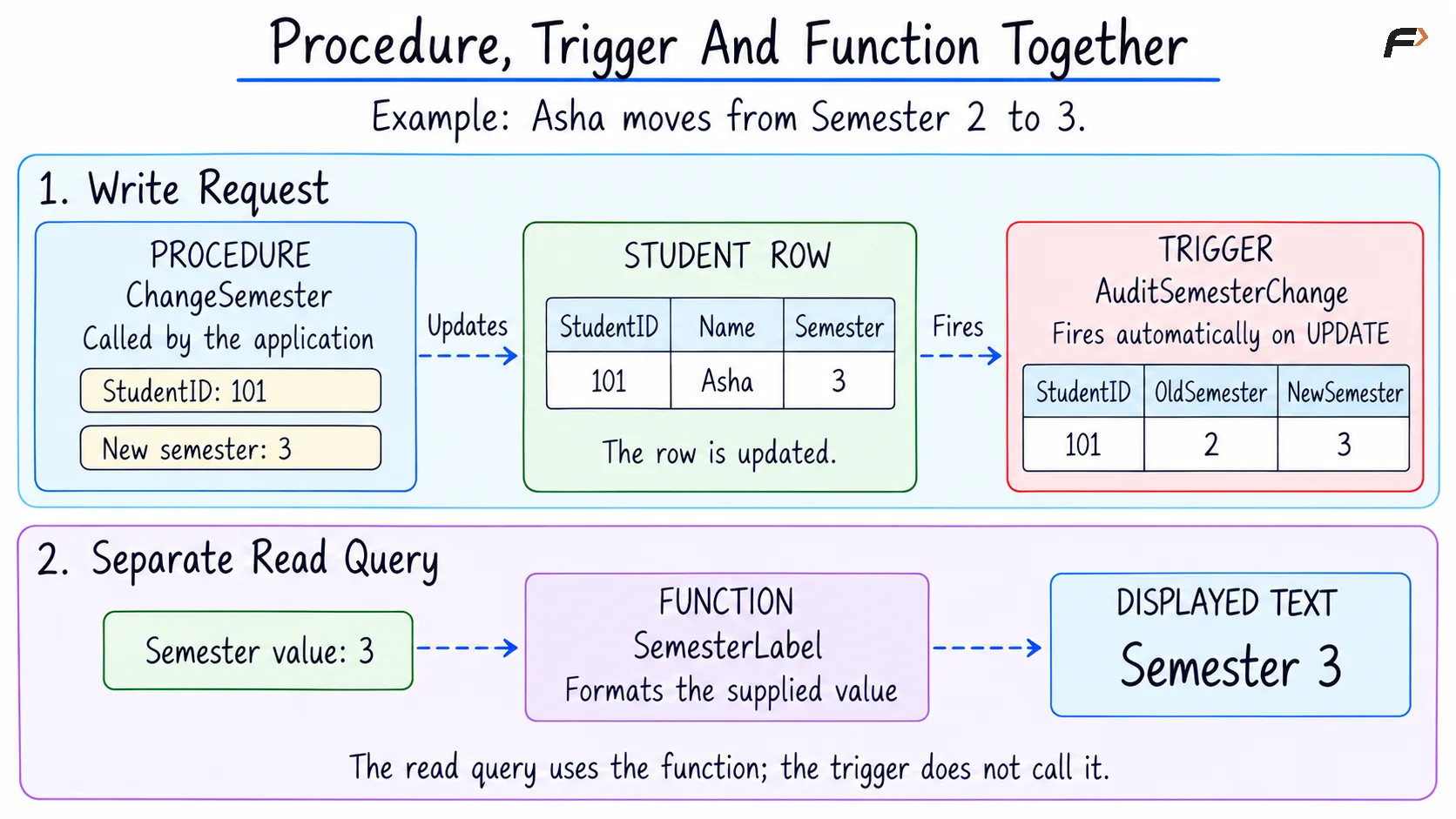
Procedure , Trigger and Function together
Permissions and Execution Security
Creating a routine and executing it are separate privileges. A database can allow an application to execute selected routines without granting unrestricted access to every underlying object, depending on the configured execution context.
Two common execution contexts are:
Invoker rights: Operations are checked using the caller’s privileges.
Definer rights: Operations run using the privileges associated with the routine’s owner or definer.
Defaults differ between systems. MySQL routines default to definer security, while PostgreSQL routines default to invoker security. Elevated routines therefore need carefully limited permissions and controlled object references.
Parameters help keep input values separate from SQL commands, but stored routines are not automatically immune to SQL injection. Constructing dynamic SQL by joining untrusted text can introduce the same problem inside a routine as in application code.
Summary
Triggers respond automatically to configured database events, stored procedures provide explicitly invoked operations, and stored functions provide reusable results. Their behavior depends on timing, execution frequency, parameters, return types, and the database system’s supported features.
Effective database-side logic combines these mechanisms with constraints, appropriate permissions, and deliberate transaction handling. Small, well-defined routines and triggers can improve consistency and reuse, while clear boundaries and testing keep automatic behavior understandable.
Be the first to add a comment.