Introduction
A database operation sometimes requires several related changes. If only some of those changes succeed, the stored information may no longer represent the intended result.
Transactions group related operations into one logical unit of work. ACID properties describe the guarantees associated with reliable transactions, while transaction states explain how a transaction progresses toward successful completion or cancellation.
What Is a Transaction in DBMS?
A transaction is a logical unit of work containing one or more database operations. It can read data, modify data, or do both.
The operations belong together because they serve one complete task. A successful transaction commits, making its changes permanent. A transaction that is cancelled rolls back, undoing its uncommitted changes.
The basic operations are:
Read: Retrieve existing data, commonly through
SELECT.Write: Change data through statements such as
INSERT,UPDATE, orDELETE.Commit: Successfully complete the transaction and retain its changes.
Rollback: Cancel the transaction and undo its pending changes.
A transaction does not have to modify data. A report that reads several related records can also run inside a transaction.
Example Relation
Consider an Account table that stores an account identifier, the account holder’s name, and the current balance.
Account: initial data
AccountID | HolderName | Balance |
|---|---|---|
1 | Asha | 1000.00 |
2 | Ravi | 500.00 |
AccountID uniquely identifies an account. Balance stores a monetary amount and must not be negative.
Suppose the task is to transfer 200.00 from Asha to Ravi. It requires two related changes:
Subtract 200.00 from Asha’s balance.
Add 200.00 to Ravi’s balance.
After a successful transfer, the balances should be 800.00 and 700.00. Their combined balance should remain 1500.00.
Saving only the subtraction would leave an incomplete transfer. Both updates therefore belong to the same transaction.
ACID Properties of Transactions
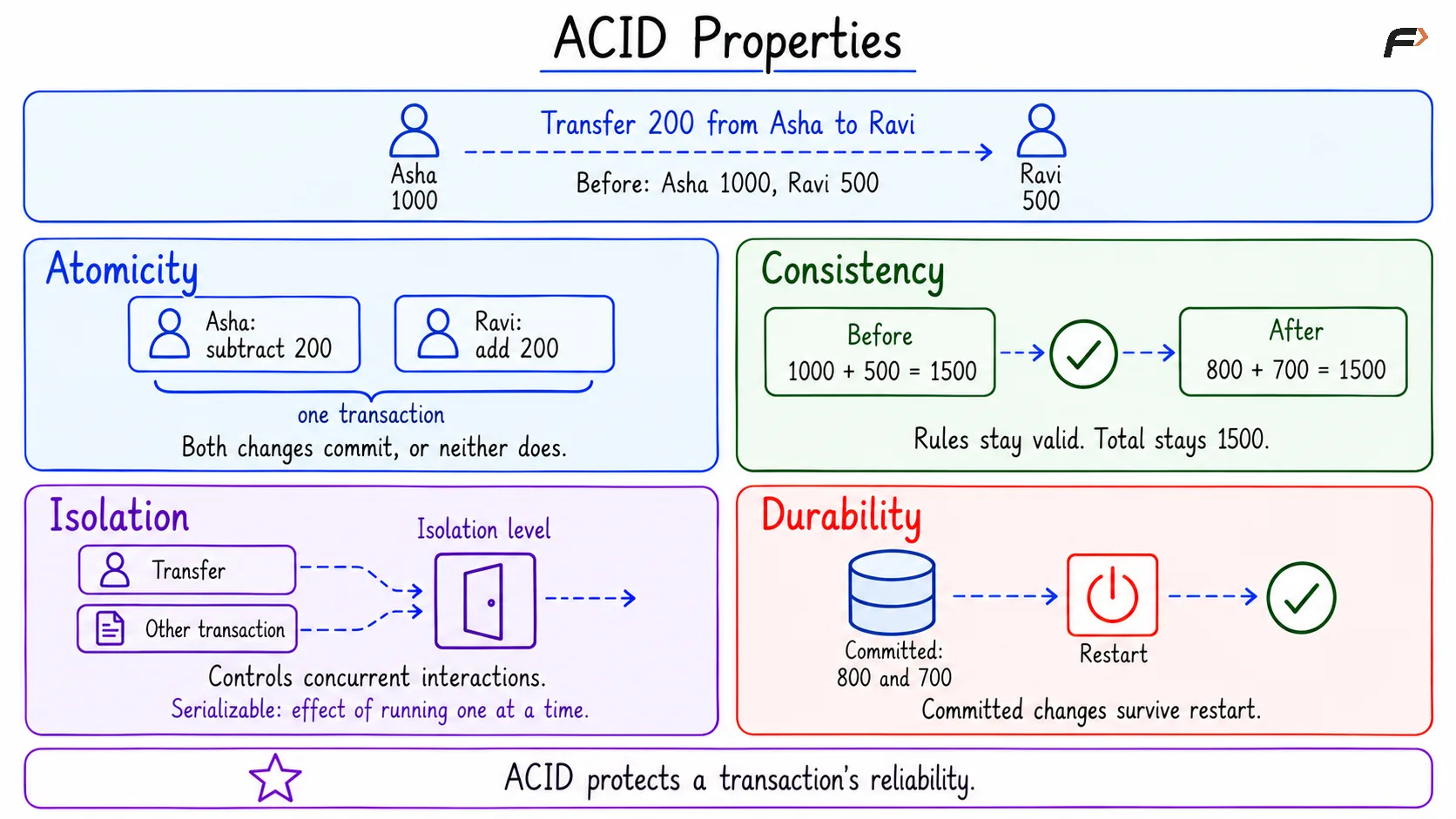
ACID stands for Atomicity, Consistency, Isolation, and Durability. Each property addresses a different requirement.
Property | Meaning | Application to the transfer |
|---|---|---|
Atomicity | The transaction’s changes are committed together or undone together. | If the transfer cannot complete, the deduction must not remain without the corresponding credit. |
Consistency | A correctly written transaction preserves the database’s rules and constraints. | Account identifiers remain valid, balances stay non-negative, and the transfer preserves the combined balance of 1500.00. |
Isolation | Controls how concurrent transactions interact. At the serializable level, their effect is equivalent to running them one at a time. | A concurrent operation must be coordinated with the transfer so that its result respects the chosen isolation guarantees. |
Durability | Successfully committed changes survive database restarts and crash recovery. | After the transfer commits, restarting the database does not reverse it. |
Consistency depends on both database constraints and correct transaction logic. For example, a non-negative balance constraint can reject an invalid balance, but the transfer logic must still subtract and add the same amount.
Databases offer different isolation levels, which control what concurrent transactions can observe. Starting a transaction does not automatically select the strongest isolation level.
Durability is commonly supported through transaction logs and recovery mechanisms. A successful commit does not necessarily require every modified table page to be written immediately, provided enough durable information exists to recover the committed changes.
ACID Properties
Transaction States in DBMS
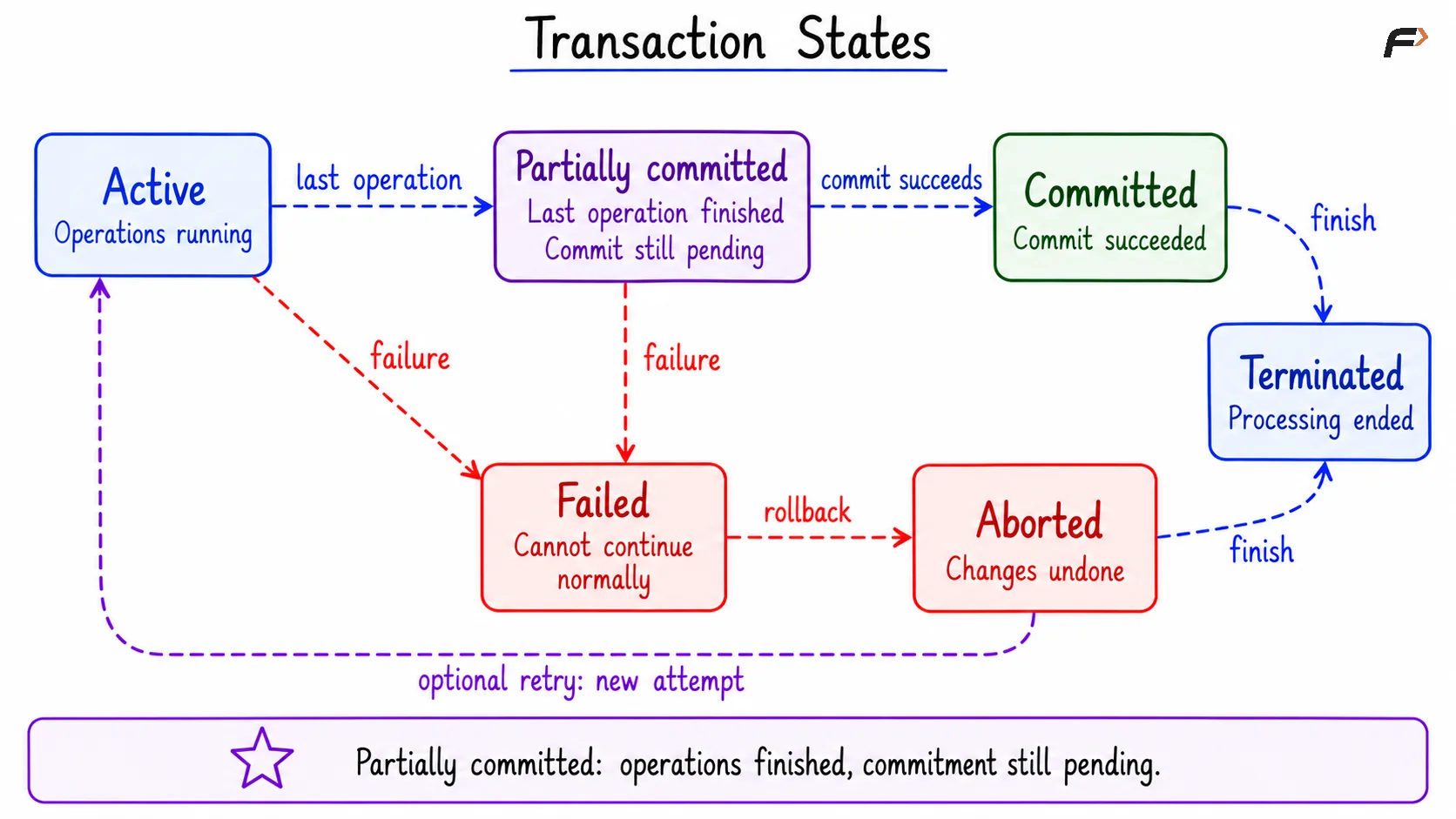
A transaction state describes the current stage of its execution. The following states form a conceptual lifecycle rather than a list of SQL commands.
State | Meaning | Transfer example |
|---|---|---|
Active | The transaction is executing its operations. | The account balances are being read or updated. |
Partially committed | The final operation has completed, but successful commitment is not yet guaranteed. | Both balance updates have completed, but commit processing is still pending. |
Committed | The transaction has completed successfully and its changes are durable. | The balances of 800.00 and 700.00 are committed. |
Failed | The transaction can no longer continue normally and must be cancelled. | A failure prevents the transfer from completing. |
Aborted | The transaction’s changes have been undone. | Any pending balance changes from the failed transfer have been removed. |
Terminated | The transaction has finished after commitment or abortion. | Processing for that transaction has ended. |
Partially committed does not mean that part of the transaction has been permanently saved. It means that the operations have finished, but the transaction has not yet reached successful commitment.
The basic paths are:
Successful execution: Active => Partially committed => Committed => Terminated.
Failure before commitment: Active or partially committed => Failed => Aborted => Terminated.
After an abort, the application or DBMS may retry the work when appropriate. A retry starts another attempt; it does not continue with the previous attempt’s undone changes.
The distinction between failed and aborted is important: failure means normal execution cannot continue, while abortion means the rollback has completed. Rolling back one transaction does not undo changes committed by other transactions.
Transaction states
SQL Commands for Transaction Control
MySQL and PostgreSQL provide commands for defining transaction boundaries and controlling pending changes.
Purpose | MySQL | PostgreSQL |
|---|---|---|
Begin an explicit transaction |
|
|
Save the transaction’s changes |
|
|
Cancel the transaction’s changes |
|
|
Create a named point inside a transaction |
|
|
Undo changes made after that point |
|
|
A savepoint allows part of a transaction to be undone. Changes made before the savepoint remain pending, and the transaction still needs a final COMMIT or ROLLBACK.
With autocommit enabled, successful statements outside an explicit transaction are committed individually. Related updates therefore need an explicit transaction boundary to be treated as one unit.
The transaction’s statements must execute through the same database connection. Once a transaction has committed, a later ROLLBACK cannot undo that completed transaction.
A Compact Example
Objective: Create the example accounts, commit a complete transfer, and then demonstrate cancellation of another unfinished transfer.
The example assumes both accounts exist, the sender has sufficient funds, and no other transaction changes these rows during the demonstration.
1. Create the Example Table
Consider the following queries to create and populate the Account table with the initial balances.
CREATE TABLE Account ( AccountID INT PRIMARY KEY, HolderName VARCHAR(50) NOT NULL, Balance DECIMAL(10, 2) NOT NULL, CHECK (Balance >= 0));INSERT INTO Account (AccountID, HolderName, Balance)VALUES (1, 'Asha', 1000.00), (2, 'Ravi', 500.00);SELECT AccountID, HolderName, BalanceFROM AccountORDER BY AccountID;Expected result
AccountID | HolderName | Balance |
|---|---|---|
1 | Asha | 1000.00 |
2 | Ravi | 500.00 |
DECIMAL(10, 2) stores exact numeric values with two digits after the decimal point. CHECK (Balance >= 0) rejects negative balances; >= means greater than or equal to.
The table creation and initial data insertion are setup operations, completed before the transfer begins.
2. Commit a Complete Transfer
Objective: Transfer 200.00 from Asha to Ravi and save both balance changes.
Consider the following queries to perform the two updates inside one transaction.
START TRANSACTION;UPDATE AccountSET Balance = Balance - 200.00WHERE AccountID = 1;UPDATE AccountSET Balance = Balance + 200.00WHERE AccountID = 2;COMMIT;SELECT AccountID, HolderName, BalanceFROM AccountORDER BY AccountID;Expected result
AccountID | HolderName | Balance |
|---|---|---|
1 | Asha | 800.00 |
2 | Ravi | 700.00 |
The first UPDATE subtracts 200.00 from account 1. The second adds 200.00 to account 2. Each WHERE condition identifies the account to update.
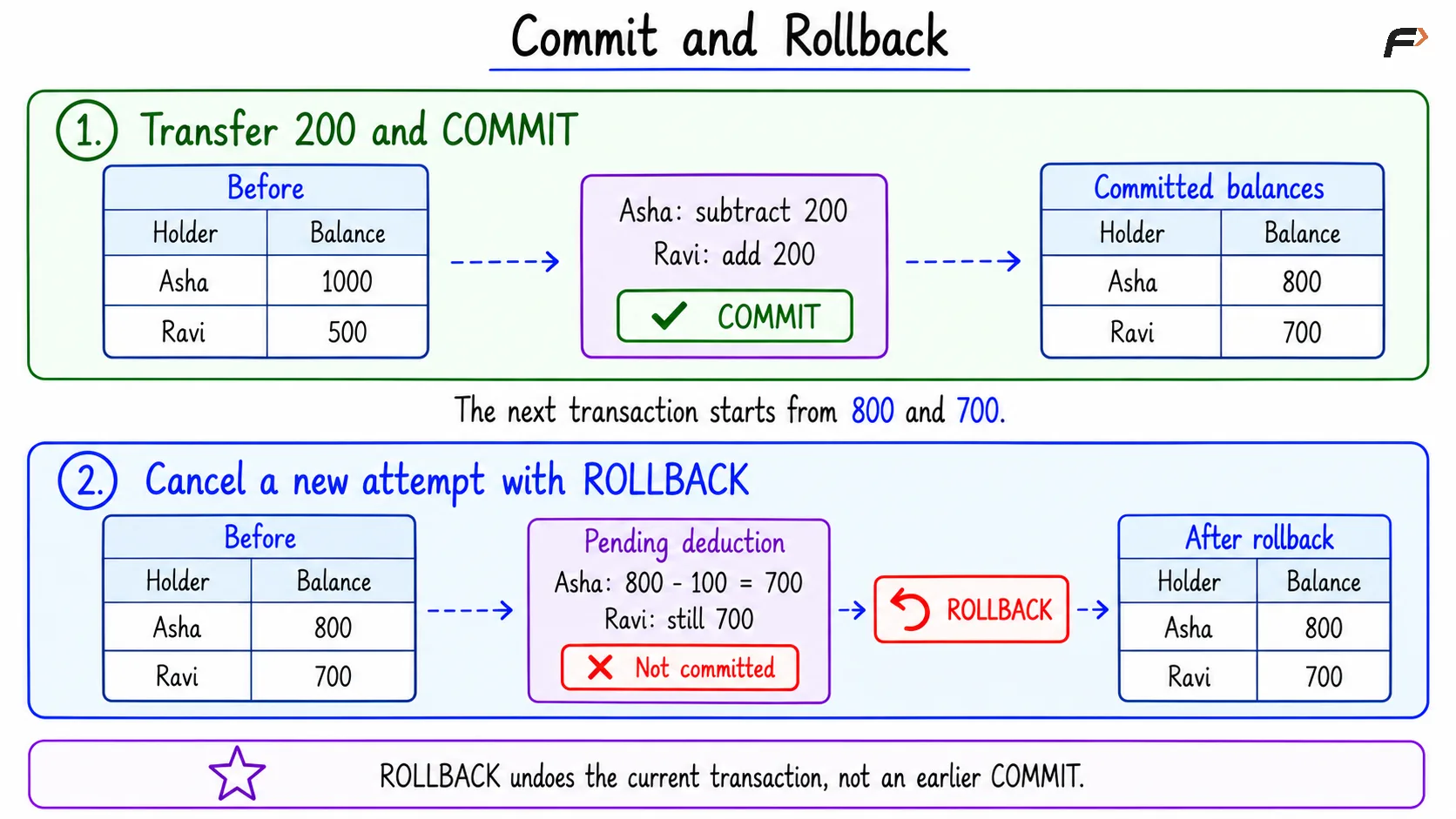
COMMIT completes the transaction and retains both changes. The combined balance remains 800.00 + 700.00 = 1500.00.
This demonstrates the successful path. Application logic should commit only after all required operations succeed; otherwise, it should roll back the transfer.
3. Roll Back an Unfinished Transfer
Objective: Attempt another transfer of 100.00, then cancel it after the deduction and before the credit.
This example starts with the committed balances from the previous step: Asha has 800.00 and Ravi has 700.00.
Consider the following queries to make a pending deduction and then undo it.
START TRANSACTION;UPDATE AccountSET Balance = Balance - 100.00WHERE AccountID = 1;ROLLBACK;SELECT AccountID, HolderName, BalanceFROM AccountORDER BY AccountID;Expected result
AccountID | HolderName | Balance |
|---|---|---|
1 | Asha | 800.00 |
2 | Ravi | 700.00 |
The pending deduction temporarily changes Asha’s balance within the transaction. ROLLBACK cancels that deduction, leaving the previously committed balances intact.
The earlier transfer of 200.00 remains committed. Only the changes belonging to this new transaction are undone.
Commit and Rollback
A statement error should not be assumed to roll back an entire transaction automatically. In MySQL, some errors undo only the failing statement. In PostgreSQL, an error normally leaves the transaction unable to continue until it is rolled back, or recovered through an appropriate savepoint.
Summary
A transaction groups related database operations into one logical unit of work. Atomicity, consistency, isolation, and durability explain how transactions preserve reliable results despite incomplete operations, concurrent activity, and failures.
Transaction states describe progress from active execution to commitment or abortion. Explicit transaction boundaries, COMMIT, and ROLLBACK make it possible to save related updates together or cancel pending changes, while savepoints provide more selective control within a transaction.
Be the first to add a comment.