Introduction
Several applications may read or change the same database record at the same time. The database must coordinate their work so that one transaction does not silently overwrite another transaction’s changes or read an unsuitable value.
Timestamp ordering, optimistic concurrency control, and multi-version concurrency control approach this problem in different ways. They can also work together: keeping multiple versions, checking timestamps, and validating changes are not always separate choices.
Example Table
The examples use an Account table containing an account identifier, holder name, balance, and application-managed version number.
Account: initial data
AccountID | HolderName | Balance | VersionNo |
|---|---|---|---|
1 | Asha | 1000.00 | 1 |
2 | Ravi | 500.00 | 1 |
AccountID is the primary key. VersionNo increases whenever an application changes a row through the version-check approach.
This application column is different from the internal row versions maintained by MVCC. MVCC does not require an application to create a VersionNo column.
In the theoretical examples, A means Asha’s balance, while T1 and T2 identify different transactions.
Timestamp Ordering
Timestamp ordering assigns each transaction an ordering value called a timestamp. A smaller timestamp represents an older transaction.
The timestamp may come from a counter or another ordering mechanism. It does not have to be a calendar date or clock time.
In basic timestamp ordering, conflicting operations must follow the order set by transaction timestamps. If T1 has timestamp 10 and T2 has timestamp 20, their accepted operations must fit an equivalent serial order with T1 before T2.
The database tracks two values for each data item:
Read timestamp,
RTS(A): The largest timestamp of a transaction that successfully read A.Write timestamp,
WTS(A): The largest timestamp of a transaction that successfully wrote A.
Here, TS(T) means the timestamp assigned to transaction T.
Requested operation | Basic timestamp-ordering rule |
|---|---|
T reads A | If |
T writes A | If |
The symbol < means “less than.” A rejected transaction can restart as a new attempt, normally with a new timestamp.
Example:
Step | Action | Result |
|---|---|---|
1 | T1 receives timestamp 10. | T1 is older. |
2 | T2 receives timestamp 20 and successfully writes A as 1200.00. |
|
3 | T1 tries to read A. | The read is rejected because |
T1 cannot read T2’s later value while still being placed before T2 in the required serial order.
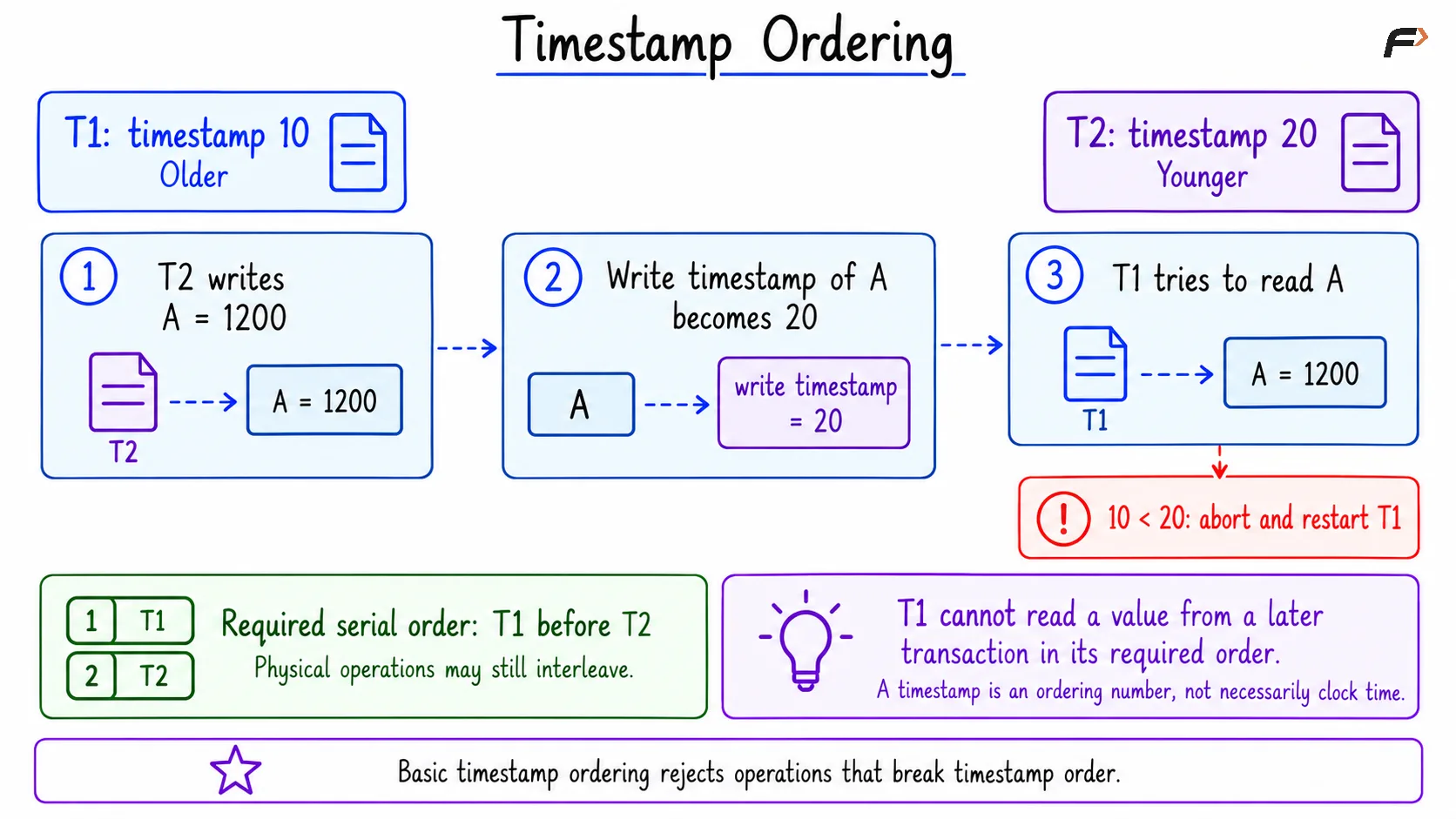
Timestamp ordering
Basic timestamp ordering avoids deadlocks caused by waiting for data locks because conflicting operations are rejected rather than made to wait. However, repeated restarts can waste work or cause starvation. The basic protocol also needs additional recovery rules to prevent unsafe use of uncommitted data.
A related variation, Thomas’s write rule, may ignore an outdated write instead of aborting the transaction. It still rejects a write that violates the read-timestamp check.
Optimistic Concurrency Control
Optimistic concurrency control, or OCC, allows a transaction to do its work first and checks for conflicts before making its changes final.
The idea is useful when conflicts are uncommon. Transactions avoid reserving every item they read for the entire period of their work.
Classical OCC has three phases:
Phase | What happens? |
|---|---|
Read and work | Read data, perform calculations, and keep proposed changes in a private workspace. |
Validation | Check whether overlapping transactions made the work unsafe to commit. |
Write | If validation succeeds, apply the changes atomically. Otherwise, abort and retry. |
Validation considers the data the transaction read and intended to write. It is more than checking whether two transactions changed exactly the same row.
A simple application-level example uses VersionNo:
T1 and T2 both read Asha’s balance as 1000.00 with version 1.
T1 saves 900.00 only if the version is still 1, then increases it to 2.
T2 tries to save 800.00 using its earlier version 1.
T2’s update matches no row because the current version is now 2.
Result:
AccountID | HolderName | Balance | VersionNo |
|---|---|---|---|
1 | Asha | 900.00 | 2 |
T2 must read the latest data and reconsider its change. It must not silently overwrite T1’s work.
This version-check pattern illustrates optimistic control for one row. It does not replace full transaction validation for rules involving several rows. It also does not remove the short-lived locks used internally to perform an SQL update.
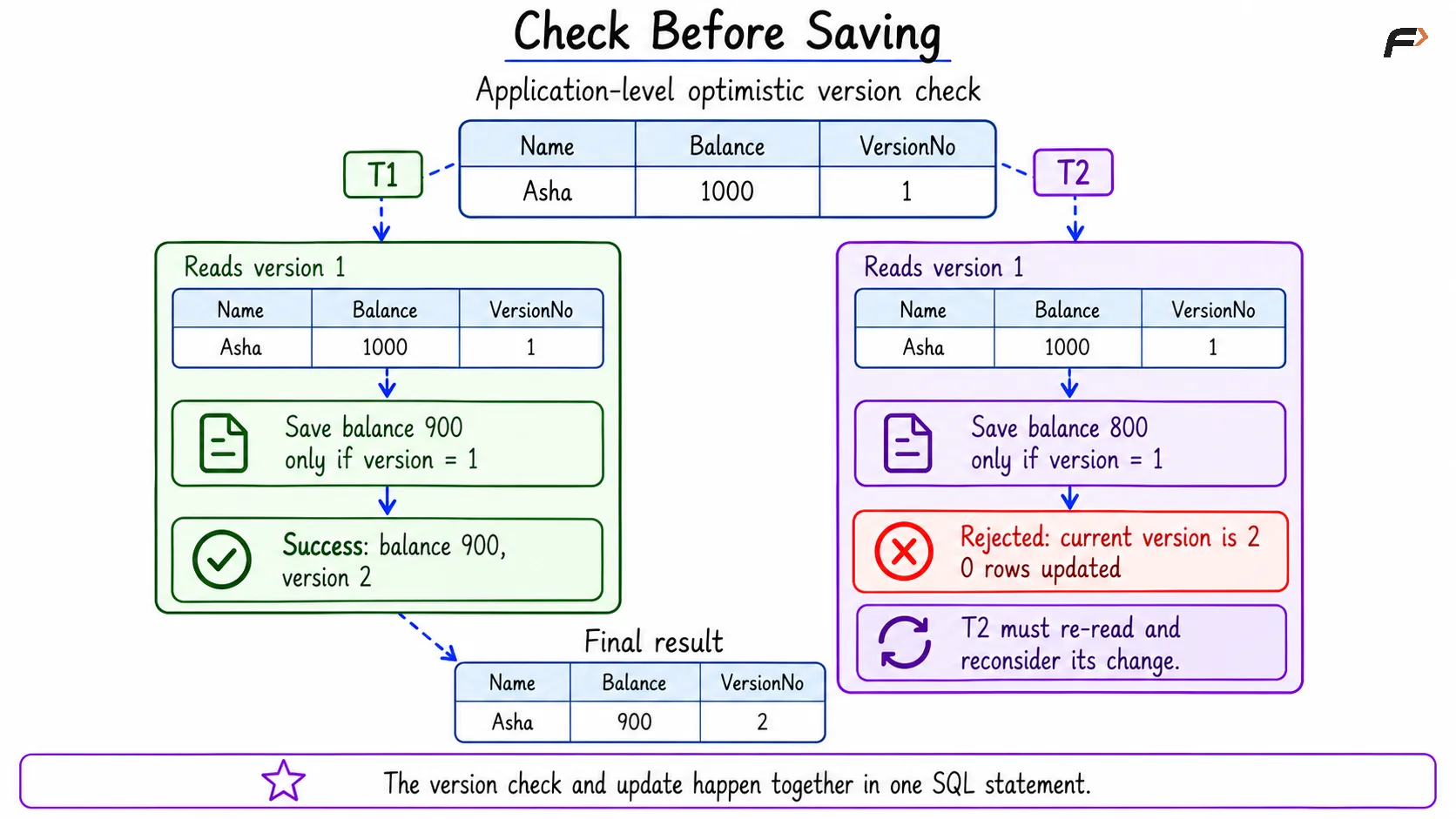
Check before saving
How MVCC Works
Multi-Version Concurrency Control, or MVCC, keeps enough information to provide different versions of a row.
A reader uses a snapshot, which defines which transaction changes are visible to that read. A writer can create a newer version while an existing reader continues using an older committed version.
For example:
Step | Session A | Session B |
|---|---|---|
1 | Reads Asha’s balance as 1000.00 and establishes a snapshot. | |
2 | Updates the balance to 1200.00 and commits. | |
3 | Reads 1000.00 again using the same snapshot. |
A new transaction whose snapshot is established after Session B commits can read 1200.00.
Reading the older committed 1000.00 is not a dirty read. A dirty read means reading another transaction’s uncommitted change.
Snapshot duration depends on the isolation level. For ordinary reads in MySQL InnoDB and PostgreSQL:
Read Committed: Each statement can use a fresh snapshot.
Repeatable Read: Repeated ordinary reads use a stable transaction snapshot, while the transaction can also see its own changes.
MVCC reduces blocking between ordinary readers and writers, but it does not remove all locks. Writers can still conflict, and locking reads behave differently from ordinary snapshot reads.
Old versions also need cleanup when they are no longer required. Long-running transactions can delay that cleanup. Finally, MVCC alone does not guarantee serializability: some snapshot-based executions can still allow problems such as write skew.
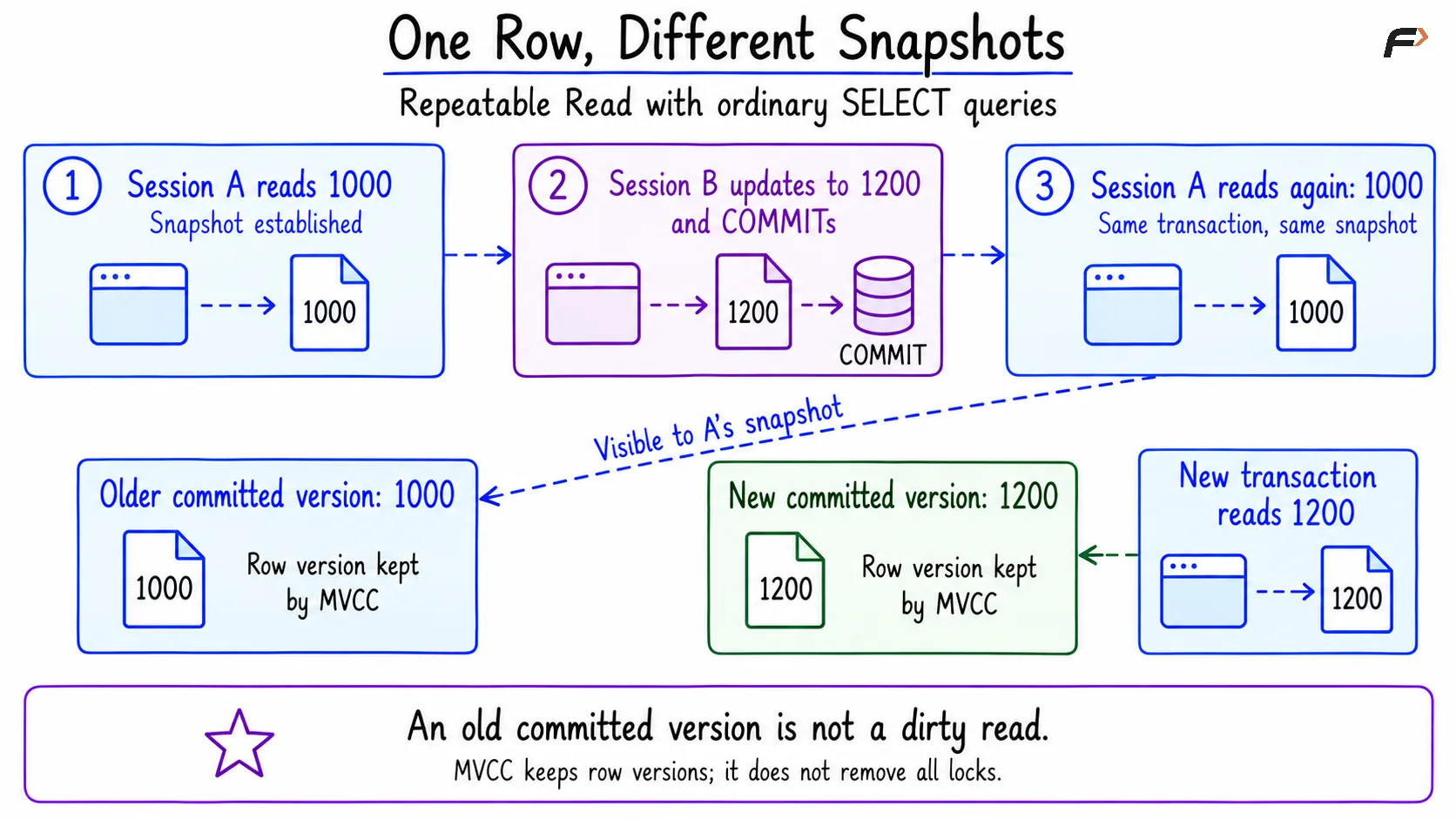
One row , different snapshots
Comparing the Three Ideas
Approach | Main idea | Useful feature | Main limit |
|---|---|---|---|
Basic timestamp ordering | Check reads and writes against a chosen transaction order. | Avoids data-lock waiting in the basic protocol. | Conflicts can cause repeated restarts. |
Optimistic control | Do work first, then validate it. | Works well when conflicts are rare. | Failed validation discards work already done. |
MVCC | Keep versions and choose the visible version for each snapshot. | Ordinary reads can often continue while writes occur. | Requires version storage, cleanup, and separate conflict rules. |
These ideas can be combined. For example, an MVCC system can use timestamps and validation to decide which transactions may commit.
A Compact SQL Example
The following examples demonstrate an application-level version check and an MVCC snapshot. MySQL and PostgreSQL do not provide a general SQL command that switches their engines to the basic timestamp-ordering algorithm.
1. Create the Initial Data
Consider the following queries to create the account table.
CREATE TABLE Account ( AccountID INT PRIMARY KEY, HolderName VARCHAR(50) NOT NULL, Balance DECIMAL(10, 2) NOT NULL, VersionNo INT NOT NULL);START TRANSACTION;INSERT INTO Account (AccountID, HolderName, Balance, VersionNo)VALUES (1, 'Asha', 1000.00, 1), (2, 'Ravi', 500.00, 1);COMMIT;Initial table:
AccountID | HolderName | Balance | VersionNo |
|---|---|---|---|
1 | Asha | 1000.00 | 1 |
2 | Ravi | 500.00 | 1 |
2. Reject an Update Based on an Old Version
Objective: Allow the first save and reject a later save based on the same outdated version.
Assume two application requests have both read Asha’s balance as 1000.00 and version as 1. The first request proposes 900.00, while the second proposes 800.00.
Consider the following queries to perform the version check and update together.
MySQL:
-- First request saves successfully.START TRANSACTION;UPDATE AccountSET Balance = 900.00, VersionNo = VersionNo + 1WHERE AccountID = 1 AND VersionNo = 1;SELECT ROW_COUNT() AS UpdatedRows;COMMIT;-- Second request still carries the old version number.START TRANSACTION;UPDATE AccountSET Balance = 800.00, VersionNo = VersionNo + 1WHERE AccountID = 1 AND VersionNo = 1;SELECT ROW_COUNT() AS UpdatedRows;COMMIT;SELECT AccountID, HolderName, Balance, VersionNoFROM AccountWHERE AccountID = 1;ROW_COUNT() reports the number of rows affected by the preceding update. AS UpdatedRows gives that result column a readable name.
First update result:
UpdatedRows |
|---|
1 |
Second update result:
UpdatedRows |
|---|
0 |
PostgreSQL:
-- First request saves successfully.BEGIN;UPDATE AccountSET Balance = 900.00, VersionNo = VersionNo + 1WHERE AccountID = 1 AND VersionNo = 1RETURNING AccountID, Balance, VersionNo;COMMIT;-- Second request still carries the old version number.BEGIN;UPDATE AccountSET Balance = 800.00, VersionNo = VersionNo + 1WHERE AccountID = 1 AND VersionNo = 1RETURNING AccountID, Balance, VersionNo;COMMIT;SELECT AccountID, HolderName, Balance, VersionNoFROM AccountWHERE AccountID = 1;RETURNING displays the rows changed by the update.
First update result:
AccountID | Balance | VersionNo |
|---|---|---|
1 | 900.00 | 2 |
The second update returns no rows and reports zero updated rows.
Final result for both databases:
AccountID | HolderName | Balance | VersionNo |
|---|---|---|---|
1 | Asha | 900.00 | 2 |
The second update is a valid SQL statement that changes nothing. The application must treat that outcome as a failed version check. If a larger transaction has already performed other related work, it should roll back that work rather than commit an incomplete operation.
For this pattern to work, every relevant writer must follow the version-number rule.
3. Observe an MVCC Snapshot
Objective: Show that an existing Repeatable Read transaction continues seeing an older committed balance after another transaction commits an update.
First, restore Asha’s initial values for this separate demonstration. This reset is only for the example and should run after the previous transactions have finished.
START TRANSACTION;UPDATE AccountSET Balance = 1000.00, VersionNo = 1WHERE AccountID = 1;COMMIT;Asha’s starting values are again Balance 1000.00, VersionNo 1.
Use two separate database connections and follow steps A, B, and C in order.
A. Session A: Establish a snapshot
Consider the following queries to start a Repeatable Read transaction and read Asha’s account.
SET TRANSACTION ISOLATION LEVEL REPEATABLE READ;START TRANSACTION;SELECT Balance, VersionNoFROM AccountWHERE AccountID = 1;-- Keep this transaction open.Expected result:
Balance | VersionNo |
|---|---|
1000.00 | 1 |
B. Session B: Update and commit
Consider the following queries to increase Asha’s balance by 200.
START TRANSACTION;UPDATE AccountSET Balance = Balance + 200, VersionNo = VersionNo + 1WHERE AccountID = 1;COMMIT;The latest committed row now contains Balance 1200.00, VersionNo 2.
C. Session A: Read again, then start a new transaction
Consider the following queries to compare the existing snapshot with a new transaction’s view.
-- Still inside the original transaction.SELECT Balance, VersionNoFROM AccountWHERE AccountID = 1;COMMIT;-- A new transaction can see the committed update.START TRANSACTION;SELECT Balance, VersionNoFROM AccountWHERE AccountID = 1;COMMIT;Result inside the original transaction:
Balance | VersionNo |
|---|---|
1000.00 | 1 |
Result inside the new transaction:
Balance | VersionNo |
|---|---|
1200.00 | 2 |
The original transaction keeps its established snapshot. The new transaction sees Session B’s committed update.
The VersionNo values are ordinary stored data in this example. The database’s internal MVCC information, not that application column, determines snapshot visibility.
Summary
Timestamp ordering checks whether operations fit a chosen transaction order. Optimistic control performs work first and checks for conflicts before saving it. A version-checked update is a simple application-level way to prevent an outdated request from silently replacing a newer change.
MVCC keeps row versions so readers can use a suitable snapshot while other transactions make changes. These methods can work together, but none should be treated as a promise of zero locks, zero retries, or automatic serializability for every workload.
Be the first to add a comment.