Introduction
A query may need one record, but the storage engine typically accesses it through the page that contains it. If that page is already in memory, the engine can reuse it. Otherwise, it has to load the page before reading the record.
That distinction matters when comparing query plans. Two plans can return the same rows and still access very different numbers of pages.
Storage Hierarchy
Database files live on persistent storage, such as an SSD. The DBMS uses RAM to hold pages it is working with or expects to reuse. RAM is faster to access, but its contents are volatile and its capacity is limited.
The buffer pool is the memory the DBMS manages for cached database pages. Each buffer frame is a slot in that pool that can hold one page. A page from a table or an index can occupy a frame while the engine reads or modifies it.
Pages and Records
A record is the stored representation of a row. A page is a fixed-size unit that can hold multiple records, along with metadata and free space. The page size depends on the database system and its configuration.
For variable-length records, one common layout is a slotted page. Its slot directory stores the location of each record within the page. A record can move during page compaction, and the DBMS can update its slot to point to the new location. A reference such as (page_id, slot_id) can still identify that record within the page.
The page is also the usual unit the buffer manager loads. If a query needs a single record on P4, loading P4 makes its other records available in memory as well.
How Many Records Fit on a Page?
Take an 8 KiB page. If 192 bytes are reserved for metadata and each record uses 200 bytes including its slot entry, the page can hold 40 records. With 400-byte records, the same page holds 20. This is a simplified calculation. Real pages may also reserve space for future inserts or updates.
With variable-length records, two pages containing the same number of rows can have different amounts of free space. The storage engine needs to know how many bytes are available before it can place a new record. An update can create the same problem. If a record grows and its page has insufficient space, the engine may have to move it, depending on how it manages records.
How the Buffer Pool Serves a Read
Suppose an index lookup identifies a record on page P4. The storage engine asks the buffer manager for that page.
Buffer pool state | What happens |
|---|---|
| This is a buffer hit. The engine reads the record from the cached page. |
| This is a buffer miss. The buffer manager loads |
| The buffer manager selects a page eligible for eviction and reuses its frame. A modified page may need to be written back first. |
While an operation is using a page, the buffer manager can pin it so its frame cannot be reused. Once the operation releases the page, it becomes eligible for eviction. A later lookup on P4 can reuse the cached copy if the page is still in the pool.
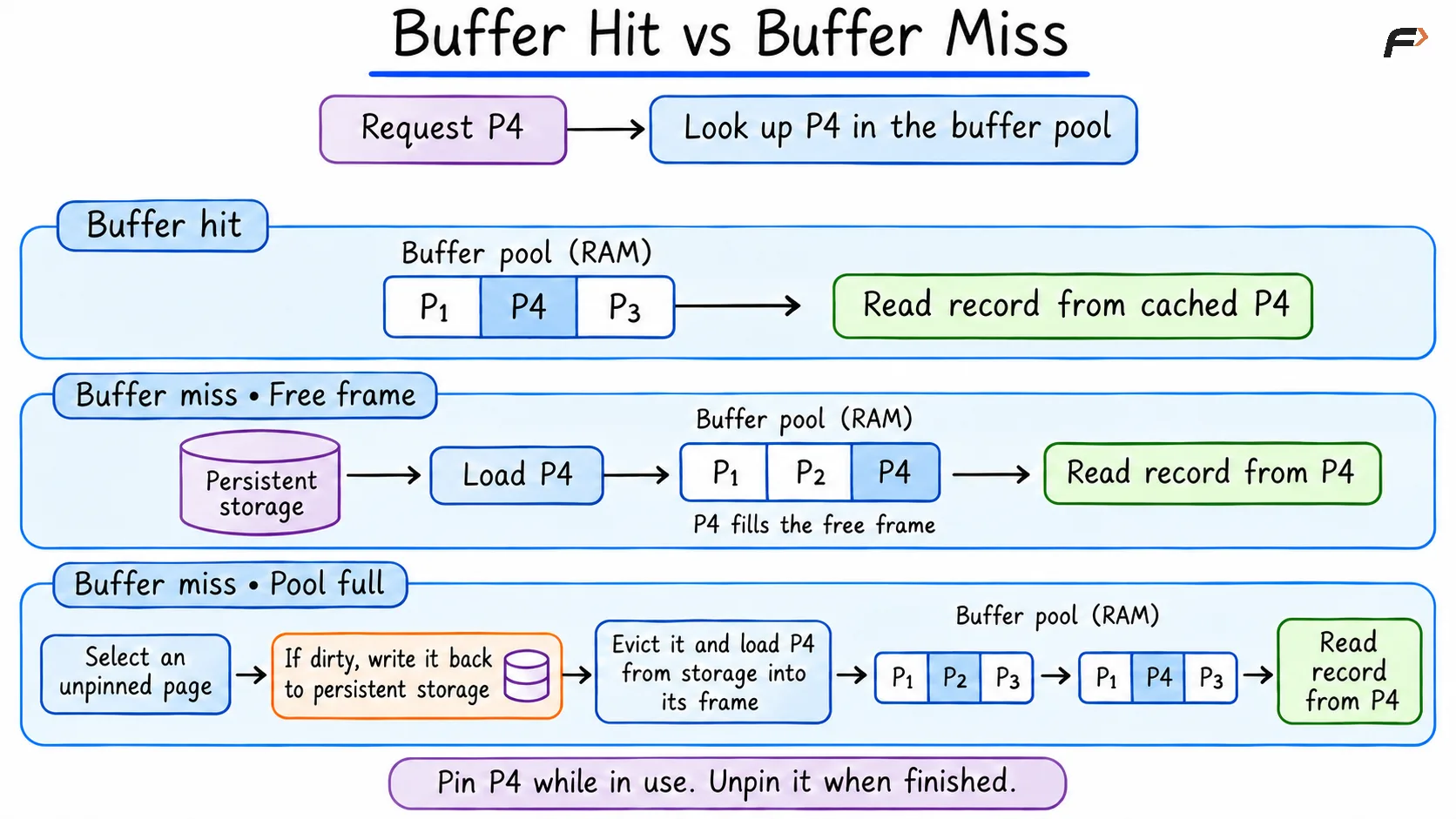
Buffer Hit vs Buffer Miss
What Happens When a Page Changes?
An update changes the record in the buffer pool and marks the page dirty. A dirty page contains changes that have yet to be written back to its data file. The DBMS can flush it later, for example during background writeback or to make room for another page.
In a system that uses write-ahead logging, the relevant log records must reach durable storage before the dirty data page is written. With a durable commit, the DBMS can make the transaction’s log durable while the modified data page stays in RAM. If the system crashes before that page is flushed, recovery can use the log to reconstruct the committed change.
Why Page Access Matters
Consider a range query that returns 100 records. If the records occupy four data pages, the engine can retrieve them by visiting those four pages. If they are spread across 100 pages, it may need to visit 100 data pages for the same result. Index pages may add work in either case.
Page visits and storage reads are separate counts. A visit to a page already in the buffer pool is a hit. This is why both where the records are stored and which pages are already cached affect the cost of a query.
Summary
Records are stored in pages, and the buffer pool holds copies of pages in RAM. Reads reuse cached pages when possible. Updates can leave dirty pages in memory for later writeback. When comparing plans, look at how many pages each plan needs and how often those accesses can be served from the buffer pool.
Be the first to add a comment.