Introduction
A database table may contain many records, but a query often needs only a few. A student portal, for example, might display students from a particular department or those whose marks meet a minimum requirement.
The WHERE clause expresses these conditions. It filters rows based on their values, allowing SQL statements to target the records relevant to an operation.
What Is the WHERE Clause?
The WHERE clause specifies a condition that rows must satisfy. For a SELECT query, only rows for which the condition evaluates to true appear in the result.
The basic syntax is:
SELECT column1, column2FROM table_nameWHERE condition;SELECT chooses the output columns, while WHERE filters the source rows. These are separate responsibilities: a query can filter on a column without displaying that column.
The examples below use MySQL-compatible SQL and this students table:
student_id | student_name | department | marks |
|---|---|---|---|
101 | Asha | CSE | 85 |
102 | Ravi | ECE | 72 |
103 | Meera | CSE | 91 |
104 | Kabir | ME | NULL |
Filtering with Comparison Operators
Comparison operators test relationships between values.
Operator | Meaning | Example condition |
|---|---|---|
| Equal to |
|
| Not equal to |
|
| Greater than |
|
| Less than |
|
| Greater than or equal to |
|
| Less than or equal to |
|
To retrieve students with marks of at least 85:
SELECT student_name, marksFROM studentsWHERE marks >= 85;The result contains Asha with 85 and Meera with 91. Kabir is excluded because comparing an unknown mark with 85 does not produce true.
Use single quotes around text values, such as 'CSE'. Numeric values can be written without quotes. Without ORDER BY, the order of returned rows is not guaranteed.
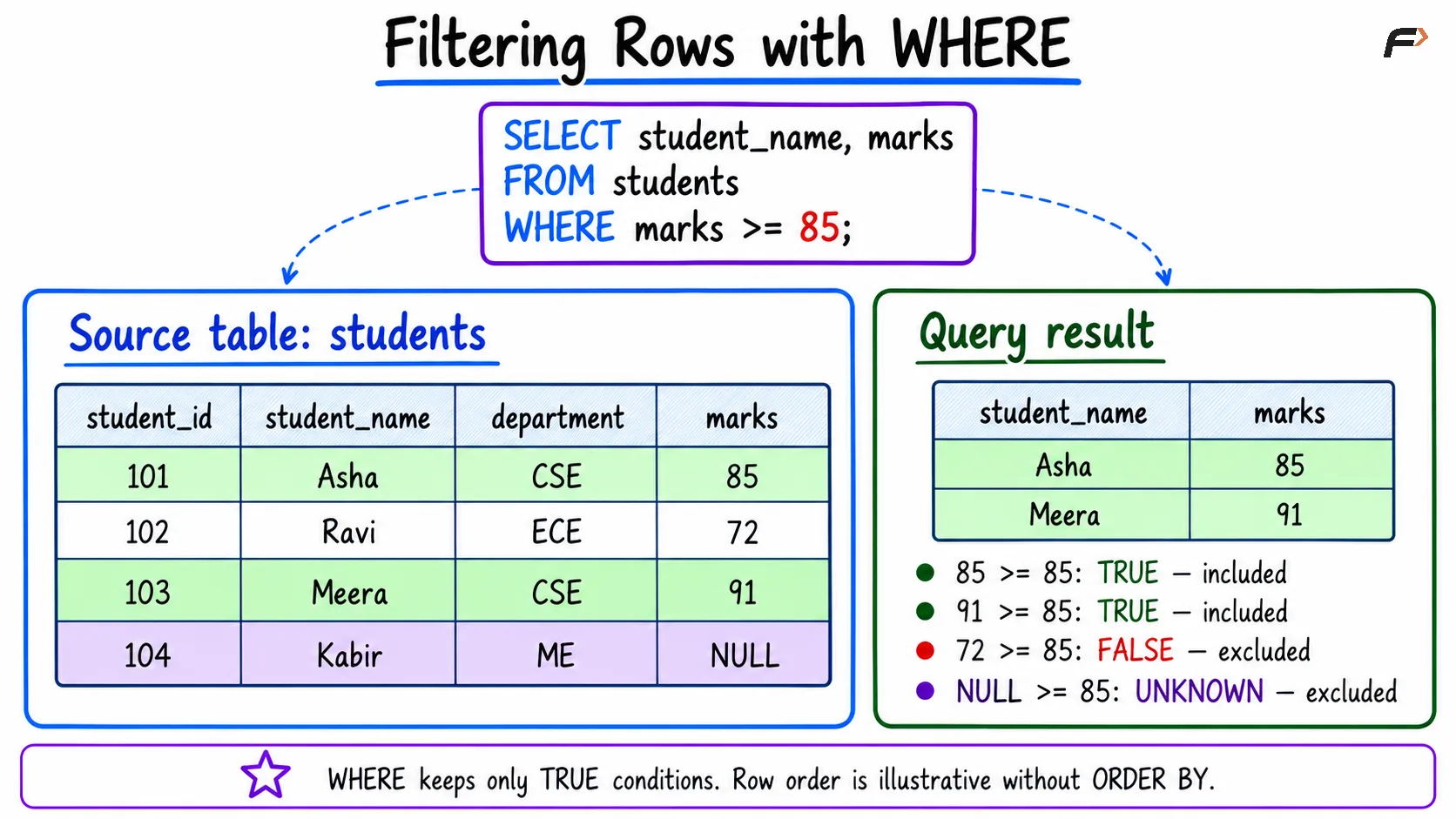
Filtering rows with where
Combining Conditions with AND, OR, and NOT
Use logical operators when one comparison is insufficient.
AND: Requires both conditions to be true.
OR: Requires at least one condition to be true.
NOT: Negates a condition; an unknown condition remains unknown.
For example, retrieve CSE students with marks of at least 90:
SELECT student_name, marksFROM studentsWHERE department = 'CSE' AND marks >= 90;Only Meera qualifies.
Use parentheses to make grouped conditions explicit:
SELECT student_name, department, marksFROM studentsWHERE (department = 'CSE' OR department = 'ECE') AND marks >= 80;This requires both membership in either department and marks of at least 80. Asha and Meera qualify.
AND has higher precedence than OR. Removing the parentheses would change the grouping to:
WHERE department = 'CSE' OR (department = 'ECE' AND marks >= 80)In that version, every CSE student qualifies regardless of marks. Parentheses clarify the intended rule.
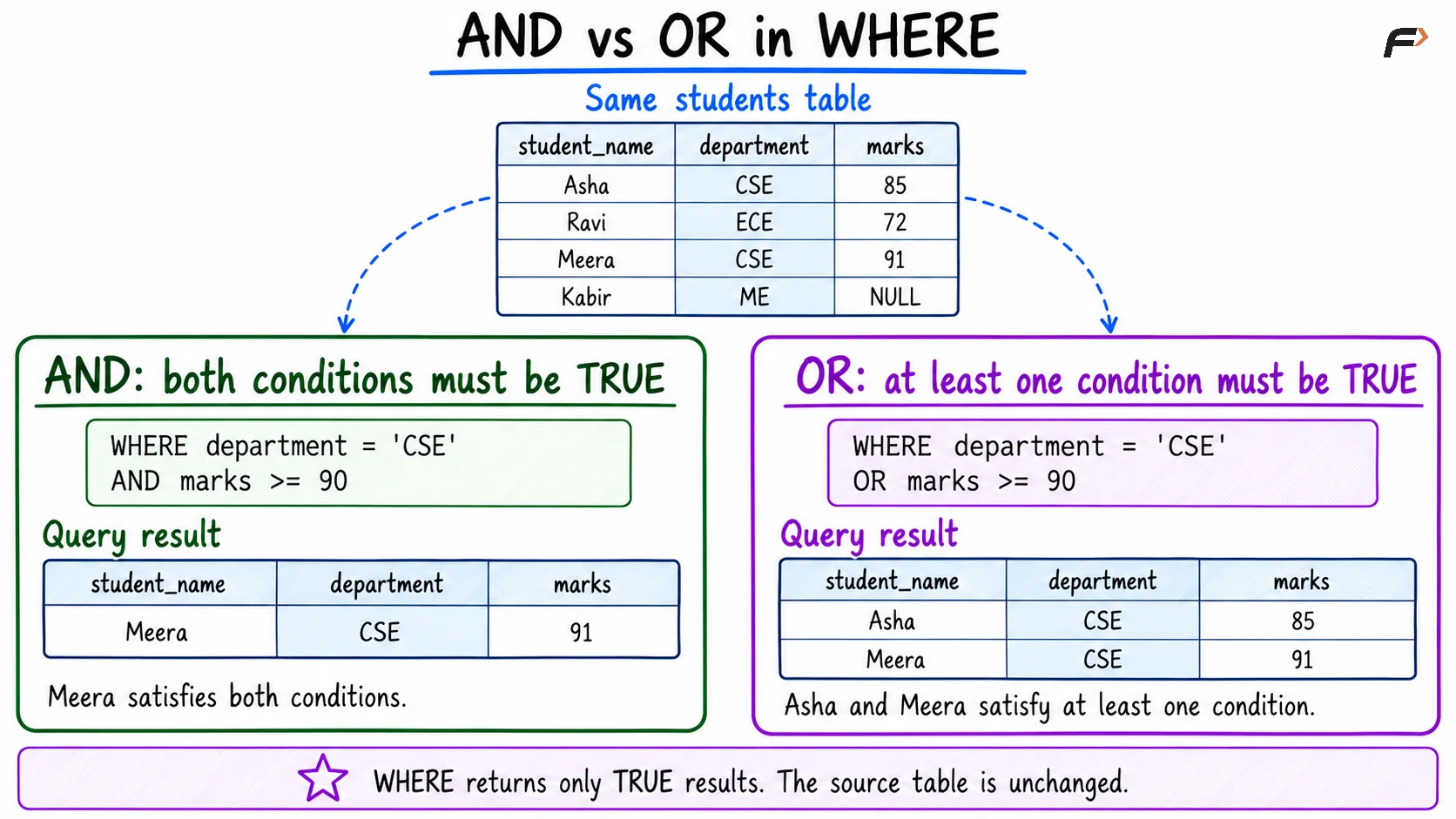
AND vs OR in WHERE
Using IN, BETWEEN, and LIKE
These operators express common filters more compactly.
Operator | Purpose | Example |
|---|---|---|
| Matches any listed value |
|
| Matches an inclusive range |
|
| Matches a text pattern |
|
For example:
SELECT student_name, marksFROM studentsWHERE marks BETWEEN 70 AND 85;This returns Ravi and Asha. Both boundaries are included, so a mark of exactly 85 qualifies.
For LIKE, % matches any sequence of characters, including no characters, while _ matches one character. The pattern 'M%' therefore matches Meera.
Text comparison and pattern-matching case sensitivity depend on the database and collation. Do not assume every system compares uppercase and lowercase letters identically.
Handling NULL in WHERE
NULL represents missing or unknown information. Use IS NULL to find missing marks:
SELECT student_nameFROM studentsWHERE marks IS NULL;This returns Kabir. Use IS NOT NULL when a recorded mark is required.
Ordinary comparisons such as marks = NULL do not test for missing values. They produce an unknown result, which does not pass a WHERE filter.
The same issue affects conditions such as marks <> 0: rows with null marks are excluded. Include them explicitly if required:
SELECT student_name, marksFROM studentsWHERE marks <> 0 OR marks IS NULL;Also take care with NOT IN when its list or subquery can contain NULL. Nonmatching values may produce unknown rather than true.
WHERE in UPDATE and DELETE
WHERE also determines which records are eligible for modification or deletion.
Update one student’s marks:
UPDATE studentsSET marks = 78WHERE student_id = 102;Delete one student’s record:
DELETE FROM studentsWHERE student_id = 104;These examples target rows by their identifiers. Without WHERE, an UPDATE makes every row eligible for the change, while a DELETE targets all rows.
Before modifying data, inspect the intended records using a SELECT with the same condition. Whether changes can later be rolled back depends on transaction state and database behavior.
WHERE vs HAVING
Both clauses filter information, but they operate at different logical stages.
Clause | Filters | Typical condition |
|---|---|---|
| Individual rows before grouping |
|
| Groups after aggregation |
|
Use WHERE to choose the records entering a grouped calculation. Use HAVING when filtering according to an aggregate result, such as the number of students in each department.
Summary
The SQL WHERE clause filters rows according to a condition. Comparisons, logical operators, ranges, lists, and patterns support different ways to identify the records an operation needs.
Use parentheses for clear grouping and IS NULL for missing-value tests. For updates and deletions, verify the condition carefully so the operation targets the intended records.
Be the first to add a comment.