Introduction
Applications often receive records without knowing whether they already exist. A student import, for example, may contain new students alongside updated details for existing students.
An UPSERT handles both situations: insert a new record when its key is absent, or update the existing record when the insertion encounters a relevant key conflict.
What Is UPSERT?
UPSERT combines the words update and insert. It describes an operation rather than a universally supported SQL keyword.
The basic idea is:
Attempt to insert the supplied record.
If no relevant key conflict occurs, insert it.
If a conflict occurs, apply the specified update to the existing row.
The database needs a primary key or an appropriate unique constraint to identify conflicts. Matching a name or another ordinary column does not automatically trigger an update.
Operation | Main behavior |
|---|---|
| Adds a new row; an ordinary duplicate-key conflict causes an error |
| Changes matching existing rows; does not create a missing row |
UPSERT | Inserts or applies a specified update when a key conflict occurs |
UPSERT does not automatically update every column. The statement must specify what should change.
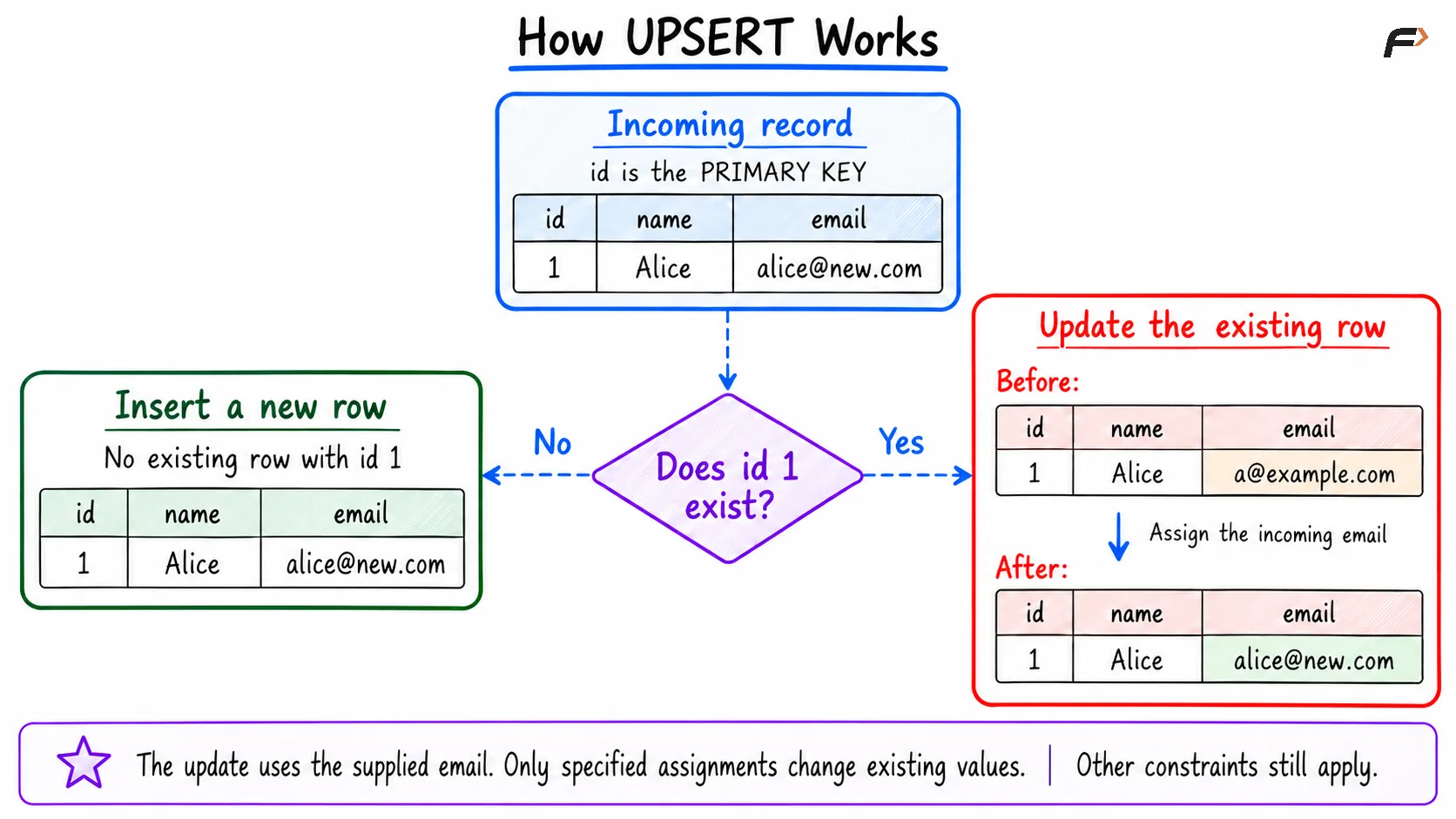
How UPSERT works
UPSERT Syntax in MySQL
MySQL uses INSERT ... ON DUPLICATE KEY UPDATE.
The following examples target :
CREATE TABLE students ( student_id INT PRIMARY KEY, student_name VARCHAR(100) NOT NULL, marks INT) ;Start with one record:
INSERT INTO students (student_id, student_name, marks)VALUES (101, 'Asha', 75);Now insert or update using a row alias:
INSERT INTO students (student_id, student_name, marks)VALUES (101, 'Asha', 85) AS incomingON DUPLICATE KEY UPDATE student_name = incoming.student_name, marks = incoming.marks;incoming represents the proposed row. Its values are available to the update assignments.
The primary key 101 already exists, so the statement updates that row. Asha’s marks become 85, and no second row with identifier 101 is created.
Inserting a New Record
Use the same pattern with an identifier that does not exist:
INSERT INTO students (student_id, student_name, marks)VALUES (102, 'Ravi', 72) AS incomingON DUPLICATE KEY UPDATE student_name = incoming.student_name, marks = incoming.marks;Because identifier 102 is absent, MySQL inserts the new row. The update clause is not needed for that record.
After the two UPSERT examples:
student_id | student_name | marks |
|---|---|---|
101 | Asha | 85 |
102 | Ravi | 72 |
The same statement structure supports both outcomes. The key conflict determines which action applies.
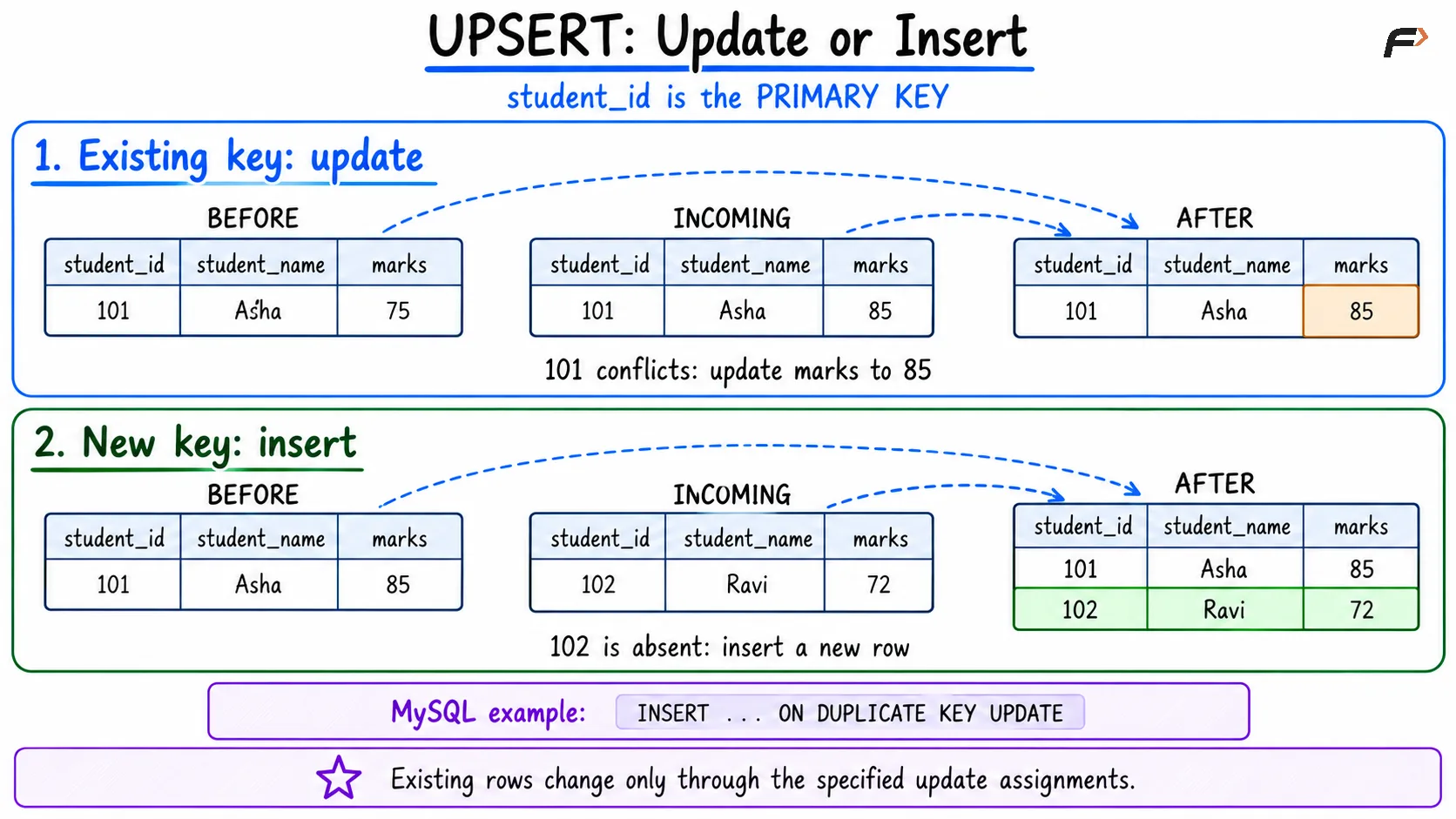
UPSERT : update or insert
Handling Multiple Rows
MySQL also supports multiple proposed rows:
INSERT INTO students (student_id, student_name, marks)VALUES (101, 'Asha', 90), (103, 'Meera', 91) AS incomingON DUPLICATE KEY UPDATE student_name = incoming.student_name, marks = incoming.marks;For the current table:
Student 101: Already exists, so Asha’s marks change from 85 to 90.
Student 103: Does not exist, so Meera’s record is inserted.
Student 102: Is not part of this input and remains unchanged.
Each proposed row can take a different path. Constraints still apply to both inserted and updated values.
Choosing the Update Behavior
The update assignments express the intended meaning of incoming data.
The earlier examples replace stored marks with the incoming value. However, not every UPSERT should overwrite existing information.
For example, keep the stored mark when the incoming mark is missing:
INSERT INTO students (student_id, student_name, marks)VALUES (101, 'Asha', NULL) AS incomingON DUPLICATE KEY UPDATE marks = COALESCE(incoming.marks, students.marks);On the update path, a non-null incoming mark replaces the stored mark; otherwise, the existing value remains.
This is a deliberate policy, not a universal rule. Sometimes an incoming NULL means “clear the value,” so preserving the old value would be incorrect.
Only listed columns change on the update path. The statement above does not update student_name.
Keys, Constraints, and Common Mistakes
The conflict rule must match the record’s identity.
In MySQL, a conflict with a primary key or another unique index can trigger ON DUPLICATE KEY UPDATE. A table with several unique keys therefore needs careful handling: the conflicting row may be identified through a different key than expected.
Other important points are:
Define a reliable key: Without a relevant uniqueness rule, repeated input may create separate rows.
Specify updates explicitly: Unlisted columns are not automatically replaced.
Respect other constraints: UPSERT does not bypass
NOT NULL, foreign keys, or check constraints.Avoid deprecated examples: MySQL’s
VALUES(column)form for referencing incoming values is deprecated; use supported row aliases.Do not assume retries are harmless: Replacing a value and incrementing a counter behave differently when repeated.
Expect transaction considerations: UPSERT still requires appropriate locking, error handling, and commit behavior.
A separate “check whether the row exists” query followed by an insert can race with another session. Native conflict-handling syntax lets the database coordinate that decision, although blocking or deadlocks can still occur.
PostgreSQL Syntax
PostgreSQL uses a different form:
INSERT INTO students (student_id, student_name, marks)VALUES (101, 'Asha', 85)ON CONFLICT (student_id)DO UPDATE SET student_name = EXCLUDED.student_name, marks = EXCLUDED.marks;ON CONFLICT (student_id) identifies the conflict target, while EXCLUDED provides the proposed values.
The intent resembles the MySQL example, but the syntax and conflict-selection rules differ. Choose the form supported by the database rather than treating UPSERT as one portable statement.
Summary
UPSERT inserts new records and updates existing records when a relevant key conflict occurs. It is useful for imports and synchronization, where incoming data can contain both new and previously stored entities.
Define suitable keys and specify update behavior carefully. Database-specific syntax, nullable input, constraints, and repeated execution all affect whether the operation matches the application’s requirements.
Be the first to add a comment.