Introduction
A student’s status and city may need to change together as part of one update. Saving only one change could leave an incomplete result.
Permissions control whether a user can perform these updates. Transactions let related changes be saved or cancelled together. Connections provide the session in which this work happens.
Connections and Connection Pools
A connection is a live communication channel between an application and the database server. It has its own session state, including any active transaction.
A connection pool keeps several connections ready for reuse. The application borrows an available connection and returns it when the work finishes. This reduces repeated connection setup and lets multiple requests use separate connections.
Every statement in one transaction must use the same connection, including the final COMMIT or ROLLBACK.
Transactions, COMMIT and ROLLBACK
A transaction groups related database changes into one unit that can be committed or rolled back.
With autocommit enabled, a successful standalone statement is committed automatically. START TRANSACTION begins an explicit transaction so related changes can be handled together.
Command | Purpose |
|---|---|
START TRANSACTION | Begins a transaction. |
COMMIT | Saves the transaction’s changes. |
ROLLBACK | Undoes the current transaction’s uncommitted changes. |
SAVEPOINT name | Creates a named checkpoint inside the transaction. |
ROLLBACK TO SAVEPOINT name | Undoes changes made after that checkpoint, keeping the transaction active. |
COMMIT finishes the transaction. A later ROLLBACK cannot undo changes that have already been committed.
SAVEPOINT Example
Suppose a students table contains this single row only.
student_id | status | city |
|---|---|---|
1 | ACTIVE | Pune |
We want to change the status to INACTIVE. We also try changing the city to Delhi, but then decide to keep the original city.
START TRANSACTION;UPDATE studentsSET status = 'INACTIVE'WHERE student_id = 1;SAVEPOINT keep_status;UPDATE studentsSET city = 'Delhi'WHERE student_id = 1;ROLLBACK TO SAVEPOINT keep_status;COMMIT;The status changes before the savepoint, so it survives the partial rollback. The city changes after the savepoint, so that change is undone. COMMIT then saves the remaining status change.
Final row: student_id = 1, status = INACTIVE, city = Pune.
Starting from the original row, committing both updates would save both new values. A full ROLLBACK would undo both updates. Rolling back to the savepoint lets us keep just the status change.
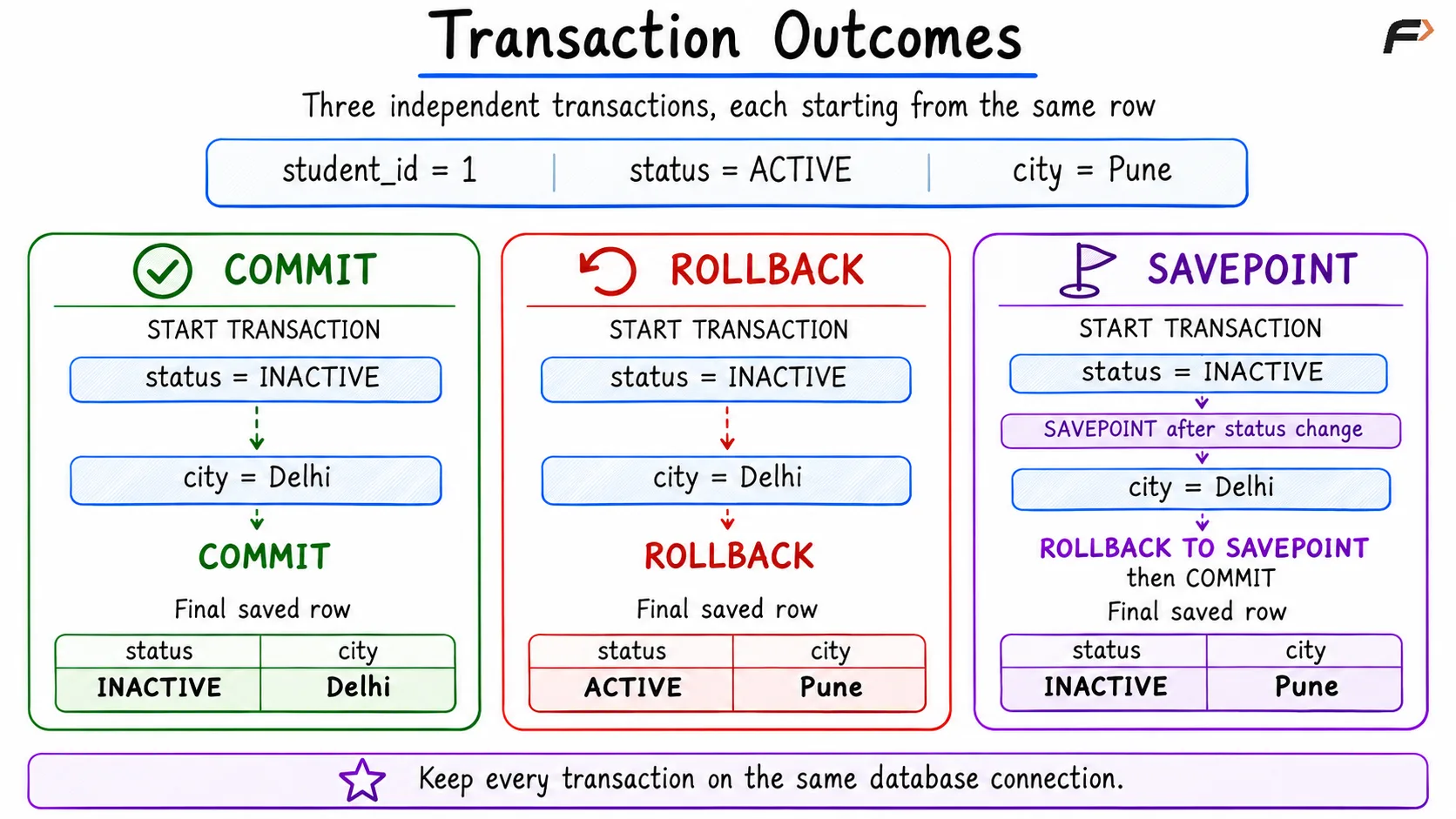
Transaction Outcomes
Important Points
A savepoint does not save changes permanently: Work retained after a partial rollback still needs COMMIT.
Handle failures explicitly: In MySQL, a statement error does not always undo earlier statements in the transaction. If the whole operation must be cancelled, handle the error and roll back.
Keep MySQL transaction boundaries clear: Commands such as CREATE TABLE, ALTER TABLE, GRANT and REVOKE can cause implicit commits. Keep them outside the data-change transaction used in this example.
Summary
Connections carry the session state for database work, while connection pools make those connections reusable. A transaction keeps related changes together: COMMIT saves them, ROLLBACK cancels uncommitted work, and SAVEPOINT allows selected later changes to be undone. Keep the transaction on one connection and finish it deliberately.
Be the first to add a comment.