Introduction
In SQL, some queries require the result of another query to determine which records should be selected. For example, a company wants to list employees who earn more than the company average. The average is itself the answer to another query. A subquery lets SQL express both parts in one statement, so a filter can depend on a calculated value, a collection of values, or the presence of related records.
How Subqueries Work
A subquery is a query nested inside another SQL statement. In the examples below, it is a SELECT enclosed in parentheses. The surrounding statement is called the outer query, and the nested query is the inner query.
The result needed by the outer query determines which form is appropriate.
Form | Result shape | Typical purpose |
|---|---|---|
Scalar subquery | One column and at most one row | Supply a single comparison or output value |
Column subquery | One column with zero or more rows | Provide values for IN, ANY, or ALL |
Row subquery | Several columns and at most one row | Compare a combination of values |
Table subquery | Zero or more rows with one or more columns | Supply a result that can be queried in FROM |
Subqueries can also be grouped by whether they rely on the main query. An independent subquery stands on its own, while a correlated subquery depends on data from the outer query. These aren't strict categories, though. For example, a correlated subquery can still return just a single value.
Reading an independent inner query first can help explain the result. However, this is a logical explanation, not a fixed execution schedule. The database optimizer decides how to execute the statement.
A Scalar Subquery in Practice
The examples below use the following two tables. Each department and employee has a unique ID. An employee can belong to one department or remain unassigned. All salaries are known; Isha’s NULL department_id means that she has no assigned department. Amounts below omit trailing decimal zeros.
departments
department_id | department_name |
|---|---|
10 | Engineering |
20 | Support |
30 | Design |
employees
employee_id | employee_name | department_id | salary |
|---|---|---|---|
101 | Mira | 10 | 60000 |
102 | Kabir | 10 | 80000 |
103 | Tara | 20 | 40000 |
104 | Dev | 20 | 50000 |
105 | Isha | NULL | 30000 |
Find employees earning above the company average
The inner query calculates the average salary. The outer query compares each employee’s salary with that single value.
SELECT e.employee_id, e.employee_name, e.salaryFROM employees AS eWHERE e.salary > ( SELECT AVG(salary) FROM employees)ORDER BY e.employee_id;Output
employee_id | employee_name | salary |
|---|---|---|
101 | Mira | 60000 |
102 | Kabir | 80000 |
The five salaries total 260000, so their average is 52000. Mira and Kabir earn more than 52000. The other employees do not satisfy the condition.
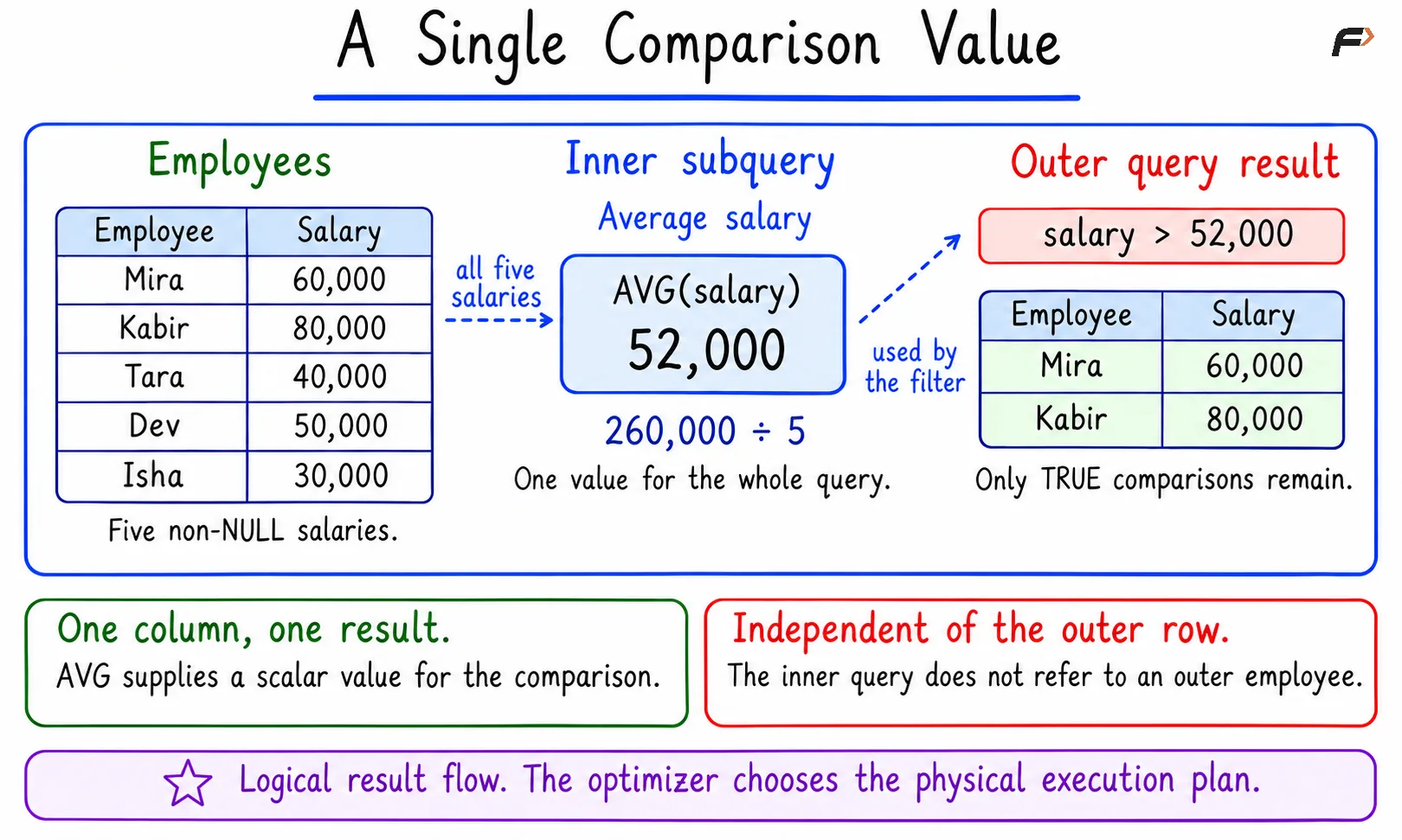
A Single Comparison Value
The subquery is scalar because it supplies one value. It is also independent because it does not refer to the outer alias e.
Checking Membership and Missing Relationships
IN checks membership
To find departments that have employees, check whether each department ID appears among the employee department IDs.
SELECT d.department_id, d.department_nameFROM departments AS dWHERE d.department_id IN ( SELECT e.department_id FROM employees AS e)ORDER BY d.department_id;Output
department_id | department_name |
|---|---|
10 | Engineering |
20 | Support |
The inner result contains 10, 10, 20, 20, and NULL. IDs 10 and 20 have matches. Repeated values inside IN do not multiply outer rows, so DISTINCT is unnecessary in this subquery.
EXISTS checks for a qualifying row
The same question can be expressed by checking whether at least one employee belongs to the current department.
SELECT d.department_id, d.department_nameFROM departments AS dWHERE EXISTS ( SELECT 1 FROM employees AS e WHERE e.department_id = d.department_id)ORDER BY d.department_id;This returns the same two departments, Engineering and Support. SELECT 1 is a conventional placeholder: EXISTS checks whether a qualifying row is present. It does not need that employee’s name or salary.
The condition e.department_id = d.department_id links an inner employee row to an outer department row. That outer reference makes this a correlated subquery. Multiple matching employees still produce only one output row for each department in this query.
NOT EXISTS finds missing relationships
To find departments without employees, keep a department only when the inner query has no matching employee.
SELECT d.department_id, d.department_nameFROM departments AS dWHERE NOT EXISTS ( SELECT 1 FROM employees AS e WHERE e.department_id = d.department_id)ORDER BY d.department_id;Output
department_id | department_name |
|---|---|
30 | Design |
Design has no matching employee. Isha’s unassigned department does not count as a match for department 30.
Why NOT IN can behave differently
It may seem that replacing IN with NOT IN would produce the same missing-department result. With this dataset, it does not.
SELECT d.department_id, d.department_nameFROM departments AS dWHERE d.department_id NOT IN ( SELECT e.department_id FROM employees AS e)ORDER BY d.department_id;Output
No rows.
The inner result includes NULL. SQL cannot establish that 30 differs from an unknown department ID, so the NOT IN condition for Design is UNKNOWN, rather than TRUE. WHERE keeps only rows for which its condition is TRUE.
Department ID | NOT IN result | Reason |
|---|---|---|
10 | FALSE | A matching 10 exists |
20 | FALSE | A matching 20 exists |
30 | UNKNOWN | No equal value exists, but NULL is present |
NOT EXISTS avoids this particular trap by checking matching rows directly. Its equality condition still follows normal NULL rules. When using NOT IN, account for possible NULLs on both sides of the comparison.
Correlated Subqueries
Now change the question: which employees earn more than the average salary in their own department? The comparison value depends on the current employee’s department.
SELECT e.employee_id, e.employee_name, e.salaryFROM employees AS eWHERE e.salary > ( SELECT AVG(e2.salary) FROM employees AS e2 WHERE e2.department_id = e.department_id)ORDER BY e.employee_id;Output
employee_id | employee_name | salary |
|---|---|---|
102 | Kabir | 80000 |
104 | Dev | 50000 |
The alias e identifies the employee being considered. The alias e2 identifies the employees used to calculate the department average. The condition e2.department_id = e.department_id restricts that average to the current employee’s department.
Engineering’s average is 70000, so Kabir qualifies. Support’s average is 45000, so Dev qualifies. Isha’s NULL department does not match through ordinary equality; her correlated AVG is NULL, and the salary comparison is not TRUE.
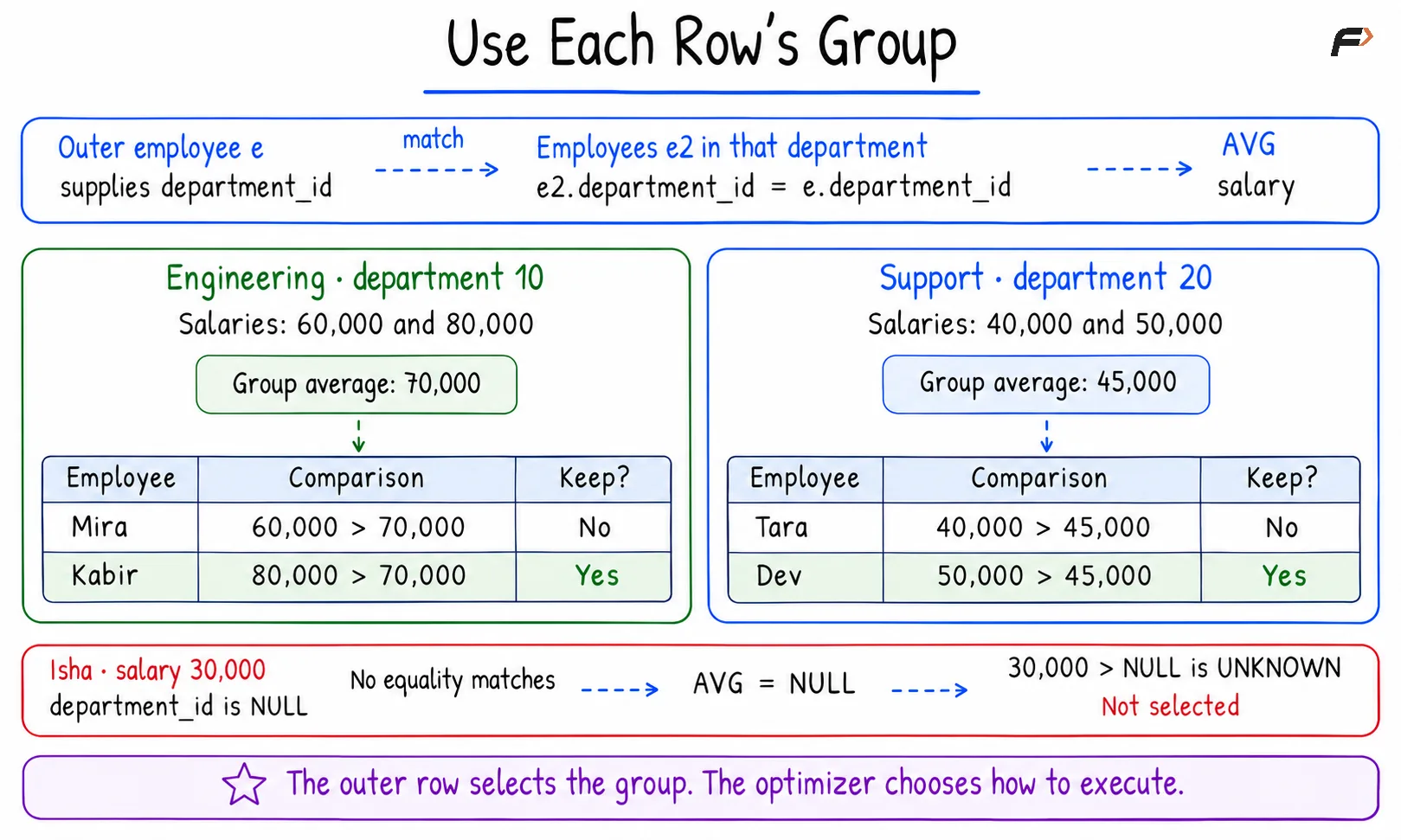
Use Each Row's Group
This row-based interpretation explains the dependency. It does not guarantee that the database physically executes the inner query separately for every outer row.
Other Forms and Practical Rules
A subquery in FROM creates a derived table
A derived table is a query result used as a table within another query. Here, the inner query produces department averages, and the outer query keeps averages above 50000.
SELECT department_averages.department_id, department_averages.avg_salaryFROM ( SELECT department_id, AVG(salary) AS avg_salary FROM employees WHERE department_id IS NOT NULL GROUP BY department_id) AS department_averagesWHERE department_averages.avg_salary > 50000ORDER BY department_averages.department_id;Output
department_id | avg_salary |
|---|---|
10 | 70000 |
The name department_averages identifies the result available to the outer query. Its avg_salary column holds each department’s calculated average. Engineering’s 70000 passes the filter; Support’s 45000 does not. The query does not create a permanent table.
Subqueries can also appear in the SELECT list to supply a scalar output value, or in HAVING to filter grouped results. They may be nested further or used in data-changing statements such as INSERT, UPDATE, and DELETE, subject to the database’s rules.
ANY and ALL compare against several values
Support salaries are 40000 and 50000. These values make the difference between ANY and ALL clear:
Operator | Meaning | Comparison using 50000 |
|---|---|---|
> ANY | Greater than at least one returned value | TRUE, because 50000 > 40000 |
> ALL | Greater than every returned value | FALSE, because 50000 is not greater than 50000 |
SOME is a synonym for ANY, and IN is equivalent to = ANY. If the subquery returns no rows, ANY is FALSE and ALL is TRUE. NULL comparisons can produce UNKNOWN when there is no decisive TRUE for ANY or decisive FALSE for ALL.
Avoid common mistakes
Respect scalar row counts: A scalar position requires one column and at most one row. Zero rows give NULL; multiple rows cause an error. An aggregate such as AVG without GROUP BY returns one row, containing NULL when no values qualify. Do not add LIMIT 1 merely to hide an unintended multiple-row result.
Make outer references explicit: Use clear aliases in correlated conditions. A mistaken inner-to-inner comparison can remove the intended relationship to the outer row and change the answer.
Choose joins according to the result needed: A join is useful when the output needs columns from matching records. Multiple matches can repeat an outer row. EXISTS expresses a presence check without adding one output row per match.
Check performance with evidence: IN, EXISTS, and joins have no universal speed ranking. Equivalent forms may receive similar execution plans. Use EXPLAIN and consider the actual data, filters, and indexes when tuning a query.
Summary
A subquery lets one SQL statement use the result of another query. Scalar subqueries supply a single value, IN checks membership, and EXISTS or NOT EXISTS tests for matching rows. Correlated subqueries refer to an outer row, while derived tables make a query result available through FROM. Choose a form that matches the question, check row counts and NULL behavior, and distinguish logical reasoning from the execution plan chosen by the database.
Be the first to add a comment.