Introduction
A relationship does not always connect records from two different tables. Sometimes, both sides of the relationship are stored in the same table, and a query needs to connect or compare those records.
A self join handles this situation by referencing the same table more than once. Different aliases distinguish the references, allowing each one to play a separate role in the query.
What Is a SELF JOIN?
A self join is a join in which both table references point to the same table. It allows a query to retrieve related records or compare values between rows within that table.
There is no separate SELF JOIN keyword in MySQL or PostgreSQL. A self join uses regular join syntax, such as INNER JOIN or LEFT JOIN, with different aliases for the same table.
The aliases do not create physical copies of the table. They provide separate names for its references within the query.
The term self join identifies which table is referenced. The choice of INNER JOIN or LEFT JOIN determines whether unmatched rows remain in the result.
Example Table
Consider an Employee table that stores each employee’s identifier, name, manager identifier, and monthly salary in rupees.
Employee
EmployeeID | Name | ManagerID | Salary |
|---|---|---|---|
1 | Neha | NULL | 90000 |
2 | Asha | 1 | 80000 |
3 | Ravi | 1 | 70000 |
4 | Meera | 2 | 85000 |
5 | Kabir | 2 | 65000 |
EmployeeID is the primary key. Each non-NULL ManagerID refers to an existing EmployeeID in the same table.
For example, Asha’s ManagerID is 1, which refers to Neha’s employee record. Meera’s ManagerID is 2, which refers to Asha.
Neha has no assigned manager, so her ManagerID is NULL. Managers are also employees, which is why both roles can be represented in one table.
Finding Employees and Their Managers
Objective: Display employees who have a matching manager record, together with their manager’s name.
Consider the following queries to connect each employee’s manager identifier to the corresponding employee record.
SELECT e.EmployeeID, e.Name AS EmployeeName, m.Name AS ManagerNameFROM Employee AS eINNER JOIN Employee AS m ON e.ManagerID = m.EmployeeIDORDER BY e.EmployeeID;AS e names the employee reference, while AS m names the manager reference. Both refer to the same Employee table.
The condition e.ManagerID = m.EmployeeID matches an employee’s manager identifier with the manager’s own employee identifier. AS EmployeeName and AS ManagerName give clear labels to the two selected name columns.
Expected result
EmployeeID | EmployeeName | ManagerName |
|---|---|---|
2 | Asha | Neha |
3 | Ravi | Neha |
4 | Meera | Asha |
5 | Kabir | Asha |
Neha is excluded from the employee side because her ManagerID is NULL, so the equality condition does not find a manager for her.
Asha appears as an employee reporting to Neha and as the manager of Meera and Kabir. The two aliases allow the same stored record to participate in these different roles.
This query retrieves each employee’s direct manager. It does not retrieve every manager higher in the reporting hierarchy.
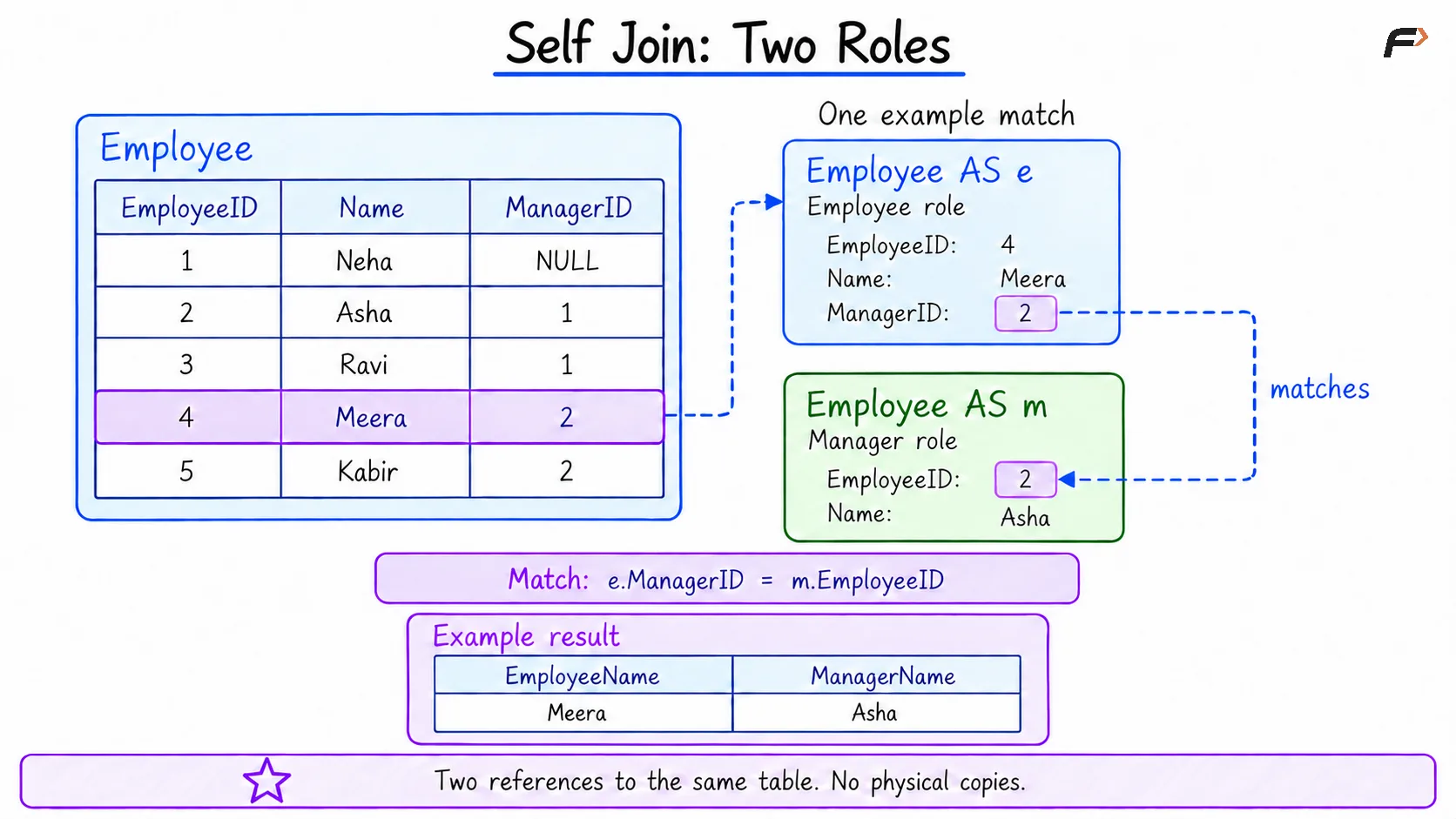
SELF JOIN : TWO ROLES
Keeping Employees Without a Manager
An inner self join returns only matching employee-manager pairs. A left self join also preserves employees whose manager reference has no match.
Objective: Display every employee, including employees without an assigned manager.
Consider the following queries to retain all employee records while looking up their managers.
SELECT e.EmployeeID, e.Name AS EmployeeName, m.Name AS ManagerNameFROM Employee AS eLEFT JOIN Employee AS m ON e.ManagerID = m.EmployeeIDORDER BY e.EmployeeID;The aliases e and m again represent the employee and manager references. EmployeeName and ManagerName label their selected name columns.
Because e is on the left side of the join, all its employee records remain in the result.
Expected result
EmployeeID | EmployeeName | ManagerName |
|---|---|---|
1 | Neha | NULL |
2 | Asha | Neha |
3 | Ravi | Neha |
4 | Meera | Asha |
5 | Kabir | Asha |
Neha now appears with NULL as her manager’s name. The other employee-manager pairs remain the same.
The join produces this result without changing the stored employee records.
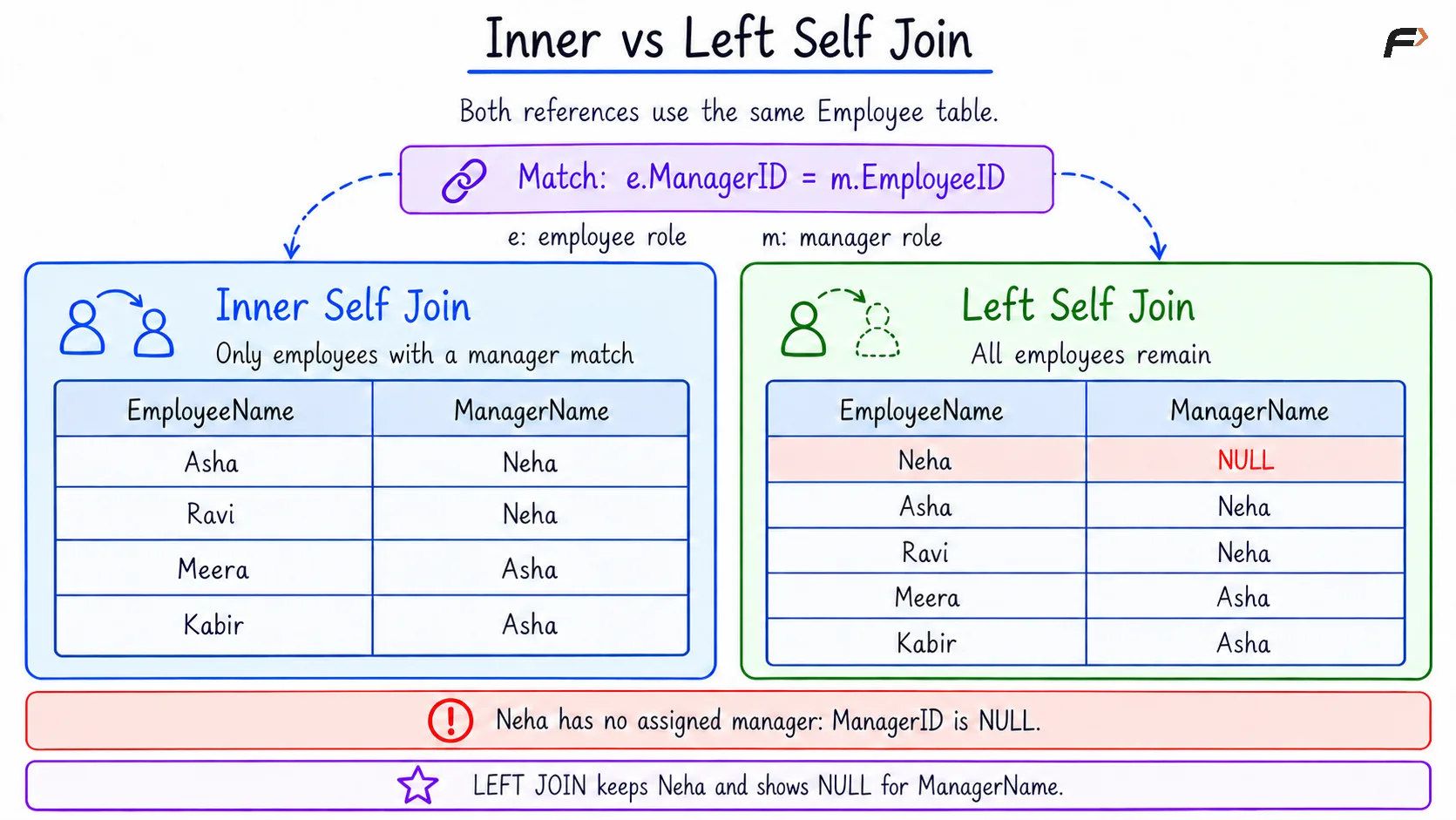
INNER vs LEFT SELF JOIN
Finding Employees Who Share a Manager
A self join can also compare different records that share a common value. When producing pairs, the query should avoid pairing a record with itself or returning the same pair in both directions.
Objective: List each pair of employees who share the same manager, showing each pair only once.
Consider the following queries to find employee pairs with equal manager identifiers.
SELECT a.Name AS Employee1, b.Name AS Employee2, a.ManagerIDFROM Employee AS aINNER JOIN Employee AS b ON a.ManagerID = b.ManagerID AND a.EmployeeID < b.EmployeeIDORDER BY a.ManagerID, a.EmployeeID, b.EmployeeID;The aliases a and b represent two employee references. AS Employee1 and AS Employee2 label the names in each pair.
The condition a.ManagerID = b.ManagerID requires both employees to have the same manager. The additional condition uses <, meaning less than, to keep only pairs where the first employee’s ID is smaller.
This ID comparison serves two purposes:
Avoid pairing a record with itself: An employee ID cannot be less than itself.
Avoid reversed duplicate pairs: Asha and Ravi are included because 2 is less than 3. Ravi and Asha are excluded because 3 is not less than 2.
Expected result
Employee1 | Employee2 | ManagerID |
|---|---|---|
Asha | Ravi | 1 |
Meera | Kabir | 2 |
Asha and Ravi share Neha as their manager. Meera and Kabir share Asha.
Using <>, meaning not equal, instead of < would exclude a record paired with itself, but would still allow both directions of each pair.
Rows with NULL manager identifiers do not match through the equality condition used here.
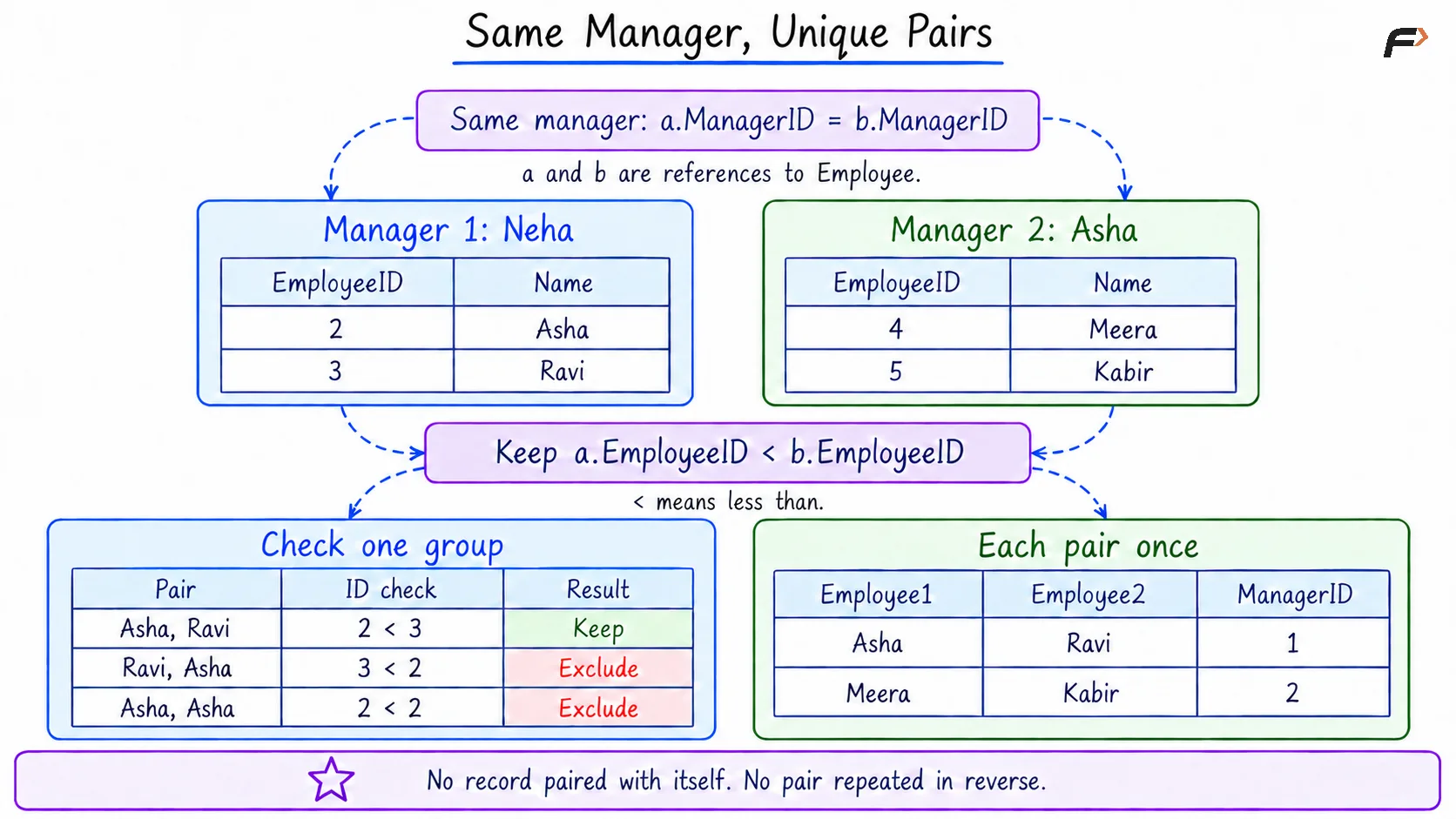
Same Manager , Unique Pairs
Summary
A self join connects or compares rows within the same table using different aliases. Regular join syntax controls the result: an inner self join returns matching pairs, while a left self join can preserve records without a match.
Self joins are useful for direct reporting relationships, shared-manager pairs, and comparisons between related records. Clear aliases and suitable conditions make these queries easier to understand, while an ID comparison such as < can prevent unwanted repeated pairs.
Be the first to add a comment.