Introduction
A table may contain thousands of records, but a useful result usually answers a specific question. You might need the two highest scores in a department, a list of available regions, or only the names of customers who meet a condition.
A SQL query expresses that request. Its clauses work together to choose a source, filter records, select output values, and arrange the result without changing the stored data.
Set Up a Practice Table
Consider a training platform that records students’ scores. This table and sample data work in both MySQL and PostgreSQL:
CREATE TABLE students ( student_id INT PRIMARY KEY, student_name VARCHAR(100) NOT NULL, department VARCHAR(20), marks INT, max_marks INT NOT NULL);INSERT INTO students (student_id, student_name, department, marks, max_marks)VALUES (101, 'Asha', 'CSE', 85, 100), (102, 'Ravi', 'ECE', 72, 100), (103, 'Meera', 'CSE', 91, 100), (104, 'Kabir', 'ME', 60, 100), (105, 'Nila', 'ECE', NULL, 100);student_id | student_name | department | marks | max_marks |
|---|---|---|---|---|
101 | Asha | CSE | 85 | 100 |
102 | Ravi | ECE | 72 | 100 |
103 | Meera | CSE | 91 | 100 |
104 | Kabir | ME | 60 | 100 |
105 | Nila | ECE | NULL | 100 |
Nila’s marks have not been recorded. NULL represents that missing value; it does not mean she scored zero.
SELECT and FROM: Choose the Output and Source
SELECT specifies the columns or expressions to return. FROM identifies the table supplying the data.
SELECT student_name, marksFROM students;This returns all five students, including Nila with NULL marks, but only the two requested columns.
To inspect every column, use:
SELECT *FROM students;SELECT * is convenient while exploring a table. Naming the required columns makes an application’s request clearer and avoids returning unnecessary data.
WHERE and Comparison Operators
WHERE filters records. For example, to find students who scored at least 85:
SELECT student_name, marksFROM studentsWHERE marks >= 85;student_name | marks |
|---|---|
Asha | 85 |
Meera | 91 |
The boundary matters: >= 85 includes Asha’s score of exactly 85, while > 85 would return only Meera.
Operator | Meaning | Example condition |
|---|---|---|
| Equal to |
|
| Not equal to |
|
| Greater than |
|
| Less than |
|
| Greater than or equal to |
|
| Less than or equal to |
|
MySQL and PostgreSQL also accept != for not equal.
WHERE keeps only rows whose condition is TRUE. For Nila, marks >= 85 evaluates to UNKNOWN, so her row is excluded. To find missing marks, use marks IS NULL, rather than marks = NULL.
AND, OR, and NOT: Combine Conditions
Logical operators let a query express more than one requirement:
AND: Both conditions must be TRUE.
OR: At least one condition must be TRUE.
NOT: Reverses TRUE and FALSE. UNKNOWN remains UNKNOWN.
To find CSE students with at least 90 marks:
SELECT student_name, marksFROM studentsWHERE department = 'CSE' AND marks >= 90;Only Meera qualifies. To include students from either CSE or ECE who scored at least 80, group the department alternatives:
SELECT student_name, department, marksFROM studentsWHERE (department = 'CSE' OR department = 'ECE') AND marks >= 80;This returns Asha and Meera. The parentheses make the marks requirement apply to both departments. Without them, AND binds more tightly than OR, which can change the result.
To exclude ME students:
SELECT student_name, departmentFROM studentsWHERE NOT (department = 'ME');This returns Asha, Ravi, Meera, and Nila.
Arithmetic Expressions and NULLIF
A query can calculate values as well as retrieve them. Common arithmetic operators are +, -, *, /, and % for the remainder.
For example, calculate the marks each student needs to reach the maximum:
SELECT student_name, max_marks - marks AS marks_remainingFROM students;Asha’s result is 15, while Meera’s is 9. Nila’s result is NULL because her marks are missing.
Division needs care because behavior depends on the operand types and database. For example:
MySQL
SELECT 7 DIV 2 AS quotient;PostgreSQL
SELECT 7 / 2 AS quotient;Both return 3 in these examples. MySQL provides DIV for integer division; PostgreSQL truncates the fractional part when dividing integers.
For a percentage calculation that preserves decimals in both systems, use a decimal operand:
SELECT student_name, marks * 100.0 / NULLIF(max_marks, 0) AS percentageFROM students;NULLIF(max_marks, 0) returns NULL when the denominator is zero; otherwise, it returns max_marks. This avoids dividing by zero. A missing score or zero denominator produces a NULL percentage, not a zero percentage.
Multiplication and division take precedence over addition and subtraction. Use parentheses when a calculation needs a different grouping.
ORDER BY and LIMIT: Return the Top Results
ORDER BY sorts the result. ASC means ascending and is the default; DESC means descending. LIMIT restricts how many rows are returned.
To find the two highest recorded scores:
SELECT student_name, marksFROM studentsWHERE marks IS NOT NULLORDER BY marks DESC, student_id ASCLIMIT 2;student_name | marks |
|---|---|
Meera | 91 |
Asha | 85 |
The query excludes missing marks, sorts the remaining scores from highest to lowest, and returns two rows. student_id provides a consistent tie-breaker when students have equal marks.
Without ORDER BY, neither the displayed row order nor the particular rows chosen by LIMIT should be assumed.
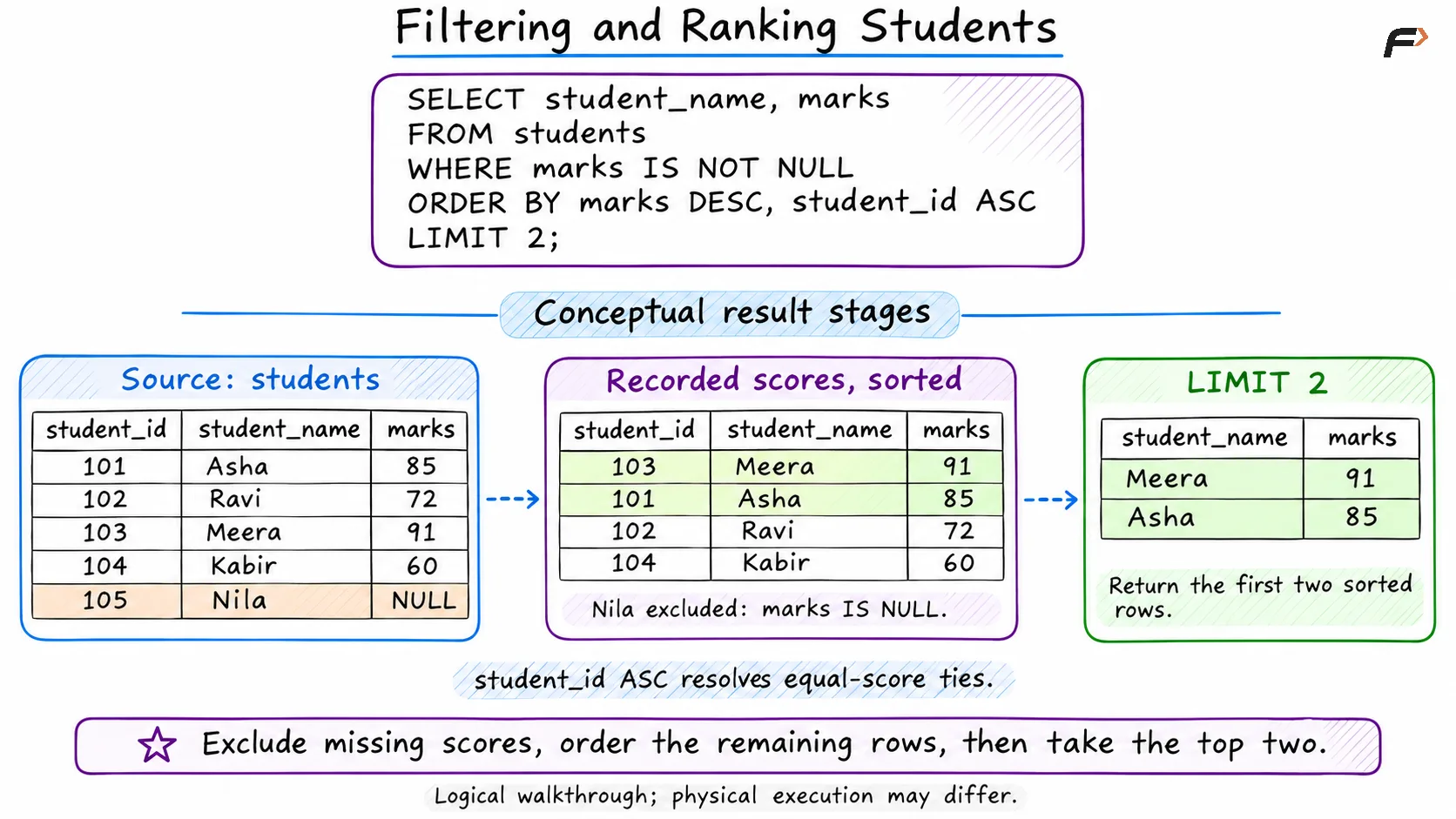
Filtering and Ranking Students
DISTINCT and AS: Make Results Clearer
DISTINCT removes duplicate rows from the selected result. To list departments once each:
SELECT DISTINCT departmentFROM studentsORDER BY department;department |
|---|
CSE |
ECE |
ME |
With several selected columns, DISTINCT applies to the whole combination. Selecting distinct department and marks pairs would retain both CSE records because their marks differ.
AS supplies a temporary alias for a column or table:
SELECT s.student_name AS name, s.marks AS scoreFROM students AS s;Here, s is the table alias, while name and score are output headings. Aliases make references easier to read without renaming the stored table or columns.
Putting the Clauses Together
Suppose the platform needs the two highest-scoring CSE or ECE students with at least 80 marks:
SELECT student_name AS name, department, marks AS scoreFROM studentsWHERE (department = 'CSE' OR department = 'ECE') AND marks >= 80ORDER BY marks DESC, student_id ASCLIMIT 2;name | department | score |
|---|---|---|
Meera | CSE | 91 |
Asha | CSE | 85 |
Each clause contributes to the request: FROM supplies the records, WHERE identifies qualifying students, SELECT chooses the output, and ORDER BY with LIMIT defines the top two. This explains the query’s meaning; the database may use different physical operations to produce that result.
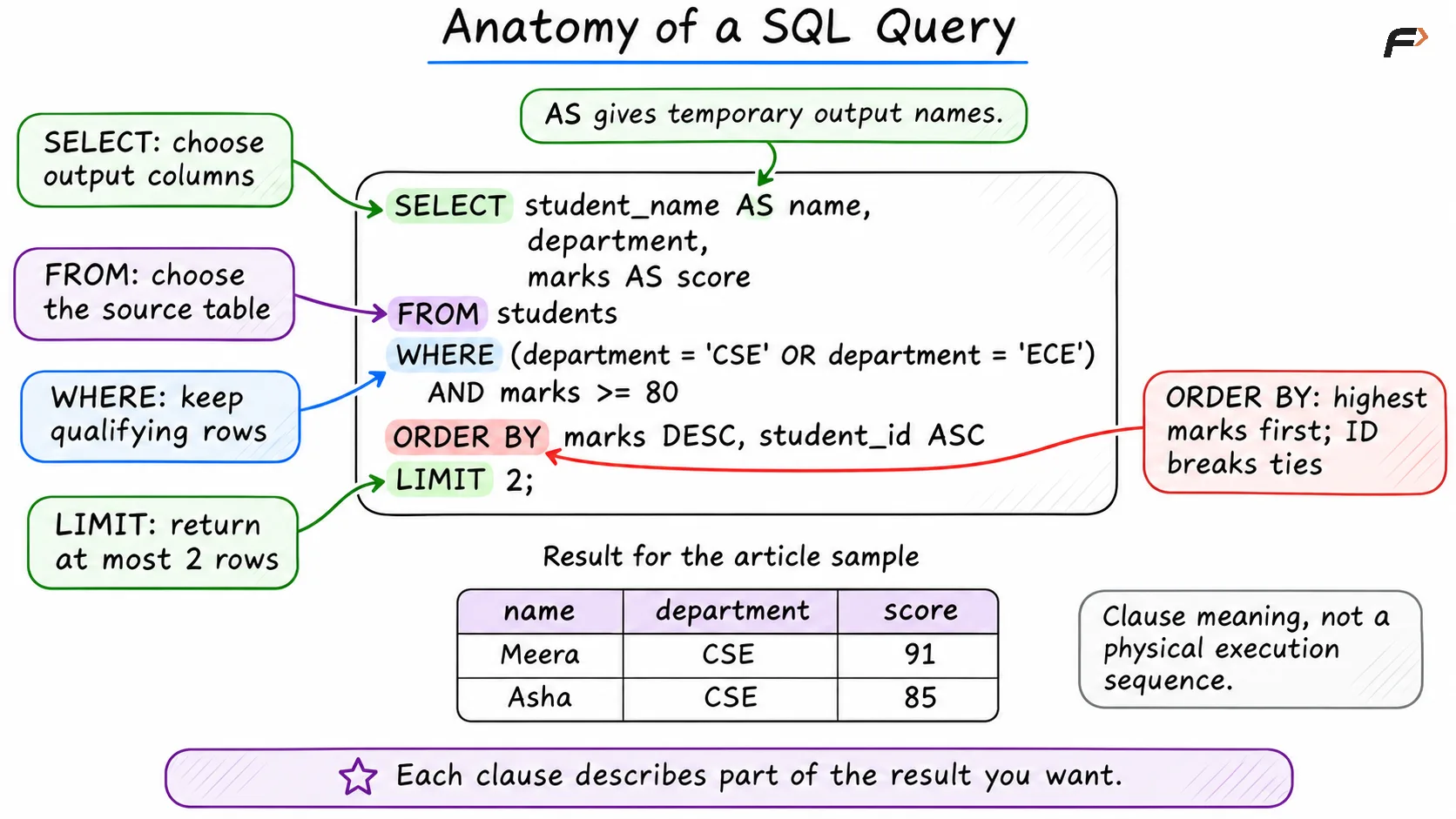
Anatomy of a SQL Query
Summary
A basic SQL query chooses a table, filters rows, and returns selected columns or calculated values. Comparison and logical operators express the conditions, while NULL requires explicit handling when values are missing.
ORDER BY, LIMIT, DISTINCT, and aliases shape the result for its intended use. Build the request around a clear question, then check boundaries, missing values, and ties before relying on the output.
Be the first to add a comment.