Introduction
An online store’s support team may need to check order status, while only authorized staff should change or delete orders. Giving every account unrestricted access makes these boundaries difficult to maintain.
Privileges define the actions an account can perform on database objects. Roles collect privileges under a reusable name, helping administrators manage access consistently across a team.
What Are Database Privileges?
A privilege is permission to perform a particular operation on a database object, such as reading a table or inserting rows.
Privilege | What it permits |
|---|---|
SELECT | Read data. |
INSERT | Add rows. |
UPDATE | Change existing values. |
DELETE | Remove rows. |
Creating, changing, and removing database structures can require additional administrative permissions or ownership rights.
Privileges Have a Scope
An account can have permission to read one table without having access to every table in the database. A permission’s scope determines where it applies.
Scope | What it covers |
|---|---|
A specific object | Access to a particular table or other database object. |
A database or schema | Permissions associated with a larger collection of objects. |
Server administration | Broader operations such as managing accounts or server settings. |
Grant only the actions and scope required for the task. This is the principle of least privilege. A support account that only checks orders needs permission to read the relevant table.
Users and Connection Access
A database account identifies a person or application. Authentication verifies that identity; privileges determine what the account can do after connecting.
Creating an account and configuring its permissions are separate tasks. The administrator must decide both who can connect and what access that account should receive.
Connections may also be restricted according to where a client connects from. A permitted connection origin does not bypass authentication or network restrictions.
Managing Permissions with Roles
A role is a named collection of privileges that can be assigned to accounts.
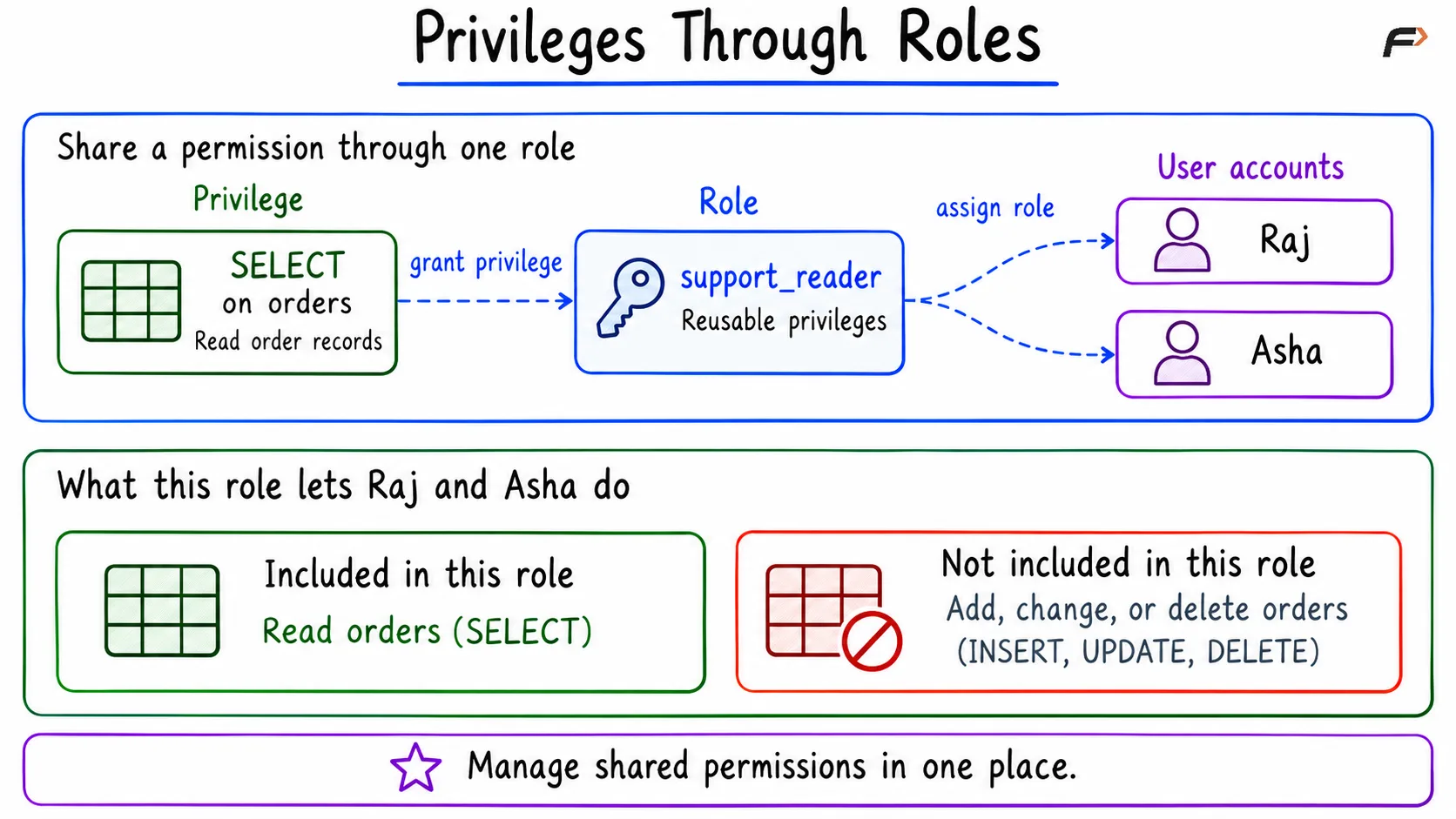
Suppose Raj and Asha both work in customer support. Each needs to read orders. An administrator can grant SELECT to a role named support_reader, then assign that role to both accounts.
If the team later grows to 50 people, the shared permission is still maintained on one role. Changing the role’s privileges avoids editing the same grant separately for every member.
Example: Give Support Staff Read Access
Assume a database named shop contains an orders table with order_id and status columns. Raj and Asha should be able to read these records without adding, changing, or deleting them.
Use new ordinary accounts, an administrator-owned table, and no additional grants that provide access. Run the setup as an administrator with the necessary permissions, and replace the example passwords before use.
-- Accounts include a username and a permitted client host.-- localhost is used here for local connections.-- For remote or container clients, use the host seen by the server.CREATE USER 'raj'@'localhost'IDENTIFIED BY 'Replace_With_Raj_Strong_Password!7';CREATE USER 'asha'@'localhost'IDENTIFIED BY 'Replace_With_Asha_Strong_Password!8';CREATE ROLE 'support_reader';GRANT SELECT ON shop.ordersTO 'support_reader';GRANT 'support_reader'TO 'raj'@'localhost', 'asha'@'localhost';-- Assigning a role does not necessarily activate it.-- Activate this role automatically at future logins.SET DEFAULT ROLE 'support_reader'TO 'raj'@'localhost', 'asha'@'localhost';The setup creates the accounts, adds SELECT to support_reader, and assigns the role to Raj and Asha. Once the role’s permissions apply in their sessions, both accounts can read the orders.
INSERT, UPDATE, and DELETE are not included in the role, so it does not provide permission to modify the records.
The diagram shows how one role supplies the same permission to both accounts.
Privileges Through Roles
Check the Result
Connect as Raj or Asha and run the read query.
-- Run in a session connected as Raj or Asha.-- New logins use the default role.-- This also activates the role in an already open session.SET ROLE 'support_reader';-- Optional: inspect the active roles.-- SELECT CURRENT_ROLE();SELECT order_id, statusFROM shop.ordersORDER BY order_id;With the sample records supplied in the setup files, the result is:
order_id | status |
|---|---|
101 | PLACED |
102 | SHIPPED |
103 | DELIVERED |
Both accounts can retrieve the same three orders. Under the stated assumptions, attempts to insert, update, or delete records are denied because no write privileges were granted.
Inspecting and Removing Access
Review Accounts and Permissions
Administrative queries help inspect account properties and permission assignments. Use meaningful role names and review the relevant grants. Password presence alone is not a reliable way to identify an account’s intended purpose.
-- Run as an administrator with access to mysql.user.-- This table includes both user and role account records.-- account_locked does not reliably distinguish users from roles.SELECT User, Host, account_lockedFROM mysql.userWHERE User IN ('asha', 'raj', 'support_reader')ORDER BY User, Host;-- Inspect the privileges assigned to the shared role.SHOW GRANTS FOR 'support_reader';-- Include the assigned role's privileges when inspecting Raj.-- SHOW GRANTS does not activate the role.SHOW GRANTS FOR 'raj'@'localhost'USING 'support_reader';These checks show the account configuration and the permission assigned to the shared role. In this example, support_reader has SELECT on orders.
Remove Membership or Change the Shared Role
REVOKE can remove a role from one account or remove a privilege from the role itself. These are different administrative changes.
-- Remove Raj's role assignment.REVOKE 'support_reader'FROM 'raj'@'localhost';-- Remove the shared role's permission to read orders.REVOKE SELECT ON shop.ordersFROM 'support_reader';Removing Raj’s membership leaves Asha’s membership in place. Removing SELECT from support_reader changes the permission supplied by that role to its members.
A user may still have the same permission through a direct grant or another role. Review those other grants before concluding that all access has been removed.
Summary
Privileges define which actions an account may perform and on which database objects. Roles group those permissions so administrators can manage shared access consistently. Give accounts only the access they need, distinguish account creation from permission assignment, and verify the permissions available in a user’s session. When access changes, review both role membership and any other grants that may still provide the same permission.
Be the first to add a comment.