Introduction
A single comparison is not always enough to identify the records a query needs. A college application might require students from a particular department who also meet a minimum marks requirement.
Logical operators connect these conditions. SQL uses AND, OR, and NOT to express combined requirements, alternatives, and exclusions.
What Are Logical Operators?
Logical operators combine or negate conditions. Comparison operators establish individual tests, such as marks >= 80, while logical operators connect those tests into a larger expression.
Operator | Purpose | Example |
|---|---|---|
| Requires both conditions to be true |
|
| Requires at least one condition to be true |
|
| Negates a condition |
|
SQL conditions can evaluate to true, false, or unknown. A WHERE clause retains only rows whose complete condition is true.
The examples below use MySQL-compatible SQL and this table:
student_id | student_name | department | marks |
|---|---|---|---|
101 | Asha | CSE | 85 |
102 | Ravi | ECE | 72 |
103 | Meera | CSE | 91 |
104 | Kabir | ME | NULL |
AND: Requiring Both Conditions
AND returns true only when both conditions are true. Use it when every stated requirement must be satisfied.
SELECT student_name, department, marksFROM studentsWHERE department = 'CSE' AND marks >= 90;Only Meera qualifies. Asha belongs to CSE but does not meet the marks requirement.
Student | CSE department? | Marks at least 90? | Included? |
|---|---|---|---|
Asha | True | False | No |
Ravi | False | False | No |
Meera | True | True | Yes |
Kabir | False | Unknown | No |
You can connect additional requirements with more AND operators. For example, marks >= 80 AND marks <= 90 defines an inclusive range.
OR: Accepting Either Condition
OR returns true when at least one condition is true. It also returns true when both are true.
SELECT student_name, department, marksFROM studentsWHERE department = 'CSE' OR marks >= 90;Asha and Meera qualify. Asha satisfies the department condition, while Meera satisfies both conditions.
A row satisfying both sides is not returned twice simply because both conditions are true. OR determines whether that row qualifies; it does not duplicate it.
For two conditions with known truth values:
First condition | Second condition |
|
|
|---|---|---|---|
True | True | True | True |
True | False | False | True |
False | True | False | True |
False | False | False | False |
NOT: Negating a Condition
NOT changes true to false and false to true.
SELECT student_name, departmentFROM studentsWHERE NOT (department = 'CSE');This returns Ravi and Kabir because their known department values differ from CSE. For this comparison, the condition can also be written as department <> 'CSE'.
NOT can negate a grouped condition:
SELECT student_name, department, marksFROM studentsWHERE NOT ( department = 'CSE' OR marks >= 80);Only Ravi qualifies. Kabir’s combined condition is unknown because his marks are missing, and negating unknown still produces unknown.
Parentheses make the expression being negated clear.
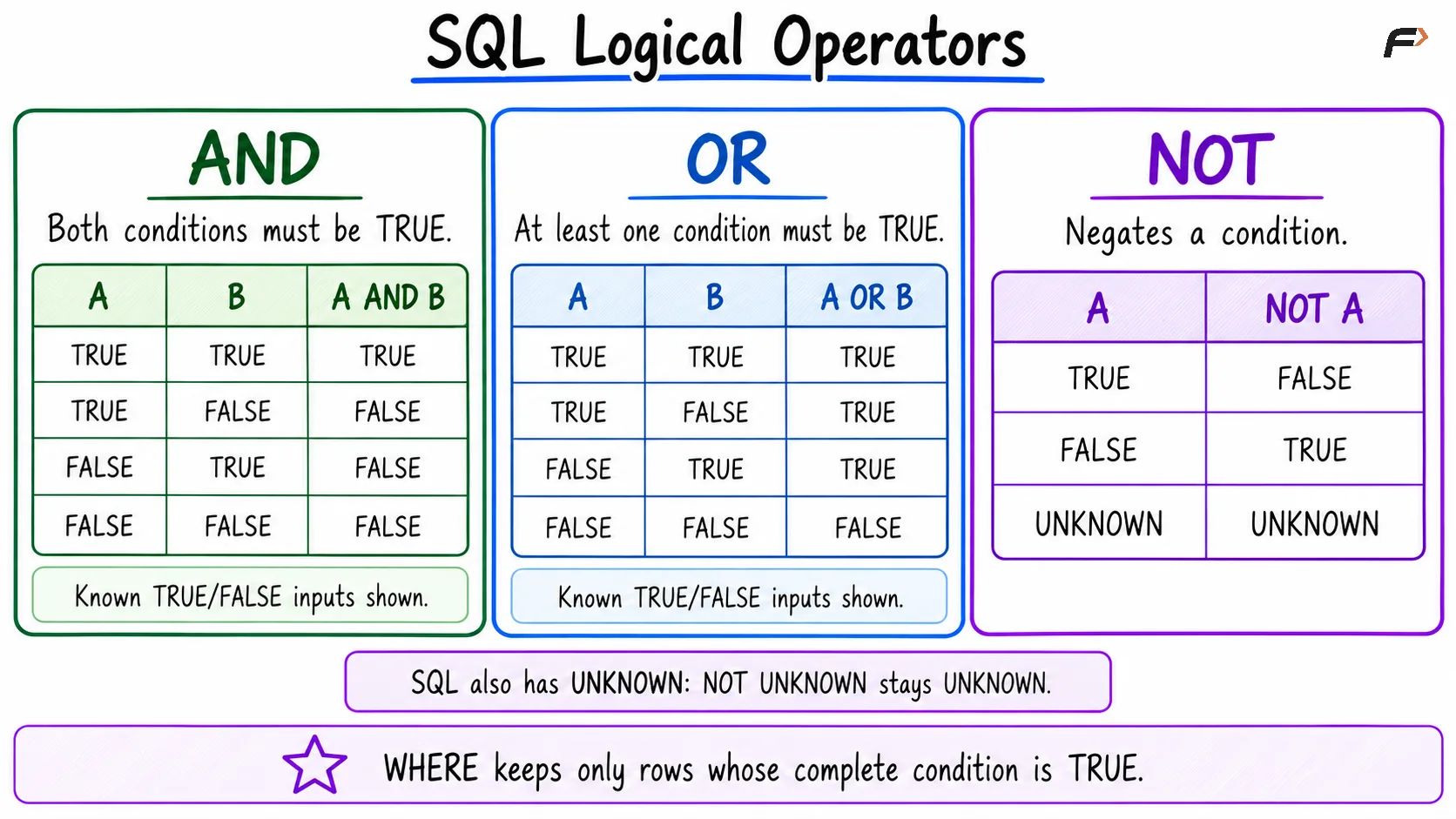
SQL logical operator
Combining Operators and Using Parentheses
Logical operators have precedence rules. Under normal MySQL precedence, NOT binds more tightly than AND, and AND binds more tightly than OR.
Consider:
SELECT student_name, department, marksFROM studentsWHERE department = 'CSE' OR department = 'ECE' AND marks >= 80;The condition is grouped as:
WHERE department = 'CSE' OR (department = 'ECE' AND marks >= 80)Every CSE student qualifies, regardless of marks. Only ECE students must satisfy the marks requirement.
If the marks requirement should apply to both departments, write:
WHERE (department = 'CSE' OR department = 'ECE') AND marks >= 80These conditions happen to return the same records from the sample table. However, a CSE student with 60 marks would qualify under the first condition and fail the second.
Parentheses specify logical grouping, not a guaranteed left-to-right physical evaluation sequence. The optimizer may rearrange work while preserving the expression’s meaning.
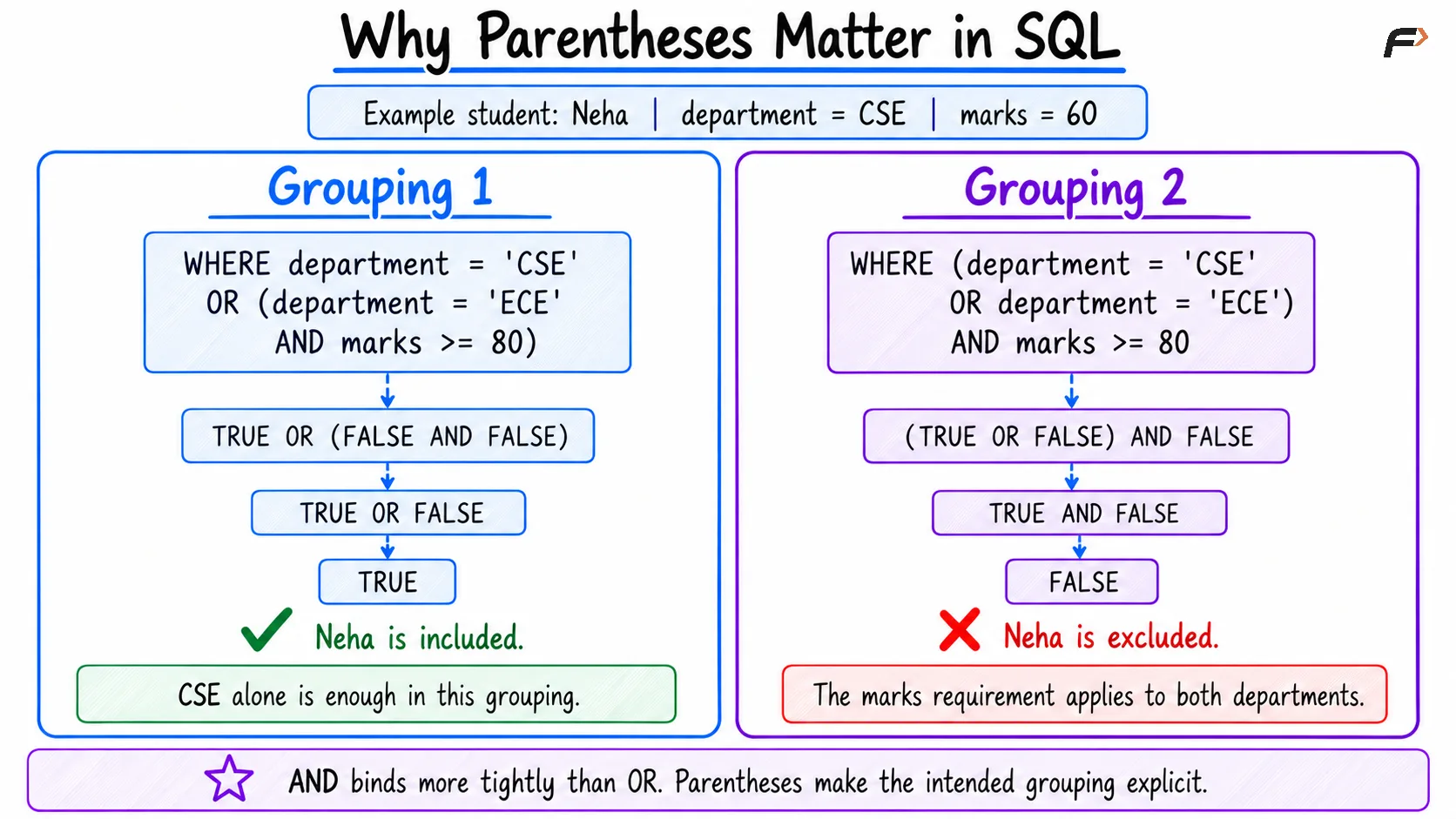
Why parenthesis matter in SQL
Logical Operators and NULL
A comparison involving NULL ordinarily produces unknown. Logical operators preserve or resolve that uncertainty according to the other condition.
Expression | Result |
|---|---|
| Unknown |
| False |
| True |
| Unknown |
| Unknown |
For example, a missing mark does not prevent a row from qualifying when another side of an OR condition is already true.
To retrieve students with marks below 80 or missing marks, state both cases:
SELECT student_name, marksFROM studentsWHERE marks < 80 OR marks IS NULL;This returns Ravi and Kabir.
By contrast, NOT (marks >= 80) returns Ravi but excludes Kabir. A missing mark is not automatically interpreted as a failing mark.
Writing Clear Logical Conditions
Make each comparison complete and keep the intended grouping visible.
Repeat the column when needed: Write
department = 'CSE' OR department = 'ECE', notdepartment = 'CSE' OR 'ECE'.Use parentheses: Group alternatives before combining them with additional requirements.
Test missing-value cases: Decide explicitly whether null values should qualify.
Check boundary values: Confirm whether conditions should include equality.
Prefer SQL keywords:
AND,OR, andNOTare clearer and more portable than symbolic alternatives.
MySQL also supports XOR, which is true when exactly one of two conditions is true. It is database-specific; the standard operators above cover most introductory filtering requirements.
Summary
SQL logical operators build conditions from individual tests. AND requires both conditions, OR accepts at least one, and NOT negates a condition.
Use parentheses to express grouping clearly and account for unknown results caused by NULL. Testing records that satisfy one, both, or neither condition helps verify that a filter matches its intended requirement.
Be the first to add a comment.