Introduction
An online store keeps user details in one table and orders in another. To find users who have placed an order, we need to check which user IDs appear in the orders table. An IN subquery lets SQL obtain those IDs directly, so we do not have to enter them manually.
What Is an IN Subquery?
A subquery is a SELECT statement written inside another SQL statement. The surrounding statement is called the outer query, and the SELECT inside it is the inner query.
The IN operator checks whether a value matches any value among a set of candidates. With an IN subquery, the inner query supplies those candidates, and the outer query uses them to filter its rows.
For a comparison involving one value, such as a user ID, the subquery returns one column. It may return zero, one, or many rows.
Example: Find Users Who Have Placed Orders
Consider these two tables. Each user has one row in users. Every order belongs to a user, and orders.user_id cannot be NULL in this example.
Input Tables
users
user_id | name |
|---|---|
1 | Ayaan |
2 | Sneha |
3 | Rohit |
4 | Kavya |
orders
order_id | user_id | amount |
|---|---|---|
101 | 1 | 1200.00 |
102 | 1 | 300.00 |
104 | 3 | 1100.00 |
106 | 4 | 400.00 |
We want each user who has at least one order. The query is identical in MySQL and PostgreSQL. The aliases u and o are short names for users and orders.
SELECT u.user_id, u.nameFROM users AS uWHERE u.user_id IN ( SELECT o.user_id FROM orders AS o)ORDER BY u.user_id;Output
user_id | name |
|---|---|
1 | Ayaan |
3 | Rohit |
4 | Kavya |
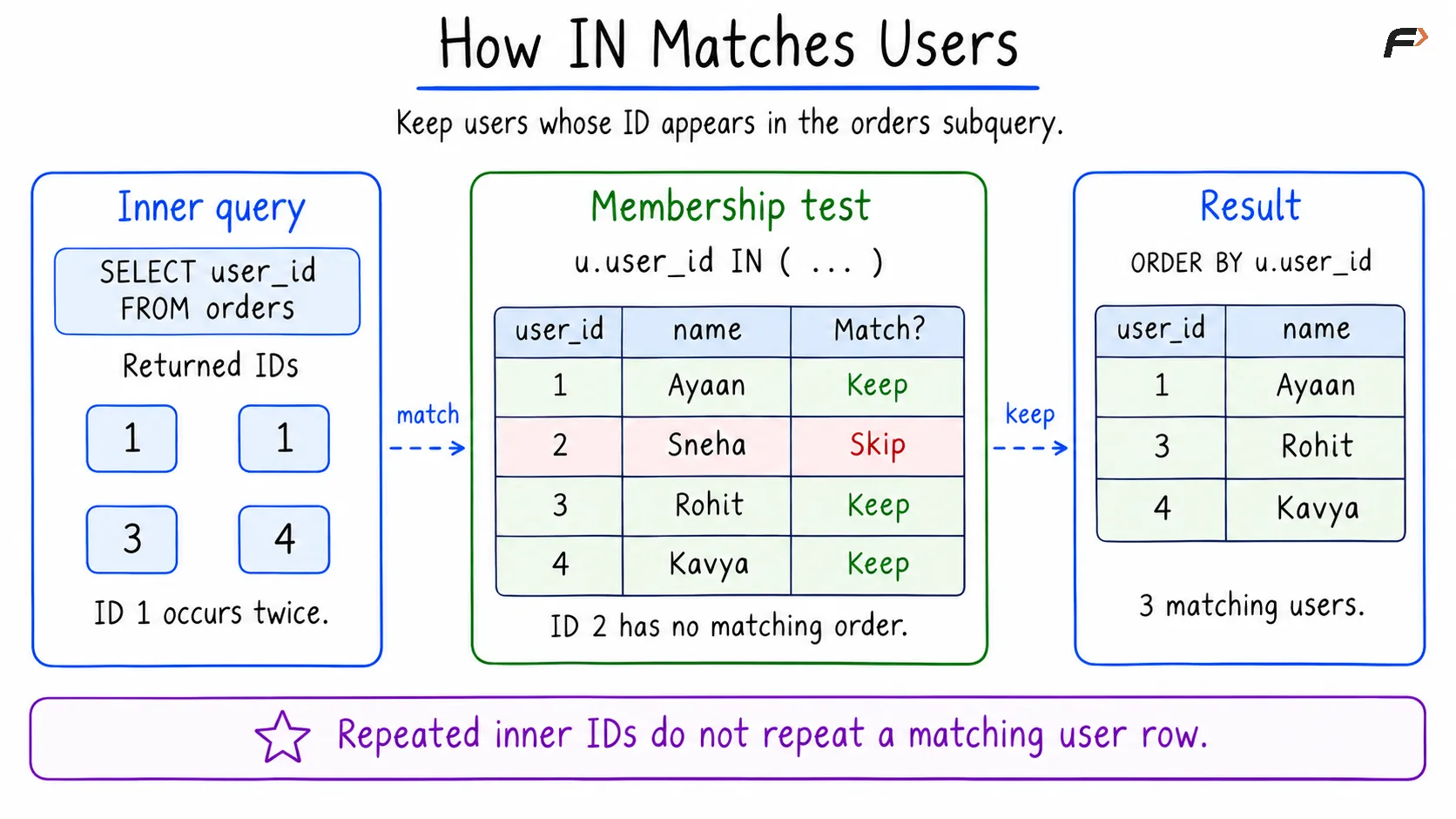
To understand the query, look at the inner result: it contains user ID 1 twice, along with IDs 3 and 4. The IN condition matches those IDs against users.user_id. Ayaan, Rohit, and Kavya qualify; Sneha’s ID 2 has no match.
Ayaan appears once even though he has two orders. IN checks whether a match exists; repeated inner values do not multiply outer rows. DISTINCT is therefore unnecessary inside this subquery. ORDER BY makes the displayed user order predictable.
The diagram shows how the candidate IDs determine which users remain. This describes the query’s logic; the database chooses its execution plan.
How IN Matches Users
Filter the Values Returned by the Subquery
Suppose we now want users with at least one order of 1000 or more. Add the amount condition inside the subquery so that only qualifying orders supply user IDs.
SELECT u.user_id, u.nameFROM users AS uWHERE u.user_id IN ( SELECT o.user_id FROM orders AS o WHERE o.amount >= 1000.00)ORDER BY u.user_id;Output
user_id | name |
|---|---|
1 | Ayaan |
3 | Rohit |
Orders 101 and 104 meet the amount condition, so the subquery supplies user IDs 1 and 3. Kavya is excluded because her order is only 400.00. The condition applies to each individual order.
Important Rules for IN Subqueries
Select the column you want to compare: To match user IDs, return user_id from the subquery. For this comparison of one value, return one column with a compatible data type.
Use IN when several candidate rows are possible: An equality comparison using = followed by a subquery requires at most one returned row. More than one row causes an error. IN allows multiple candidate rows.
An empty inner result matches no rows: If the subquery finds no qualifying orders, no users satisfy this IN filter.
Account for NULL when columns allow it: If no value matches and the inner result contains NULL, IN evaluates to unknown, and WHERE excludes that row. A matching non-NULL value still makes IN true. The example avoids this issue by requiring non-NULL user IDs.
Choose IN or JOIN according to the result needed: IN is useful for filtering by related values. JOIN is useful when the result needs columns from related rows, such as a user’s name alongside each order amount. Neither form is always faster; performance depends on the data, indexes, and execution plan.
Summary
An IN subquery filters outer rows using values returned by another SELECT statement. It accepts multiple candidate rows, and repeated inner values do not create extra outer rows. Add conditions inside the subquery when only certain related records should qualify, and choose the comparison column carefully so the filter matches the intended data.
Be the first to add a comment.