Introduction
Related information is often stored in separate database tables. Retrieving it together requires a condition that identifies which records belong together.
An implicit join expresses this relationship by listing tables with commas and writing the matching condition in WHERE. This syntax remains supported in MySQL and PostgreSQL and is useful to recognize when reading existing SQL queries.
What Is an Implicit Join?
An implicit join, also called a comma join, lists multiple tables in the FROM clause and uses the WHERE clause to specify how their rows should match.
The pattern has two main parts:
Table list: Commas separate the tables in
FROM.Join condition: A condition in
WHEREidentifies the required row pairs.
There is no IMPLICIT JOIN keyword in MySQL or PostgreSQL. The term describes this way of writing a query.
The matching condition must be provided in the query. Shared column names, primary keys, or foreign keys do not automatically supply it.
Example Tables
Consider a college database containing student and department information.
The Student table stores each student’s identifier, name, department assignment, and semester.
Student
StudentID | Name | DeptID | Semester |
|---|---|---|---|
101 | Asha | 10 | 2 |
102 | Ravi | 20 | 4 |
103 | Meera | 10 | 2 |
104 | Neha | NULL | 2 |
The Department table stores each department’s identifier and name.
Department
DeptID | DeptName |
|---|---|
10 | Computer Science |
20 | Electronics |
30 | Mathematics |
Assume that Student.StudentID and Department.DeptID are primary keys.
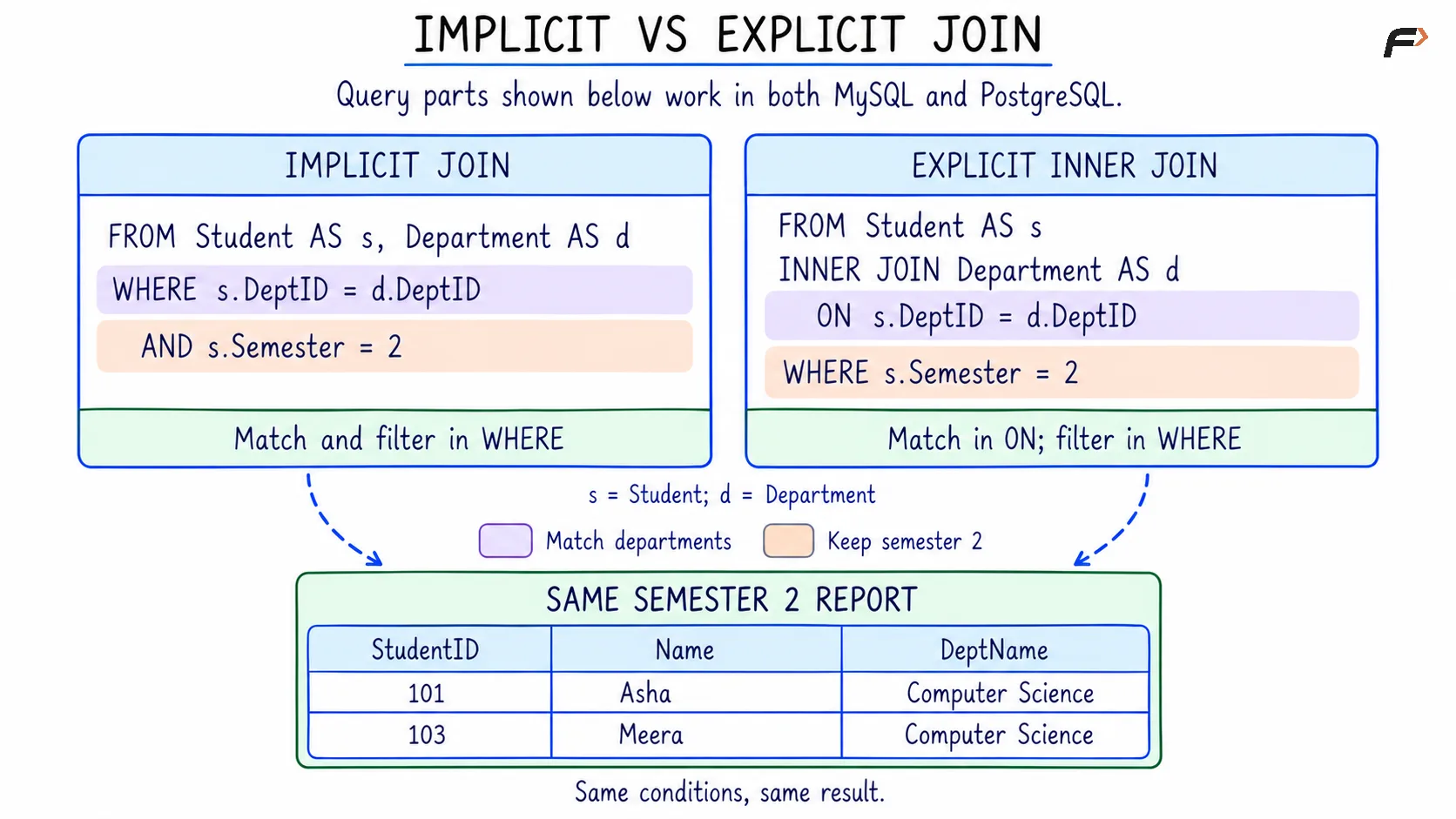
Asha and Meera belong to Computer Science, while Ravi belongs to Electronics. Neha’s department identifier is NULL because no department has been assigned. Mathematics has no students in the displayed data.
Writing an Implicit Join
Objective: Display students together with their matching department names.
Consider the following queries to match students with departments using their department identifiers.
SELECT s.StudentID, s.Name, d.DeptNameFROM Student AS s, Department AS dWHERE s.DeptID = d.DeptIDORDER BY s.StudentID;AS s and AS d give the tables shorter names called aliases. For example, s.DeptID refers to the department identifier in Student, while d.DeptID refers to the identifier in Department.
The comma separates the table references. The condition s.DeptID = d.DeptID keeps only pairs whose department identifiers are equal. ORDER BY sorts the result by student ID.
Expected result
StudentID | Name | DeptName |
|---|---|---|
101 | Asha | Computer Science |
102 | Ravi | Electronics |
103 | Meera | Computer Science |
Neha is excluded because her NULL department identifier does not produce a true equality match. Mathematics is excluded because no student references department 30.
This query has inner join behavior: only matching pairs appear. Computer Science appears twice because it matches two different students.
HOW IMPLICIT JOIN WORKS
Adding Filters to an Implicit Join
An implicit join can place both the matching condition and additional filters in WHERE.
Objective: Display matching department names only for students in semester 2.
Consider the following queries to combine the department matching condition with a semester filter.
SELECT s.StudentID, s.Name, d.DeptNameFROM Student AS s, Department AS dWHERE s.DeptID = d.DeptID AND s.Semester = 2ORDER BY s.StudentID;The aliases s and d identify Student and Department.
The first condition connects the tables. The second restricts the students to semester 2. AND requires both conditions to be true.
Expected result
StudentID | Name | DeptName |
|---|---|---|
101 | Asha | Computer Science |
103 | Meera | Computer Science |
Asha and Meera satisfy both conditions. Ravi has a matching department but is in semester 4. Neha is in semester 2 but has no matching department.
Implicit Join vs Explicit Join
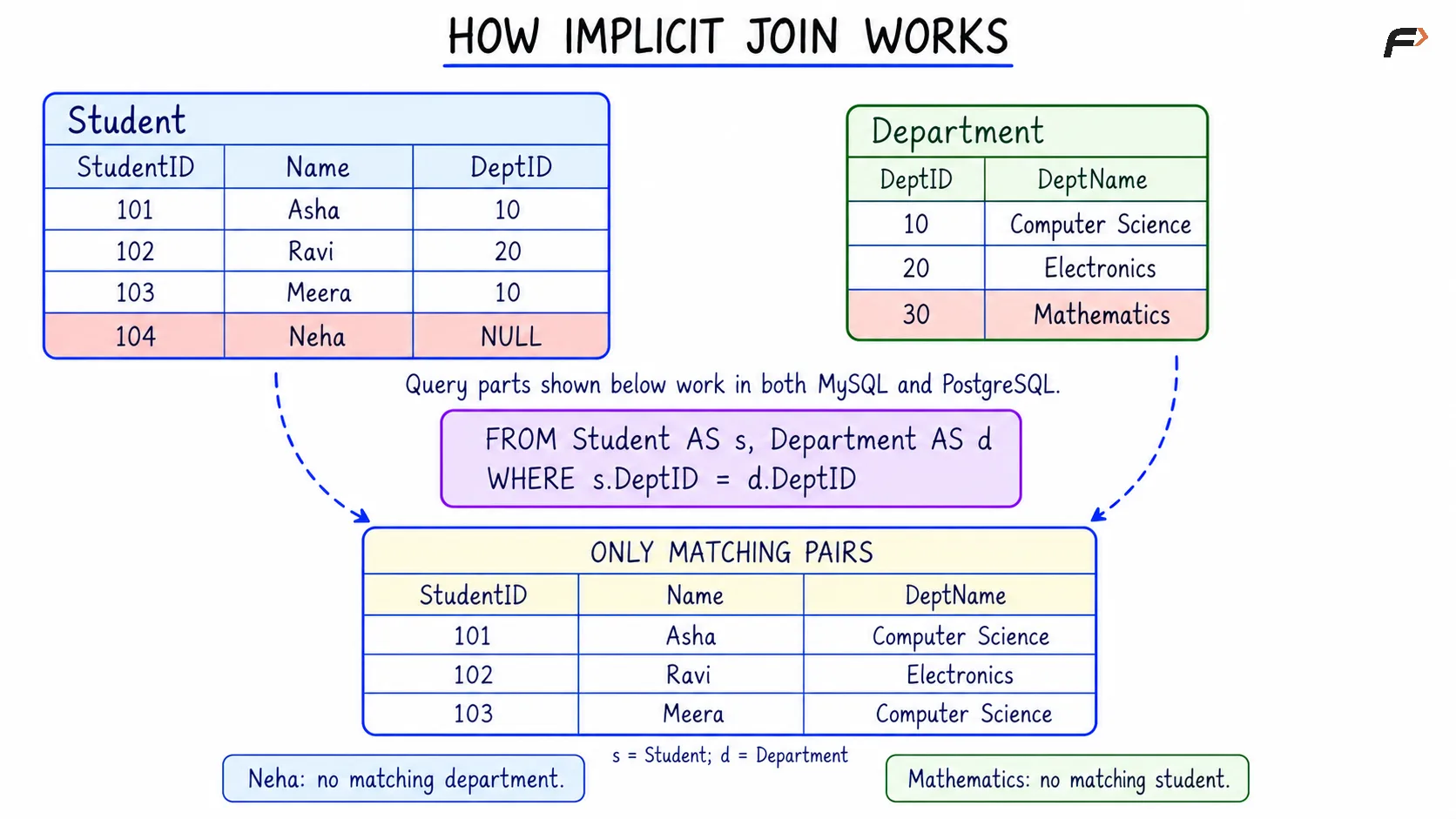
An equivalent inner join can be written using the INNER JOIN keyword and an ON condition.
Aspect | Implicit join | Explicit INNER JOIN |
|---|---|---|
Tables are connected using | Commas in |
|
Matching condition appears in |
|
|
Additional filters appear in |
|
|
Readability | Relationships can be harder to identify among several filters | Relationships and filters are easier to distinguish |
Objective: Rewrite the semester 2 department report using explicit join syntax.
Consider the following queries to produce the same report with the matching condition separated from the semester filter.
SELECT s.StudentID, s.Name, d.DeptNameFROM Student AS sINNER JOIN Department AS d ON s.DeptID = d.DeptIDWHERE s.Semester = 2ORDER BY s.StudentID;Here, s and d remain aliases for the two tables. The department matching condition appears in ON, while the semester filter remains in WHERE.
Expected result
StudentID | Name | DeptName |
|---|---|---|
101 | Asha | Computer Science |
103 | Meera | Computer Science |
The result is unchanged because the matching and filtering requirements are the same.
For new queries, explicit join syntax usually makes the relationships easier to read, especially when several tables are involved. Implicit joins remain important for understanding existing code.
IMPLICIT VS EXPLICIT JOIN
What Happens When the Join Condition Is Missing?
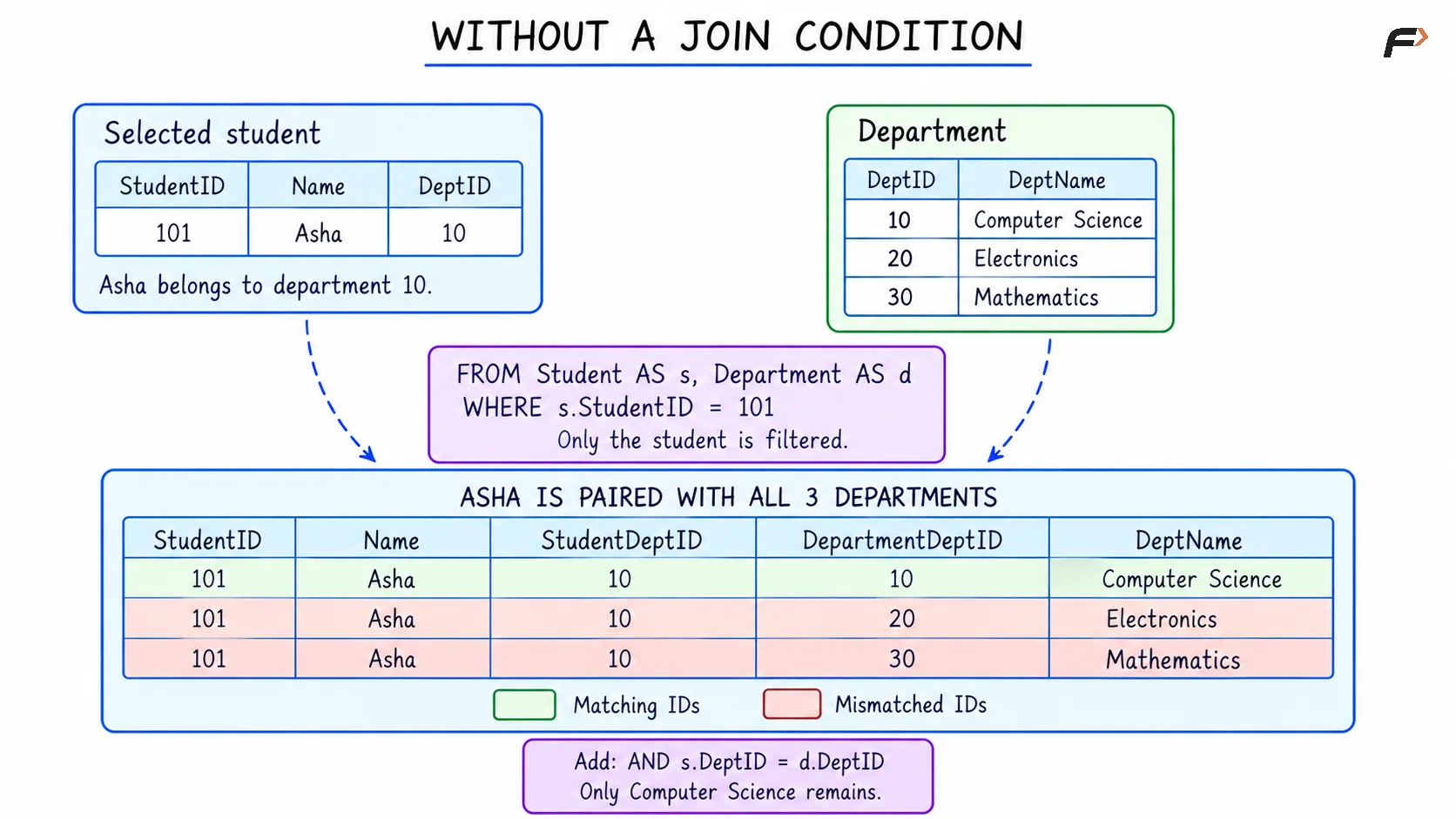
Listing tables with commas does not establish a relationship between their rows. Without a condition connecting them, every row from one table can combine with every row from the other.
This creates a Cartesian product, meaning all possible row pairs. With four students and three departments, there are 4 × 3 = 12 combinations before additional filtering. Here, × means multiplication.
A filter on one table does not replace the missing relationship condition.
Objective: Observe what happens when Asha is selected without matching her department identifier.
Consider the following queries to inspect the result when the student filter is present but the department join condition is missing.
SELECT s.StudentID, s.Name, s.DeptID AS StudentDeptID, d.DeptID AS DepartmentDeptID, d.DeptNameFROM Student AS s, Department AS dWHERE s.StudentID = 101ORDER BY d.DeptID;The aliases s and d identify the source tables. AS StudentDeptID and AS DepartmentDeptID name the output columns so that the two department identifiers can be compared easily.
Expected result
StudentID | Name | StudentDeptID | DepartmentDeptID | DeptName |
|---|---|---|---|---|
101 | Asha | 10 | 10 | Computer Science |
101 | Asha | 10 | 20 | Electronics |
101 | Asha | 10 | 30 | Mathematics |
The student filter keeps Asha, but nothing connects her department identifier to the department table. She therefore appears with all three departments.
Only the first row represents her actual department. Adding AND s.DeptID = d.DeptID to the condition would keep only that row.
WITHOUT A JOIN CONDITION
Summary
An implicit join lists tables with commas in FROM and places their matching conditions in WHERE. It can combine related records, apply additional filters, and connect multiple tables. The examples shown have inner join behavior, so records without a qualifying match are excluded.
The matching conditions must be written correctly. Omitting one can produce unrelated combinations even when other filters are present. Equivalent explicit joins separate relationships into ON clauses, making the purpose of the query easier to read.
Be the first to add a comment.