Introduction
An online store may need two lists: users who have placed an order and users who have not. These questions depend on whether related records exist in the orders table.
SQL provides EXISTS and NOT EXISTS for these checks. They let a query keep rows according to whether another query finds a qualifying record.
How EXISTS and NOT EXISTS Work
A subquery is a SELECT statement written inside another SQL statement. EXISTS and NOT EXISTS test whether that subquery returns any rows.
Rows returned by the subquery | EXISTS | NOT EXISTS |
|---|---|---|
At least one row | TRUE | FALSE |
No rows | FALSE | TRUE |
When used in WHERE, a TRUE condition keeps the outer row. A matching row must satisfy all the conditions inside the subquery.
Example: Users With and Without Orders
Consider these tables. Each user_id identifies one user, and orders.user_id identifies who placed an order. User IDs cannot be NULL in this sample.
users
user_id | name |
|---|---|
1 | Ayaan |
2 | Sneha |
3 | Rohit |
4 | Kavya |
5 | Zoya |
orders
order_id | user_id | amount |
|---|---|---|
101 | 1 | 1200.00 |
102 | 1 | 300.00 |
104 | 3 | 1100.00 |
106 | 4 | 400.00 |
EXISTS: Find Users Who Have Placed an Order
The aliases u and o are short names for users and orders. The condition o.user_id = u.user_id links each user to their orders. Because the inner query refers to the outer query's user, this is a correlated subquery.
SELECT u.user_id, u. nameFROM users AS uWHERE EXISTS ( SELECT 1 FROM orders AS o WHERE o.user_id = u.user_id)ORDER BY u.user_id;Output
user_id | name |
|---|---|
1 | Ayaan |
3 | Rohit |
4 | Kavya |
Ayaan, Rohit, and Kavya each have a matching order. Ayaan has two orders, but his users row appears only once. Several matching inner rows do not multiply an outer row.
SELECT 1 makes the query's purpose clear: only the presence of a row matters. The number 1 is a constant, not a row limit or a count. For these simple existence checks, SELECT * is also valid; SELECT 1 is a readability convention.
NOT EXISTS: Find Users Who Have No Orders
Use the same matching condition with NOT EXISTS to keep users for whom the subquery finds no order.
SELECT u.user_id, u.nameFROM users AS uWHERE NOT EXISTS ( SELECT 1 FROM orders AS o WHERE o.user_id = u.user_id)ORDER BY u.user_id;Output
user_id | name |
|---|---|
2 | Sneha |
5 | Zoya |
Neither Sneha nor Zoya has a matching row in orders, so NOT EXISTS is TRUE for both. If orders were empty, the EXISTS query would return no users, while this NOT EXISTS query would return all five.
The diagram shows how the same relationship produces the two result sets.
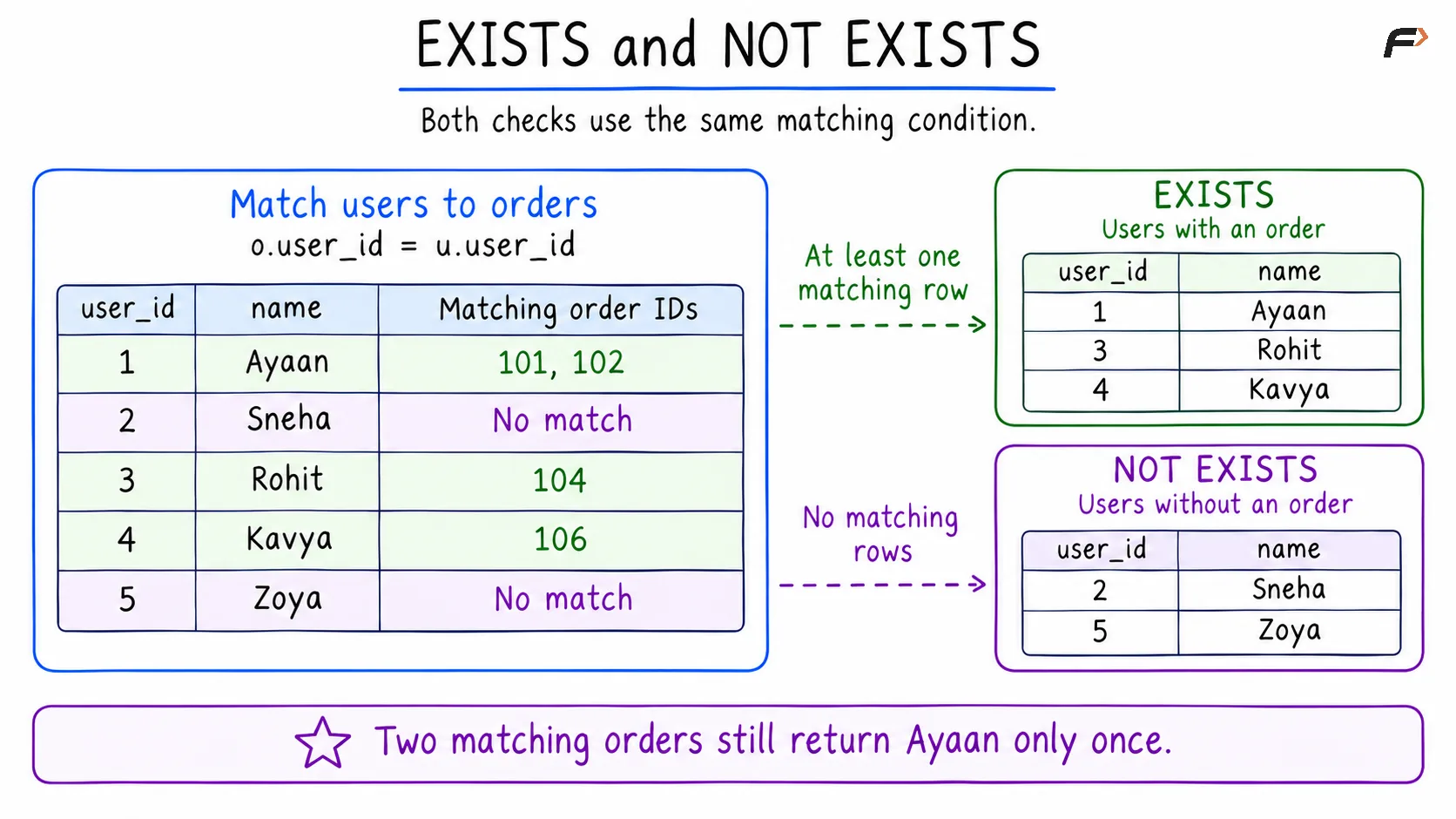
EXISTS and NOT EXISTS
Add a Condition to Find Qualifying Orders
To find users with at least one order of 500 or more, add the amount condition inside EXISTS.
SELECT u.user_id, u.nameFROM users AS uWHERE EXISTS ( SELECT 1 FROM orders AS o WHERE o.user_id = u.user_id AND o.amount >= 500.00)ORDER BY u.user_id;Output
user_id | name |
|---|---|
1 | Ayaan |
3 | Rohit |
Orders 101 and 104 satisfy both conditions. Kavya has an order, but its amount is only 400.00. The filter checks each individual order’s amount.
Using NOT EXISTS with that amount condition would mean no order of 500 or more. Kavya would qualify even though she has an order, because it is below the threshold.
Important Details and Common Mistakes
Keep the relationship condition when checking each user: Without o.user_id = u.user_id, the first query would check whether any order exists anywhere in orders. Since this table has orders, every user would pass. Uncorrelated EXISTS queries are valid, but they answer a different question.
Distinguish a NULL value from a missing row: A row containing NULL still counts as a row for EXISTS. NULL can still affect comparisons inside the subquery; an order with a NULL user_id would not satisfy the equality with an ordinary user ID.
Understand the NOT IN difference: If a NOT IN subquery returns NULL, an unmatched value can produce an unknown result, which WHERE excludes. For example, checking 2 against candidate values 1 and NULL with NOT IN produces unknown, not a SQL error. NOT EXISTS with the appropriate matching condition avoids this particular issue.
Avoid blanket performance claims: EXISTS does not need every matching row to establish that a match exists, and the database can often stop searching early. However, EXISTS is not always faster than IN. The optimizer may use similar strategies for both; performance depends on the data, indexes, and execution plan. Reasoning about one user at a time does not require the database to execute the inner query separately for every user.
Summary
EXISTS keeps an outer row when its subquery finds at least one qualifying row. NOT EXISTS keeps it when no qualifying row is found. Use a correlation condition to check related records for each outer row, and add filters inside the subquery to define what qualifies. SELECT 1 expresses an existence check clearly, while careful handling of NULL and query conditions keeps the result accurate.
Be the first to add a comment.