Introduction
Query results sometimes contain repeated values or headings that are difficult to understand. A report might need each department listed once or a calculated amount displayed under a meaningful name.
SQL handles these requirements with DISTINCT and aliases. DISTINCT controls duplicate result rows, while AS provides temporary names within a query.
What Do DISTINCT and AS Do?
DISTINCT removes duplicate rows from the selected result. AS introduces an alias, which gives a column, expression, or table a temporary name.
Feature | Purpose | Example |
|---|---|---|
| Removes duplicate result rows |
|
Column alias | Labels an output column or expression |
|
Table alias | Provides a shorter table reference |
|
These features do not delete stored records or permanently rename columns and tables.
The examples below use MySQL-compatible SQL and this students table:
student_id | student_name | department | marks |
|---|---|---|---|
101 | Asha | CSE | 85 |
102 | Ravi | ECE | 72 |
103 | Meera | CSE | 91 |
104 | Kabir | ME | 85 |
Removing Duplicates with DISTINCT
An ordinary query retains repeated result values:
SELECT departmentFROM students;Its result contains CSE, ECE, CSE, and ME. To return each department once, add DISTINCT immediately after SELECT:
SELECT DISTINCT departmentFROM students;The result contains:
department |
|---|
CSE |
ECE |
ME |
The original four student records remain unchanged. Only the query output has duplicates removed.
DISTINCT does not guarantee sorted output. Add ORDER BY when a particular order is required.
DISTINCT with Multiple Columns
When several columns are selected, DISTINCT applies to their complete combination, rather than independently removing repeated values from each column.
SELECT DISTINCT department, marksFROM students;The result contains all four combinations:
department | marks |
|---|---|
CSE | 85 |
ECE | 72 |
CSE | 91 |
ME | 85 |
CSE appears twice because its marks differ. The mark 85 also appears twice because its departments differ.
Including a unique identifier often prevents any reduction in rows:
SELECT DISTINCT student_id, departmentFROM students;Every combination remains distinct because each student_id is unique.
For duplicate elimination, repeated NULL values are treated as duplicates. Thus, a single-column SELECT DISTINCT department returns one null entry if several source rows have null departments.
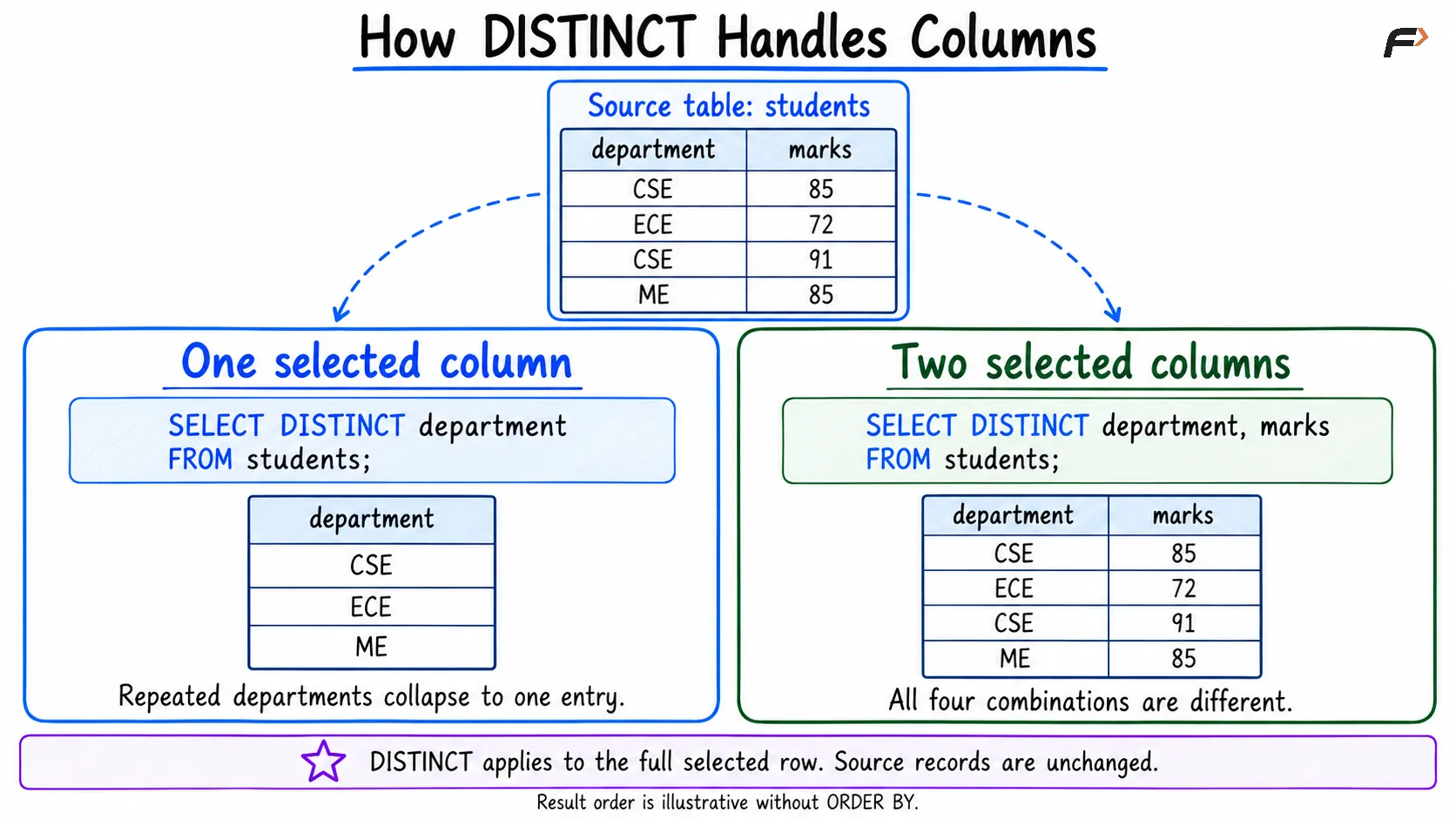
How DISTINCT handles columns
Naming Result Columns with AS
A column alias supplies a heading for an output expression:
SELECT student_name AS name, marks AS scoreFROM students;The result uses name and score as headings. The stored columns remain student_name and marks.
Aliases are particularly useful for calculated values:
SELECT student_name, marks + 5 AS adjusted_marksFROM students;The expression produces a calculated result for each student, and adjusted_marks gives that result a clear label. It does not update the stored marks.
Choose descriptive aliases such as total_price or average_marks. Names without spaces avoid additional quoting requirements.
Using Table Aliases
A table alias provides a temporary reference to a source table:
SELECT s.student_name, s.departmentFROM students AS s;Here, s represents students, and the dot identifies a column belonging to that table reference.
Once the table alias is assigned, use it consistently when qualifying columns. Table aliases become especially useful in joins, where different tables may have columns with the same name.
MySQL permits omitting AS in these alias declarations, but writing it explicitly makes the intention easier to recognize. Table-alias syntax differs in some other SQL systems.
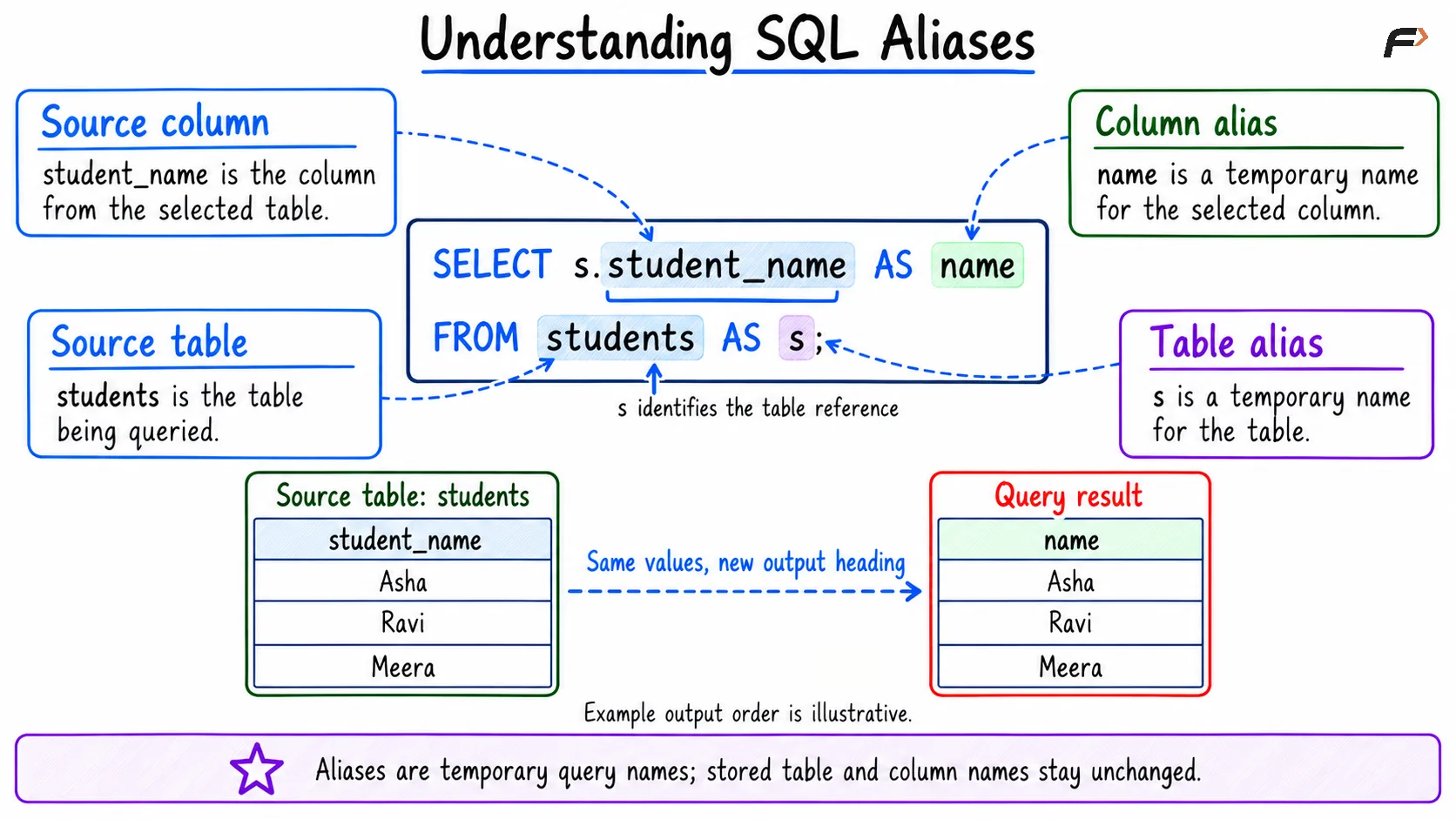
Understanding SQL alias
Combining DISTINCT and Aliases
Both features can appear in the same query:
SELECT DISTINCT s.department AS department_nameFROM students AS sORDER BY department_name;This query returns each department once under the heading department_name, ordered by that result column.
The alias changes the label, not the values used to determine duplicates. Renaming two equal values does not make them different.
You can also count distinct, non-null values:
SELECT COUNT(DISTINCT department) AS department_countFROM students;For the sample table, the result is 3. Unlike a plain SELECT DISTINCT, COUNT(DISTINCT column) excludes null values from its count.
Where Can an Alias Be Used?
An output alias can be used in ORDER BY:
SELECT student_name, marks AS scoreFROM studentsORDER BY score DESC;However, MySQL does not allow that newly defined output alias in the same query block’s WHERE clause:
-- Incorrect: score is an output aliasSELECT student_name, marks AS scoreFROM studentsWHERE score >= 80;Use the original column instead:
SELECT student_name, marks AS scoreFROM studentsWHERE marks >= 80;Conceptually, WHERE determines eligible rows before the output expressions receive their aliases.
Also avoid confusing aliases with string literals. In a condition or ordering expression, single-quoted text such as 'score' represents text, not a reference to the output column.
Summary
DISTINCT removes duplicate rows from query output, while aliases provide temporary names for columns, expressions, and tables. Neither feature changes the underlying records or permanently renames database objects.
Apply DISTINCT to the intended set of columns and choose meaningful aliases. Understanding alias scope and null handling helps prevent results that look correct but represent a different requirement.
Be the first to add a comment.