Introduction
Some records eventually become unnecessary. An application might remove a cancelled registration, clear expired entries, or delete a record created by mistake.
The SQL DELETE statement removes existing rows. Its condition determines which records are targeted, while the table remains available for future use.
What Is DELETE in SQL?
DELETE is a Data Manipulation Language (DML) statement that removes rows from an existing table.
The basic syntax is:
DELETE FROM table_nameWHERE condition;Unlike UPDATE, which changes column values, DELETE removes the complete matching row. It does not remove individual columns or the table definition.
The examples use a students table with the following structure. This table definition works in both MySQL and PostgreSQL.
CREATE TABLE students ( student_id INT PRIMARY KEY, student_name VARCHAR(100) NOT NULL, department VARCHAR(20), marks INT);student_id | student_name | department | marks |
|---|---|---|---|
101 | Asha | CSE | 85 |
102 | Ravi | ECE | 72 |
103 | Meera | CSE | 91 |
104 | Kabir | ME | 60 |
105 | Nila | ECE | NULL |
Each example starts from this original data unless stated otherwise.
Deleting a Single Record
Remove Kabir’s record using his identifier:
DELETE FROM studentsWHERE student_id = 104;The remaining table contains Asha, Ravi, Meera, and Nila. Its columns, data types, and constraints remain unchanged.
Using a primary key is useful when the requirement targets one specific record. A condition based on a repeated value, such as a department, may match several rows.
If no row satisfies the condition, nothing is deleted. The statement does not treat the absence of a matching record as a reason to create or change another row.
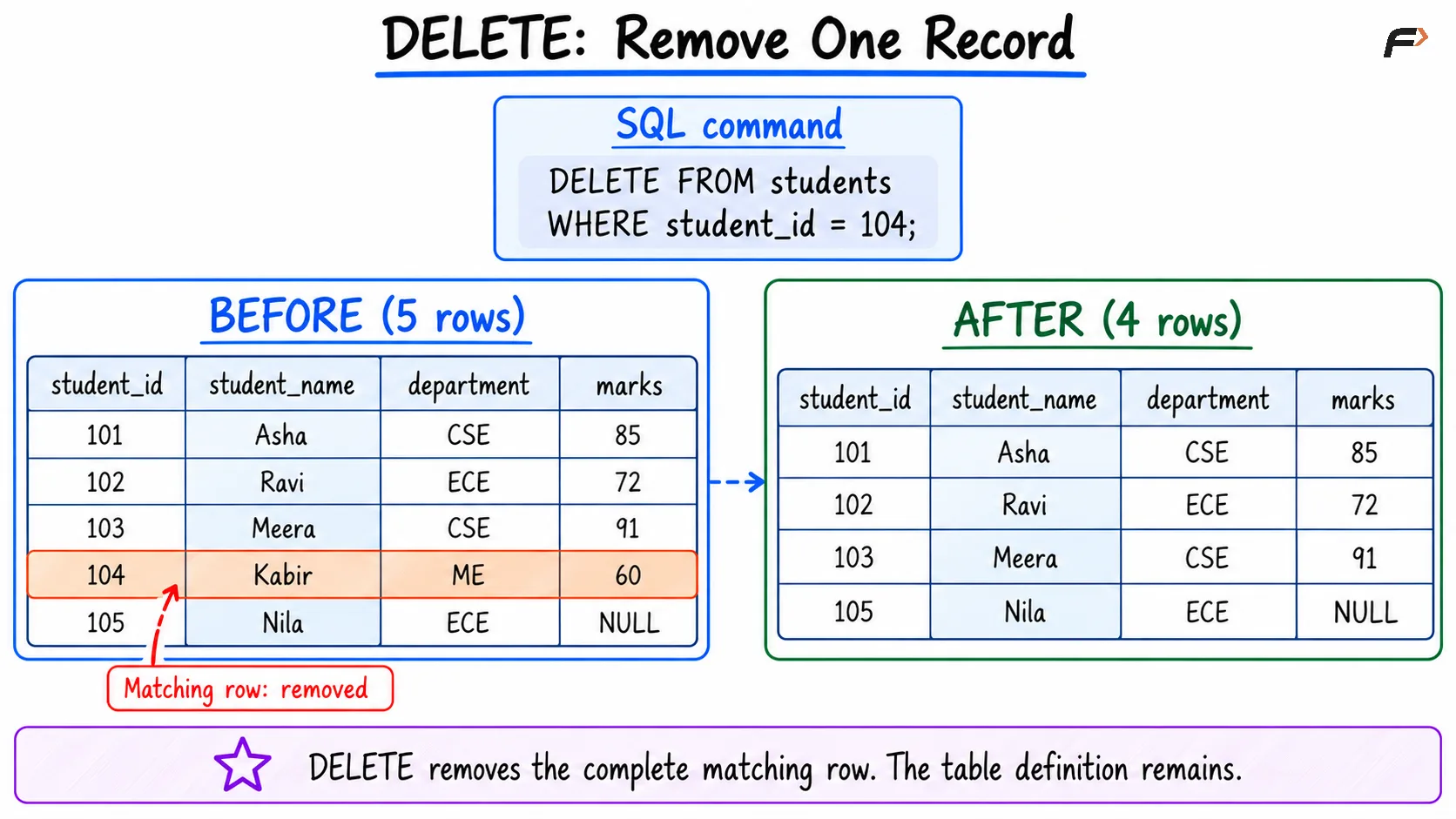
DELETE : remove one record
Deleting Multiple Records
A condition can deliberately select several rows:
DELETE FROM studentsWHERE marks < 80;From the original table, Ravi and Kabir qualify. Asha and Meera remain because their marks are at least 80.
Nila also remains, but for a different reason: her missing mark makes marks < 80 unknown. A WHERE condition must be true for the row to qualify.
Other filters work in the same way:
DELETE FROM studentsWHERE department IN ('ECE', 'ME');This targets Ravi, Kabir, and Nila because their known departments match the list.
Combine conditions carefully when the requirement is narrower:
DELETE FROM studentsWHERE department = 'ECE' AND marks < 80;Only Ravi qualifies.
Deleting Rows with Missing Values
Use IS NULL when deletion depends on missing information:
DELETE FROM studentsWHERE marks IS NULL;This removes Nila’s record from the sample data.
Do not write marks = NULL; ordinary equality does not test whether information is missing.
To remove both low marks and missing marks:
DELETE FROM studentsWHERE marks < 80 OR marks IS NULL;Ravi, Kabir, and Nila qualify.
Deleting an incomplete record and filling its missing value are different requirements. Use UPDATE when the row should remain and only a column value needs correction.
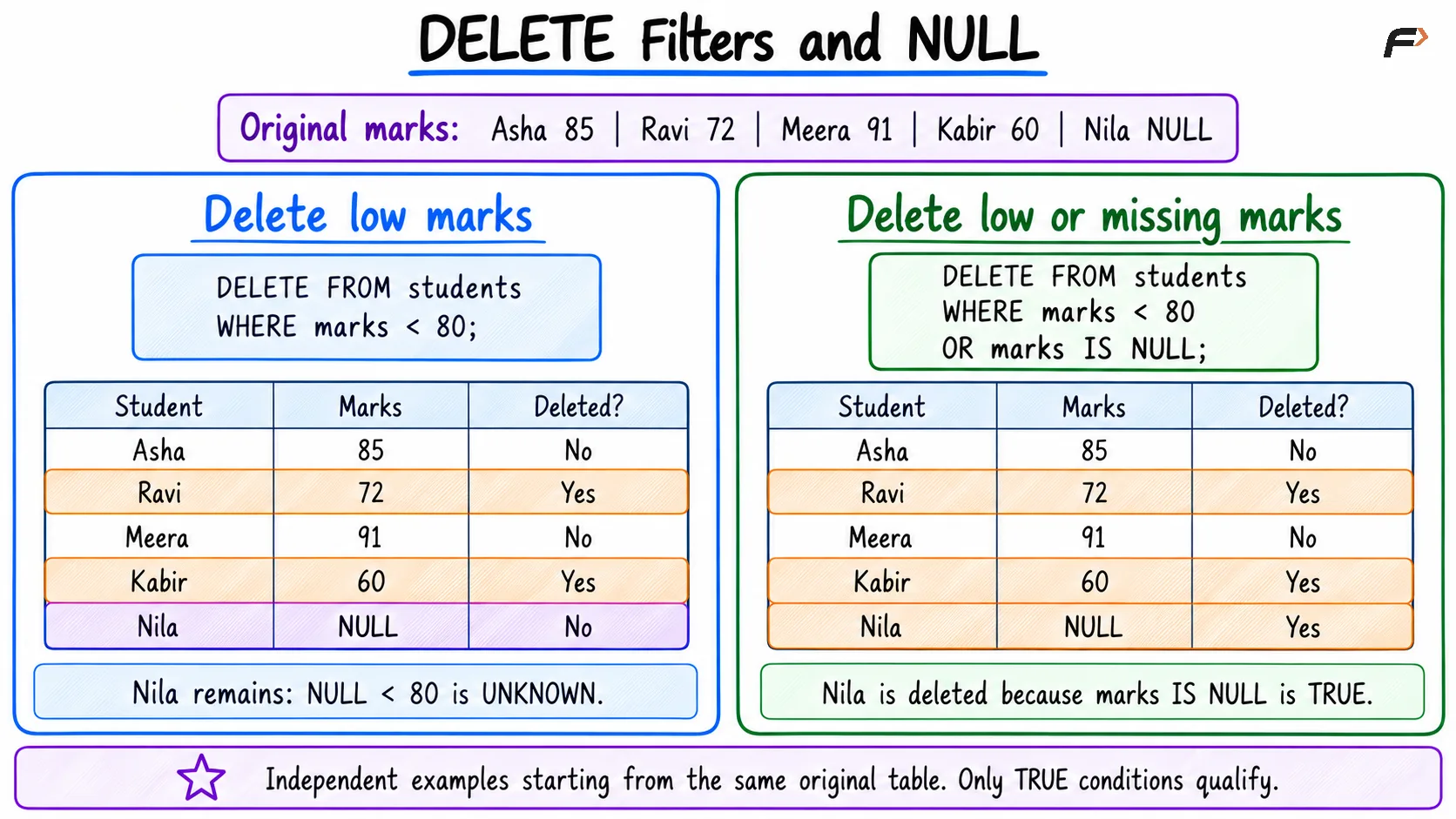
DELETE filter and NULL
Deleting All Rows
Omitting WHERE makes every row eligible:
DELETE FROM students;Assuming the operation succeeds, the table becomes empty. Its definition remains, so new records can still be inserted.
Statement | Scope | Table definition remains? |
|---|---|---|
| Matching rows | Yes |
| All rows | Yes |
| Empties the table | Yes |
| Removes the table and its data | No |
DELETE and TRUNCATE can both empty a table, but their transaction, trigger, and foreign key behavior differ.
For ordinary MySQL tables, DELETE can participate in a transaction. TRUNCATE TABLE causes an implicit commit and cannot be undone with an ordinary rollback. Do not assume these rules are identical across database systems.
Foreign Keys and Related Records
Deleting a parent record can affect child records that reference it.
Suppose enrollments.student_id references students.student_id. The foreign key’s ON DELETE action determines what happens:
Action | Effect when matching child records exist |
|---|---|
| Rejects the parent deletion |
| In MySQL , behaves like |
| Deletes the matching child records |
| Sets child foreign key values to NULL, where permitted |
Deleting a student therefore does not always affect only the students table. A cascade may remove related enrollments, while a restrictive relationship may prevent the deletion.
Check the defined relationship rather than assuming related records are automatically removed.
Checking and Controlling a Deletion
Inspect the intended filter before applying it:
SELECT student_id, student_name, marksFROM studentsWHERE marks < 80;This previews the current matching records. It does not lock the result against all concurrent changes.
With MySQL , use a transaction when a deletion needs inspection before the final decision:
START TRANSACTION;DELETE FROM studentsWHERE student_id = 104;SELECT student_id, student_nameFROM studentsWHERE student_id = 104;ROLLBACK;The record is absent within the transaction after deletion. ROLLBACK restores it because the deletion was not committed.
Use COMMIT instead when retaining the deletion is intended. A later rollback cannot undo an already committed operation, including a successful standalone deletion executed with autocommit enabled.
Common Mistakes
Keep these points clear when removing records:
Missing WHERE: All rows become eligible for deletion.
Broad conditions: A department or name may identify several records.
Confusing rows and columns:
DELETEremoves rows;ALTER TABLEcan remove columns.Incorrect NULL tests: Use
IS NULLorIS NOT NULL.Ignoring related tables: Foreign keys can block deletion or propagate it.
Expecting automatic recovery: Rollback applies only while the relevant transactional changes remain uncommitted.
Check the intended scope, execute the operation, and verify the resulting data.
Summary
DELETE FROM removes existing rows while retaining the table’s definition. Its WHERE clause can target one record, several records, or records with missing values.
Verify conditions and account for foreign key actions before deleting. Use transactions where appropriate, and distinguish row deletion from emptying or removing the table itself.
Be the first to add a comment.