Introduction
Some database queries need every possible pairing of records. These combinations can help list available choices, prepare practice plans, or create reports covering all combinations of categories.
A CROSS JOIN produces these combinations using rows from separate tables. Understanding how it combines records, how many rows it returns, and how filtering works makes its behavior easier to predict.
What Is a CROSS JOIN?
A CROSS JOIN combines every row from one table with every row from another table. The resulting collection of combinations is called a Cartesian product.
The tables do not need a shared column or an existing relationship. Unlike a join that matches records using a condition, a cross join includes every possible pair.
Before filtering, the row count is:
Result rows = rows in the first table × rows in the second table
Here, × means multiplication. For example, combining a table containing three rows with another containing two rows produces six combinations.
The explicit CROSS JOIN form used below does not require an ON or USING clause because no matching condition is needed.
Example Tables
Consider a college database containing students and available practice topics.
The Student table stores each student’s identifier, name, and current semester.
Student
StudentID | Name | Semester |
|---|---|---|
101 | Asha | 2 |
102 | Ravi | 4 |
103 | Meera | 2 |
The PracticeTopic table lists topics available for practice.
PracticeTopic
TopicID | TopicName |
|---|---|
T1 | SQL Basics |
T2 | Database Design |
StudentID and TopicID uniquely identify records in their respective tables. For this example, every listed student can practise either topic.
Combining these tables with a cross join produces possible student-topic pairings. These pairings do not represent existing assignments or completed practice sessions.
Generating All Combinations with CROSS JOIN
Objective: Display every possible combination of a student and a practice topic.
Consider the following queries to list every student-topic combination.
SELECT s.StudentID, s.Name, t.TopicID, t.TopicNameFROM Student AS sCROSS JOIN PracticeTopic AS tORDER BY s.StudentID, t.TopicID;AS s and AS t give the tables shorter names called aliases. Here, s.Name refers to the student’s name, while t.TopicName refers to the practice topic’s name.
CROSS JOIN pairs each student with both topics. ORDER BY arranges the result by student ID and then topic ID.
Expected result
StudentID | Name | TopicID | TopicName |
|---|---|---|---|
101 | Asha | T1 | SQL Basics |
101 | Asha | T2 | Database Design |
102 | Ravi | T1 | SQL Basics |
102 | Ravi | T2 | Database Design |
103 | Meera | T1 | SQL Basics |
103 | Meera | T2 | Database Design |
The result contains 3 × 2 = 6 rows. Each student appears twice because each student is paired with two different topics.
The query only displays these combinations. It does not insert assignments into either source table.
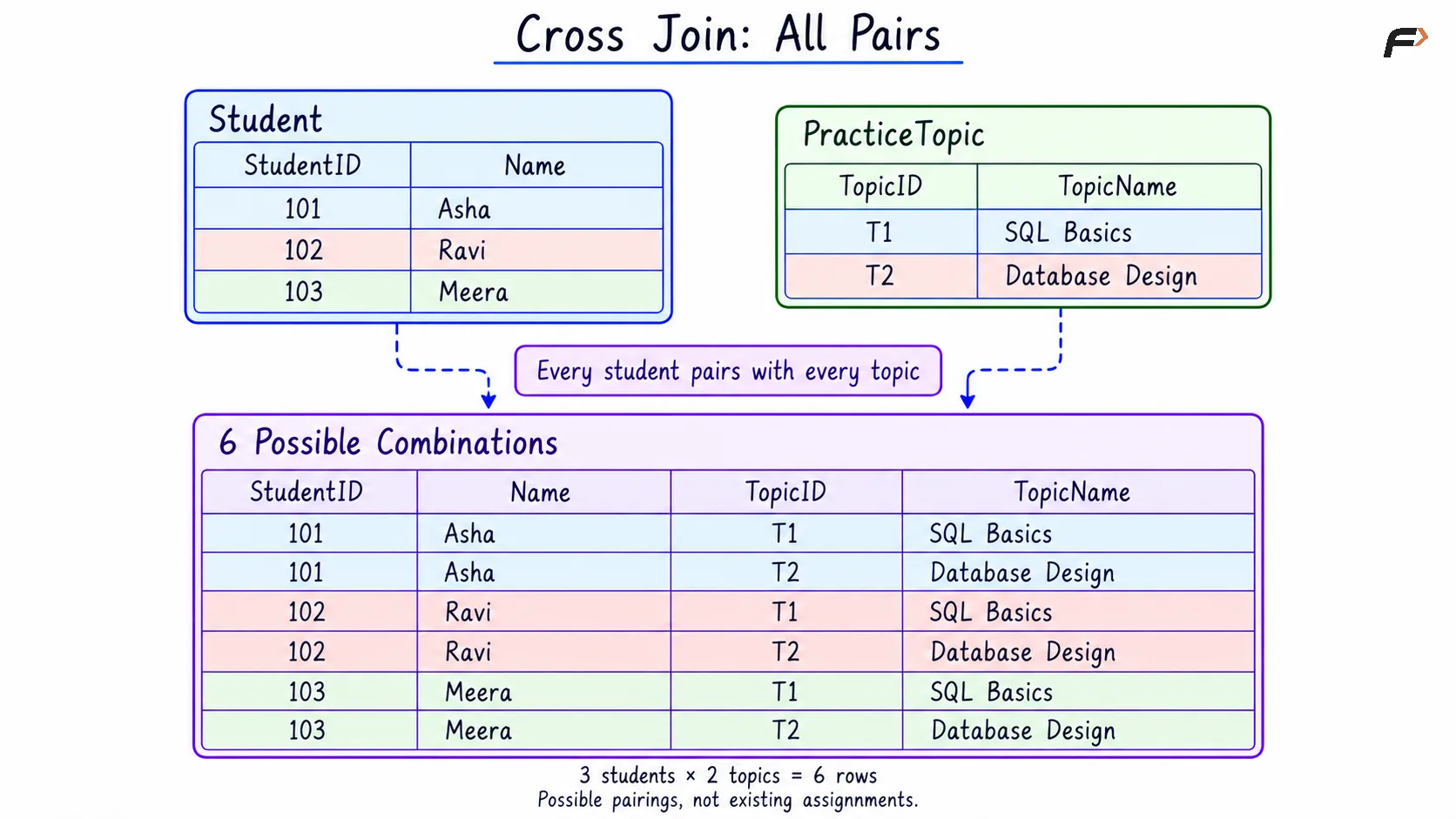
CROSS JOIN : ALL PAIRS
Filtering CROSS JOIN Results with WHERE
A cross join can be combined with a WHERE clause when only some combinations are required. The condition determines which combinations appear in the final result.
Objective: Display every practice topic for students in semester 2.
Consider the following queries to generate student-topic combinations restricted to semester 2 students.
SELECT s.StudentID, s.Name, t.TopicID, t.TopicNameFROM Student AS sCROSS JOIN PracticeTopic AS tWHERE s.Semester = 2ORDER BY s.StudentID, t.TopicID;The aliases s and t refer to Student and PracticeTopic. The condition s.Semester = 2 keeps combinations belonging to semester 2 students.
Semester can be used in the filter without being included in the selected output columns.
Expected result
StudentID | Name | TopicID | TopicName |
|---|---|---|---|
101 | Asha | T1 | SQL Basics |
101 | Asha | T2 | Database Design |
103 | Meera | T1 | SQL Basics |
103 | Meera | T2 | Database Design |
Asha and Meera remain because their semester is 2. Ravi’s combinations are excluded because his semester is 4.
The final result contains 2 students × 2 topics = 4 rows. The filter restricts the students, but each remaining student is still paired with every topic.
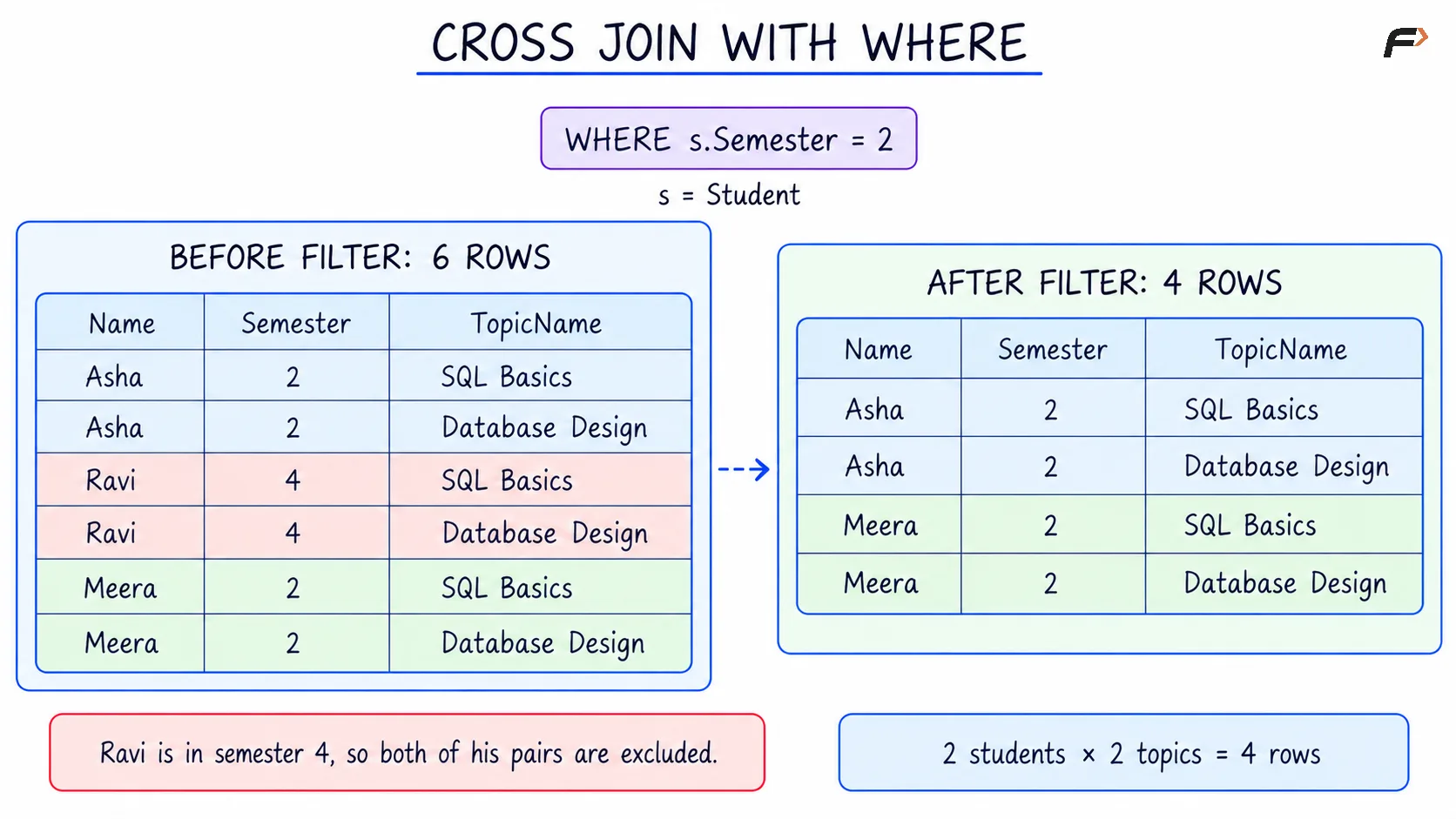
CROSS JOIN WITH WHERE
CROSS JOIN vs INNER JOIN
Both joins combine data from tables, but they select row pairs differently.
Aspect | CROSS JOIN | INNER JOIN |
|---|---|---|
Pairs included | Every possible pair | Only pairs satisfying the join condition |
Matching condition | Not required for the Cartesian product | Determines which pairs qualify |
Row count before additional filtering | Product of the input row counts | Depends on the qualifying pairs |
Typical purpose | Generate possible combinations | Retrieve records connected by a specified condition |
In the practice example, CROSS JOIN answers which student-topic combinations are possible. Retrieving topics actually assigned to students would require stored assignment information and an appropriate matching condition.
A cross join followed by a WHERE condition comparing columns from both tables can produce the same result as an inner join using that condition. When the purpose is to match related records, an explicit INNER JOIN usually communicates that purpose more clearly.
Important Points to Remember
An empty input produces an empty result: If either input table has no rows, there are no pairs to form. For example, three students combined with zero topics produce zero rows.
NULL values do not prevent combinations: A source row containing
NULLstill participates because a cross join does not compare values to find matches. The originalNULLvalue appears in its combinations.Duplicates are not automatically removed: A cross join produces a row for every source-row combination. If different combinations have identical selected values, those result rows remain unless duplicate elimination is explicitly requested.
Results can grow quickly: Two tables containing 1,000 rows each produce 1,000,000 combinations before filtering. Check the input sizes and restrict the result when only some combinations are needed.
Use it when all combinations are meaningful: Common uses include product sizes and colours, available rooms and time slots, test datasets, and complete reporting grids.
Summary
A CROSS JOIN produces the Cartesian product of its input tables by combining every row from one table with every row from another. It does not require a shared column, and its unfiltered row count equals the product of the input row counts.
MySQL and PostgreSQL support the explicit CROSS JOIN syntax shown in these examples. WHERE can restrict the combinations, and additional cross joins can introduce more choices. Small, clearly defined inputs make the results easier to understand and manage.
Be the first to add a comment.