Introduction
A shop wants to find products that cost more than the average price of their own category. Comparing every product with the average price of the entire catalog would answer a different question.
A correlated subquery lets an inner query use a value from the current row of an outer query. Here, that value is the product’s category, which determines which prices belong in the comparison.
What Is a Correlated Subquery?
A correlated subquery is a query nested inside another SQL query that references a column from the outer query.
The outer query supplies a value, and the inner query uses it to calculate a result or check a condition for that row. Because of this dependency, the inner query cannot run unchanged on its own.
The logic can be understood as a row-by-row process: taking an outer row, evaluating the inner query using that row’s values, and using the result in the outer query.
Example: Products Above Their Category Average
Consider this products table. Each product has a unique product_id, and the name, category, and price are not NULL. All prices use the same currency.
product_id | product_name | category | price |
|---|---|---|---|
1 | SQL Basics | Books | 200.00 |
2 | SQL Guide | Books | 400.00 |
3 | Chess Set | Games | 600.00 |
4 | Puzzle Box | Games | 900.00 |
5 | Strategy Game | Games | 1200.00 |
Goal: Find products whose price is greater than the average price of their own category.
We use p for the product being checked by the outer query and p2 for the products considered inside the subquery. These aliases distinguish two uses of the same table; they do not create separate tables.
SELECT p.product_id, p.product_name, p.category, p.priceFROM products AS pWHERE p.price > ( SELECT AVG(p2.price) FROM products AS p2 WHERE p2.category = p.category)ORDER BY p.product_id;Output
product_id | product_name | category | price |
|---|---|---|---|
2 | SQL Guide | Books | 400.00 |
5 | Strategy Game | Games | 1200.00 |
The Books average is (200 + 400) / 2 = 300, so SQL Guide qualifies. The Games average is (600 + 900 + 1200) / 3 = 900, so Strategy Game qualifies.
Puzzle Box is excluded because its price equals the Games average. The condition uses >, so equality does not qualify. SQL Basics and Chess Set are below their category averages.
How the Correlation Works
The link is p2.category = p.category. The left side belongs to the inner query; the right side refers to the current outer product.
For SQL Guide, the inner query considers the Books prices. For Puzzle Box, it considers the Games prices. The diagram follows these two cases to show how the outer row determines the inner query’s matching rows.
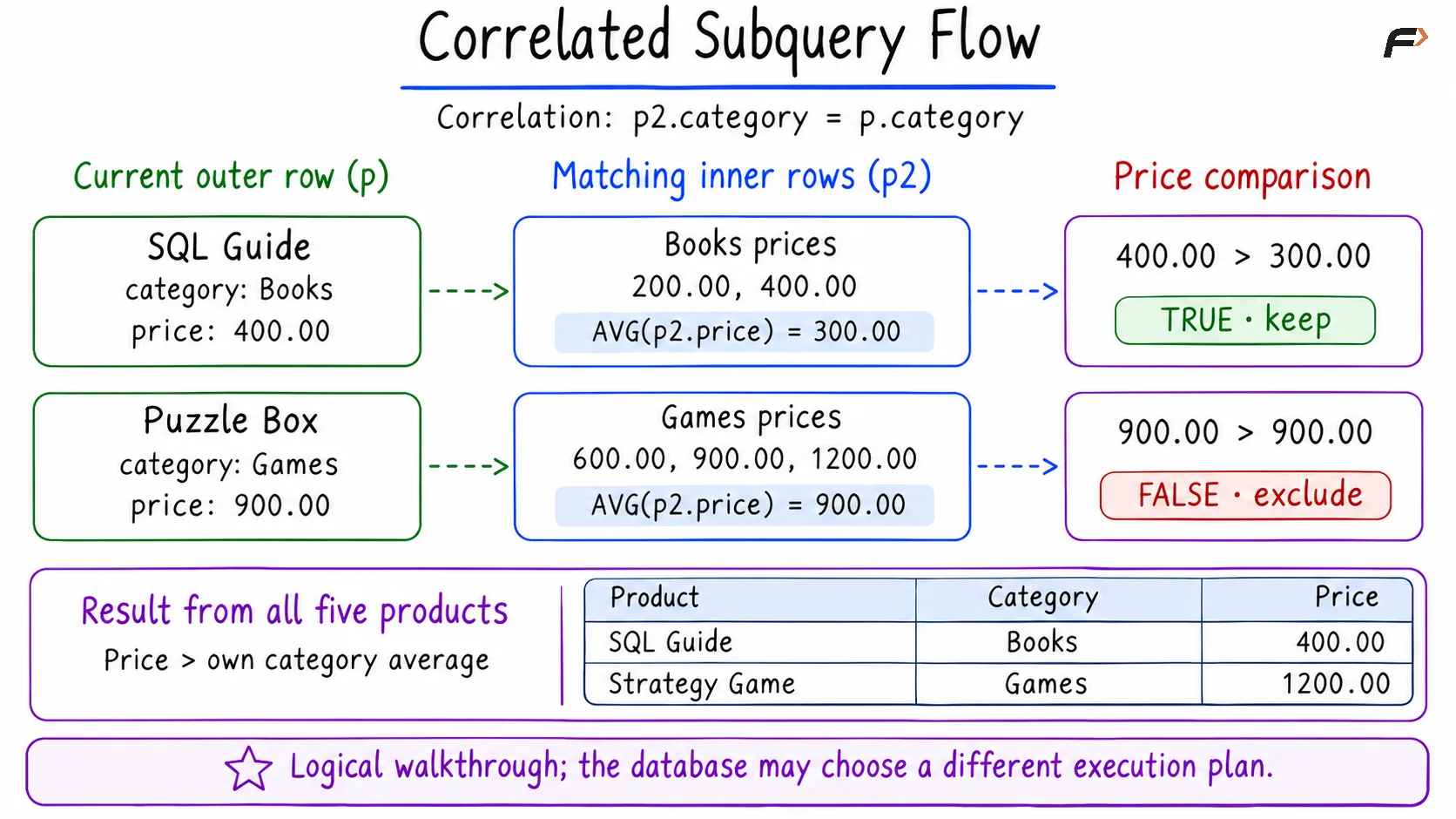
Correlated Subquery Flow
The average includes the current product itself because it also belongs to the matching category. Products in the same category therefore use the same average.
Here, AVG without GROUP BY produces one value for the comparison. A subquery used as a single value is called a scalar subquery. Correlation describes its dependency on the outer query; scalar describes the shape of its result.
Correlated vs. Uncorrelated Subqueries
An uncorrelated subquery does not reference the outer query. Its result can be determined independently.
Feature | Uncorrelated subquery | Correlated subquery |
|---|---|---|
Outer reference | Does not reference the outer query | References a column from the outer query |
Run independently | Can run on its own | Needs the outer values or a rewrite |
Example question | Is this price above the catalog average? | Is this price above its category average? |
Comparison in this dataset | Every product uses 660.00 | Books use 300.00; Games use 900.00 |
Using the same table inside and outside a query does not automatically make the subquery correlated. The defining feature is the reference to an outer column.
Correlation also works with other kinds of subqueries. A correlated subquery in SELECT can show a related maximum or count beside each outer row. With EXISTS or NOT EXISTS, it can check whether matching related rows exist or are absent.
Common Mistakes and Performance
Omitting the correlation condition: Removing p2.category = p.category changes the inner query to calculate the catalog average, which is 660.00. The query would then return Puzzle Box and Strategy Game, answering a different question.
Confusing the aliases: A condition such as p2.category = p2.category compares an inner value with itself. It does not connect the inner query to the outer product. Qualify columns with the intended alias.
Returning several rows where one value is expected: An ordinary comparison such as price > (subquery) needs a single-column result containing at most one row. Returning several prices causes an error. AVG without GROUP BY gives this example one aggregate result.
Overlooking NULL values: AVG ignores NULL prices. If it has no non-NULL values to average, it returns NULL, and a greater-than comparison with that result does not select the row. The example avoids this case by requiring non-NULL prices.
Correlated subqueries can be expensive when the chosen plan repeatedly scans many inner rows. An index on the correlation column, such as category, may help, but its benefit depends on the data and the execution plan.
The number of outer rows does not by itself tell how many times the database physically executes the subquery. Optimizers can transform some queries, and an equivalent JOIN is not automatically faster. For large datasets, inspect the execution plan with EXPLAIN and compare performance using realistic data.
Summary
A correlated subquery references a column from an outer query, allowing its result or condition to depend on the current outer row. Clear aliases and the correct correlation condition make that dependency easy to follow. Use it for questions about related rows, such as comparing each product with its category average, and assess performance from the database’s execution plan.
Be the first to add a comment.