Introduction
A table’s original design may not meet every future requirement. An application might need an email column, longer names, or an additional rule restricting acceptable values.
ALTER TABLE changes an existing table’s definition. It allows the structure to evolve, but each change must remain compatible with the data and objects that already depend on it.
What Is ALTER TABLE?
ALTER TABLE is a Data Definition Language (DDL) command. It changes a table’s structure rather than selecting individual records for modification.
The general form is:
ALTER TABLE table_namealteration;Common alterations include:
ADD COLUMN: Introduces a new column.
MODIFY COLUMN: Changes a column definition in MySQL.
RENAME COLUMN: Changes a column’s name.
DROP COLUMN: Removes a column and its values.
ADD CONSTRAINT: Introduces a table rule.
The examples below use MySQL 8.4 and assume this starting definition:
CREATE TABLE students ( student_id INT PRIMARY KEY, student_name VARCHAR(100) NOT NULL, department VARCHAR(20), marks INT);Inspecting the Existing Definition
Check the table before changing it:
DESCRIBE students;For a more complete definition, including constraints and defaults:
SHOW CREATE TABLE students;Inspection matters because a change can affect existing attributes. For example, modifying a required name column should preserve its NOT NULL rule unless the requirement deliberately changes.
Also check whether current values fit the proposed definition. Shortening text columns or reducing numeric ranges can fail or affect data.
Adding a Column
Add an email column with:
ALTER TABLE studentsADD COLUMN email VARCHAR(150);The table now accepts email addresses. Because this new column permits nulls and has no explicit default, existing records receive NULL for it.
To add a column with a declared default:
ALTER TABLE studentsADD COLUMN status VARCHAR(20) NOT NULL DEFAULT 'active';Existing records receive 'active' for the new status column. Future inserts that omit it also use that default.
Adding a required column to a populated table needs a valid way to supply values. Do not assume every new NOT NULL column can be added without considering existing records.
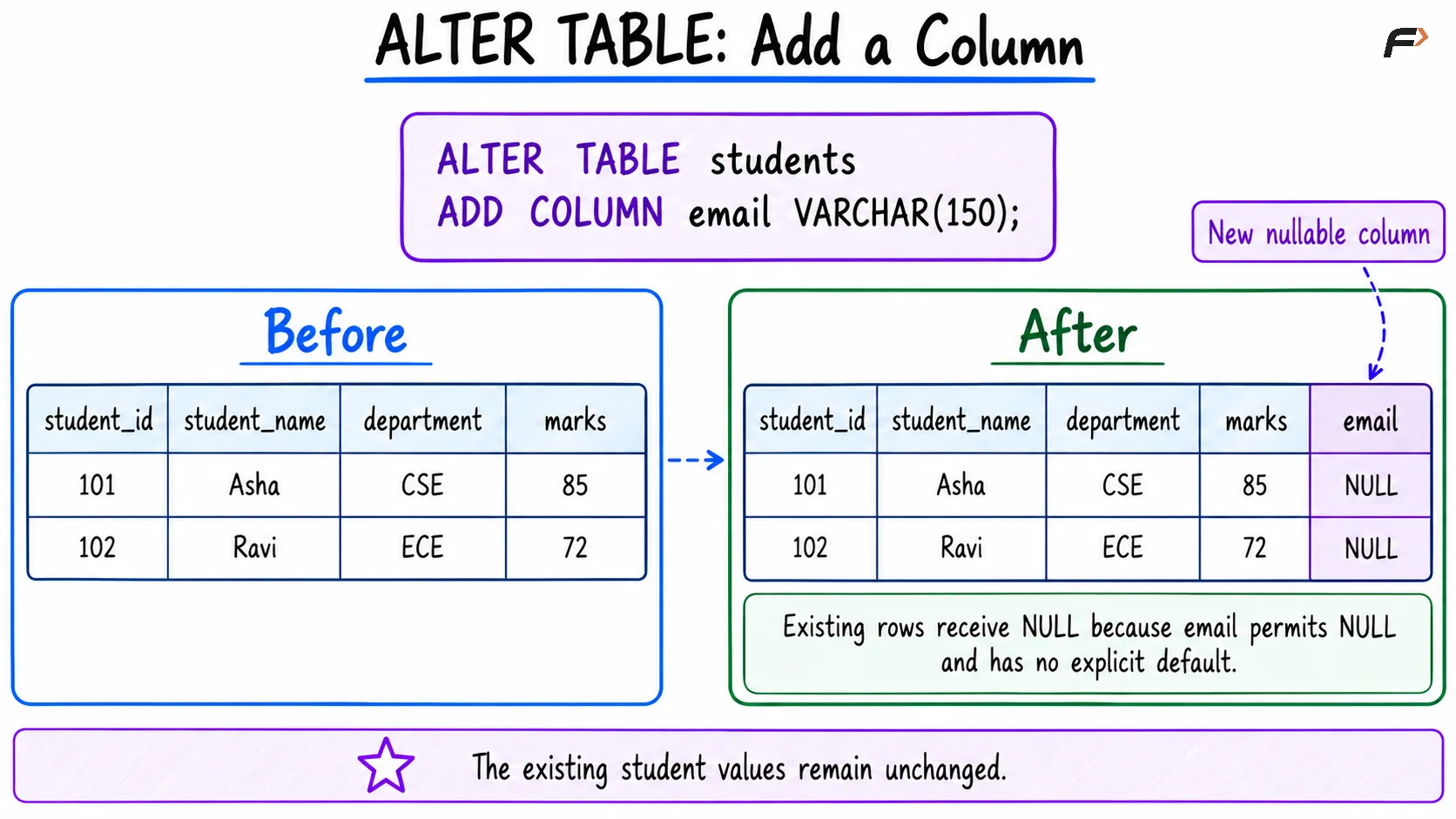
ALTER TABLE : add a column
Modifying a Column and Its Default
Increase the permitted length of student names:
ALTER TABLE studentsMODIFY COLUMN student_name VARCHAR(150) NOT NULL;In MySQL, restate column attributes that must remain, such as NOT NULL and an existing explicit default where applicable. Attributes omitted from the replacement definition may be lost.
Increasing a length gives future values more room; it does not lengthen the text already stored. Decreasing a length requires checking whether existing values still fit.
Change a default separately:
ALTER TABLE studentsALTER department SET DEFAULT 'Undeclared';This changes the default used by applicable future inserts. It does not replace existing null departments.
To fill those values, use a separate data operation:
UPDATE studentsSET department = 'Undeclared'WHERE department IS NULL;The distinction is important: ALTER TABLE changes the rule, while UPDATE changes existing values.
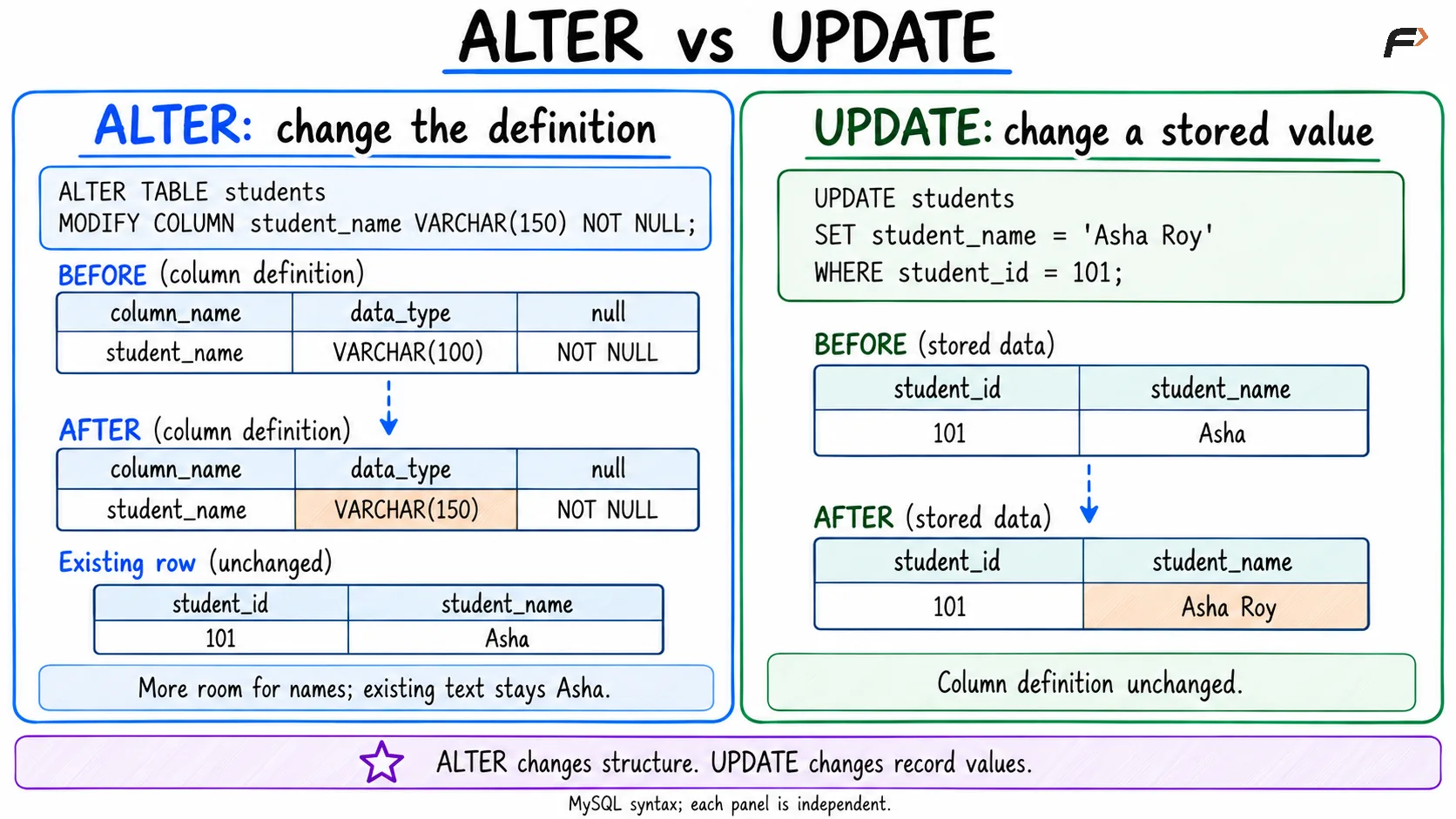
ALTER vs UPDATE
Renaming Columns and Tables
Rename a column using:
ALTER TABLE studentsRENAME COLUMN department TO department_name;The column retains its values under the new name. Queries using department must be updated where necessary.
To rename the table itself:
ALTER TABLE studentsRENAME TO college_students;This retains the table’s records and structure under the new name.
Renaming does not automatically rewrite every application query or dependent definition. Check references before changing names.
Adding and Removing Constraints
Introduce a named rule for marks:
ALTER TABLE studentsADD CONSTRAINT chk_student_marksCHECK (marks BETWEEN 0 AND 100);Existing records must satisfy the new enforced constraint. Correct incompatible values before applying it.
This check permits null marks because an unknown check result does not violate the condition. Require a value separately when needed:
ALTER TABLE studentsMODIFY COLUMN marks INT NOT NULL;That change requires existing null marks to be resolved first.
Remove the named check in MySQL with:
ALTER TABLE studentsDROP CHECK chk_student_marks;Constraint-removal syntax depends on the constraint type and database system. Naming constraints clearly makes them easier to identify and manage.
Dropping a Column
Remove the previously added email column with:
ALTER TABLE studentsDROP COLUMN email;This removes both its definition and the email values stored in it. Other columns and rows remain, subject to dependency rules.
Dropping a column is different from clearing its values:
Requirement | Operation |
|---|---|
Remove the column itself |
|
Retain the column but clear selected values |
|
Remove complete records |
|
Check indexes, constraints, and dependent code before removing a column.
Practical Considerations
Structural changes can involve more work than their short statements suggest.
Check existing data: New types and constraints must accept the stored values.
Preserve required attributes: Review nullability, defaults, and other rules after modification.
Review dependencies: Queries and related objects may rely on the old definition.
Allow for operational work: Some alterations rebuild tables or block concurrent operations; behavior depends on the change and engine.
Understand commits: MySQL
ALTER TABLEcauses an implicit commit and cannot be undone with an ordinary transaction rollback.Verify the result: Inspect the updated definition after the change.
Other SQL systems use different syntax for some alterations and have different transaction behavior.
Summary
ALTER TABLE changes an existing table’s definition through additions, modifications, renames, removals, and constraint changes. It supports evolving requirements without automatically replacing the whole table.
Inspect the current definition and check data compatibility before applying changes. Keep structural rules separate from record updates, and verify dependencies and database-specific behavior.
Be the first to add a comment.