Introduction
Database recovery handles more than interrupted transactions. A disk can fail, an important row can be deleted accidentally, or an incorrect update can commit successfully. Different problems require different ways of protecting and restoring data.
Shadow paging preserves a committed database state through page copies and a pointer switch. Backups provide recoverable copies of data, while point-in-time recovery (PITR) combines a suitable backup with saved logs to restore an earlier state.
Example Table
Consider an Account table that stores account identifiers, holder names, and balances.
Account: initial data
AccountID | HolderName | Balance |
|---|---|---|
1 | Asha | 1000.00 |
2 | Ravi | 500.00 |
AccountID is the primary key and uniquely identifies each account.
A valid transaction adds 100 to Asha’s balance, producing:
AccountID | HolderName | Balance |
|---|---|---|
1 | Asha | 1100.00 |
2 | Ravi | 500.00 |
This change will help explain both shadow paging and recovery from a backup.
What Is Shadow Paging?
Shadow paging is a recovery technique that writes changed data to new pages instead of overwriting the pages belonging to the current committed state.
A page is a unit of data stored and managed by the database. A page table maps logical page identifiers to their physical storage locations. It is an internal structure, not a SQL table.
The basic approach maintains two page mappings:
Shadow page table: Preserves the committed state from before the transaction.
Working page table: Points to the pages used by the transaction, including newly changed copies.
A persistent root pointer identifies the page table representing the committed database.
How Shadow Paging Works
For the transaction that adds 100 to Asha’s balance:
Preserve the committed mapping.
The shadow page table continues to point to the page containing Asha’s balance of 1000.00.Create a working mapping.
Initially, it can reference the same data pages. Unchanged data pages do not need to be copied.Copy the page before changing it.
A new copy of Asha’s page is created. The balance becomes 1100.00 in that copy.Update the working page table.
It now points to the new page. The shadow mapping still points to the old page.Make the new state durable.
Before commit completes, the changed pages and the new page-table information must reach persistent storage.Switch the root pointer atomically.
The durable root is changed to identify the new committed page table.
Atomically means recovery must see either the old root or the new root, not a partly written pointer. Correct storage ordering and a reliable root-update mechanism are essential.
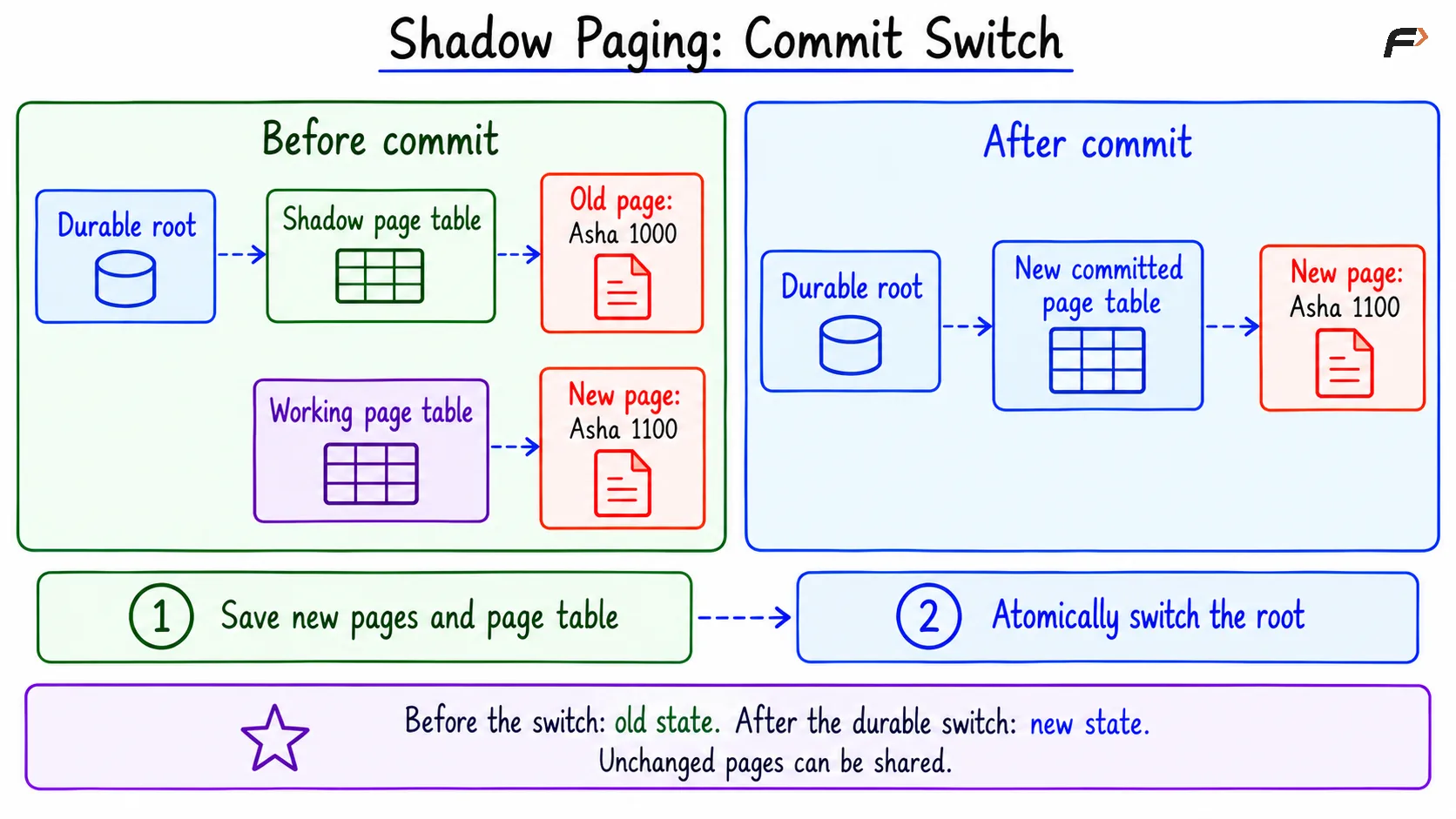
Shadow paging : commit switch
What Happens If a Failure Occurs?
Failure point | State used after recovery | Asha’s balance |
|---|---|---|
Before the durable root switch | The old committed mapping. | 1000.00 |
After the durable root switch | The new committed mapping. | 1100.00 |
If the transaction aborts before commit, its private changes can be discarded. Pages that are no longer needed can later be reclaimed.
In this basic design, recovery selects the committed mapping rather than undoing or redoing individual updates. This is why shadow paging is often described as a NO-UNDO/NO-REDO approach.
Benefits and Limits of Shadow Paging
Shadow paging provides a clear all-or-nothing commit boundary. The old committed pages remain available while the transaction prepares its new state.
However, it also has costs:
Copying pages and maintaining page mappings requires extra work.
Changed pages must be made durable before the root switch.
Related pages may become scattered across storage.
Unused page versions must be reclaimed.
Supporting many concurrent writers makes the design more complicated.
Shadow paging is not a backup strategy. If the storage containing both old and new pages is destroyed, the page mappings alone cannot restore the data. It also does not automatically retain every historical database state.
What Is a Database Backup?
A database backup is a recoverable copy of database data and any additional information required by the backup method.
Two terms describe different recovery steps:
Restore: Load data from a backup.
Recover: Apply the necessary recovery processing, such as log replay, to reach a usable target state.
A backup must be created using a method that produces a consistent or recoverable copy. Simply copying files while a database is changing may produce an unusable backup.
Copies should be protected separately from the original storage. Keeping the only backup on the same failed disk would not protect against that disk’s loss.
Full, Incremental, and Differential Backups
These backup types differ in how much data they capture.
Backup type | What it contains | Typical restore requirement |
|---|---|---|
Full backup | All data in the selected backup scope. | Restore the full backup. |
Incremental backup | Changes since the preceding backup in the chain. | Restore the full backup and each required incremental backup in order. |
Differential backup | Changes since the latest full backup. | Restore the full backup and the latest required differential backup. |
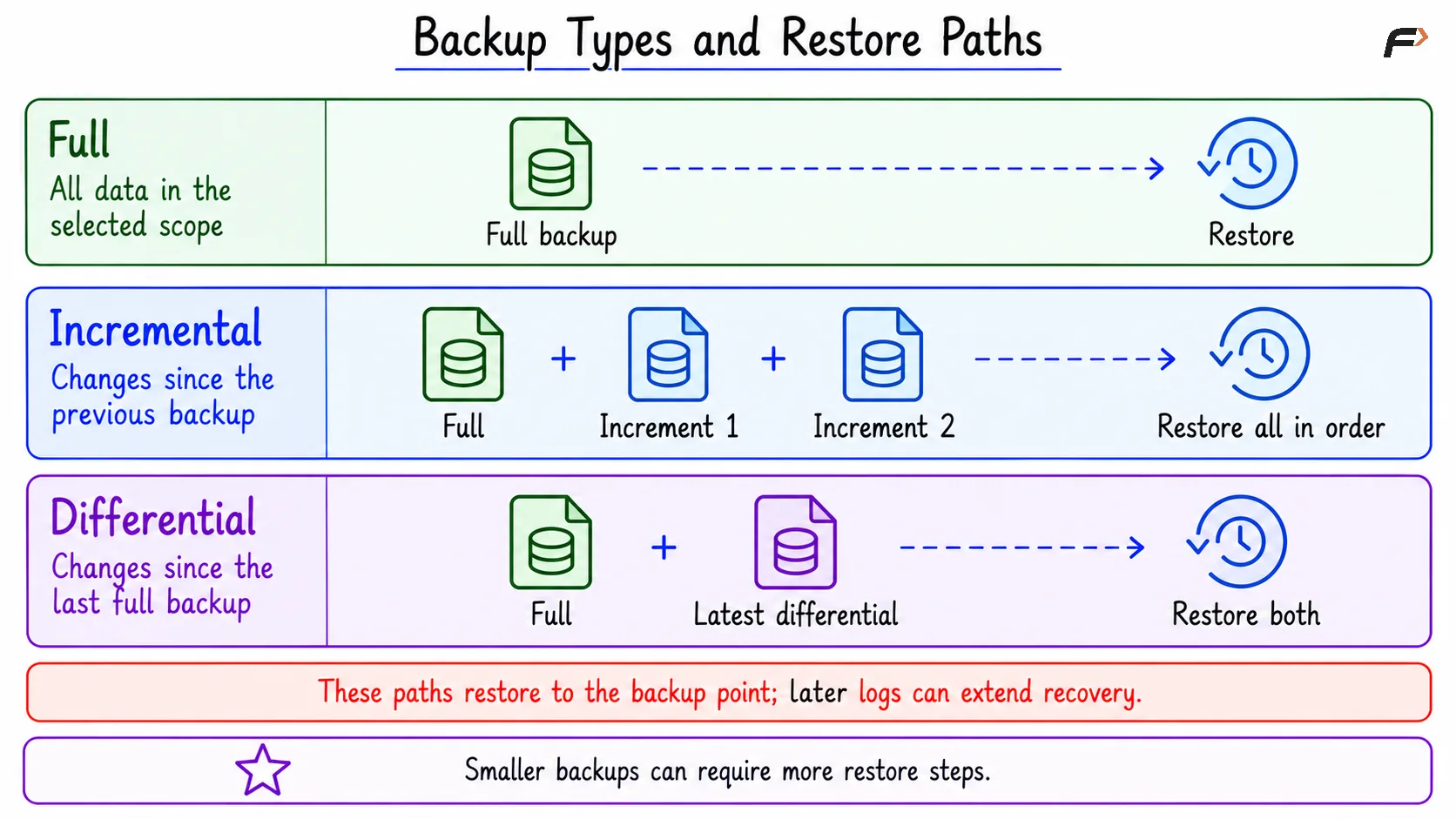
Backup types and restore paths
For example, after a Sunday full backup:
A Tuesday incremental backup may contain changes since Monday’s incremental backup.
A Tuesday differential backup contains changes since Sunday’s full backup.
Support and terminology vary across backup tools. Additional logs may be required to recover beyond the point represented by the restored backup.
Physical and Logical Backups
Backups can also be classified by what they store:
Form | What it stores | Main consideration |
|---|---|---|
Physical backup | Database files or storage blocks. | Must follow the database’s consistency and compatibility requirements. |
Logical backup | Definitions and data represented as SQL or an export format. | Restoring usually recreates objects and loads records. |
A backup taken while the database runs is an online backup. An offline backup is taken while the database is shut down appropriately. Online backups need database-aware coordination to remain recoverable.
What Is Point-in-Time Recovery?
Point-in-time recovery (PITR) restores a database to a chosen recoverable point in its history.
The usual process is:
Restore a suitable backup from before the target.
Replay the required saved logs in order.
Stop at the selected recovery target.
Validate the recovered data before using it.
PITR is useful when a harmful change has already committed. An ordinary ROLLBACK cannot cancel a transaction after its commit.
Successful PITR requires:
A usable backup compatible with the recovery method.
An unbroken sequence of the required logs.
A target within the available recovery history.
Correct handling of the target’s transaction boundary.
A missing required log file can prevent recovery from reaching a later target.
Point-in-Time Recovery Example
Assume the following events occur on the same day, with no other account changes:
Time | Event | Account state |
|---|---|---|
09:00 | A recoverable backup represents the initial data. | Asha: 1000.00, Ravi: 500.00 |
09:10 | The addition of 100 to Asha commits. | Asha: 1100.00, Ravi: 500.00 |
09:15 | The desired recovery target. | Asha: 1100.00, Ravi: 500.00 |
09:20 | An accidental deletion of Ravi’s account commits. | Only Asha remains. |
Restoring only the 09:00 backup would bring Ravi back but also lose Asha’s valid addition.
To recover the desired state:
Restore the backup representing 09:00.
Replay the required logs up to the 09:15 target.
Exclude the deletion committed at 09:20.
Expected recovered result
AccountID | HolderName | Balance |
|---|---|---|
1 | Asha | 1100.00 |
2 | Ravi | 500.00 |
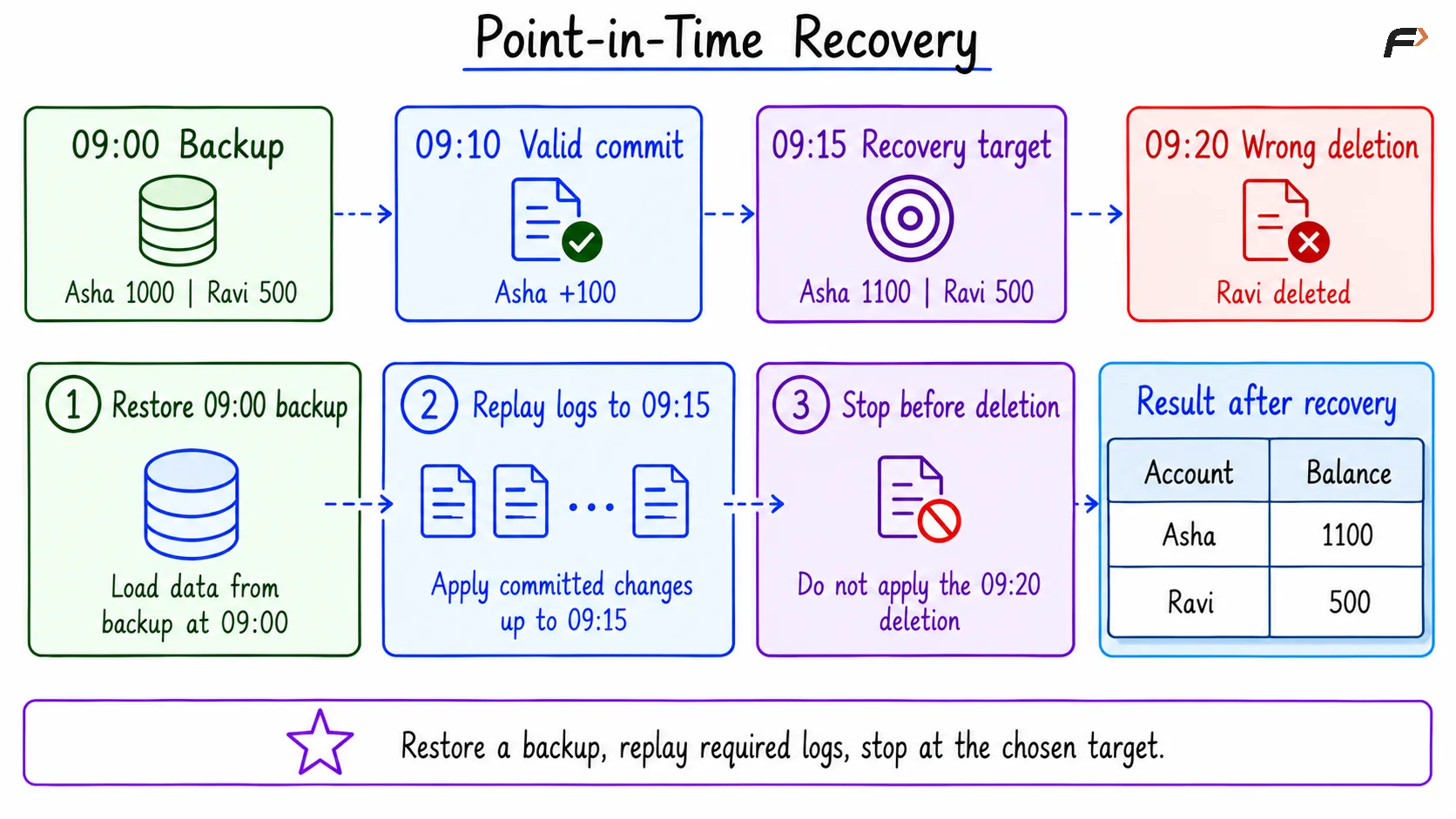
Point-in-time Recovery
PITR restores the selected scope to the target state. It does not automatically remove only the incorrect operation while preserving every later valid transaction.
If valid work occurred after 09:15, that work would need separate review and reconciliation. Restoring to a separate instance first can help inspect the recovered data without immediately replacing the current database.
PITR in MySQL and PostgreSQL
Both systems support PITR, but their recovery inputs differ.
Database | Typical starting point | Changes replayed afterward |
|---|---|---|
MySQL | A suitable backup with the corresponding binary-log coordinates. | Binary log events, commonly processed using |
PostgreSQL | A physical base backup. | The required archived Write-Ahead Log (WAL) records. |
Actual PITR uses backup utilities, saved logs, and recovery configuration. It is not performed by a single ordinary SQL query.
A Compact SQL Example
The following queries create the account data and demonstrate the two committed changes from the timeline.
They show why PITR may be needed. They do not create a backup, enable log archiving, or perform an actual restore. The times in the timeline are illustrative.
1. Create the Initial Data
Objective: Create the account state represented by the 09:00 backup.
Consider the following queries to create and populate Account.
CREATE TABLE Account ( AccountID INT PRIMARY KEY, HolderName VARCHAR(50) NOT NULL, Balance DECIMAL(10, 2) NOT NULL);START TRANSACTION;INSERT INTO Account (AccountID, HolderName, Balance)VALUES (1, 'Asha', 1000.00), (2, 'Ravi', 500.00);COMMIT;SELECT AccountID, HolderName, BalanceFROM AccountORDER BY AccountID;Expected result
AccountID | HolderName | Balance |
|---|---|---|
1 | Asha | 1000.00 |
2 | Ravi | 500.00 |
2. Commit the Valid Addition
Objective: Add 100 to Asha’s balance, matching the valid transaction at 09:10.
Consider the following queries to update and commit Asha’s balance.
START TRANSACTION;UPDATE AccountSET Balance = Balance + 100.00WHERE AccountID = 1;COMMIT;SELECT AccountID, HolderName, BalanceFROM AccountORDER BY AccountID;Expected result
AccountID | HolderName | Balance |
|---|---|---|
1 | Asha | 1100.00 |
2 | Ravi | 500.00 |
This is the state required at the 09:15 recovery target.
3. Illustrate the Accidental Committed Deletion
Objective: Show the sample-table state after the incorrect deletion at 09:20.
Consider the following queries to reproduce that deletion in the example.
START TRANSACTION;DELETE FROM AccountWHERE AccountID = 2;COMMIT;SELECT AccountID, HolderName, BalanceFROM AccountORDER BY AccountID;Expected result
AccountID | HolderName | Balance |
|---|---|---|
1 | Asha | 1100.00 |
Because the deletion committed, a later ROLLBACK cannot restore Ravi’s row.
After a correctly configured PITR to the earlier target, the verification query would be:
SELECT AccountID, HolderName, BalanceFROM AccountORDER BY AccountID;Expected result after actual PITR
AccountID | HolderName | Balance |
|---|---|---|
1 | Asha | 1100.00 |
2 | Ravi | 500.00 |
The SELECT statement only verifies the restored data. It does not perform recovery.
Recovery Planning Basics
A useful recovery plan considers both data loss and downtime:
Recovery Point Objective (RPO): The maximum acceptable amount of lost recent data, measured in time.
Recovery Time Objective (RTO): The target time for restoring service.
Backup frequency, log retention, and restore speed affect whether these targets can be met.
Backups should be protected, retained for the required recovery window, and tested through actual restores. Replication is not a replacement for backup because an accidental deletion may also reach the replica.
Summary
Shadow paging protects transaction changes by preserving the old committed pages and switching to a new page mapping at commit. Its basic recovery path selects the committed state, but it does not replace independent backups or provide an unlimited history of past states.
Backups provide a starting point for restoration. Point-in-time recovery adds the required saved logs and stops at a chosen target, allowing recovery from events such as accidental committed deletions. Reliable recovery depends on compatible backups, complete log history, and tested restore procedures.
Be the first to add a comment.