Introduction
Retrieving information is one of the most common database operations. A student portal might need to display names, departments, or marks without showing every column stored in its tables.
SELECT and FROM provide the foundation for these queries. They describe what the result should contain and where its source data comes from.
What Do SELECT and FROM Do?
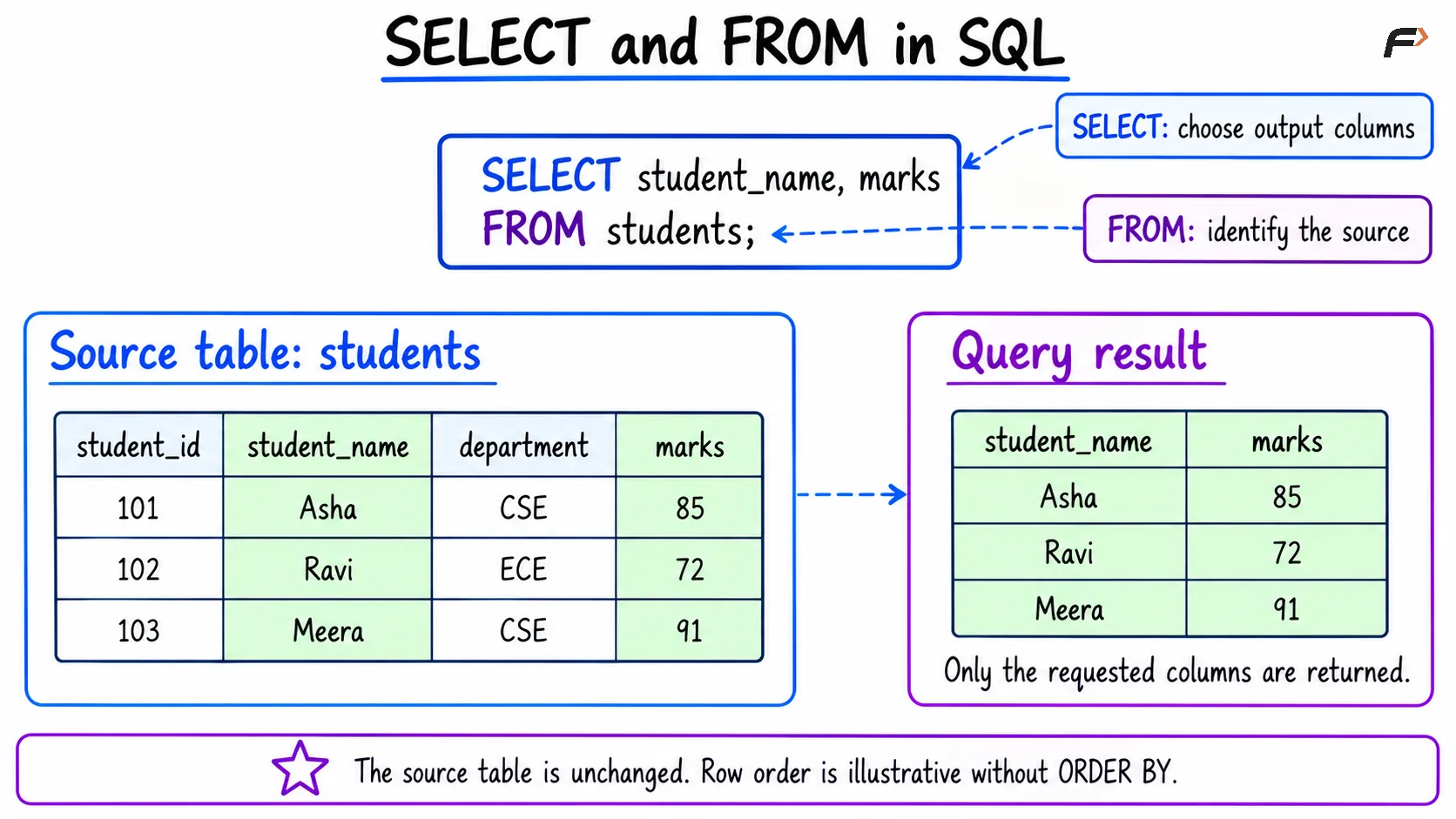
The SELECT clause specifies the columns or expressions to return. The FROM clause identifies the source used by the query.
The basic syntax is:
SELECT column1, column2FROM table_name;For example:
The examples below use MySQL-compatible SQL.
SELECT student_name, departmentFROM students;Here, SELECT requests two columns, while FROM identifies students as the source table. This query retrieves information without modifying the stored records.
Selecting Particular Columns
Assume the students table contains:
student_id | student_name | department | marks |
|---|---|---|---|
101 | Asha | CSE | 85 |
102 | Ravi | ECE | 72 |
103 | Meera | CSE | 91 |
To retrieve only names and marks:
SELECT student_name, marksFROM students;The result contains:
student_name | marks |
|---|---|
Asha | 85 |
Ravi | 72 |
Meera | 91 |
The selected columns appear in the order written in the SELECT list. Reversing that list places marks before student_name.
Without an ORDER BY clause, however, the database does not guarantee the order of the returned rows. The displayed order here is illustrative.
SELECT and FROM in SQL
Selecting All Columns with SELECT *
The asterisk * requests all columns from the source:
SELECT *FROM students;For the sample table, the result includes student_id, student_name, department, and marks.
SELECT * is convenient when exploring a table. For application queries, explicitly naming columns usually makes the required output clearer.
It also avoids returning unnecessary information and reduces surprises when new columns are added to the table. Choosing fewer columns does not guarantee a particular performance improvement, but it can reduce the amount of data returned.
Using Column and Table Aliases
An alias gives a column or table a temporary name within a query. It does not rename the stored database object.
Use AS to label result columns:
SELECT student_name AS name, marks AS scoreFROM students;The result headings become name and score, while the original column names remain unchanged.
A table alias provides a shorter way to qualify column references:
SELECT s.student_name, s.marksFROM students AS s;Here, s represents students. The dot connects the table alias to its column.
Table aliases become particularly useful when later queries involve multiple tables with overlapping column names.
Selecting Calculated Values
The SELECT list can contain expressions as well as stored columns. For example, calculate a hypothetical score after adding five marks:
SELECT student_name, marks, marks + 5 AS adjusted_marksFROM students;The result contains:
student_name | marks | adjusted_marks |
|---|---|---|
Asha | 85 | 90 |
Ravi | 72 | 77 |
Meera | 91 | 96 |
adjusted_marks is calculated for the result. The stored marks values remain unchanged; changing them would require an operation such as UPDATE.
MySQL also supports expressions without a table source:
SELECT 10 + 5 AS total;This returns 15. A FROM clause is unnecessary here because the expression does not read table data.
Removing Duplicate Results with DISTINCT
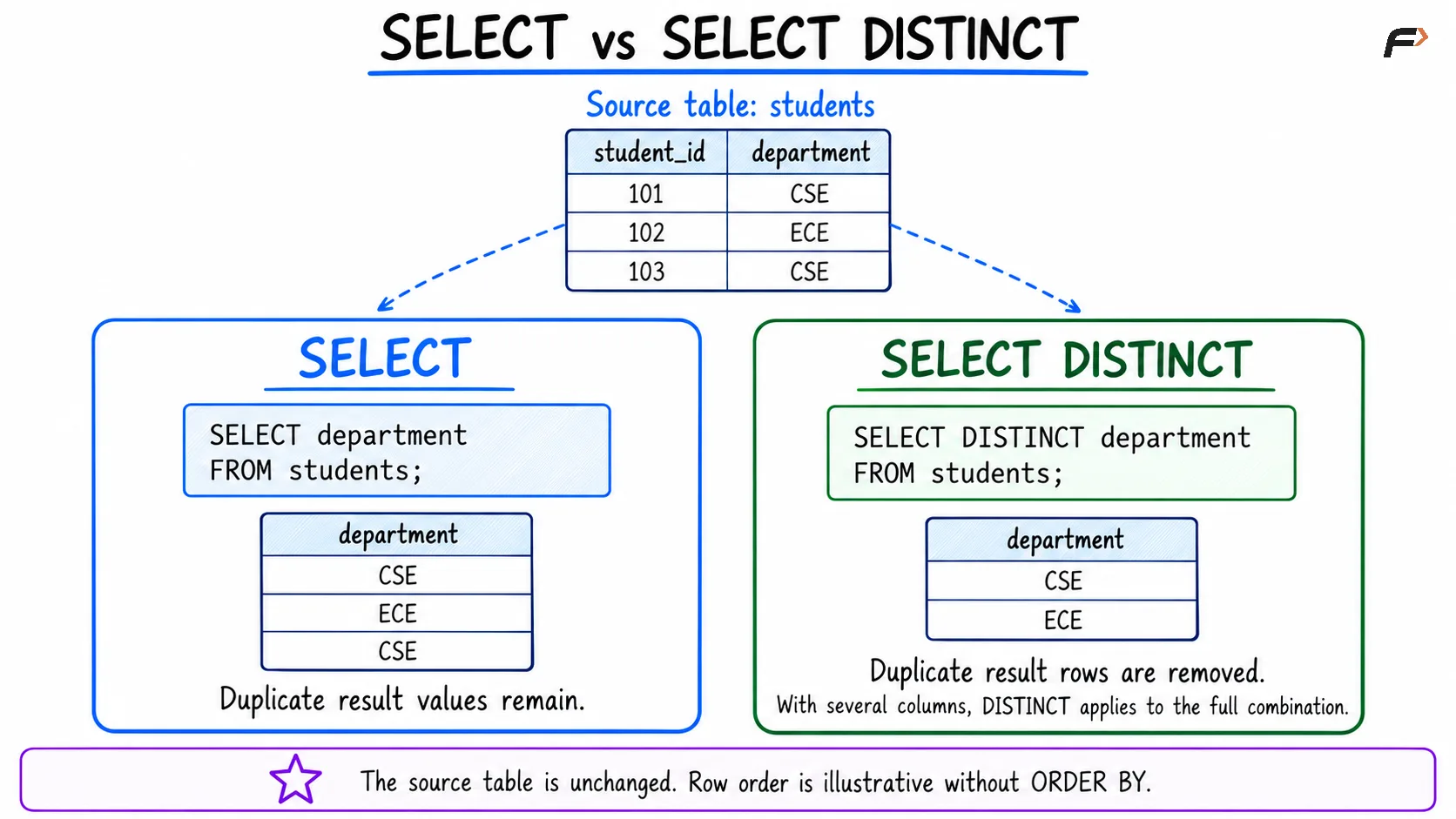
Ordinary SELECT queries retain duplicate result rows. To retrieve each department once, use DISTINCT:
SELECT DISTINCT departmentFROM students;The result contains CSE and ECE, with no guaranteed row order.
When multiple columns are selected, DISTINCT applies to their complete combination:
SELECT DISTINCT department, marksFROM students;Both CSE records remain because (CSE, 85) and (CSE, 91) are different combinations.
DISTINCT changes the query result. It does not remove duplicate records from the source table.
SELECT vs SELECT DISTINCT
Common Mistakes
Small syntax and interpretation errors can produce unexpected results:
Missing commas: Separate selected expressions with commas. A missing comma can sometimes be interpreted as an alias rather than producing an error.
Quoting a column as text:
SELECT 'student_name' FROM students;returns the literal textstudent_namefor each source row.Confusing columns with rows:
SELECTchooses output expressions; a clause such asWHEREfilters rows.Assuming a fixed row order: Use
ORDER BYwhen a particular ordering is required.Expecting aliases to rename stored columns: Aliases affect the query, not the table definition.
Conceptually, FROM establishes the source before the selected expressions produce the output. This differs from SQL’s written order and does not prescribe the database’s physical execution steps.
Summary
SELECT defines what a query returns, while FROM identifies its source. Together, they retrieve particular columns, complete records, and calculated results without changing stored data.
Use explicit column names, clear aliases, and DISTINCT where appropriate. Keep column selection separate from row filtering and remember that row order requires an explicit ordering clause.
Be the first to add a comment.