Introduction
A database often handles several transactions at once. One application might update an account balance while another reads it or prepares a report. Allowing these transactions to overlap improves resource use, but their operations must be coordinated.
A schedule describes the order of these operations. Understanding schedules helps explain why some concurrent executions produce correct results while others cause missing updates, changing query results, or reads of unfinished work.
What Is a Schedule in DBMS?
A schedule is an ordered sequence of operations from one or more transactions. It preserves the order of operations within each individual transaction, even when operations from different transactions are interleaved.
A transaction is a logical unit of work that ends with either COMMIT, which makes its changes permanent, or ROLLBACK, which cancels its uncommitted changes.
Schedule notation commonly uses:
R1(A): Transaction T1 reads data item A.W1(A): Transaction T1 writes data item A.C1: Transaction T1 commits.A1: Transaction T1 aborts.
Here, the number identifies the transaction. The letter inside parentheses identifies the data item.
Concurrency does not require operations to run at exactly the same instant. Transactions are concurrent when their execution periods overlap, even if the database alternates between their operations.
Example Table
The examples use an Account table. Each row stores an account identifier, its holder’s name, and its current balance.
Account: initial data
AccountID | HolderName | Balance |
|---|---|---|
1 | Asha | 1000.00 |
2 | Ravi | 500.00 |
3 | Meera | 700.00 |
AccountID is the primary key. In the schedule examples, A refers to Asha’s balance and B refers to Ravi’s balance.
Each conceptual example starts with these initial balances. T1 and T2 represent transactions running through separate database connections.
Serial and Non-Serial Schedules
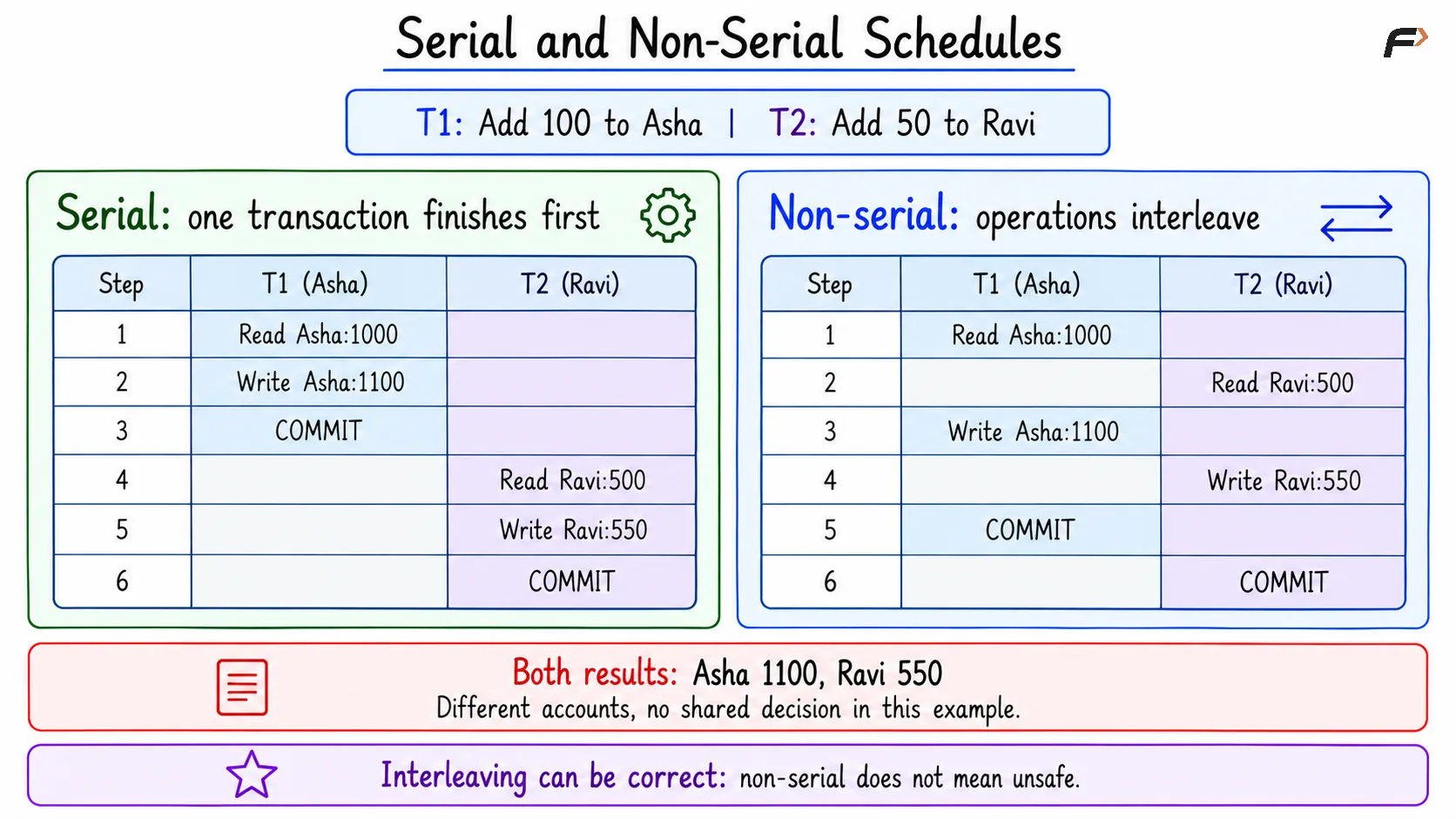
A serial schedule completes one transaction before starting another. A non-serial schedule interleaves operations from multiple transactions.
Consider T1 adding 100 to Asha’s account and T2 adding 50 to Ravi’s account.
Step | Serial schedule | Non-serial schedule |
|---|---|---|
1 | T1 reads Asha’s balance | T1 reads Asha’s balance |
2 | T1 writes 1100.00 | T2 reads Ravi’s balance |
3 | T1 commits | T1 writes 1100.00 |
4 | T2 reads Ravi’s balance | T2 writes 550.00 |
5 | T2 writes 550.00 | T1 commits |
6 | T2 commits | T2 commits |
Result in both cases:
AccountID | HolderName | Balance |
|---|---|---|
1 | Asha | 1100.00 |
2 | Ravi | 550.00 |
3 | Meera | 700.00 |
The interleaving is safe here because the transactions update different accounts and have no shared decision or rule linking those updates.
A serializable schedule has the same effect as some serial execution of the transactions. It may still interleave their operations. Therefore, non-serial does not automatically mean incorrect.
Operations can conflict when they belong to different transactions, access the same data item, and at least one is a write. Two reads alone do not conflict.
Serial and None-serial schedules
Common Concurrency Anomalies
A concurrency anomaly is an unexpected interaction between overlapping transactions. Whether an anomaly can occur depends on the queries, isolation level, and database implementation.
1. Lost Update
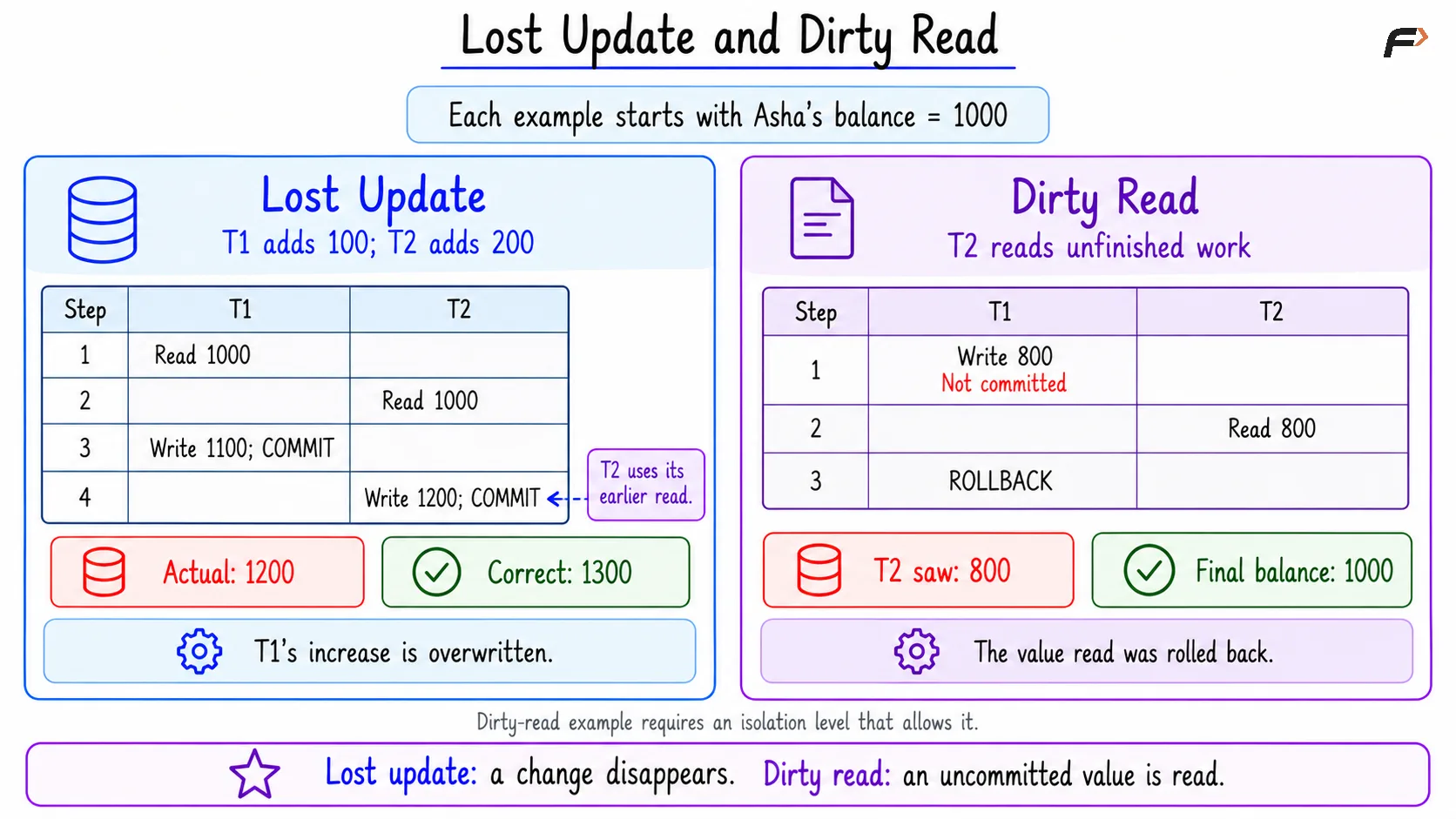
A lost update occurs when one transaction overwrites another transaction’s change using an outdated value.
Objective: Add 100 and 200 to Asha’s balance through two transactions. The correct final balance is 1000 + 100 + 200 = 1300.
Step | T1: Add 100 | T2: Add 200 |
|---|---|---|
1 | Reads 1000.00 | |
2 | Reads 1000.00 | |
3 | Calculates 1100.00 | |
4 | Calculates 1200.00 | |
5 | Writes 1100.00 and commits | |
6 | Writes its previously calculated 1200.00 and commits |
Outcome:
Account | Expected balance | Balance after the lost update |
|---|---|---|
Asha | 1300.00 | 1200.00 |
T2 overwrites T1’s increase. The problem comes from writing a value calculated from an earlier read, not merely from two transactions updating the same row.
For simple increments, an update that calculates directly from the stored balance can avoid this stale-value pattern. More complex read-and-update decisions may require locking or conflict detection.
2. Dirty Read
A dirty read occurs when a transaction reads changes made by another transaction before those changes commit.
Objective: Read Asha’s balance while another transaction has an unfinished deduction.
Step | T1: Deduct 200 | T2: Read balance |
|---|---|---|
1 | Updates Asha’s balance to 800.00 without committing | |
2 | Reads the uncommitted 800.00 | |
3 | Rolls back, restoring 1000.00 |
Outcome:
Value read by T2 | Committed balance after T1 rolls back |
|---|---|
800.00 | 1000.00 |
T2 used a value that never became committed data. Reading another transaction’s uncommitted value is a dirty read even if that transaction eventually commits.
Lost update and Dirty read
3. Non-Repeatable Read
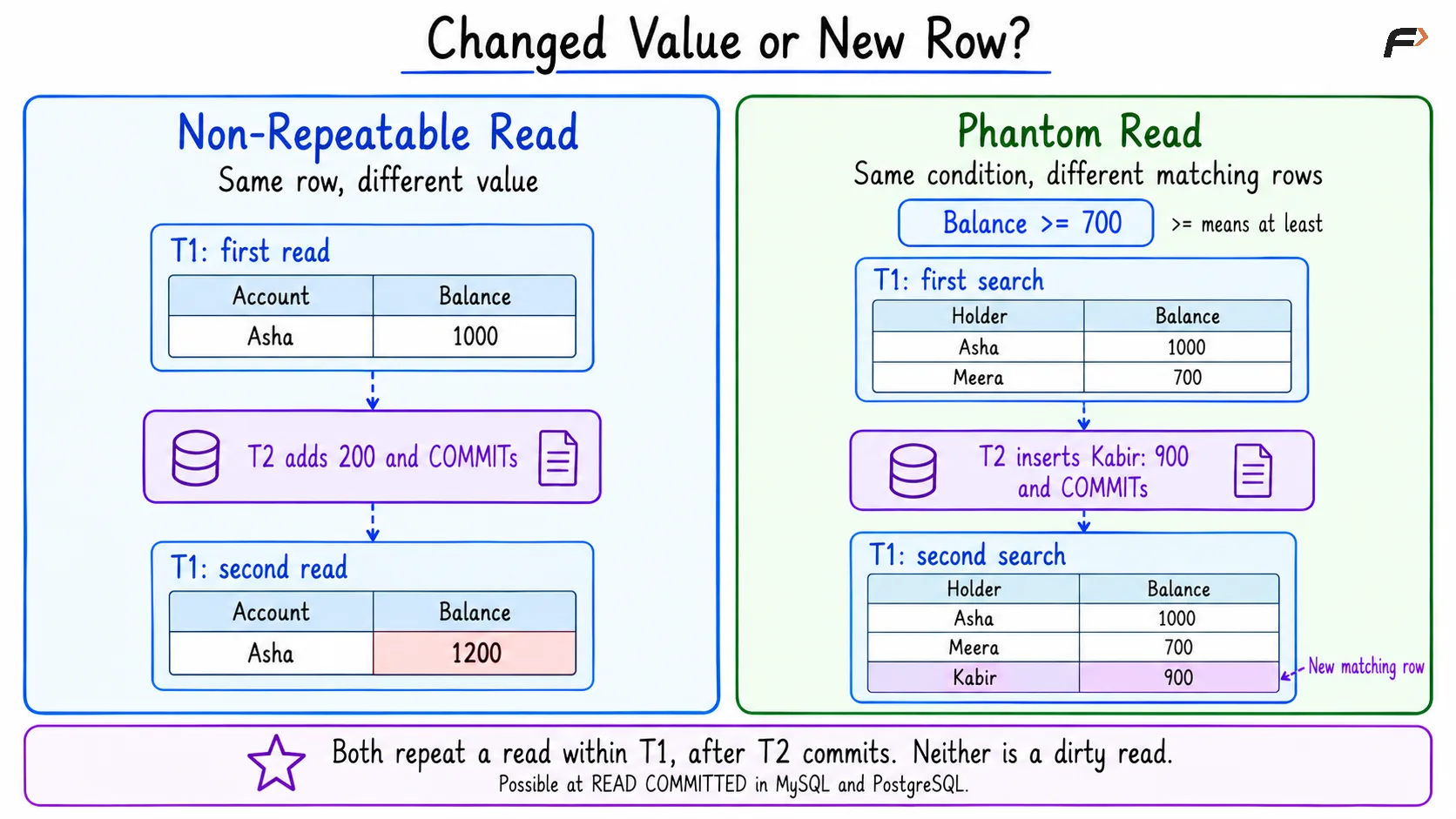
A non-repeatable read occurs when a transaction reads the same row twice and sees a different value because another transaction committed a change between the reads.
Objective: Read Asha’s balance twice within one transaction.
Step | T1: Read balance twice | T2: Add 200 |
|---|---|---|
1 | Reads 1000.00 | |
2 | Updates the balance to 1200.00 and commits | |
3 | Reads 1200.00 |
Outcome:
First read by T1 | Second read by T1 |
|---|---|
1000.00 | 1200.00 |
Both values were committed when read. This distinguishes a non-repeatable read from a dirty read.
4. Phantom Read
A phantom read occurs when repeating a query within a transaction returns a different set of matching rows because another transaction committed changes.
Objective: Find accounts whose balance is at least 700.
Step | T1: Find qualifying accounts | T2: Add an account |
|---|---|---|
1 | Finds Asha and Meera | |
2 | Inserts Kabir with a balance of 900.00 and commits | |
3 | Repeats the query and finds Asha, Meera, and Kabir |
First result:
AccountID | HolderName | Balance |
|---|---|---|
1 | Asha | 1000.00 |
3 | Meera | 700.00 |
Second result:
AccountID | HolderName | Balance |
|---|---|---|
1 | Asha | 1000.00 |
3 | Meera | 700.00 |
4 | Kabir | 900.00 |
The new matching row is the phantom. Deletes and updates that change which rows satisfy the condition can also change the matching set.
A non-repeatable read focuses on a previously read row. A phantom read focuses on the set of rows satisfying a condition.
Changed value or New row ?
Other Important Concurrency Problems
Some problems involve multiple rows or unfinished writes rather than a repeated read of one account.
Problem | Meaning | Example using the account data |
|---|---|---|
Dirty write | A transaction overwrites another transaction’s uncommitted write. | T2 overwrites Asha’s balance before T1 commits or rolls back. |
Incorrect summary or read skew | A calculation combines values from different database states. | T1 reads Asha’s 1000.00, T2 transfers 200 from Asha to Ravi and commits, then T1 reads Ravi’s 700.00. T1 calculates 1700.00 although their combined balance remains 1500.00. |
Write skew | Transactions make decisions from a shared view of data, then update different rows in a way that violates a shared rule. | Suppose Asha and Ravi must retain a combined balance of at least 500. Each transaction checks the initial total of 1500. One withdraws 800 from Asha, while another withdraws 400 from Ravi. Each withdrawal appears safe alone, but together they leave only 300. |
MySQL and PostgreSQL coordinate conflicting writes, so the dirty-write sequence is not an ordinary permitted execution.
The incorrect-summary example uses separate reads. It does not imply that a single ordinary SUM query at READ COMMITTED in these systems mixes committed states during that statement.
Schedules and Safe Recovery
A schedule must also handle transactions that fail. If one transaction depends on another’s unfinished changes, a rollback can affect more than one transaction.
Schedule property | Basic rule |
|---|---|
Recoverable | If T2 reads a value written by T1, T2 must not commit before T1 commits. |
Cascadeless | Transactions read values written by other transactions only after those writers commit. |
Strict | Other transactions cannot read or overwrite an item written by a transaction until that transaction commits or aborts. |
If T2 reads T1’s uncommitted changes and T1 aborts, T2 may also need to abort. This is a cascading rollback.
Every strict schedule is cascadeless, and every cascadeless schedule is recoverable. These properties concern safe recovery. Serializability concerns equivalence to a serial execution.
How Concurrency Anomalies Are Controlled
Databases use isolation rules, locks, and data versions to coordinate concurrent work.
Isolation levels: Define which interactions transactions may observe.
READ COMMITTEDprevents dirty reads but can allow non-repeatable reads and phantoms.Row locks: A locking read such as
SELECT ... FOR UPDATEcan protect existing rows during a read-and-update decision. It must run inside a transaction.Atomic updates: Expressions such as
Balance = Balance + 100calculate from the row being updated instead of replacing it with a stale application value.Version checks: An update can verify that a row has not changed since it was read. A mismatch tells the application to reconsider its work.
Serializable execution: Provides the effect of a serial order for successfully committed transactions. Applications may need to retry transactions rejected because of conflicts.
REPEATABLE READ behavior is database-specific. PostgreSQL prevents phantom reads at this level.
A Compact Example
Objective: Observe a non-repeatable read and a phantom read within the same transaction at READ COMMITTED.
The example uses two database connections:
Session A: Reads the data, pauses, and then reads again.
Session B: Updates Asha’s balance and inserts Kabir’s account between Session A’s reads.
Run the numbered steps in order. Session A must remain open while Session B performs its work.
1. Create and populate the table
Consider the following queries to create the three initial accounts.
CREATE TABLE Account ( AccountID INT PRIMARY KEY, HolderName VARCHAR(50) NOT NULL, Balance DECIMAL(10, 2) NOT NULL);START TRANSACTION;INSERT INTO Account (AccountID, HolderName, Balance)VALUES (1, 'Asha', 1000.00), (2, 'Ravi', 500.00), (3, 'Meera', 700.00);COMMIT;The table now contains:
AccountID | HolderName | Balance |
|---|---|---|
1 | Asha | 1000.00 |
2 | Ravi | 500.00 |
3 | Meera | 700.00 |
2. Session A: Start a transaction and read
Consider the following queries to read Asha’s balance and list accounts with a balance of at least 700.
SET TRANSACTION ISOLATION LEVEL READ COMMITTED;START TRANSACTION;SELECT BalanceFROM AccountWHERE AccountID = 1;SELECT AccountID, HolderNameFROM AccountWHERE Balance >= 700ORDER BY AccountID;-- Pause here. Keep this transaction open.First query result:
Balance |
|---|
1000.00 |
Second query result:
AccountID | HolderName |
|---|---|
1 | Asha |
3 | Meera |
The >= operator means “greater than or equal to.” ORDER BY AccountID displays the matching accounts in identifier order.
3. Session B: Change and commit the data
Consider the following queries to add 200 to Asha’s balance and create Kabir’s account.
START TRANSACTION;UPDATE AccountSET Balance = Balance + 200WHERE AccountID = 1;INSERT INTO Account (AccountID, HolderName, Balance)VALUES (4, 'Kabir', 900.00);COMMIT;Committed table contents:
AccountID | HolderName | Balance |
|---|---|---|
1 | Asha | 1200.00 |
2 | Ravi | 500.00 |
3 | Meera | 700.00 |
4 | Kabir | 900.00 |
4. Session A: Repeat the reads
Consider the following queries to repeat the original reads before ending Session A’s transaction.
SELECT BalanceFROM AccountWHERE AccountID = 1;SELECT AccountID, HolderNameFROM AccountWHERE Balance >= 700ORDER BY AccountID;COMMIT;First query result:
Balance |
|---|
1200.00 |
Second query result:
AccountID | HolderName |
|---|---|
1 | Asha |
3 | Meera |
4 | Kabir |
Asha’s balance changed from 1000.00 to 1200.00 between reads, demonstrating a non-repeatable read. Kabir appeared in the repeated search, demonstrating a phantom read.
Neither observation is a dirty read because Session B committed before Session A repeated its queries. At READ COMMITTED, each ordinary query can see changes committed before that query begins.
Summary
A schedule records how transaction operations are ordered. Serial schedules execute transactions one at a time, while non-serial schedules interleave their operations. An interleaved schedule can still be correct when its effect is equivalent to a serial execution.
Concurrency anomalies include lost updates, dirty reads, non-repeatable reads, and phantom reads. Recovery rules, suitable isolation levels, atomic updates, and carefully chosen locks help control these interactions without requiring every transaction to run alone.
Be the first to add a comment.