Introduction
A database table can contain valid rows and still be difficult to maintain. When the same fact appears in several places, a small change may require multiple updates. Adding or deleting a record may also affect information that should exist independently.
These problems connect data redundancy, functional dependencies, and database design. Understanding update, insertion, and deletion anomalies helps explain why related facts sometimes belong in separate tables and how normalization improves the structure of a relational database.
What Is Data Redundancy?
Data redundancy occurs when the same fact is stored in multiple places within a database. If that fact changes, several stored copies may need to be updated to keep the information consistent.
Repeated values alone do not establish harmful redundancy. Identical values can describe different, independent facts. The important distinction is between values that happen to match and multiple stored copies of the same fact.
Unnecessary duplication increases storage and maintenance work. It can also produce inconsistent information if some copies are updated while others retain the old value.
An Example Relation
Consider a college database that stores student and department details together in a table, or relation, named StudentDepartment. Each row represents one student and includes information about that student’s department.
StudentDepartment : initial data
StudentID | Name | DeptID | DeptName | DeptOffice |
|---|---|---|---|---|
101 | Asha | 10 | Computer Science | Block A |
102 | Ravi | 20 | Electronics | Block B |
103 | Meera | 10 | Computer Science | Block A |
The example follows these business rules:
Student identification:
StudentIDis the primary key and uniquely identifies each student.Department membership: Each student belongs to exactly one department.
Department details: Each
DeptIDidentifies one department with one current name and office location.Independent existence: A department may exist before any students join it.
Asha and Meera both belong to department 10. Consequently, the facts that department 10 is named Computer Science and occupies Block A are stored in both student rows. These repeated department details illustrate data redundancy.
The repeated DeptID value serves a different purpose: each occurrence identifies a particular student’s department membership. The unnecessary duplication lies in storing the department’s name and office again for every student in that department.
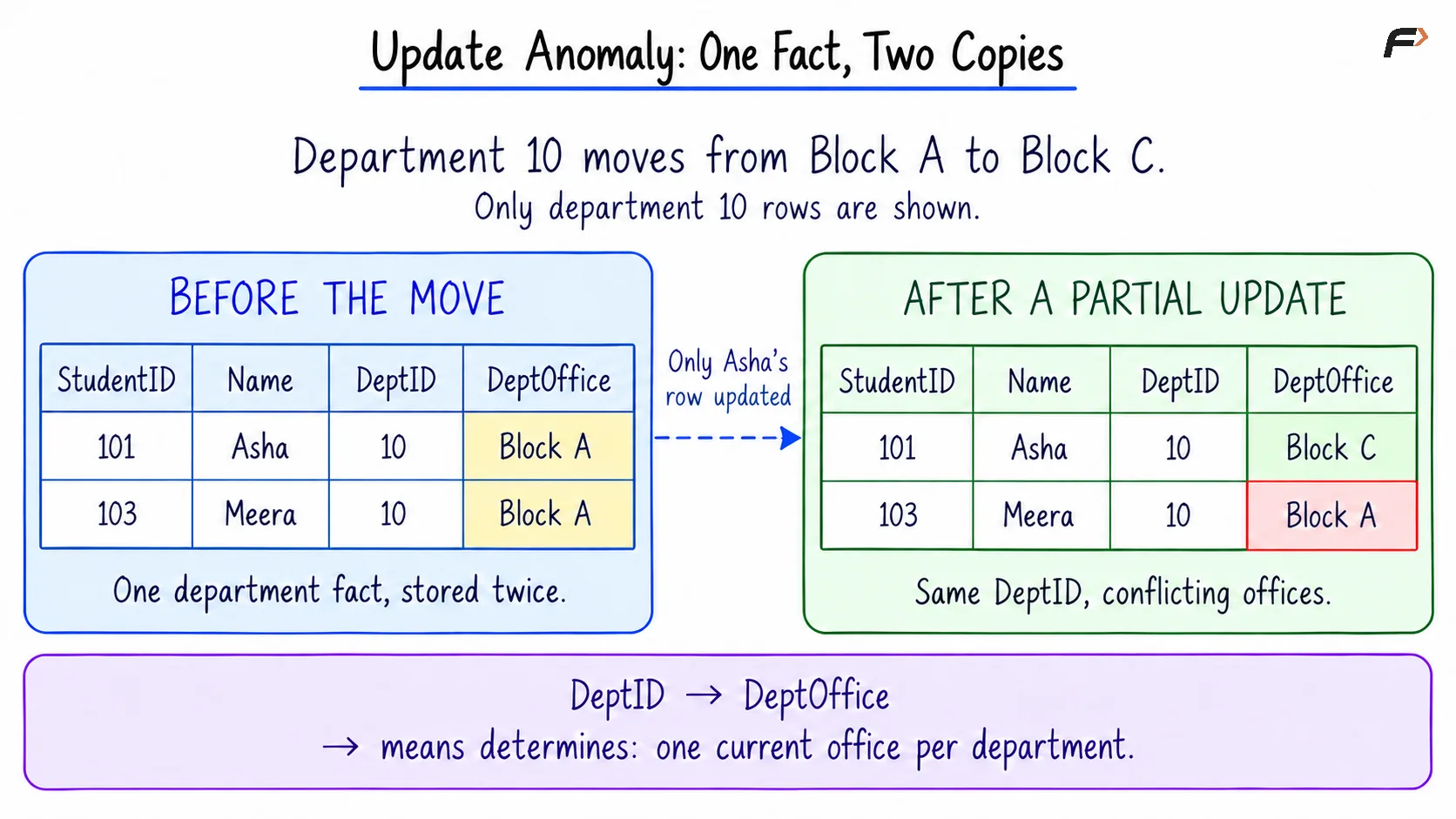
If department 10 moves to another office, both stored copies of DeptOffice must change. Updating only one would leave conflicting information about the same department.
Each anomaly in the following sections is illustrated independently using this initial data.
What Are Modification Anomalies?
A modification anomaly is an undesirable consequence of inserting, updating, or deleting data because facts have been combined poorly in a table.
The term update anomalies is sometimes used broadly for all three categories. When update, insertion, and deletion anomalies are listed separately, an update anomaly specifically refers to problems changing existing information.
These problems can occur even when the SQL statement executes successfully. A database may accept an operation that satisfies its declared constraints while leaving the stored business information incomplete or inconsistent.
Update Anomaly
An update anomaly occurs when changing one fact requires changes in multiple places. If only some copies are updated, the database contains conflicting information.
Suppose the Computer Science department moves from Block A to Block C. Both Asha’s and Meera’s rows must reflect the new office.
If only Asha’s row changes, the relevant values become:
StudentID | DeptID | DeptOffice |
|---|---|---|
101 | 10 | Block C |
103 | 10 | Block A |
Department 10 now has two different office locations, violating the rule that each department has one current office.
Updating every matching row would restore consistency for this change. However, the table still stores multiple copies of the department’s office, so future changes require the same coordination.
Update anomaly : one fact , two copies
Insertion Anomaly
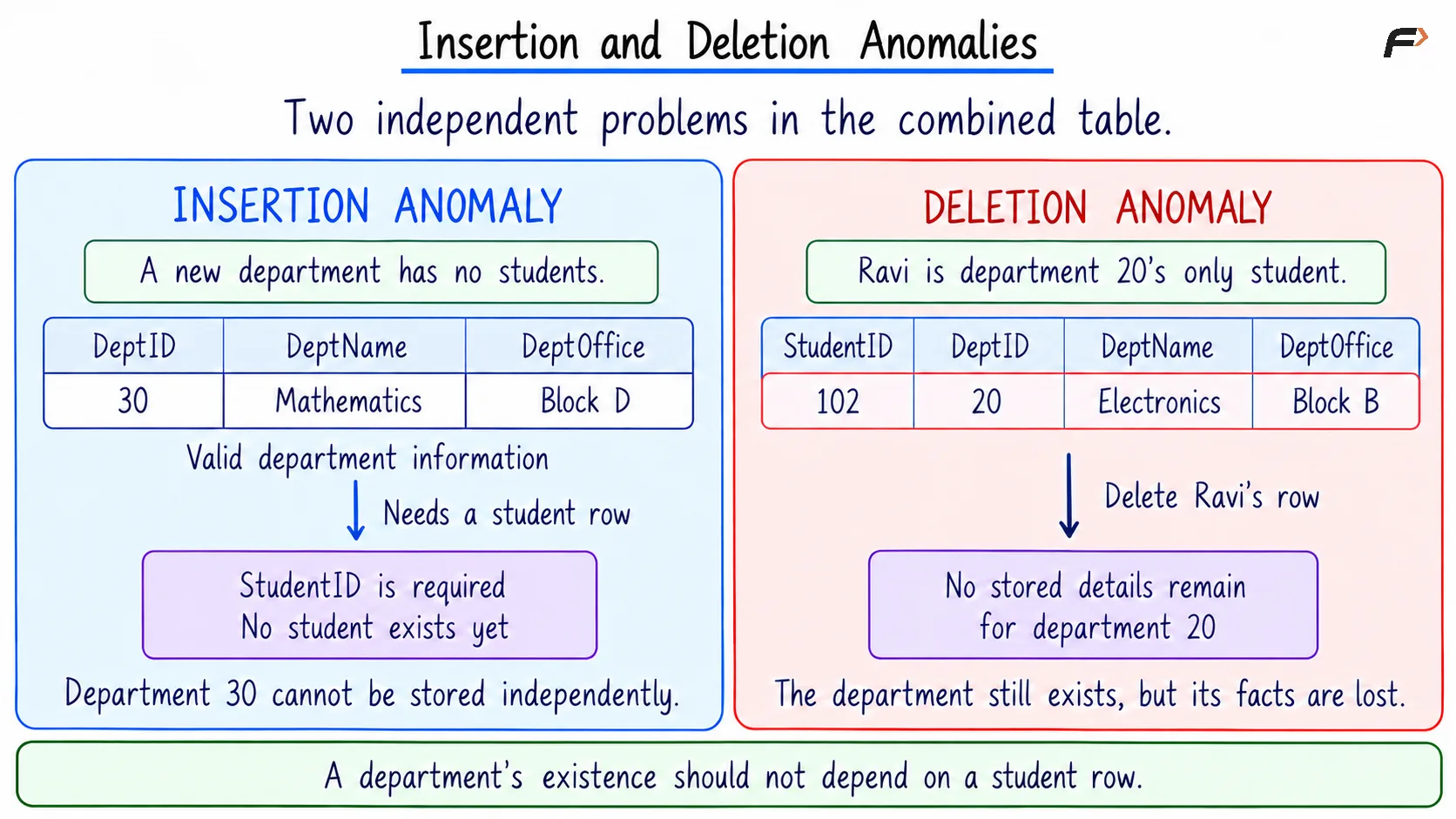
An insertion anomaly occurs when a fact cannot be recorded without supplying another fact that should not be required.
Suppose a new Mathematics department is created with DeptID 30 and office Block D, but no students have joined it.
The combined table has one row per student, and its primary key is StudentID. There is no appropriate student row in which to store the new department. A NULL student ID would violate the primary key, while inventing a student would introduce false information.
The department’s existence should not depend on a student joining it. The difficulty comes from storing department facts inside student records.
Deletion Anomaly
A deletion anomaly occurs when deleting one fact unintentionally removes another fact that should remain available.
In the initial relation, Ravi is the only student in department 20. Deleting Ravi’s row also removes the only stored occurrence of the Electronics department’s name and office.
Removing a student should not imply that the department no longer exists. Nevertheless, the combined table can no longer represent the department after its last student row disappears.
This is unintended information loss caused by the table’s structure, even though deleting the student may be a valid operation.
Insertion and deletion Anomalies
Why Keys and Transactions Are Not Enough
A primary key prevents duplicate identifiers and identifies individual rows. It does not automatically enforce every dependency among non-key attributes.
For example, Asha and Meera can have distinct, valid student IDs while their rows contain conflicting office locations for the same department. The primary key remains satisfied.
Transactions can make a group of changes succeed or fail together. However, a transaction that updates only Asha’s row cannot determine that Meera’s row should also change unless the operation or an enforced rule expresses that requirement.
Constraints and transactions remain important, but they work best with a design that stores each independently maintained fact in an appropriate place.
Reducing Redundancy Through Normalization
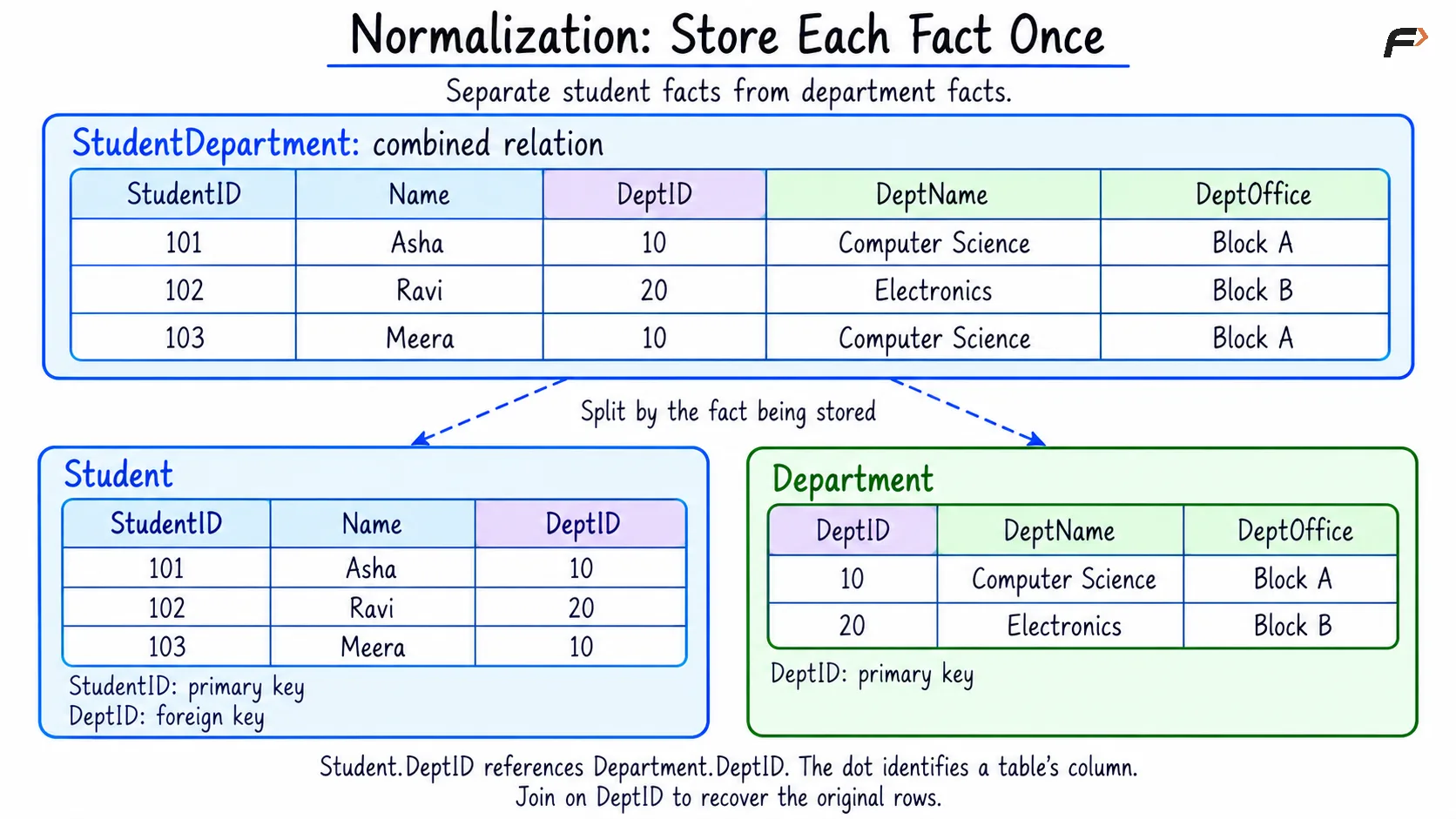
Normalization organizes relations according to their dependencies to reduce unnecessary repetition and the anomalies it causes. Decomposition is the process of splitting a relation into smaller related relations.
The combined relation can be decomposed into Student and Department.
Student
StudentID | Name | DeptID |
|---|---|---|
101 | Asha | 10 |
102 | Ravi | 20 |
103 | Meera | 10 |
Department
DeptID | DeptName | DeptOffice |
|---|---|---|
10 | Computer Science | Block A |
20 | Electronics | Block B |
StudentID is the primary key of Student, and DeptID is the primary key of Department. The DeptID column in Student becomes a foreign key, requiring each student’s department reference to match an existing department.
Department names and offices are now stored once per department. Student rows retain the information needed to identify each student’s membership.
A useful decomposition has two important properties:
Lossless reconstruction: Joining the decomposed relations should reproduce the original relation’s data without introducing incorrect combinations. Here, joining on
DeptIDmatches each student to exactly one department.Dependency preservation: The original functional dependencies should remain enforceable through the decomposed relations. Student details depend on the student key, while department details depend on the department key.
Moving department details into their own relation removes the transitive dependency from the combined student table. This is the kind of design problem addressed by third normal form, or 3NF.
Normalization reduces anomalies caused by the identified dependencies. Appropriate constraints and correct application operations are still required to maintain valid data.
NORMALIZATION : Store each fact once
A Compact Example
For reference, the example starts with the following information:
StudentID | Name | DeptID | DeptName | DeptOffice |
|---|---|---|---|---|
101 | Asha | 10 | Computer Science | Block A |
102 | Ravi | 20 | Electronics | Block B |
103 | Meera | 10 | Computer Science | Block A |
The following scripts create and populate the decomposed tables directly. Each script then changes department 10’s office, adds a department without students, and deletes Ravi’s student record.
PRIMARY KEY makes an identifier unique and non-null. NOT NULL requires a value, while FOREIGN KEY ... REFERENCES connects each student to an existing department. INT stores integers, and VARCHAR(n) stores text up to the specified character limit.
CREATE TABLE Department ( DeptID INT PRIMARY KEY, DeptName VARCHAR(60) NOT NULL, DeptOffice VARCHAR(30) NOT NULL);CREATE TABLE Student ( StudentID INT PRIMARY KEY, Name VARCHAR(60) NOT NULL, DeptID INT NOT NULL, FOREIGN KEY (DeptID) REFERENCES Department(DeptID));INSERT INTO Department (DeptID, DeptName, DeptOffice)VALUES (10, 'Computer Science', 'Block A'), (20, 'Electronics', 'Block B');INSERT INTO Student (StudentID, Name, DeptID)VALUES (101, 'Asha', 10), (102, 'Ravi', 20), (103, 'Meera', 10);UPDATE DepartmentSET DeptOffice = 'Block C'WHERE DeptID = 10;INSERT INTO Department (DeptID, DeptName, DeptOffice)VALUES (30, 'Mathematics', 'Block D');DELETE FROM StudentWHERE StudentID = 102;SELECT DeptID, DeptName, DeptOfficeFROM DepartmentORDER BY DeptID;SELECT s.StudentID, s.Name, d.DeptName, d.DeptOfficeFROM Student AS sJOIN Department AS d ON s.DeptID = d.DeptIDORDER BY s.StudentID;In SET, = assigns the replacement value; in WHERE and ON, it tests equality.
In the final query, AS s and AS d introduce short table aliases. The dot in s.DeptID identifies a column through its alias, and JOIN ... ON combines rows with matching department IDs. ORDER BY specifies the displayed row order.
Department result
DeptID | DeptName | DeptOffice |
|---|---|---|
10 | Computer Science | Block C |
20 | Electronics | Block B |
30 | Mathematics | Block D |
The Computer Science office changed in one department row. Mathematics was added without inventing a student, and Electronics remained available after Ravi’s record was deleted.
Student and department query result
StudentID | Name | DeptName | DeptOffice |
|---|---|---|---|
101 | Asha | Computer Science | Block C |
103 | Meera | Computer Science | Block C |
Both remaining students display the updated office because the query reads the department’s current stored value. The office is not maintained as a separate copy in either student row.
When Redundancy Is Intentional
Normalization does not require every value to appear only once. Repeated department IDs in Student represent different students’ memberships and provide the links between the relations.
Some systems deliberately store additional copies or derived results to improve read performance. Examples include denormalized reporting tables, cached totals, and materialized views.
Such designs need a clear authoritative source and a maintenance strategy. The performance benefit must be considered alongside additional storage, update work, and the possibility of stale or inconsistent copies.
Intentional redundancy is a design trade-off that should follow an identified requirement. It should not arise accidentally from combining facts with different lifecycles.
Summary
Data redundancy becomes problematic when several stored values represent copies of the same independently maintained fact. Update anomalies can produce conflicting values, insertion anomalies can prevent independent facts from being recorded, and deletion anomalies can remove information that should remain available.
Functional dependencies help identify these design problems and guide normalization into related tables. Separating student and department facts, preserving their relationships with keys, and using a suitable decomposition reduces unnecessary repetition while allowing each kind of information to change independently.
Be the first to add a comment.