Introduction
An order-history page may need only a customer’s two newest orders, even though the database stores orders for thousands of customers. A query can return just two rows while doing a large amount of work to find them.
Query performance describes the time and resources needed to execute a query. One useful starting point is to reduce unnecessary reading and sorting. Indexes can help when their structure matches the query’s filters and requested order.
How an Index Changes Data Access
An index is a data structure the database maintains to help locate rows efficiently. This article focuses on B-tree indexes, used for ordinary indexes in MySQL’s InnoDB engine and as PostgreSQL’s default index type. Their keys stay ordered, which supports searches for specific values and ranges.
An access path is the method the database uses to retrieve data. Two common choices are:
Access path | How it works | When it can be useful |
|---|---|---|
Table scan | Reads through the table and checks rows against the filter. | The table is small, or the query needs a large proportion of its rows. |
Index lookup or range scan | Locates a matching key or range in an index, then fetches table data when needed. | The query needs a small subset of rows, or the index also supplies the requested order. |
The optimizer, the component that chooses an execution plan, estimates the cost of the available paths. Creating an index gives it another option. It does not guarantee that every query will use that index or become faster.
Example: Find a User’s Latest Orders
Suppose an orders table contains the following records. Each order has a unique order_id, and created_at stores a non-NULL date and time.
order_id | user_id | created_at | total_amount |
|---|---|---|---|
301 | 7 | 2026-06-28 09:00:00 | 450.00 |
302 | 9 | 2026-07-14 11:00:00 | 900.00 |
303 | 7 | 2026-07-06 10:00:00 | 650.00 |
304 | 7 | 2026-07-18 14:30:00 | 1200.00 |
305 | 7 | 2026-07-26 16:00:00 | 800.00 |
306 | 7 | 2026-08-01 00:00:00 | 500.00 |
We want the two newest orders placed by user 7 during July 2026.
SELECT order_id, created_at, total_amountFROM ordersWHERE user_id = 7 AND created_at >= '2026-07-01' AND created_at < '2026-08-01'ORDER BY created_at DESCLIMIT 2;Expected output
order_id | created_at | total_amount |
|---|---|---|
305 | 2026-07-26 16:00:00 | 800.00 |
304 | 2026-07-18 14:30:00 | 1200.00 |
Orders 305 and 304 are user 7’s newest July orders. Order 303 also passes the filters, but it is older than the two returned rows. Order 301 falls before July, order 302 belongs to another user, and order 306 is exactly at the excluded August 1 boundary.
The date range includes July 1 and every time on July 31. Using an exclusive upper boundary avoids accidentally omitting orders placed later on the last day.
The sample has distinct timestamps. If timestamps tie, their relative order is unspecified unless ORDER BY also includes a unique tie-breaker.
Choose an Index That Matches the Query
An index on user_id can help find one user’s orders. For this query, which also filters and sorts by time, a composite index, an index on multiple columns, is a suitable candidate.
CREATE INDEX idx_orders_user_created_atON orders (user_id, created_at);Column order matters. This index groups entries by user_id, then orders each user’s entries by created_at. If the optimizer chooses this access path, the index can support several parts of the query:
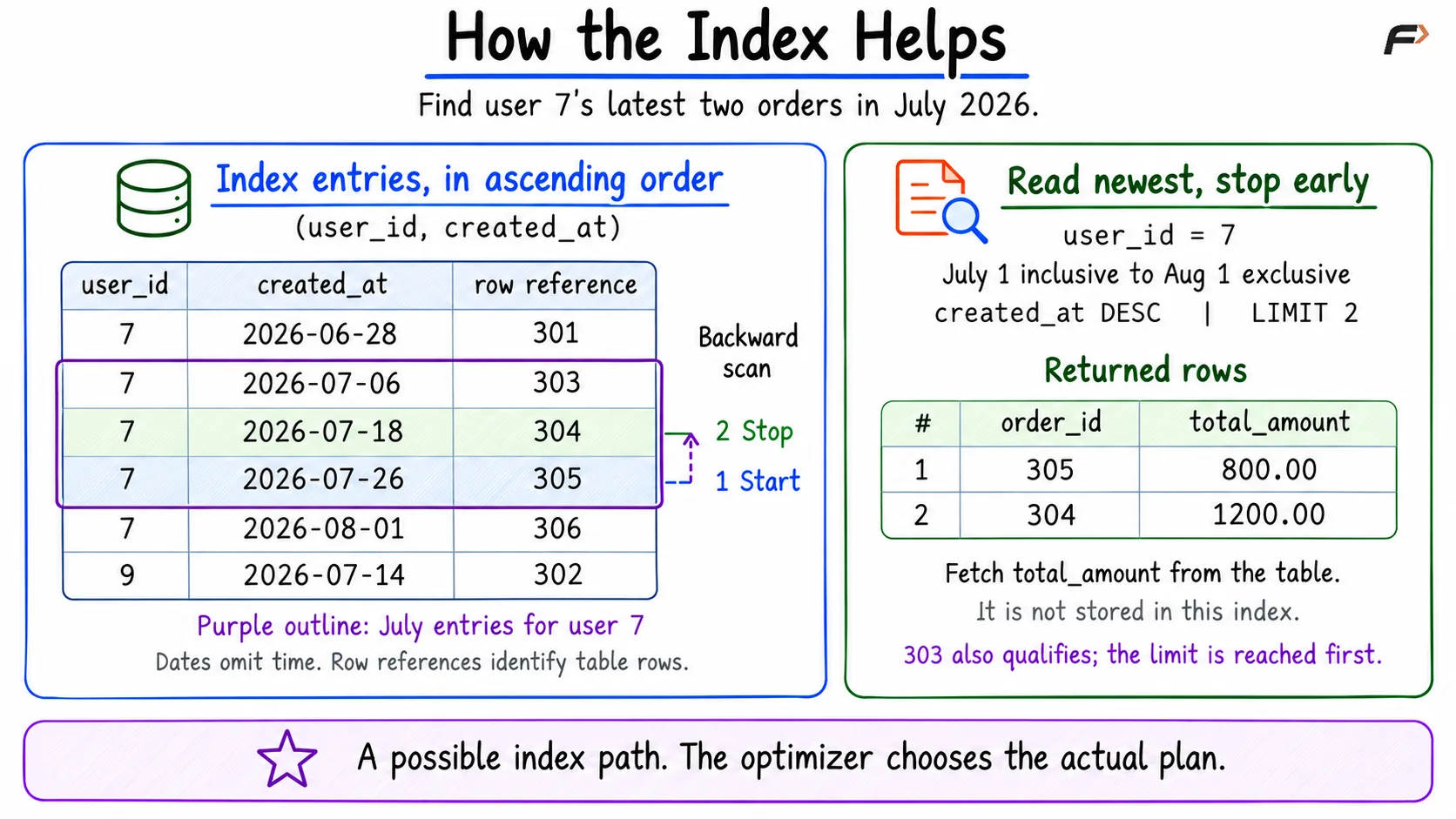
Filter by user: Locate the section containing user 7’s entries instead of searching every user’s orders.
Restrict the date range: Narrow that section to entries from July 1 up to, but excluding, August 1.
Read newest first: Traverse the matching range backward to satisfy ORDER BY created_at DESC without a separate sort.
Stop after enough matches: Once two qualifying rows have been returned, later matching entries need not all be processed.
The diagram shows this possible index path. The July entries remain ordered within user 7’s section, so the scan can start with order 305 and then reach order 304.
How the Index Helps
The query still needs table data for total_amount, which this index does not contain. An index can reduce search and sorting work without supplying every selected value.
This index most directly supports queries that filter by user, or by user and date together. A workload that mainly searches by date alone may benefit from a different index.
LIMIT 2 restricts the number of returned rows. It does not guarantee that only two rows are examined. Keep ORDER BY in the query, because an index alone does not guarantee the order of SQL results.
Verify the Benefit and Consider the Costs
Check the execution plan
EXPLAIN shows the chosen execution plan and its estimates. Check the access method, the index selected, the estimated row counts, and whether a separate sorting operation is needed.
Compare the plan and execution time before and after adding an index, using data and queries representative of the application. EXPLAIN ANALYZE executes the query and adds actual execution information; ordinary EXPLAIN does not measure its runtime.
Our six-row table demonstrates the query’s result and the index’s structure. It cannot establish a speedup. On such a small table, a scan may remain the cheapest choice.
Account for index maintenance
Storage cost: Each additional index occupies space. More and wider indexes increase the amount of data the database must maintain.
Write cost: Inserts, deletes, and changes to indexed values require index maintenance. Extra indexes can therefore slow write-heavy workloads.
Build cost: Adding an index to an existing table requires reading its data and constructing the index. On a large table, this can consume substantial time, processing capacity, and temporary storage.
Choose indexes around frequent, important queries, and verify that their read benefits justify their maintenance costs.
Summary
Query performance depends partly on how much data a query reads and how much sorting it performs. A suitable B-tree index can narrow the search, provide the required order, and enable early stopping. Composite-index column order matters, and the optimizer may still prefer a table scan. Check the actual workload and balance faster reads against storage, write, and index-build costs.
Be the first to add a comment.