Introduction
A training platform may let support staff read student records while allowing an operations team to correct them. Giving every account permission to delete records or change tables would provide more access than these jobs require.
Database permissions define which actions an account can perform. Roles make shared permissions easier to manage, while transactions control how related data changes are committed or rolled back. This part focuses on creating accounts, assigning privileges, and managing access.
Understanding Database Permissions
A privilege is permission to perform an operation on a database object.
Privilege | What it allows |
|---|---|
SELECT | Read records. |
INSERT | Add records. |
UPDATE | Modify existing records. |
DELETE | Remove records. |
These permissions are separate. An account that can read student records does not automatically receive permission to change or delete them.
The principle of least privilege means giving an account only the access needed for its work. For example, someone who only looks up student details may need SELECT, while someone who maintains those details may also need INSERT and UPDATE.
A table-level permission does not, by itself, limit a user to their own records. That requires additional access rules.
Create an Account and Grant Access
Consider a students table containing the following records:
student_id | full_name | city |
|---|---|---|
1 | Asha | Delhi |
2 | Meera | Pune |
3 | Kabir | Chennai |
Rahul needs to view these records. Start by creating his account and granting read access to the table.
Run account creation and permission changes as an administrator with the required authority. The examples assume that the table already exists and that Rahul has no other permissions on it. Use the matching version of each example and replace the sample passwords.
Grant Read Access
-- MySQL: run as an administrator.-- The host part limits this account to local connections.-- CREATE USER and GRANT cause implicit commits.CREATE USER 'rahul'@'localhost'IDENTIFIED BY 'Replace_with_your_own_password_1!';GRANT SELECTON training.studentsTO 'rahul'@'localhost';Creating an account and granting access are separate actions. In this example, the SELECT grant gives Rahul permission to read the student records.
Check Access from the User’s Account
Open a connection as Rahul and run:
SELECT student_id, full_name, cityFROM training.studentsORDER BY student_id;The query returns the three student records shown above, ordered by student_id. An attempt to insert, update, or delete records would be denied because those permissions have not been granted.
Manage Shared Permissions with Roles
A role is a named collection of privileges. It lets an administrator maintain permissions for a job or responsibility instead of repeating the same grants for every user.
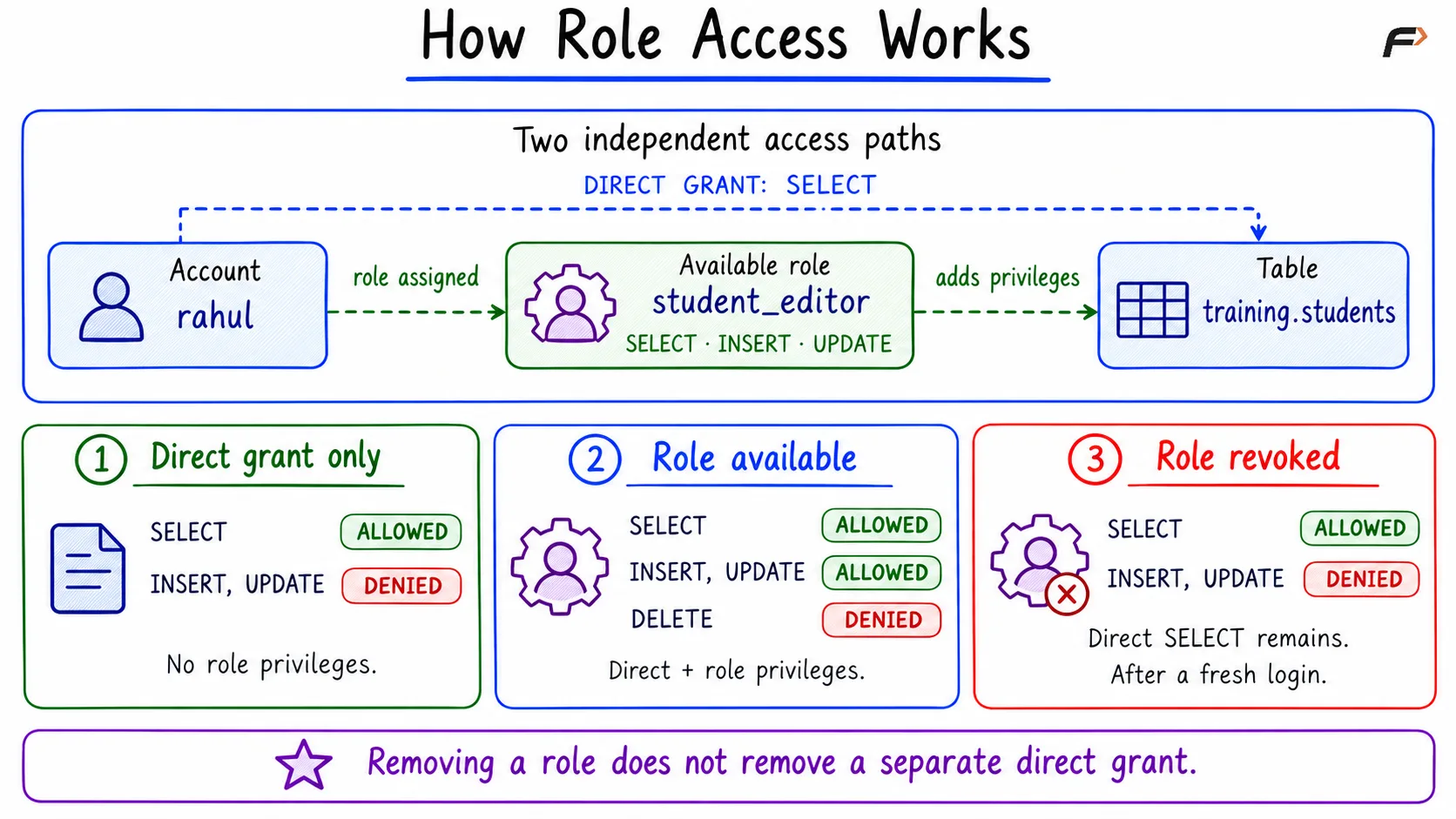
Suppose the operations team needs to read, add, and update student records. A student_editor role can contain those permissions. Once Rahul’s account is configured to use this role, he receives its permissions in addition to his direct SELECT grant.
Create and Assign the Role
-- MySQL: run as an administrator.CREATE ROLE 'student_editor';GRANT SELECT, INSERT, UPDATEON training.studentsTO 'student_editor';GRANT 'student_editor'TO 'rahul'@'localhost';-- Make the role available on Rahul's next login.SET DEFAULT ROLE 'student_editor'TO 'rahul'@'localhost';-- Inspect direct grants and privileges from this role.SHOW GRANTS FOR 'rahul'@'localhost'USING 'student_editor';Open a fresh connection as Rahul to check the resulting access. If continuing an existing session, use the appropriate session command where necessary.
-- MySQL: run as Rahul in an already-open session.SET ROLE 'student_editor';SELECT CURRENT_USER(), CURRENT_ROLE();Rahul can now read, insert, and update student records. DELETE remains unavailable because neither the direct grant nor the role provides it.
Permissions can come from more than one place. Here, SELECT is granted both directly and through student_editor. This matters when access is removed later.
How Role Access Works
Control the Scope of a Grant
The scope of a grant identifies the object or area to which it applies. Permission to read one table is narrower than permission to manage a broader set of database objects.
Choose the scope that matches the task. An account responsible only for student records should not receive unrelated administrative access.
ALL PRIVILEGES
ALL PRIVILEGES is a shortcut for granting the privileges available at a chosen scope. It does not automatically include permission to pass those privileges to other users.
A broad grant is convenient when an account needs broad responsibility, but a specific list such as SELECT, INSERT, and UPDATE makes limited access easier to understand and review.
WITH GRANT OPTION
WITH GRANT OPTION allows an account to delegate access. This is a separate responsibility from using the data.
If Rahul’s job includes granting read access to other accounts, an administrator could use the following optional grant. It is separate from the main walkthrough.
-- MySQL: optional delegation authority.-- GRANT OPTION applies at this scope and can cover other-- privileges held there, including privileges granted later.GRANT SELECTON training.studentsTO 'rahul'@'localhost'WITH GRANT OPTION;Grant delegation authority only when the account needs to manage access. Someone who only reads records usually does not need it.
Remove Access and Manage Accounts
Permissions should change when a person’s responsibilities change. REVOKE removes a specified privilege or role assignment.
The syntax follows a useful pattern: GRANT gives access TO an account, while REVOKE removes access FROM an account.
Remove a Privilege from a Role
Suppose the operations team should still read and add records but should no longer update existing records.
-- MySQL: run as an administrator.REVOKE UPDATEON training.studentsFROM 'student_editor';This changes the shared role. Every account relying on that role for UPDATE loses that source of permission. SELECT and INSERT remain available through the role.
Remove a Role from One User
If Rahul no longer belongs to the operations team, remove the role from his account.
-- MySQL: run as an administrator.REVOKE 'student_editor'FROM 'rahul'@'localhost';After a fresh login, Rahul can still read student records because his original direct SELECT grant remains. INSERT and UPDATE are unavailable under the example’s assumptions.
Removing a role does not remove a separate direct grant. To remove the remaining read access, revoke that direct SELECT grant as well. Check whether another grant or role still supplies the same permission.
Change a Password or Block New Logins
Account management changes the account itself. It can include replacing a password, blocking new logins, or restoring login access.
Each command below is a separate administrative action. Run the one needed for the account.
-- MySQL: change the password.ALTER USER 'rahul'@'localhost'IDENTIFIED BY 'Replace_with_a_new_unique_password_2!';-- Block new logins.ALTER USER 'rahul'@'localhost' ACCOUNT LOCK;-- Allow new logins again.ALTER USER 'rahul'@'localhost' ACCOUNT UNLOCK;These actions preserve the account and its grants. Changing a password or blocking new logins does not terminate sessions that are already connected.
How Permissions Relate to Transactions
Permissions determine whether an account may perform an operation. Transactions group related data changes so they can be committed or rolled back together.
For example, UPDATE permission allows Rahul to change a student’s city. A transaction can group that update with other permitted changes so they can be committed together or rolled back. Starting a transaction does not provide missing permissions.
Summary
Database privileges control permitted actions, while roles organize permissions shared by several accounts. Grant access at the required scope, verify it from the intended account, and give delegation authority only when needed. When removing access, check both direct grants and role-based permissions. Account management controls login details, while transactions determine how related data changes are committed or rolled back.
Be the first to add a comment.