Introduction
A query can return the correct records without presenting them in a useful order. A student leaderboard, for example, needs the highest marks first and may display only a few students.
ORDER BY and LIMIT handle these requirements. One defines the result’s order, while the other controls how many rows are returned.
What Do ORDER BY and LIMIT Do?
The ORDER BY clause sorts query results using one or more expressions. The LIMIT clause restricts the number of rows returned and can skip rows using an offset.
The basic syntax is:
SELECT column1, column2FROM table_nameORDER BY column_name ASCLIMIT row_count;The examples below use MySQL. LIMIT is also supported by some other database systems, but it is not universal SQL syntax.
Assume the students table contains:
student_id | student_name | department | marks |
|---|---|---|---|
101 | Asha | CSE | 85 |
102 | Ravi | ECE | 72 |
103 | Meera | CSE | 91 |
104 | Kabir | ME | 85 |
105 | Nila | ECE | NULL |
Sorting with ASC and DESC
Use ASC for ascending order and DESC for descending order.
SELECT student_name, marksFROM studentsORDER BY marks DESC;Meera appears first with 91 marks. Asha and Kabir follow with 85, then Ravi with 72. In MySQL, Nila’s null mark appears last for this descending sort.
Direction | Numeric values | Typical date order |
|---|---|---|
| Smallest to largest | Earliest to latest |
| Largest to smallest | Latest to earliest |
Ascending order is the default, so ORDER BY marks means ORDER BY marks ASC.
Text sorting follows the column’s collation, which determines comparison and ordering rules. ORDER BY arranges the query result; it does not permanently rearrange stored records.
Sorting by Multiple Columns
When several rows share the same first sort value, additional columns can determine their order.
SELECT student_id, student_name, marksFROM studentsORDER BY marks DESC, student_id ASC;The result is:
student_id | student_name | marks |
|---|---|---|
103 | Meera | 91 |
101 | Asha | 85 |
104 | Kabir | 85 |
102 | Ravi | 72 |
105 | Nila | NULL |
Marks are sorted first. Within the tied score of 85, student ID places Asha before Kabir.
Each sort expression has its own direction. In ORDER BY marks DESC, student_id, only marks use descending order; student IDs default to ascending order.
A unique final sort key, such as a primary key, provides an unambiguous order for otherwise tied records.
Returning Top Records with LIMIT
Use LIMIT after ORDER BY to return a limited number of ordered results.
SELECT student_id, student_name, marksFROM studentsORDER BY marks DESC, student_id ASCLIMIT 2;The result contains:
student_id | student_name | marks |
|---|---|---|
103 | Meera | 91 |
101 | Asha | 85 |
LIMIT 2 returns at most two rows. It does not automatically include every row tied with the last result, so Kabir is excluded despite also having 85 marks.
Without the student-ID tie-breaker, either Asha or Kabir could occupy the second position. Without ORDER BY altogether, LIMIT does not identify the highest, lowest, earliest, or latest records.
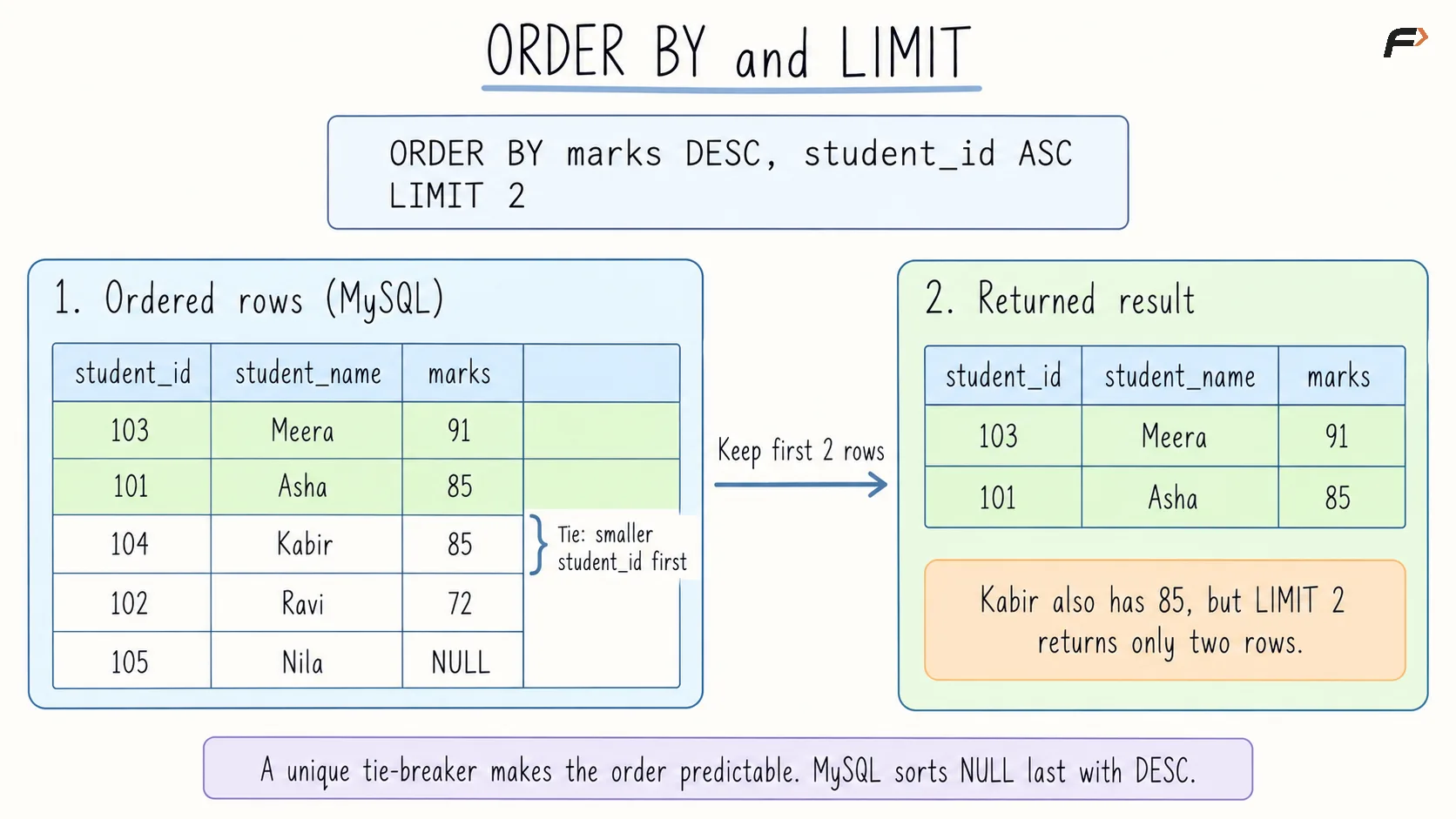
Sort, then limit
Combining WHERE, ORDER BY, and LIMIT
These clauses perform separate tasks:
WHERE: Determines which rows qualify.
ORDER BY: Defines their result order.
LIMIT: Restricts how many are returned.
For example, retrieve the highest-scoring CSE student:
SELECT student_name, marksFROM studentsWHERE department = 'CSE'ORDER BY marks DESC, student_id ASCLIMIT 1;The result is Meera with 91 marks.
Conceptually, the department condition restricts the candidates, their marks determine the order, and the limit retains the first result. The optimizer may use a physical plan that avoids separately materializing every intermediate stage.
Pagination with LIMIT and OFFSET
Pagination divides results into smaller pages. OFFSET specifies how many rows to skip before returning the requested number.
For a page size of two:
SELECT student_id, student_nameFROM studentsORDER BY student_idLIMIT 2 OFFSET 2;This skips IDs 101 and 102, then returns 103 and 104.
Page | Rows per page | Offset |
|---|---|---|
1 | 2 | 0 |
2 | 2 | 2 |
3 | 2 | 4 |
The calculation is Offset = (page number - 1) * page size.
MySQL also supports LIMIT offset, row_count, but the explicit LIMIT row_count OFFSET offset form makes the two roles easier to read.
Use a unique ordering for pagination. Even then, records inserted or deleted between page requests can shift offsets, causing omissions or repetitions. Large offsets can also require substantial work; cursor-based pagination is an alternative for more advanced use cases.
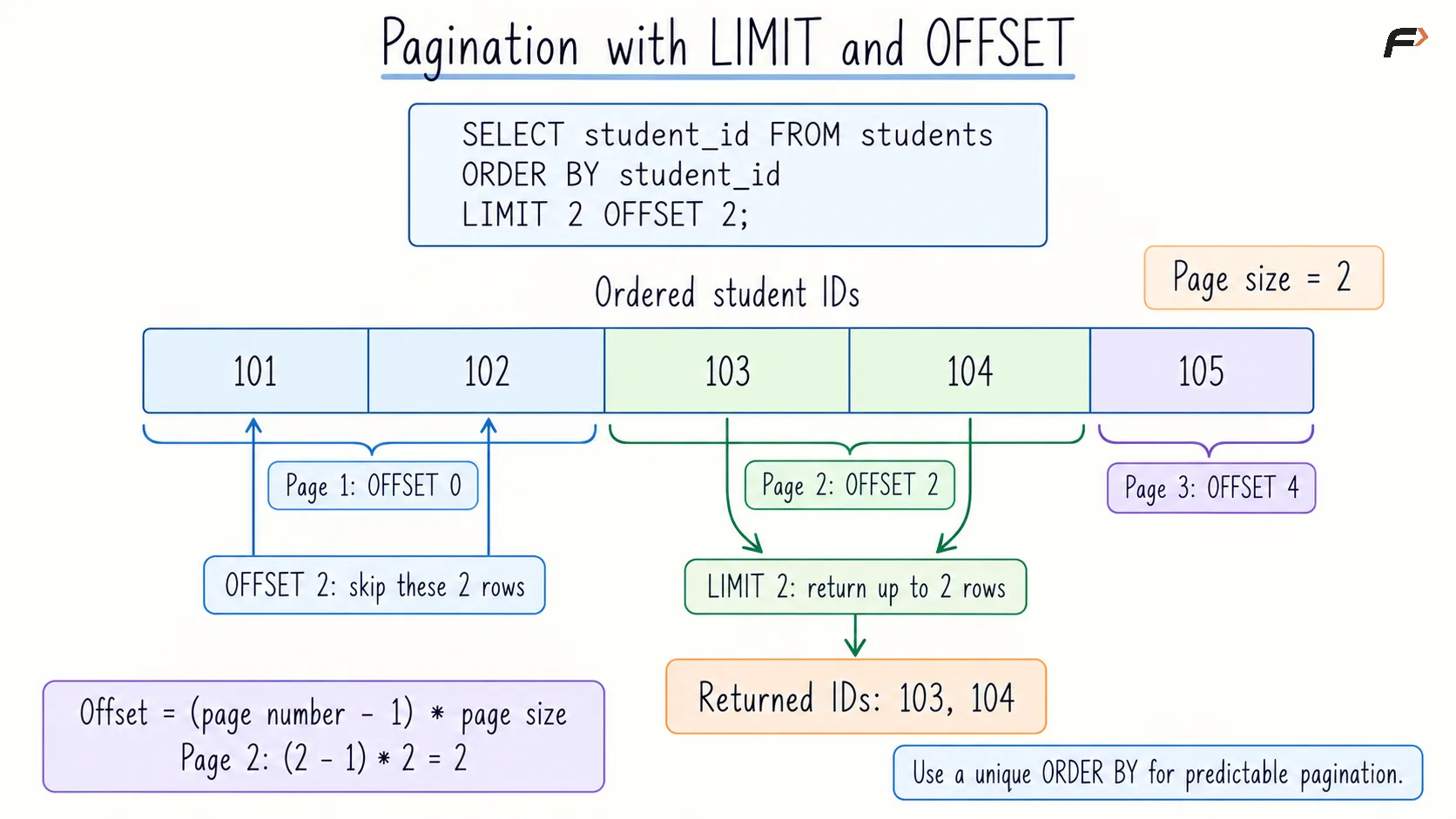
Pagination walkthrough
NULL Values and Common Mistakes
In MySQL, nulls appear first in ascending sorts and last in descending sorts. Other database systems can use different defaults.
To place null marks last while sorting known marks in ascending order in MySQL:
SELECT student_name, marksFROM studentsORDER BY marks IS NULL ASC, marks ASC, student_id ASC;The first expression places non-null marks before null marks. The remaining expressions sort the known scores and resolve ties.
Avoid these common mistakes:
Assuming insertion order: Use
ORDER BYwhen order matters.Ignoring ties: Add a unique tie-breaker for predictable top-record results.
Confusing LIMIT and filtering:
LIMIT 5means five rows, not rows whose values meet a condition.Reversing offset and count: Check the syntax when using MySQL’s comma form.
Expecting LIMIT to ensure speed: Performance still depends on filtering, indexes, sorting, and the execution plan.
Summary
ORDER BY defines how query results are sorted, while LIMIT controls how many rows are returned. Together, they support leaderboards, top-record queries, and paginated displays.
Specify sort directions clearly and resolve ties when a predictable subset matters. Account for null placement, changing data, and database-specific syntax when designing result pages.
Be the first to add a comment.