Introduction
SQL queries often combine related tables and apply conditions to select useful records. Although ON and WHERE can contain similar conditions, they serve different purposes.
The distinction becomes especially important with outer joins, where unmatched records may need to remain visible. Placing a condition in the correct clause helps preserve the required records and avoid unexpectedly removing them.
What Is the Difference Between ON and WHERE?
The ON clause defines which pairs of rows qualify as matches in a join. The WHERE clause filters the rows produced by the FROM clause, including any joins.
Aspect | ON | WHERE |
|---|---|---|
Main purpose | Define matching conditions for a join | Filter the resulting rows |
With an inner join | Determines which row pairs match | Can further restrict those matches |
With an outer join | Determines matches while unmatched rows from the preserved side remain | Can remove rows, including unmatched rows |
Without a join | Not used as a standalone row filter | Can filter a single table |
An ON condition can include both a comparison between tables and additional requirements involving one table. It is not limited to comparing IDs.
Example Tables
Consider a college database containing two tables.
The Department table stores the departments offered by the college. A department can exist even when no students are assigned to it.
Department
DeptID | DeptName |
|---|---|
10 | Computer Science |
20 | Electronics |
30 | Mathematics |
The Student table stores each student’s identifier, name, assigned department, and semester.
Student
StudentID | Name | DeptID | Semester |
|---|---|---|---|
101 | Asha | 10 | 2 |
102 | Ravi | 20 | 4 |
103 | Meera | 10 | 2 |
104 | Neha | NULL | 2 |
Department.DeptID and Student.StudentID are primary keys. A non-NULL value in Student.DeptID refers to an existing department.
Asha and Meera belong to Computer Science and are in semester 2. Ravi belongs to Electronics and is in semester 4. Mathematics has no students, while Neha has no assigned department.
ON vs. WHERE with INNER JOIN
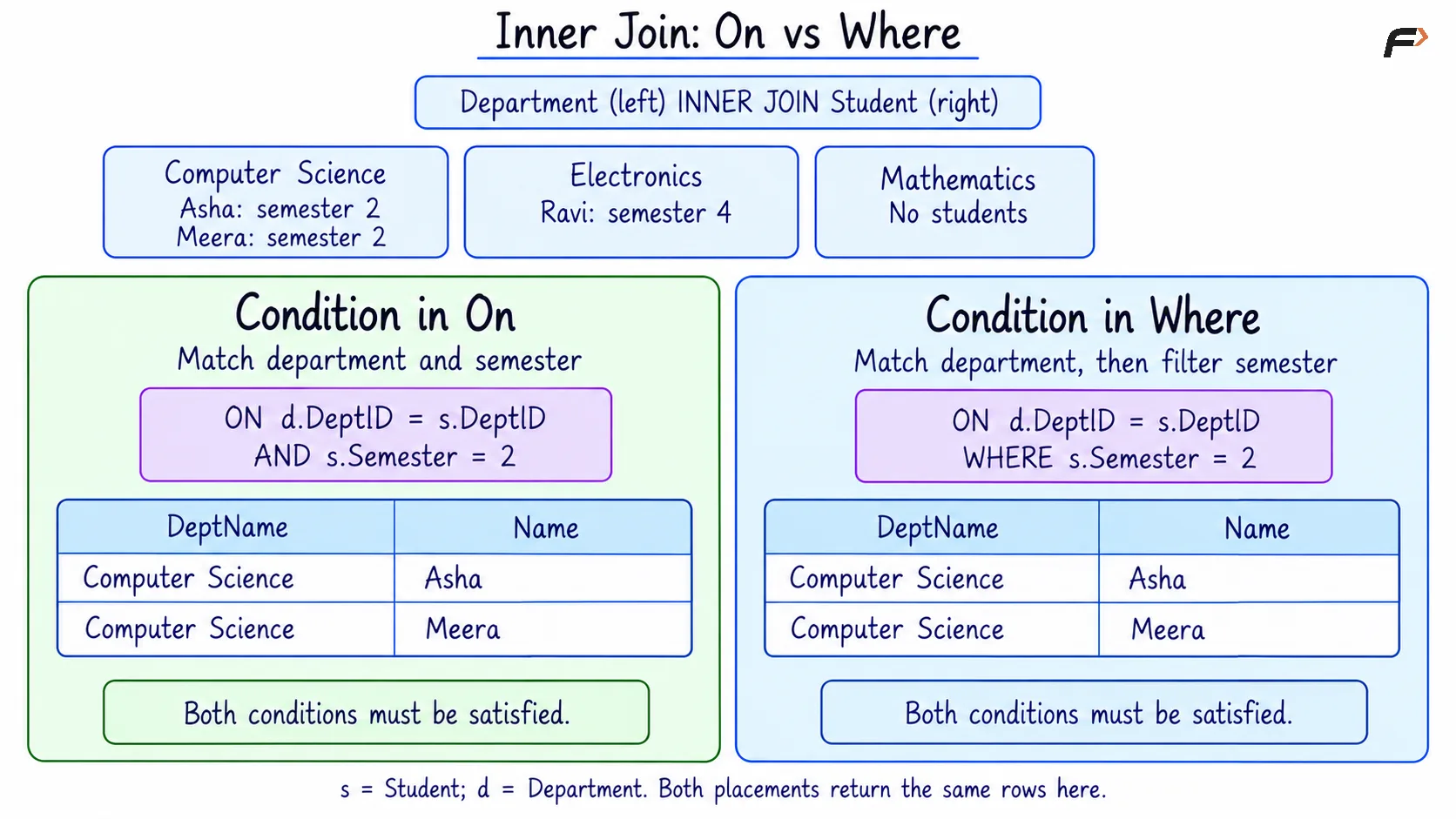
An INNER JOIN returns only matching row pairs. For a condition such as checking a student’s semester, placing it in ON or WHERE produces the same result when the rest of the query remains unchanged.
Objective: Display students in semester 2 who belong to an existing department.
Consider the following queries to apply the semester condition in either ON or WHERE.
-- Semester condition in ONSELECT d.DeptID, d.DeptName, s.Name, s.SemesterFROM Department AS dINNER JOIN Student AS s ON d.DeptID = s.DeptID AND s.Semester = 2ORDER BY d.DeptID, s.StudentID;-- Semester condition in WHERESELECT d.DeptID, d.DeptName, s.Name, s.SemesterFROM Department AS dINNER JOIN Student AS s ON d.DeptID = s.DeptIDWHERE s.Semester = 2ORDER BY d.DeptID, s.StudentID;AS d and AS s assign temporary aliases, or shorter names, to Department and Student. For example, s.Semester refers to the student’s semester. AND requires both conditions to be true.
ORDER BY d.DeptID, s.StudentID sorts by department ID first and student ID within each department, both in ascending order.
Expected result is same for both placements:
DeptID | DeptName | Name | Semester |
|---|---|---|---|
10 | Computer Science | Asha | 2 |
10 | Computer Science | Meera | 2 |
Both versions require matching department IDs and semester 2. Ravi fails the semester condition. Neha has no matching department, and Mathematics has no matching student, so neither contributes a row to this inner join.
For readability, an inner join commonly keeps the relationship between tables in ON and places additional result filters in WHERE.
INNER JOIN : ON VS WHERE
ON vs. WHERE with LEFT JOIN
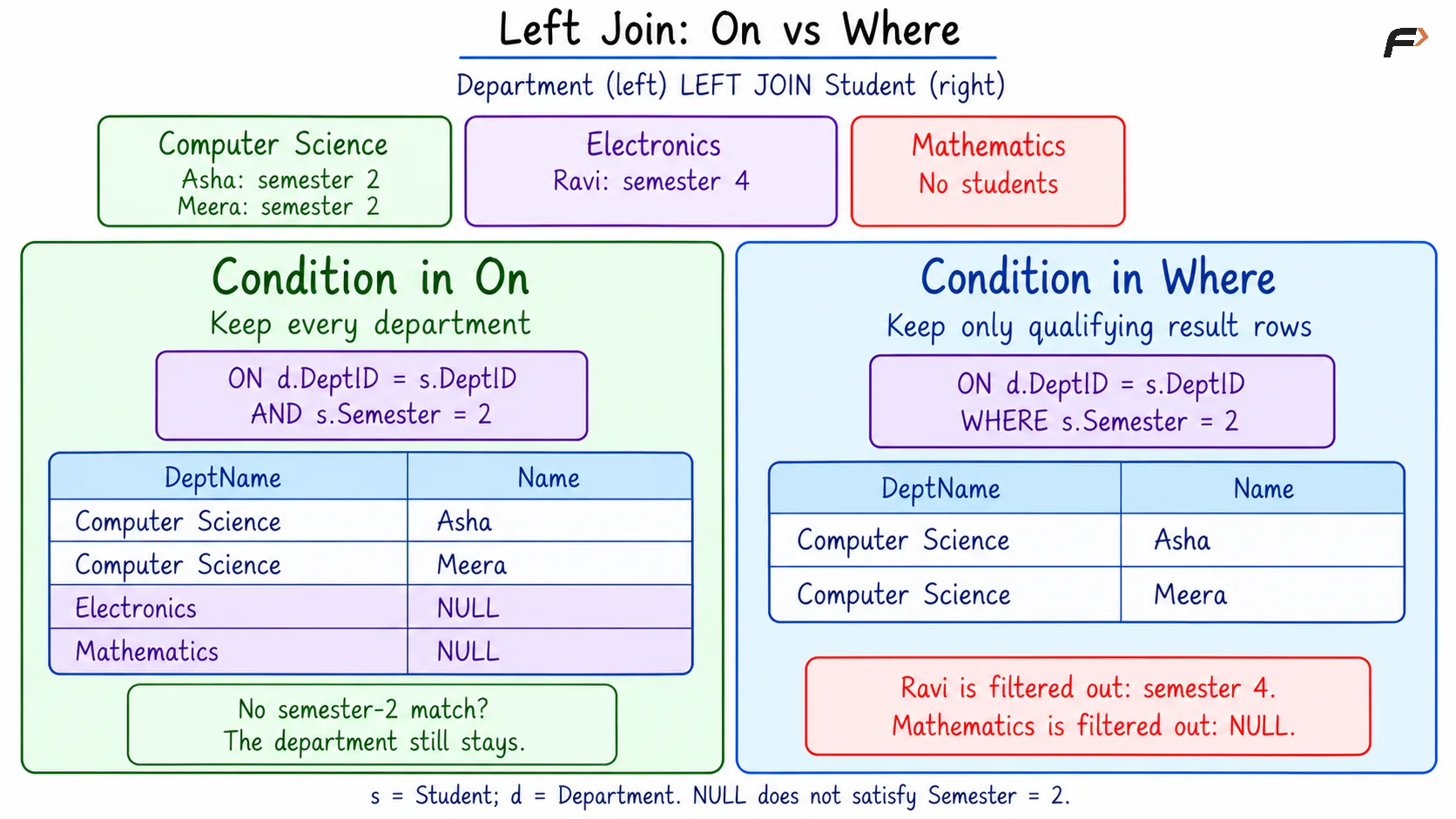
A LEFT JOIN preserves every row from the left table during the join. When no right-table row satisfies the complete ON condition, the right-table columns receive NULL.
In the following examples, Department is the left table and Student is the right table. The placement of the semester condition changes whether departments without qualifying students remain visible.
Condition in ON: Preserve Every Department
Objective: Display every department, showing student details only for students in semester 2.
Consider the following queries to restrict student matches while keeping all departments.
SELECT d.DeptID, d.DeptName, s.Name, s.SemesterFROM Department AS dLEFT JOIN Student AS s ON d.DeptID = s.DeptID AND s.Semester = 2ORDER BY d.DeptID, s.StudentID;Expected result
DeptID | DeptName | Name | Semester |
|---|---|---|---|
10 | Computer Science | Asha | 2 |
10 | Computer Science | Meera | 2 |
20 | Electronics | NULL | NULL |
30 | Mathematics | NULL | NULL |
Asha and Meera satisfy both parts of the ON condition. Ravi does not qualify because he is in semester 4, but Electronics remains because the left join preserves every department.
The NULL values for Electronics mean no student matched the complete condition. They do not mean Electronics has no students. Mathematics also remains, although it has no students at all.
Condition in WHERE: Filter the Joined Rows
Objective: Display only rows containing a matched student in semester 2.
Consider the following queries to apply the semester requirement to the joined result.
SELECT d.DeptID, d.DeptName, s.Name, s.SemesterFROM Department AS dLEFT JOIN Student AS s ON d.DeptID = s.DeptIDWHERE s.Semester = 2ORDER BY d.DeptID, s.StudentID;Expected result
DeptID | DeptName | Name | Semester |
|---|---|---|---|
10 | Computer Science | Asha | 2 |
10 | Computer Science | Meera | 2 |
The join initially matches Ravi with Electronics and preserves Mathematics with NULL student columns. The WHERE condition then removes Ravi’s row because his semester is 4 and removes Mathematics because its student-side semester is NULL.
WHERE keeps only rows for which its condition is true. A comparison such as NULL = 2 is unknown, so it does not pass the filter.
For this particular condition, the left join produces the same final result as an inner join with the semester filter. This does not mean every WHERE condition removes unmatched rows: an IS NULL condition can deliberately select them.
LEFT JOIN : ON VS WHERE
ON vs. WHERE with RIGHT JOIN
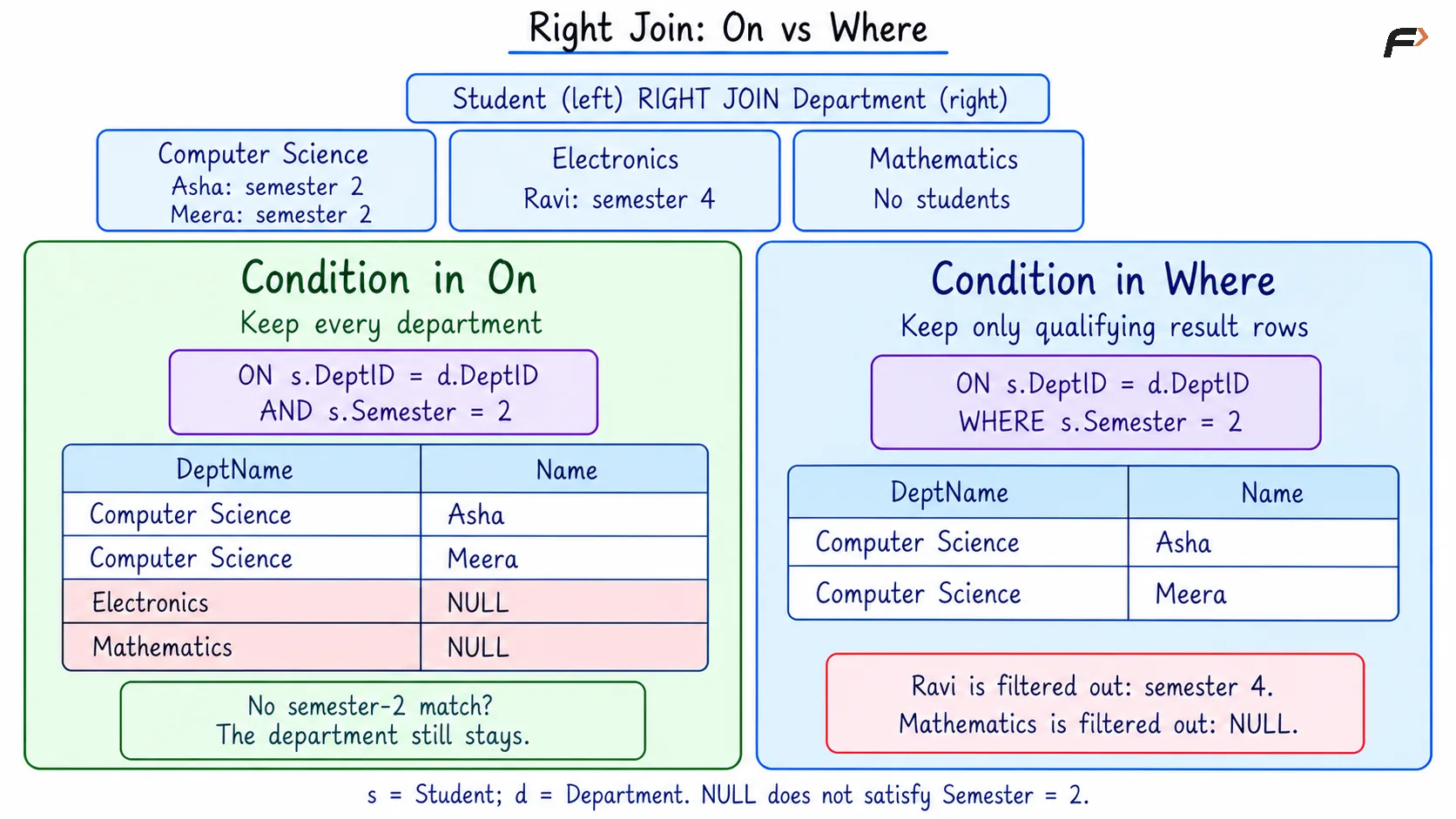
A RIGHT JOIN preserves every row from the right table during the join. When no left-table row satisfies the complete ON condition, the left-table columns receive NULL.
In the following examples, Student is the left table and Department is the right table. The join therefore preserves departments, while the placement of the semester condition determines which rows remain in the final result.
Condition in ON: Preserve Every Department
Objective: Display every department, showing student details only for students in semester 2.
Consider the following queries to restrict student matches while keeping all departments.
SELECT d.DeptID, d.DeptName, s.Name, s.SemesterFROM Student AS sRIGHT JOIN Department AS d ON s.DeptID = d.DeptID AND s.Semester = 2ORDER BY d.DeptID, s.StudentID;AS s and AS d give shorter names to Student and Department. The AND operator requires both conditions to be true: the department IDs must match, and the student must be in semester 2.
ORDER BY sorts the result by department ID first and student ID within each department, both in ascending order.
Expected result
DeptID | DeptName | Name | Semester |
|---|---|---|---|
10 | Computer Science | Asha | 2 |
10 | Computer Science | Meera | 2 |
20 | Electronics | NULL | NULL |
30 | Mathematics | NULL | NULL |
Asha and Meera satisfy both conditions, so their details appear with Computer Science. Ravi does not satisfy the semester condition because he is in semester 4. Electronics still appears because it belongs to the preserved right table.
Mathematics also remains, although it has no students. In both unmatched rows, NULL means no student satisfied the complete join condition. It does not necessarily mean the department has no students.
Neha does not appear because her department ID is NULL, so she has no matching department. A right join does not preserve unmatched rows from the left table.
Condition in WHERE: Filter the Joined Rows
Objective: Display only rows containing a matched student in semester 2.
Consider the following queries to apply the semester requirement to the joined result.
SELECT d.DeptID, d.DeptName, s.Name, s.SemesterFROM Student AS sRIGHT JOIN Department AS d ON s.DeptID = d.DeptIDWHERE s.Semester = 2ORDER BY d.DeptID, s.StudentID;Expected result
DeptID | DeptName | Name | Semester |
|---|---|---|---|
10 | Computer Science | Asha | 2 |
10 | Computer Science | Meera | 2 |
The join matches students to departments using only their department IDs. The WHERE condition then filters those joined rows:
Computer Science: Asha and Meera remain because their semester is 2.
Electronics: Ravi’s row is removed because his semester is 4.
Mathematics: Its unmatched row is removed because the student-side semester is
NULL.
WHERE keeps only rows whose condition is true. Comparing NULL with 2 produces an unknown result, so the Mathematics row does not pass the filter.
For this particular condition, the right join produces the same final result as an inner join with the semester filter. To retain every department while limiting which students match, place the semester condition in ON.
The same distinction applies to a FULL OUTER JOIN, which preserves unmatched rows from both tables during the join: a later WHERE condition can still remove those rows.
RIGHT JOIN : ON VS WHERE
Filtering the Preserved Table
An ON condition does not remove a row merely because that row belongs to the preserved table and fails the condition. It prevents matches, but the outer join can still retain that row with NULL values from the other side.
For example, if the report should contain only Computer Science, the condition d.DeptID = 10 belongs in WHERE. Placing it only in the ON clause of the department-preserving left join would still retain Electronics and Mathematics, with NULL student details.
This separates two different requirements: deciding which records may match and deciding which departments should appear in the report.
Summary
ON defines which rows match in a join, while WHERE filters the resulting rows. A straightforward condition can produce the same result in either clause with an inner join, but moving it between clauses can change an outer join’s result.
For outer joins, identify the side whose unmatched records must remain. Use ON to control qualifying matches and WHERE to select the required result rows, including unmatched rows when an IS NULL check is appropriate.
Be the first to add a comment.