Introduction
Placing an order and calculating a year’s sales both involve data, but they require different kinds of database work. One changes a small set of records quickly, while the other may examine millions of records.
OLTP, OLAP, data warehousing, and columnar storage help explain these differences. They describe workloads, analytical architecture, and physical storage choices rather than four competing database types.
OLTP: Run Operational Transactions
Online Transaction Processing (OLTP) supports the application’s everyday operations.
Examples include placing orders, recording payments, updating stock, and changing customer details.
A typical transaction might:
Create an order.
Add its order items.
Update the relevant stock records.
Commit the related changes.
OLTP workloads commonly involve many concurrent requests, selective lookups, and short transactions. Correctness, predictable latency, and recovery are important.
A request may touch only a few records, but the system must handle many such requests safely.
OLAP: Analyze Larger Datasets
Online Analytical Processing (OLAP) supports analysis across many records, often including historical data.
For example:
SELECT region, SUM(amount) AS total_salesFROM salesWHERE sale_date >= '2026-01-01' AND sale_date < '2027-01-01'GROUP BY region;This query may examine a large portion of the sales dataset to produce a small summary.
OLAP workloads commonly involve scans, joins, grouping, and aggregation. Their priorities include efficient data processing and acceptable completion times for complex queries.
Analytical systems can still serve interactive requests. “Analytical” does not necessarily mean an overnight batch job.
OLTP vs OLAP
Aspect | OLTP | OLAP |
|---|---|---|
Main purpose | Run operational workflows | Analyze data |
Typical access | Selective reads and writes | Broad reads and aggregation |
Transaction pattern | Many short transactions | Often longer analytical queries |
Data emphasis | Current operational state | Historical and integrated information |
Example | Update one order | Compare quarterly sales by region |
These are common patterns, not strict boundaries.
A system can support both workloads. However, a large analytical scan can compete with operational requests for CPU, memory, and storage bandwidth.
What Is a Data Warehouse?
A data warehouse brings data together for analysis, often preserving history beyond what operational applications need.
Sources might include order processing, customer management, inventory, and external datasets.
Before analysis, the data may need:
Consistent customer and product identifiers.
Standardized dates, currencies, and units.
Duplicate handling and validation.
Historical records and agreed business definitions.
The warehouse is therefore more than a copy of one production table.
Data can arrive through scheduled batches, streaming pipelines, or change-data capture. Its freshness depends on the ingestion and processing design.
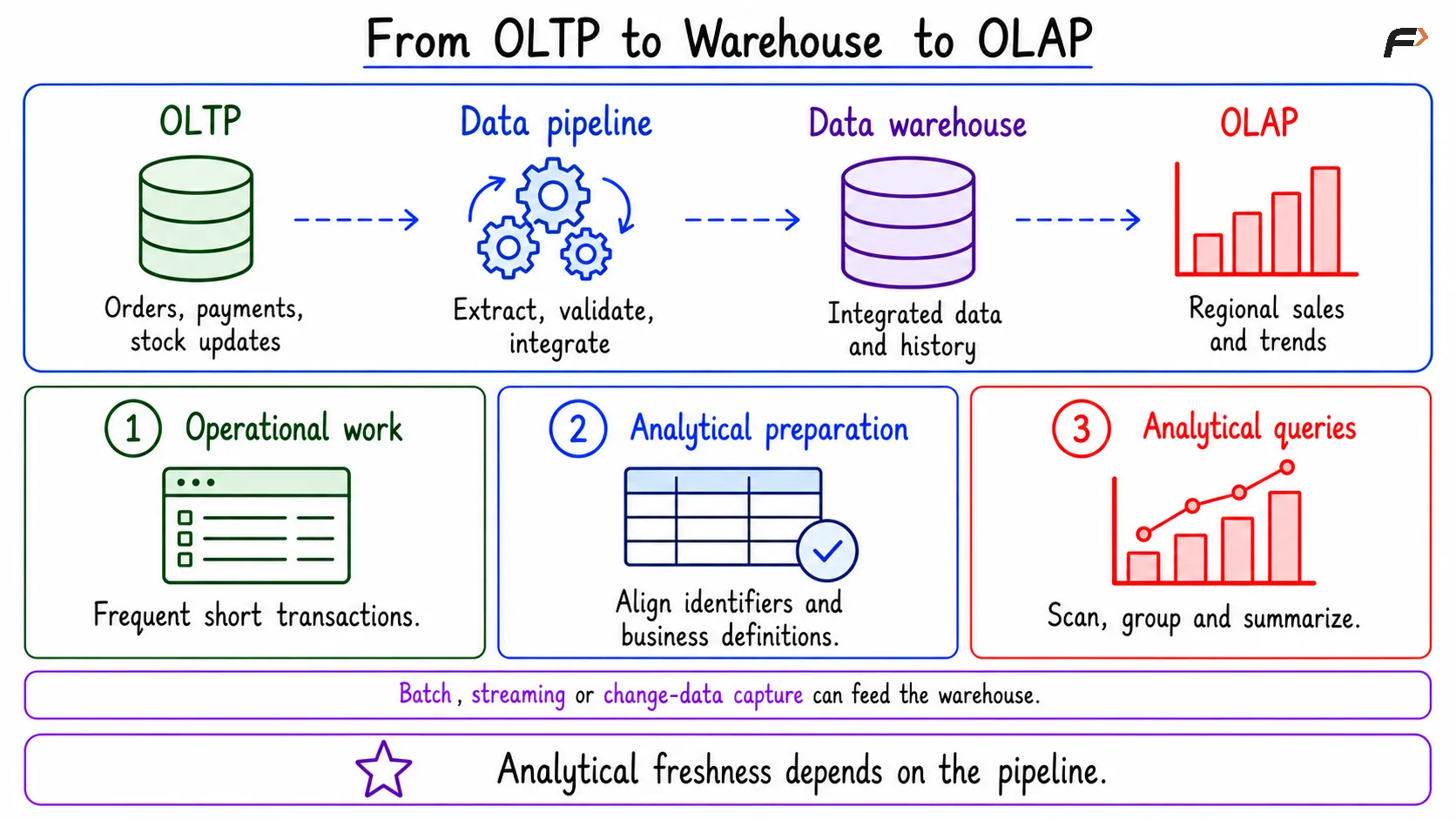
OLTP to warehouse to OLAP
ETL and ELT
Two common pipeline patterns are:
Pattern | Sequence |
|---|---|
ETL | Extract, transform, then load |
ELT | Extract, load, then transform |
The distinction concerns where transformation occurs. Neither pattern automatically guarantees clean data or real-time freshness.
Warehouses often use analytical models such as fact tables for events and dimension tables for descriptive attributes.
Row Storage vs Columnar Storage
Consider:
order_id | region | amount |
|---|---|---|
501 | North | 100 |
502 | South | 80 |
503 | North | 120 |
Row-oriented storage keeps a record’s fields together in its physical layout. This can suit accessing or modifying individual records.
Columnar storage groups values from the same column, usually within manageable storage chunks rather than one giant file per column.
For example, the region values and amount values are organized separately.
A query calculating sales by region may need those two columns without reading order_id.
Neither layout guarantees the best performance for every query. Indexes, compression, caching, and execution methods also matter.
Why Columnar Storage Helps Analytics
Columnar organization offers several opportunities:
Column pruning: Read the columns required by the query.
Compression: Similar values and types can be encoded efficiently.
Batch processing: Apply operations to groups of values.
Chunk skipping: Use metadata, where available, to avoid irrelevant storage chunks.
For a table with many columns, an aggregation using only a few can process substantially less data.
However, columnar storage does not mean that only matching records are read. The database may still scan selected columns across many records unless filtering or skipping structures reduce that work.
Wide-column NoSQL models are also different from analytical columnar storage, despite the similar names.
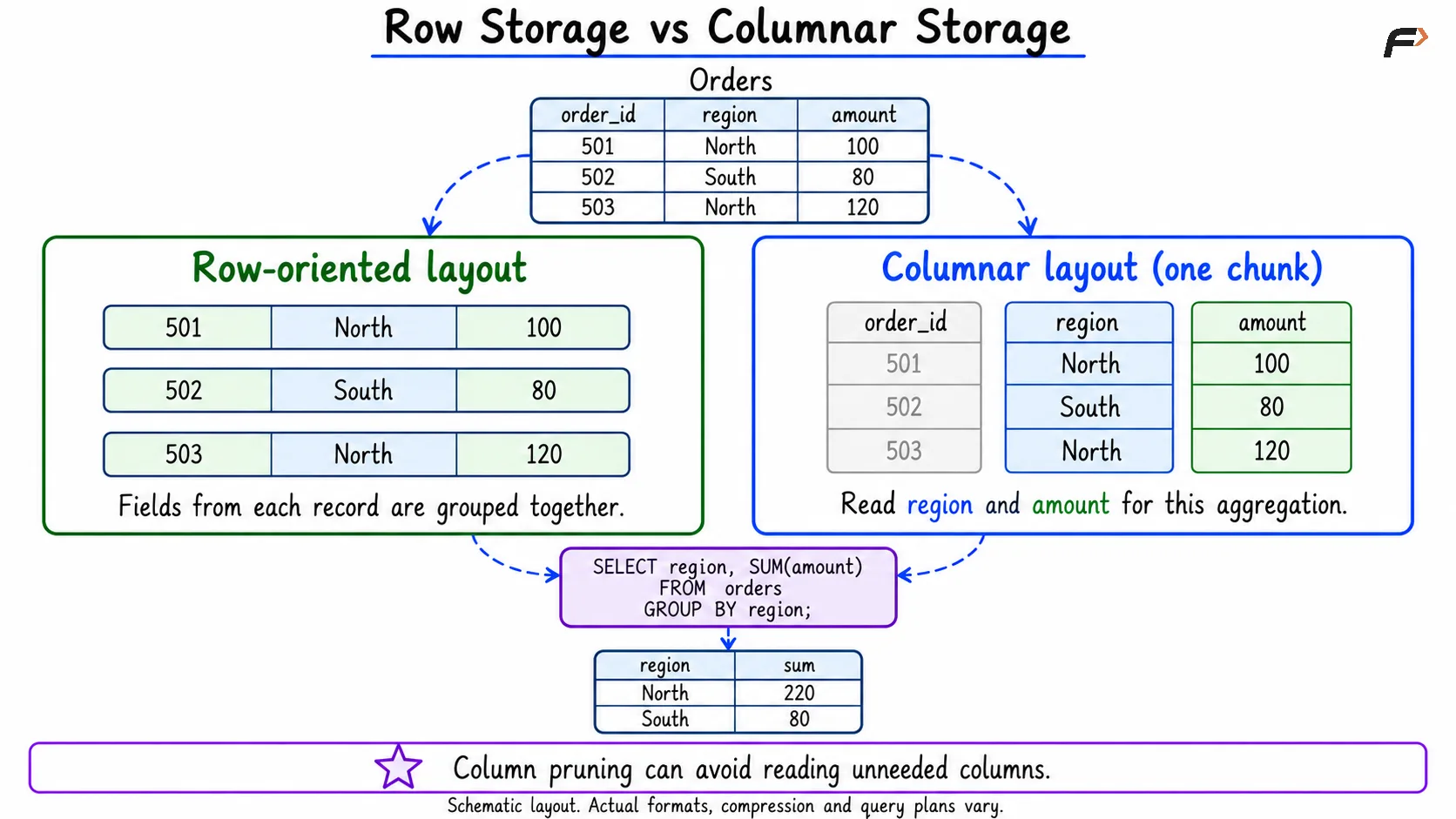
Row vs column storage
Updates and Mixed Workloads
Accessing a complete record can require combining values from several column segments. Frequent small updates can also require additional management.
Columnar systems may address this through buffering, versioning, delta structures, and background merging. Their behavior depends on the implementation.
Some architectures use separate operational and analytical systems, with a pipeline between them. Others support mixed workloads through Hybrid Transactional/Analytical Processing (HTAP) techniques.
Neither approach removes trade-offs. Separate systems introduce synchronization and freshness considerations, while mixed systems must manage resource competition and maintain the required guarantees.
Choosing an Approach
Begin with the work the system must perform:
Does it handle frequent small transactions or broad analytical scans?
How many columns does each query need?
How fresh must analytical results be?
What history must be retained?
Can reporting compete with customer-facing traffic?
What operational complexity can the team manage?
Avoid assuming that every OLTP database uses only row storage or every warehouse uses only columnar storage. Workload and storage layout are related decisions, not interchangeable labels.
Summary
OLTP supports operational transactions, while OLAP supports analysis across larger datasets. A data warehouse integrates information for analytical use and often preserves history.
Columnar storage can improve analytical efficiency through column pruning, compression, and batch processing. Choosing a design requires balancing query patterns, updates, freshness, and resource use.
Be the first to add a comment.