Introduction
A missing value, a numeric zero, and a blank text value can look similar in a query result. However, they represent different information and can produce different results in calculations and comparisons.
SQL distinguishes these situations through NULL, 0, and the empty string ''. Choosing the correct representation helps preserve what the data actually means.
Difference Between NULL, 0, and Empty String
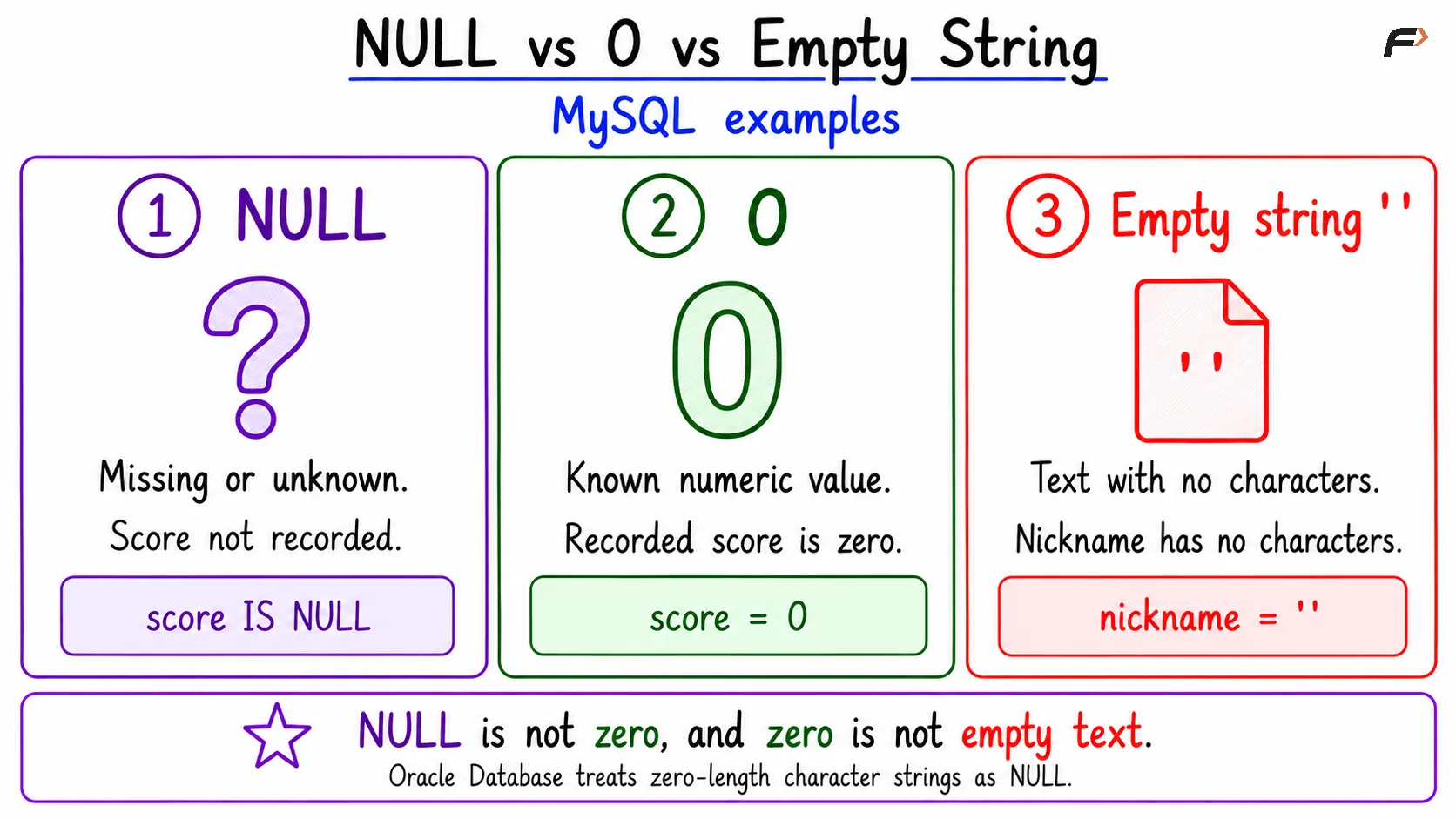
NULL indicates that a value is missing, unknown, or not applicable. It does not represent a particular number or text value.
Zero and the empty string are actual supplied values: 0 is a number, while '' is a string containing zero characters.
Feature |
|
| Empty string |
|---|---|---|---|
Meaning | Missing or unknown information | Known numeric zero | Known text value with no characters |
Example | Score not recorded | Recorded score of zero | Nickname stored as empty text |
Typical test |
|
|
|
Counted by | No | Yes | Yes |
Allowed by | No | Yes, for a suitable column | Yes, for a suitable text column |
The examples below use MySQL. Oracle Database treats zero-length character strings as null, so the empty-string distinction is database-specific.
null vs 0 vs empty string in sql
A Simple Table Example
Consider students whose scores and nicknames have been recorded differently:
CREATE TABLE student_results ( student_id INT PRIMARY KEY, score INT, nickname VARCHAR(30));INSERT INTO student_results (student_id, score, nickname)VALUES (101, NULL, NULL), (102, 0, ''), (103, 80, 'Mia');The records have different meanings:
Student 101: The score and nickname are missing or unknown.
Student 102: The score is explicitly zero, and the nickname contains no characters.
Student 103: The recorded score is 80, and the nickname is
'Mia'.
An empty string is also different from ' ', which contains one space. Similarly, 'NULL' is text containing four letters; it is not the SQL marker NULL.
Comparing and Filtering Values
Use IS NULL to find missing values:
SELECT student_idFROM student_resultsWHERE score IS NULL;This returns student 101. To find a recorded zero, use an ordinary comparison:
SELECT student_idFROM student_resultsWHERE score = 0;This returns student 102. For an empty nickname, use:
SELECT student_idFROM student_resultsWHERE nickname = '';This also returns student 102.
Do not use score = NULL or score <> NULL to test for missing values. Ordinary comparisons involving NULL evaluate to unknown, including NULL = NULL. A WHERE clause retains only rows whose condition is true.
For example, WHERE score <> 0 returns student 103, but not student 101. If missing scores should also be included, state that explicitly:
SELECT student_idFROM student_resultsWHERE score <> 0 OR score IS NULL;Effect on Calculations and Aggregate Functions
A zero participates in arithmetic as a known number. A missing value generally makes an arithmetic expression unknown: for example, 0 + 10 produces 10, while NULL + 10 produces NULL.
Aggregate functions also distinguish between missing and supplied values:
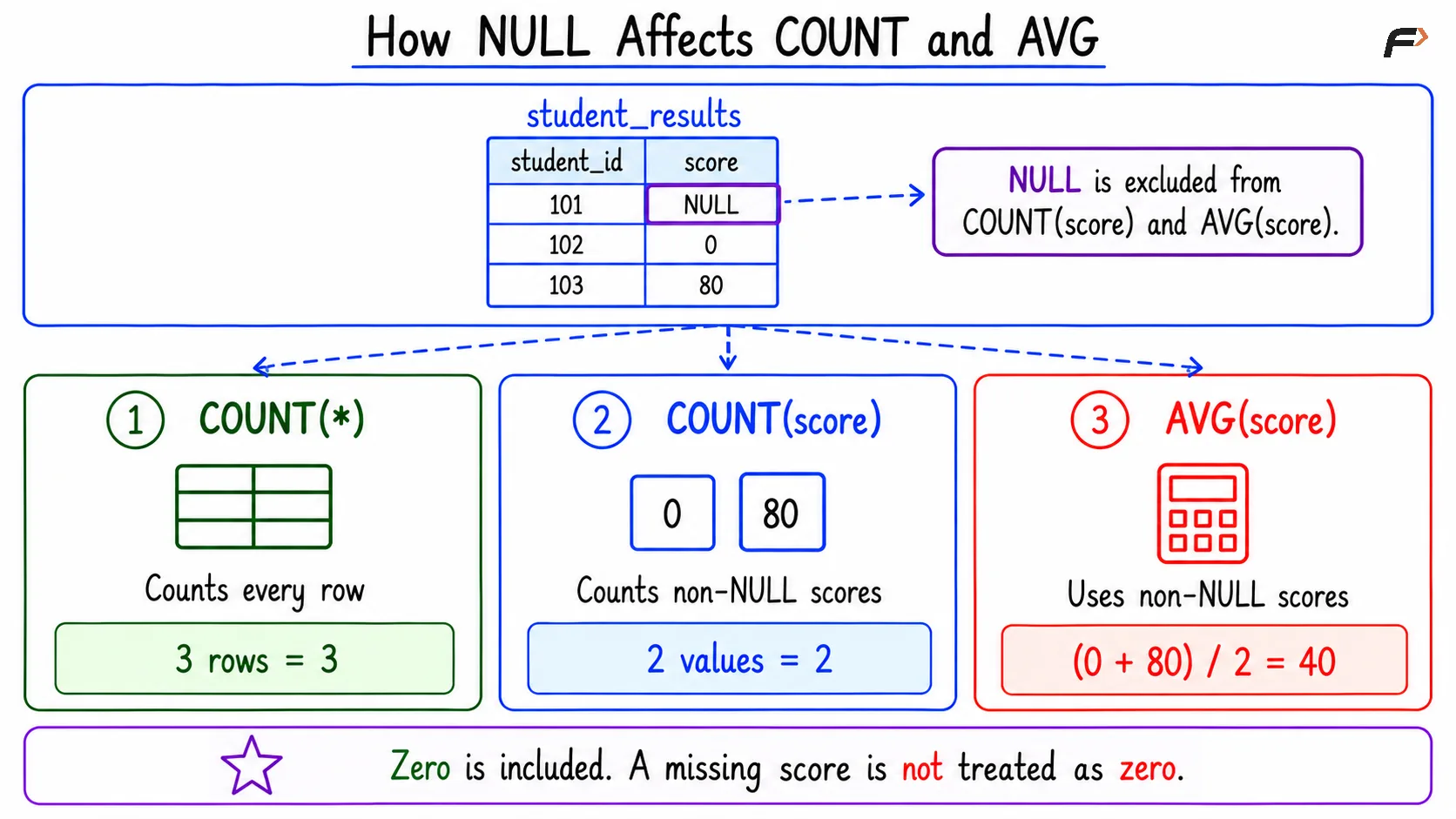
SELECT COUNT(*) AS total_students, COUNT(score) AS recorded_scores, COUNT(nickname) AS recorded_nicknames, SUM(score) AS total_score, AVG(score) AS average_scoreFROM student_results;For the sample records:
Expression | Result | Reason |
|---|---|---|
| 3 | Counts all rows |
| 2 | Excludes the null score |
| 2 | Counts |
| 80 | Adds 0 and 80 |
| 40 | Divides 80 by two recorded scores |
The missing score is not treated as zero. Replacing it with zero would change the average by increasing the number of scores included.
Avoid using empty strings for numeric information. Implicit conversions vary between database systems and can lead to unexpected results.
How null effect count and average
Handling Missing Values with COALESCE
COALESCE returns the first non-null expression in its argument list. It is useful when a query needs a display value for missing information.
SELECT student_id, COALESCE(nickname, 'Not provided') AS display_nameFROM student_results;Student 101 receives 'Not provided', but student 102 still has an empty string. This is because COALESCE checks for NULL, not empty text.
If both empty strings and nulls should receive the same display label, combine NULLIF and COALESCE:
SELECT student_id, COALESCE( NULLIF(nickname, ''), 'Not provided' ) AS display_nameFROM student_results;NULLIF(nickname, '') returns NULL when the nickname is empty. The fallback label then applies to both students 101 and 102.
These expressions change the query result, not the stored records. Replace missing numeric values with zero only when that interpretation matches the data’s meaning.
Constraints and Common Mistakes
A NOT NULL constraint prevents missing values, but it does not automatically reject zero or empty text. Additional rules are needed when those values are unacceptable.
For example, in MySQL:
student_name VARCHAR(100) NOT NULL CHECK (CHAR_LENGTH(TRIM(student_name)) > 0)This definition rejects NULL, an empty string, and names consisting only of ordinary spaces.
Keep these distinctions in mind:
Unknown is not zero: A score not recorded should not automatically become a score of zero.
Empty is not missing: Decide whether an empty text value has a useful meaning in the application.
Blank-looking output can be ambiguous: Use explicit tests rather than relying on how a client displays values.
Defaults are separate: An omitted column may receive a default; an explicitly supplied
NULLis not generally replaced by that default.
Summary
NULL represents missing or unknown information, 0 represents a known numeric value, and '' represents text with no characters in systems such as MySQL. These meanings affect filtering, calculations, counts, and validation.
Use IS NULL for missing-value tests and ordinary comparisons for supplied values. Apply replacement expressions and constraints deliberately so that convenient formatting does not change the meaning of the data.
Be the first to add a comment.