Introduction
Two users may try to update the same student record at the same time. The database must decide which update can proceed, what other users can read, and how to recover if an operation fails.
In MySQL, the InnoDB storage engine coordinates this work through transactions, locks, and recovery logs. A transaction groups operations so that the application can commit them together or roll them back.
How InnoDB Handles a Transaction
A transaction belongs to the connection that starts it. After START TRANSACTION, keep its statements and final COMMIT or ROLLBACK on that same connection. An application using a connection pool should keep one connection for the whole transaction. A COMMIT sent through another connection cannot finish the original transaction.
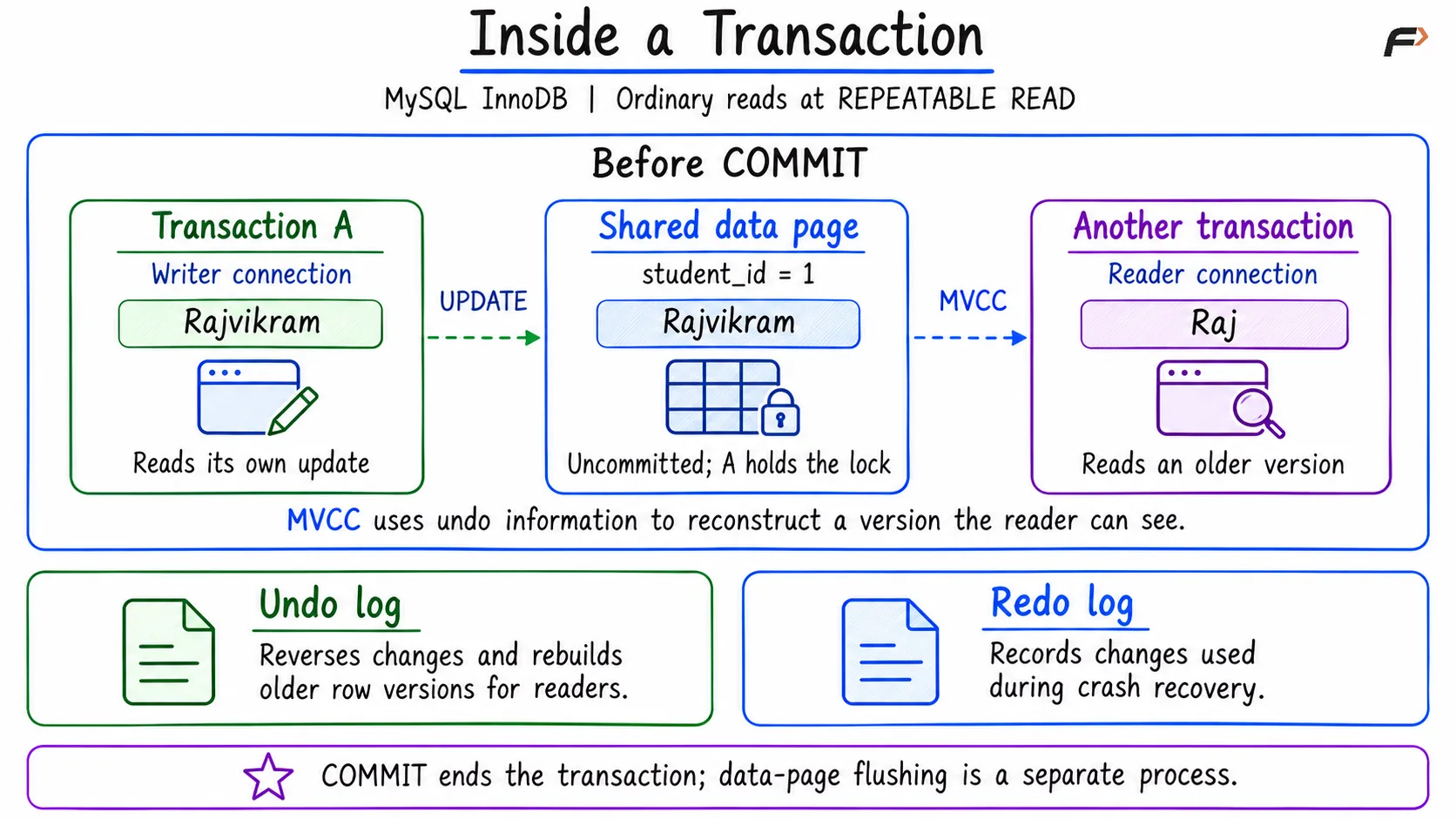
Suppose student_id 1 has the committed name Raj. Transaction A changes it to Rajvikram but has not committed yet.
InnoDB updates the required data page in its buffer pool, the memory area that caches database pages. A modified page that has not yet been written back to its data file is called a dirty page. A also holds a write lock that prevents another transaction from updating the same row at the same time.
Two logs support this work:
Mechanism | Purpose |
|---|---|
Undo log | Stores information used to reverse changes and reconstruct older row versions for consistent reads. |
Redo log | Records information used to recover data changes after a crash. |
Transaction A can read its own update, Rajvikram. Under InnoDB’s default REPEATABLE READ isolation, an ordinary SELECT in another transaction still sees the earlier committed value, Raj. Multi-version concurrency control (MVCC) makes this possible by reconstructing older row versions from undo information.
Inside a Transaction
What Happens at COMMIT or ROLLBACK?
COMMIT accepts the transaction’s changes and releases its locks. ROLLBACK reverses that transaction’s changes and also releases its locks. In this example, committing keeps Rajvikram, while rolling back restores Raj.
Committing and writing data pages to disk are separate processes. COMMIT does not require every changed data page to be written to its data file immediately.
After A commits, a new read snapshot can see Rajvikram. However, a reader still using an older repeatable-read snapshot, its consistent view of the data, may continue to see Raj.
Lock Wait Timeout
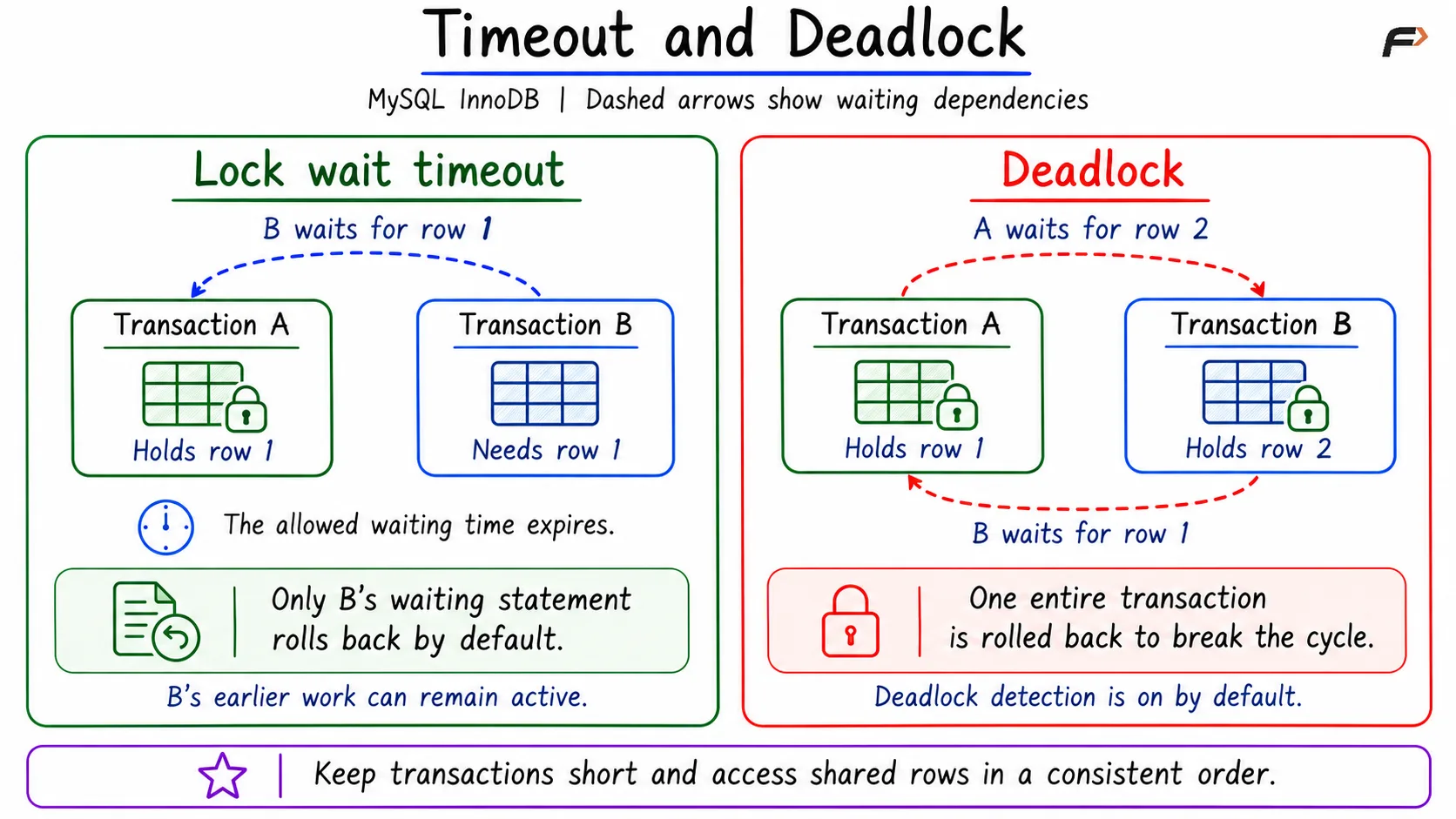
Suppose Transaction A leaves its transaction open after updating student 1. Transaction B now tries to update the same row. B must wait until A releases the conflicting lock.
A lock wait timeout occurs when that wait exceeds the configured limit. This refers specifically to waiting for an InnoDB row lock.
By default, InnoDB rolls back only the statement that timed out. Earlier work in B’s transaction can remain active, and its locks can remain held.
If the application will abandon and retry the complete operation, it should explicitly roll back B’s transaction before retrying. This prevents earlier, incomplete work from being left active.
Deadlock
A deadlock occurs when transactions form a circular wait for one another’s locks.
Using the same students table, Transaction A updates student 1 and holds its lock. Transaction B updates student 2 and holds that lock. A then tries to update student 2 and waits. When B also tries to update student 1, each transaction is waiting for a lock held by the other.
With deadlock detection enabled, as it is by default, InnoDB detects the cycle and rolls back one entire participating transaction. Its locks are released so the other transaction can continue. The application can retry the rolled-back transaction if the operation is still needed.
Timeout and Deadlock
Reducing Lock Problems
Keep transactions short and commit or roll back promptly. When several transactions modify the same records, access those records in a consistent order, such as student 1 before student 2.
Applications should also handle lock errors and use a limited number of retries, with a short delay between attempts. The transaction that continues after a deadlock still needs to commit or roll back.
Summary
InnoDB uses shared data pages, locks, undo information, and redo information to manage transactions. MVCC lets ordinary readers use older row versions while updates are in progress. A lock wait timeout means the allowed waiting time expired; a deadlock means transactions formed a circular wait. Their default rollback behavior differs: a timeout cancels the waiting statement, while a detected deadlock rolls back one whole transaction.
Be the first to add a comment.