Introduction
A training program keeps separate lists of online and onsite attendees. Some learners appear in both lists. To prepare one attendance report, you need to decide whether those learners should appear once or whether every entry from both lists should remain.
SQL set operators combine query results under a shared column layout. UNION and UNION ALL handle the two versions of this report, while INTERSECT finds shared rows and EXCEPT finds rows present only in the first result. Choosing the operator starts with deciding what one row in your report should represent.
How SQL Combines Query Results
A result set is the collection of rows returned by a query. A set operation takes the output of two queries and produces one result set. These SELECT queries read the source data without changing either source table.
The inputs can come from different tables, filtered queries on one table, or more complex queries. What matters is the layout of the selected columns. Both inputs must return the same number of columns, and corresponding positions must have compatible data types. These requirements are called union compatibility.
The main operations answer different questions:
Operator | Rows included | Repeated selected rows |
|---|---|---|
UNION | Rows appearing in either result | Kept once |
UNION ALL | Every row from both results | Preserved |
INTERSECT | Rows appearing in both results | Kept once |
EXCEPT | Rows in the first result that are absent from the second | Kept once |
Here, a repeated row means the selected values match across the whole row. Two records about the same person can still be different output rows if one of their selected values differs.
UNION and UNION ALL with Examples
Consider an online_attendees table that stores online attendees and an onsite_attendees table that stores onsite attendees. Both tables contain attendee_id and attendee_name columns.
online_attendees
attendee_id | attendee_name |
|---|---|
101 | Asha |
102 | Kabir |
103 | Meera |
onsite_attendees
attendee_id | attendee_name |
|---|---|
102 | Kabir |
103 | Meera |
104 | Ravi |
The attendee_id column is the primary key in each table, so the same ID cannot appear more than once within that table.
CREATE TABLE online_attendees ( attendee_id INTEGER PRIMARY KEY, attendee_name VARCHAR(40) NOT NULL);CREATE TABLE onsite_attendees ( attendee_id INTEGER PRIMARY KEY, attendee_name VARCHAR(40) NOT NULL);INSERT INTO online_attendees (attendee_id, attendee_name)VALUES (101, 'Asha'), (102, 'Kabir'), (103, 'Meera');INSERT INTO onsite_attendees (attendee_id, attendee_name)VALUES (102, 'Kabir'), (103, 'Meera'), (104, 'Ravi');Use UNION to return distinct rows
Suppose the report needs one entry for each attendee represented in these lists. Select the ID and name from each table, with UNION between the two SELECT statements.
SELECT attendee_id, attendee_nameFROM online_attendeesUNIONSELECT attendee_id, attendee_nameFROM onsite_attendeesORDER BY attendee_id, attendee_name;Expected result
attendee_id | attendee_name |
|---|---|
101 | Asha |
102 | Kabir |
103 | Meera |
104 | Ravi |
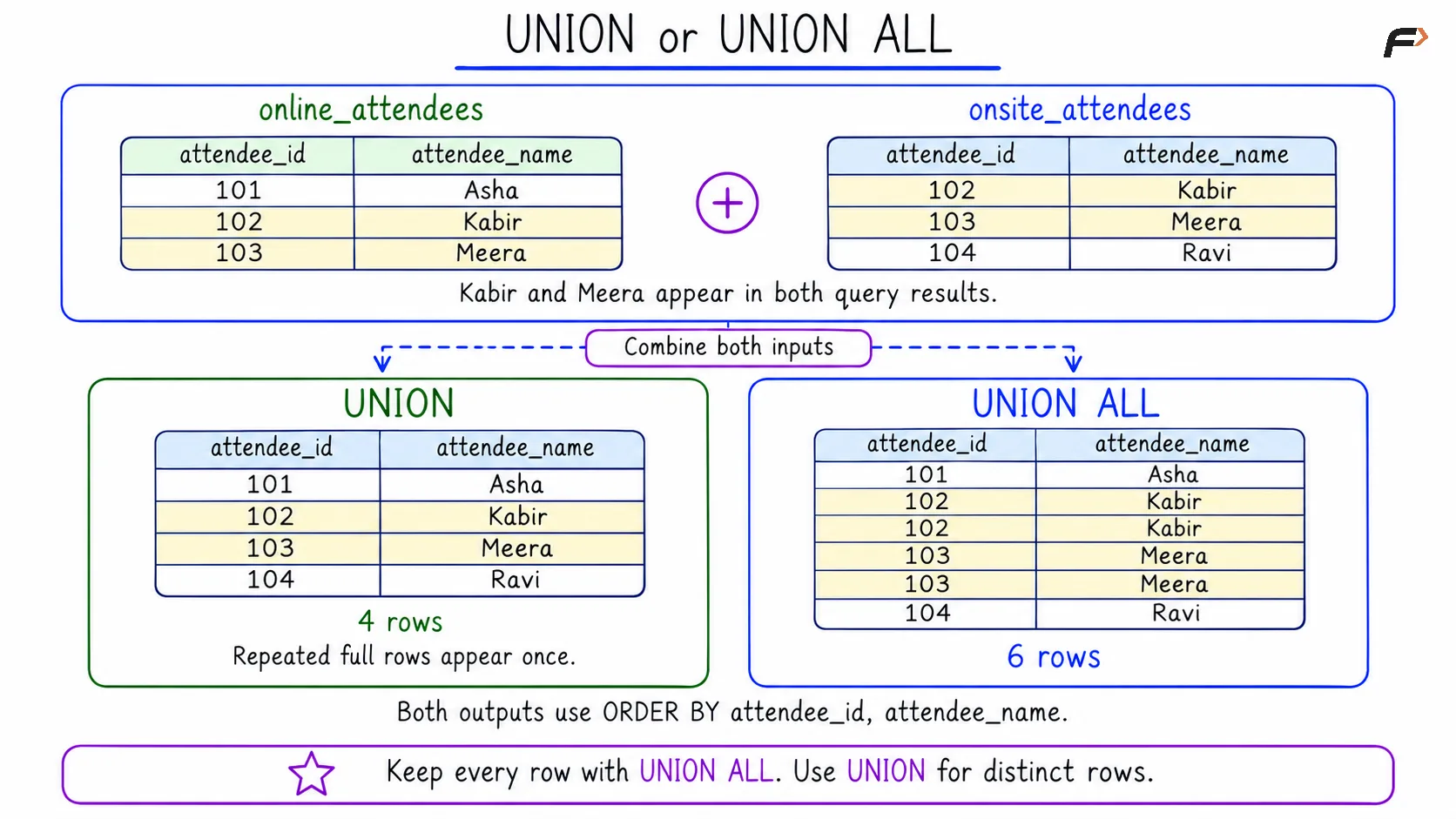
The two queries return six rows in total. Kabir’s row and Meera’s row each appear twice. UNION keeps one copy of each repeated row, leaving four rows.
UNION also removes repeated selected rows within a single input result. Its duplicate removal applies to the combined output. Writing UNION DISTINCT makes the same default behavior explicit.
Use UNION ALL to preserve every row
Now suppose each appearance in a source list represents a participation record that should be retained. UNION ALL preserves all six rows.
SELECT attendee_id, attendee_nameFROM online_attendeesUNION ALLSELECT attendee_id, attendee_nameFROM onsite_attendeesORDER BY attendee_id, attendee_name;Expected result
attendee_id | attendee_name |
|---|---|
101 | Asha |
102 | Kabir |
102 | Kabir |
103 | Meera |
103 | Meera |
104 | Ravi |
The repeated entries now carry useful information: Kabir and Meera each appear in two source lists. Removing those entries would change a count of participation records. However, these two selected columns do not identify the source of each entry. A source column can provide that information, as shown later.
The diagram compares the same inputs under both operators. The repeated rows are highlighted, and both outputs are sorted using the final ORDER BY clause.
Union or Union ALL
Compare UNION and UNION ALL
Question | UNION | UNION ALL |
|---|---|---|
What happens to repeated selected rows? | One copy remains | Every copy remains |
How many rows does this example return? | 4 | 6 |
Does the operator remove duplicates? | Yes | No |
Does it guarantee display order by itself? | No | No |
When is it appropriate? | The report needs distinct selected rows | Every occurrence matters, or the inputs are known to be disjoint |
UNION ALL avoids duplicate-removal work and is often faster when keeping all rows is correct. A final sort can still require work, so the choice does not guarantee a particular runtime or execution plan. Choose the correct result first, then assess performance.
INTERSECT and EXCEPT with Examples
Use INTERSECT to find common rows
To find attendees represented in both lists with the same selected ID and name, use INTERSECT.
SELECT attendee_id, attendee_nameFROM online_attendeesINTERSECTSELECT attendee_id, attendee_nameFROM onsite_attendeesORDER BY attendee_id, attendee_name;Expected result
attendee_id | attendee_name |
|---|---|
102 | Kabir |
103 | Meera |
Both complete rows occur in both inputs. Asha appears only online, while Ravi appears only onsite, so neither appears in this result.
If the real question concerns shared attendee IDs even when names disagree, select only attendee_id in both inputs. The selected columns determine what must match.
Use EXCEPT to find rows missing from the second result
To find the online rows that have no identical counterpart in the onsite result, place the online query first and use EXCEPT.
SELECT attendee_id, attendee_nameFROM online_attendeesEXCEPTSELECT attendee_id, attendee_nameFROM onsite_attendeesORDER BY attendee_id, attendee_name;Expected result
attendee_id | attendee_name |
|---|---|
101 | Asha |
Kabir and Meera have matching rows in the onsite result, so only Asha remains. Reversing the two inputs would return Ravi instead. The direction of EXCEPT changes the question being answered.
INTERSECT and EXCEPT remove duplicates by default. Their ALL variants account for repeated occurrences: if a particular row occurs m times on the left and n times on the right, INTERSECT ALL keeps the smaller count, while EXCEPT ALL keeps max(m - n, 0) copies. For example, counts of three and two produce two copies with INTERSECT ALL and one with EXCEPT ALL.
Rules That Keep Merged Results Correct
Match column positions and meanings
The first selected column lines up with the first column of the other input, the second with the second, and so on. Align the meanings of the selected expressions by position. Two tables may use different column names and still produce compatible results.
In this example, both queries select attendee_id followed by attendee_name. Reversing those positions in one query would mix unrelated values or cause a type error. Explicit column lists make this alignment clear and reduce surprises when a table's schema changes.
MySQL and PostgreSQL have different type-resolution rules. MySQL may convert some combinations that PostgreSQL rejects. Use matching types where practical, or deliberately cast corresponding expressions to an appropriate common type. A CAST converts an expression to a specified data type; it cannot make unrelated meanings compatible.
Compare the entire selected row
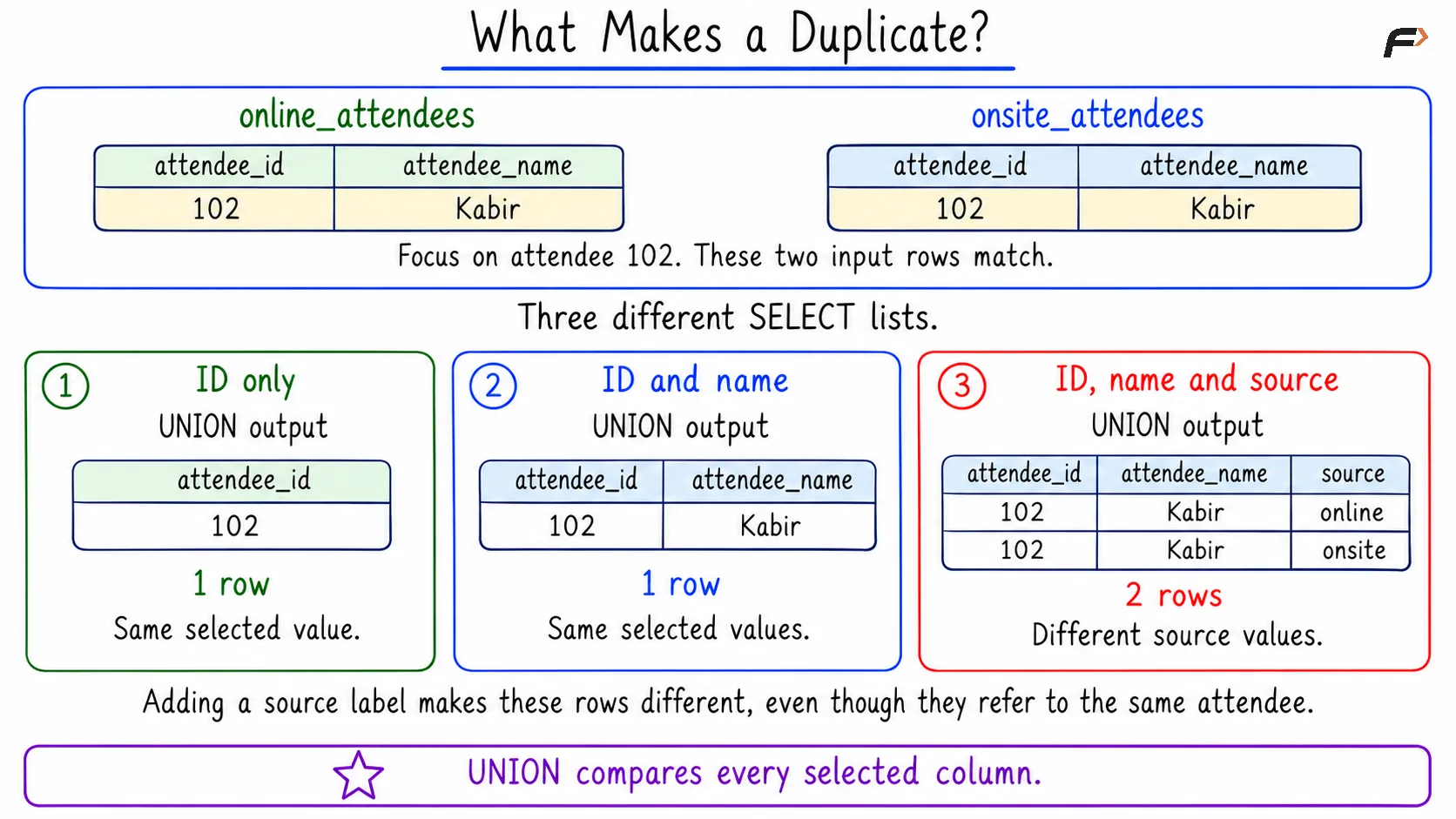
UNION checks all selected columns when deciding whether rows are duplicates. For example, the hypothetical rows (102, Kabir) and (102, Kabeer) remain distinct because the names differ. UNION does not choose which spelling is correct. Conversely, selecting only a name could collapse different people who share that name.
To retain where an entry came from, add a source column. The string literal supplies a source label for each row, and AS source names the output column.
The following query deliberately uses UNION to show how an added column changes duplicate detection.
SELECT attendee_id, attendee_name, 'online' AS sourceFROM online_attendeesUNIONSELECT attendee_id, attendee_name, 'onsite' AS sourceFROM onsite_attendeesORDER BY attendee_id, source;Expected result
attendee_id | attendee_name | source |
|---|---|---|
101 | Asha | online |
102 | Kabir | online |
102 | Kabir | onsite |
103 | Meera | online |
103 | Meera | onsite |
104 | Ravi | onsite |
All six rows remain because the overlapping attendees have different source values. If the goal is to preserve every source record, UNION ALL expresses that intention directly and also preserves duplicates that might exist within a source result.
The next diagram focuses on Kabir. It shows how changing the selected columns changes which rows count as duplicates.
What Makes a Dublicate
Handle NULL correctly
NULL represents missing or unknown information. In duplicate elimination, corresponding NULL values are treated as matching. That rule is different from ordinary equality: the condition NULL = NULL evaluates to unknown, rather than true.
These standalone queries use an explicit integer cast to give the output a clear type. They do not insert NULL into the attendee tables.
SELECT CAST(NULL AS SIGNED) AS attendee_idUNIONSELECT CAST(NULL AS SIGNED);SELECT CAST(NULL AS SIGNED) AS attendee_idUNION ALLSELECT CAST(NULL AS SIGNED);The first statement returns one row containing NULL. The second returns two rows containing NULL. With multiple columns, corresponding NULL values match for duplicate elimination only when the remaining selected values also match.
Sort and limit the correct result
Use a final ORDER BY to request a display order. Without it, neither UNION nor UNION ALL guarantees an order, including an order where all rows from the first input appear first. The main examples sort by attendee_id and then attendee_name.
The output column names come from the first query. For a direct sort of the combined result, use those names or their aliases, rather than a source-table-qualified name. A final LIMIT applies to the combined output.
If the requirement is to take a subset from each input, put each input's ORDER BY and LIMIT inside its own parentheses. A separate final ORDER BY still controls the combined display.
For example, take the attendee with the highest ID from each list:
(SELECT attendee_id, attendee_name FROM online_attendees ORDER BY attendee_id DESC LIMIT 1)UNION ALL(SELECT attendee_id, attendee_name FROM onsite_attendees ORDER BY attendee_id DESC LIMIT 1)ORDER BY attendee_id, attendee_name;Expected result
attendee_id | attendee_name |
|---|---|
103 | Meera |
104 | Ravi |
The online input contributes Meera, and the onsite input contributes Ravi. Moving LIMIT 1 to the end would limit the entire combined result to one row.
Apply filters and grouping deliberately
Filter each input where appropriate: A WHERE clause inside one SELECT affects that input. Apply a shared condition to both inputs, or wrap the set operation in an outer SELECT and filter its result.
Make mixed operators explicit: In MySQL and PostgreSQL, INTERSECT has higher precedence than UNION and EXCEPT. Parentheses make the intended grouping clear when several operators appear together.
Preserve meaningful repetitions: Two rows with equal selected values may represent separate events. Include the event identifier when it belongs in the report, and use UNION ALL when every occurrence must remain.
Summary
SQL set operators combine compatible query results into one output. UNION removes repeated selected rows, while UNION ALL preserves every occurrence. INTERSECT returns shared rows, and EXCEPT returns rows found only in the first result. Match column positions and types, compare complete selected rows, handle NULL deliberately, and use a final ORDER BY whenever the output needs a defined order.
Be the first to add a comment.