Introduction
A database report may need to include records even when related information is missing. Combining tables using only matching rows can leave out records that are important to the report.
LEFT JOIN handles this requirement by preserving every row from the left table during the join. Understanding its matching rules, NULL values, and interaction with filters helps produce complete and accurate results.
What Is a LEFT JOIN?
A LEFT JOIN, also called a LEFT OUTER JOIN, combines rows from two tables according to a join condition. It returns matching row pairs and preserves unmatched rows from the left table.
Its basic behavior is:
A match exists: Combine the left-table row with each matching right-table row.
No match exists: Keep the left-table row and fill the right-table columns with
NULL.An unmatched row exists only in the right table: Exclude that row.
In a simple two-table query, the left table is the table written before LEFT JOIN. The order of columns in SELECT does not determine which table is preserved.
LEFT JOIN and LEFT OUTER JOIN have the same meaning; OUTER is optional. A later WHERE condition can still remove rows from the joined result.
Example Tables
Consider a college database containing two tables.
The Department table stores the departments offered by the college. A department can exist even when no students are assigned to it.
Department
DeptID | DeptName |
|---|---|
10 | Computer Science |
20 | Electronics |
30 | Mathematics |
The Student table stores each student’s identifier, name, assigned department, and semester.
Student
StudentID | Name | DeptID | Semester |
|---|---|---|---|
101 | Asha | 10 | 2 |
102 | Ravi | 20 | 4 |
103 | Meera | 10 | 2 |
104 | Neha | NULL | 2 |
Department.DeptID and Student.StudentID are primary keys. A non-NULL value in Student.DeptID refers to an existing department.
Asha and Meera belong to Computer Science, while Ravi belongs to Electronics. Mathematics has no students. Neha has no assigned department, represented by NULL.
Using LEFT JOIN to Include Every Department
Objective: Display every department together with its students, including departments that have no students.
Department must be the left table because every department needs to remain in the joined result.
Consider the following queries to list all departments and their matching students.
SELECT d.DeptID, d.DeptName, s.StudentID, s.NameFROM Department AS dLEFT JOIN Student AS s ON d.DeptID = s.DeptIDORDER BY d.DeptID, s.StudentID;AS d and AS s assign temporary aliases, or shorter names, to Department and Student. For example, d.DeptID refers to the department table’s ID column.
The ON condition matches equal department IDs. ORDER BY d.DeptID, s.StudentID sorts by department ID first and student ID within each department, both in ascending order.
Expected result
DeptID | DeptName | StudentID | Name |
|---|---|---|---|
10 | Computer Science | 101 | Asha |
10 | Computer Science | 103 | Meera |
20 | Electronics | 102 | Ravi |
30 | Mathematics | NULL | NULL |
The result illustrates three important behaviors:
Multiple matches: Computer Science appears twice because it matches two students.
An unmatched left-table row: Mathematics remains, with
NULLstudent details.An unmatched right-table row: Neha does not appear because she has no matching department.
A left join therefore does not guarantee exactly one result row per left-table row. Each matching pair contributes a row.
The displayed DeptID comes from Department, so Mathematics retains its ID, 30. Selecting s.DeptID instead would show NULL for that row because no student matched it.
These NULL values appear only in the query result. The join does not insert or modify records in either source table.
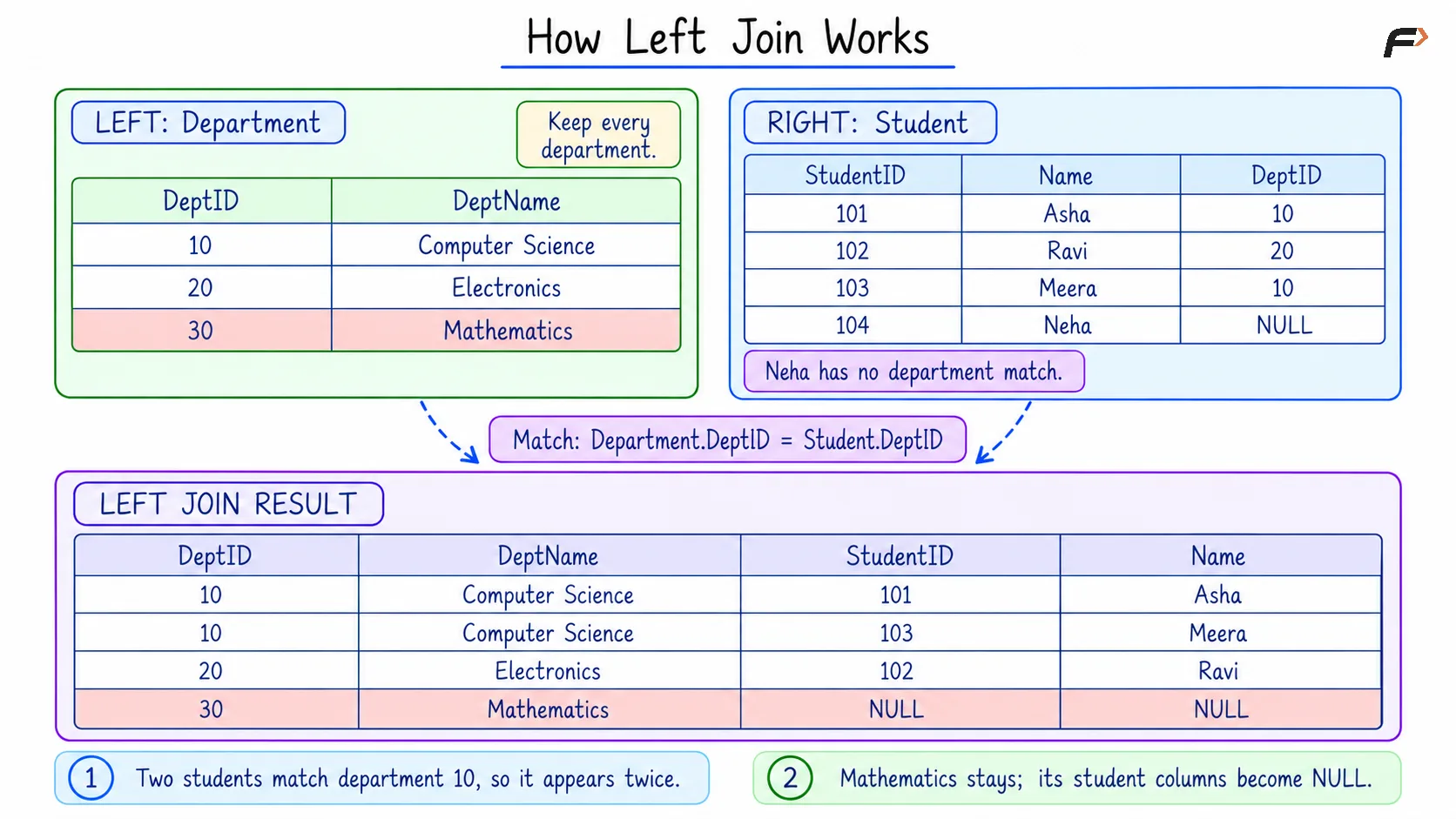
HOW LEFT JOIN WORKS
Finding Departments Without Students
Objective: Return only departments that have no matching student.
The left join preserves these departments with NULL values in the student columns. Checking the student’s primary key identifies those unmatched rows.
Consider the following queries to find departments without students.
SELECT d.DeptID, d.DeptNameFROM Department AS dLEFT JOIN Student AS s ON d.DeptID = s.DeptIDWHERE s.StudentID IS NULLORDER BY d.DeptID;Expected result
DeptID | DeptName |
|---|---|
30 | Mathematics |
IS NULL checks whether a value is NULL. Since an actual student’s primary key cannot be NULL, s.StudentID IS NULL identifies the absence of a matching student.
Use IS NULL for this check, rather than = NULL. Ordinary equality comparisons involving NULL do not evaluate to true.
Checking a primary key is useful here because a nullable column, such as an optional phone number, could contain NULL even when a matching record exists.
LEFT JOIN Compared with Other Joins
The main difference is which unmatched rows are preserved during the join.
Join type | Rows preserved during the join |
|---|---|
| Matching pairs only |
| Every left-table row, with matching right-table data |
| Every right-table row, with matching left-table data |
With Department on the left and Student on the right, an inner join would omit Mathematics. The left join retains it with NULL student details.
The same department-preserving result can be written using a right join by placing Student on the left and Department on the right, while retaining the matching condition and selected columns. Changing the join direction without swapping the tables changes which side is preserved.
Summary
LEFT JOIN preserves every row from the left table during the join and combines it with matching rows from the right table. Missing matches produce NULL values in right-table columns, while multiple matches produce multiple result rows.
The placement of conditions matters: ON controls matching, and WHERE filters the joined result. Checking a non-nullable right-table key with IS NULL finds unmatched records, while counting that key supports reports that include zero matches.
Be the first to add a comment.