Introduction
A join in DBMS combines rows from tables into a query result. It allows related information to remain stored in separate tables while still being retrieved together when needed.
The join type determines how matching and unmatched rows are handled. Some queries require only matching records, while others must also preserve records without a match. A join query retrieves this information without changing the stored records.
Example Relations
The examples use a college database with two tables: Department and Student. Each table stores a different kind of information.
Department stores one row for each department. DeptID uniquely identifies the department, and DeptName stores its name.
DeptID | DeptName |
|---|---|
10 | Computer Science |
20 | Electronics |
30 | Mathematics |
Student stores one row for each student. It records the student’s identifier, name, assigned department, and an optional student mentor.
StudentID | Name | DeptID | MentorID |
|---|---|---|---|
101 | Asha | 10 | NULL |
102 | Ravi | 20 | 101 |
103 | Meera | 10 | 101 |
104 | Neha | NULL | 102 |
The columns establish the following relationships:
StudentID: Uniquely identifies a student and is the primary key of
Student.Student.DeptID: Refers to
Department.DeptID. For example, Asha’s department ID is 10, which identifies Computer Science.MentorID: Refers to another student’s
StudentID. Ravi and Meera have Asha as their mentor, while Neha has Ravi.NULL: Indicates a missing value. Neha has no assigned department, and Asha has no recorded mentor.
A department can have several students or none. Computer Science has two students, Electronics has one, and Mathematics currently has no students.
INNER JOIN: Retrieve Matching Records
An INNER JOIN returns a result row for each pair of rows that satisfies the join condition. Rows without a matching partner are excluded.
Consider the following queries to display students who have an assigned department, together with that department’s name.
SELECT s.StudentID AS student_id, s.Name AS student_name, d.DeptName AS department_nameFROM Student AS sINNER JOIN Department AS d ON s.DeptID = d.DeptIDORDER BY s.StudentID;Here, AS creates temporary names called aliases. s represents Student, and d represents Department. The aliases after the selected columns, such as student_name, provide the output column headings.
The condition s.DeptID = d.DeptID matches equal department IDs; = means “equal to.” ORDER BY s.StudentID sorts the result by student ID.
Expected result
student_id | student_name | department_name |
|---|---|---|
101 | Asha | Computer Science |
102 | Ravi | Electronics |
103 | Meera | Computer Science |
Neha is excluded because her missing department ID does not match a department. Mathematics is excluded because no student belongs to it.
Computer Science appears twice because two students match that department. A join returns matching pairs and does not automatically remove repeated values.
LEFT JOIN: Preserve the Left Table
A LEFT JOIN returns matching pairs and preserves every row from the table on its left. If a left-side row has no match, the columns supplied by the right table contain NULL.
Consider the following queries to display every student, including students without an assigned department.
SELECT s.StudentID AS student_id, s.Name AS student_name, d.DeptName AS department_nameFROM Student AS sLEFT JOIN Department AS d ON s.DeptID = d.DeptIDORDER BY s.StudentID;Here, s is the alias for the left table, Student, and d represents the right table, Department. The join preserves students whether or not the department condition finds a match.
Expected result
student_id | student_name | department_name |
|---|---|---|
101 | Asha | Computer Science |
102 | Ravi | Electronics |
103 | Meera | Computer Science |
104 | Neha | NULL |
Neha remains in the result, but her department name is NULL because no department matches her.
LEFT JOIN and LEFT OUTER JOIN have the same meaning. The word OUTER is optional.
RIGHT JOIN: Preserve the Right Table
A RIGHT JOIN returns matching pairs and preserves every row from the table on its right. If a right-side row has no match, the columns supplied by the left table contain NULL.
Consider the following queries to display every department with its students, including departments that have no students.
SELECT s.StudentID AS student_id, s.Name AS student_name, d.DeptName AS department_nameFROM Student AS sRIGHT JOIN Department AS d ON s.DeptID = d.DeptIDORDER BY d.DeptID, s.StudentID;Here, s represents Student, and d represents Department. Because Department appears on the right of RIGHT JOIN, every department is preserved. The result is sorted by department ID and then student ID.
Expected result
student_id | student_name | department_name |
|---|---|---|
101 | Asha | Computer Science |
103 | Meera | Computer Science |
102 | Ravi | Electronics |
NULL | NULL | Mathematics |
Mathematics appears with missing student details because it has no students. Neha is excluded because she does not match a department.
Left and right refer to the tables’ positions in the query. Swapping the table positions and using LEFT JOIN can express the same relationship as a RIGHT JOIN.
FULL OUTER JOIN: Preserve Both Tables
A FULL OUTER JOIN returns matching pairs and preserves unmatched rows from both tables. When either side lacks a matching row, its columns contain NULL.
Consider the following queries to display all students and all departments, including students without departments and departments without students.
PostgreSQL supports FULL OUTER JOIN directly. MySQL 8.4 does not provide native FULL OUTER JOIN syntax, so the equivalent result can be constructed using two left joins and UNION ALL.
SELECT student_id, student_name, department_nameFROM ( SELECT s.StudentID AS student_id, s.Name AS student_name, d.DeptName AS department_name FROM Student AS s LEFT JOIN Department AS d ON s.DeptID = d.DeptID UNION ALL SELECT s.StudentID, s.Name, d.DeptName FROM Department AS d LEFT JOIN Student AS s ON s.DeptID = d.DeptID WHERE s.StudentID IS NULL) AS combinedORDER BY student_id IS NULL, student_id;In these queries, s represents Student, and d represents Department. In the MySQL query, combined names the result formed inside the parentheses.
Also , observe that in the final statement of MySQL query ORDER BY student_id IS NULL, student_id ;, the expression student_id IS NULL returns 0 when an ID is present and 1 when it is NULL. Since ascending order places 0 before 1, rows with student IDs appear first, followed by departments with no matching student. The second student_id sorts the student rows by ID in ascending order.
Expected result
student_id | student_name | department_name |
|---|---|---|
101 | Asha | Computer Science |
102 | Ravi | Electronics |
103 | Meera | Computer Science |
104 | Neha | NULL |
NULL | NULL | Mathematics |
Neha is preserved as an unmatched student, and Mathematics is preserved as an unmatched department.
The MySQL query builds this result in two parts:
First part: Returns all students with any matching department.
Second part: Returns only departments without a matching student.
IS NULLchecks for a missing value. Since a stored student’s primary key cannot beNULL, this identifies unmatched departments.UNION ALL: Appends the two results. Filtering the second part to unmatched departments prevents matching pairs from being included twice.
The final sorting expression places rows with a student ID first and the unmatched department afterward.
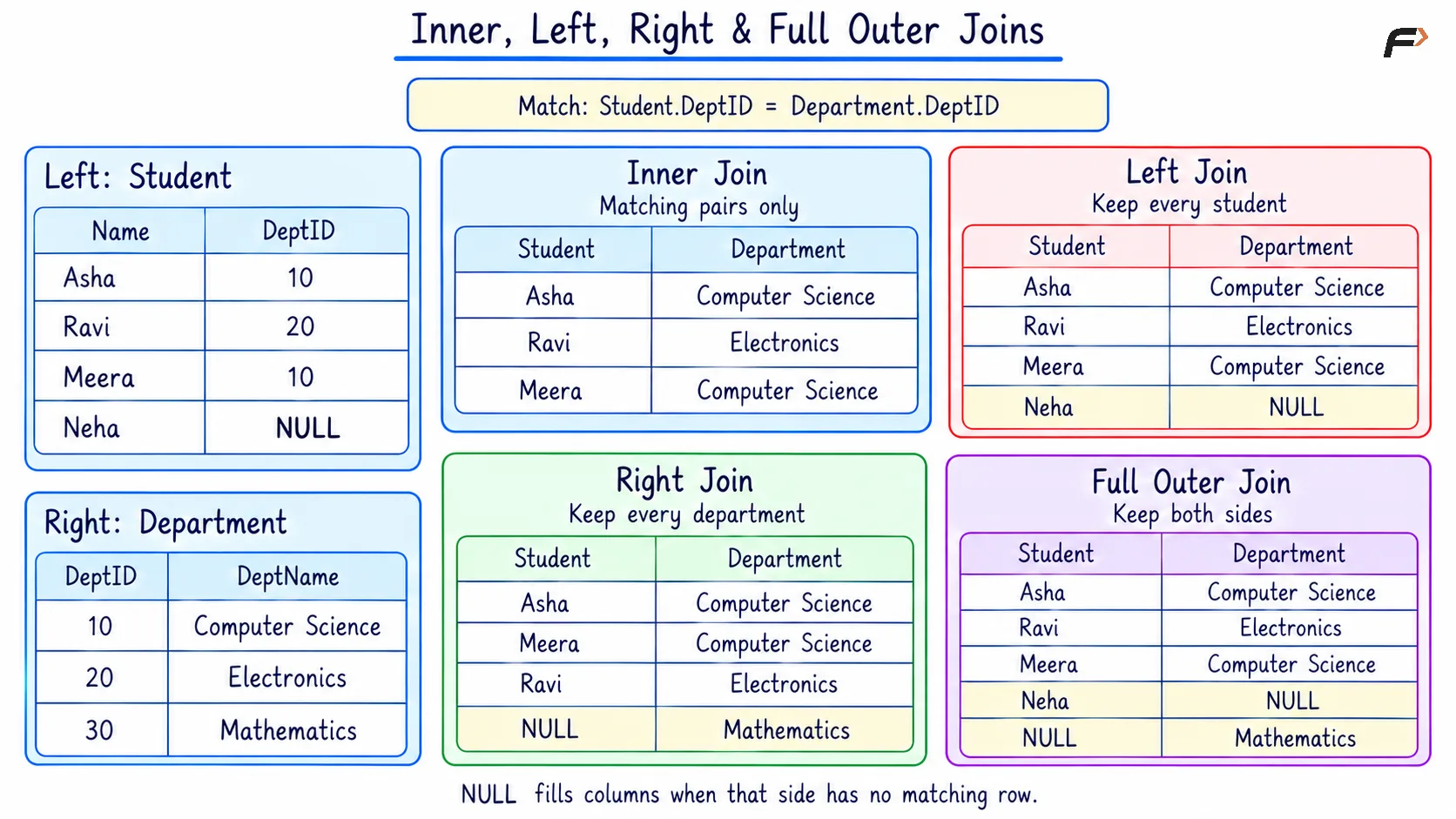
INNER , LEFT , RIGHT AND FULL OUTER JOINS
CROSS JOIN: Generate All Combinations
A CROSS JOIN pairs every row from one table with every row from another. The resulting collection of combinations is called a Cartesian product.
Consider the following queries to list every possible student–department pairing for a planning exercise, regardless of existing assignments.
SELECT s.StudentID AS student_id, s.Name AS student_name, d.DeptName AS department_nameFROM Student AS sCROSS JOIN Department AS dORDER BY s.StudentID, d.DeptID;Here, s represents Student, and d represents Department. There is no ON condition because every student is paired with every department.
Expected result
student_id | student_name | department_name |
|---|---|---|
101 | Asha | Computer Science |
101 | Asha | Electronics |
101 | Asha | Mathematics |
102 | Ravi | Computer Science |
102 | Ravi | Electronics |
102 | Ravi | Mathematics |
103 | Meera | Computer Science |
103 | Meera | Electronics |
103 | Meera | Mathematics |
104 | Neha | Computer Science |
104 | Neha | Electronics |
104 | Neha | Mathematics |
Four students and three departments produce 4 × 3 = 12 rows, where × means multiplication. These rows represent possible pairings; the query does not change stored department assignments.
Cross joins are useful when every combination is required, but their results can become large quickly.
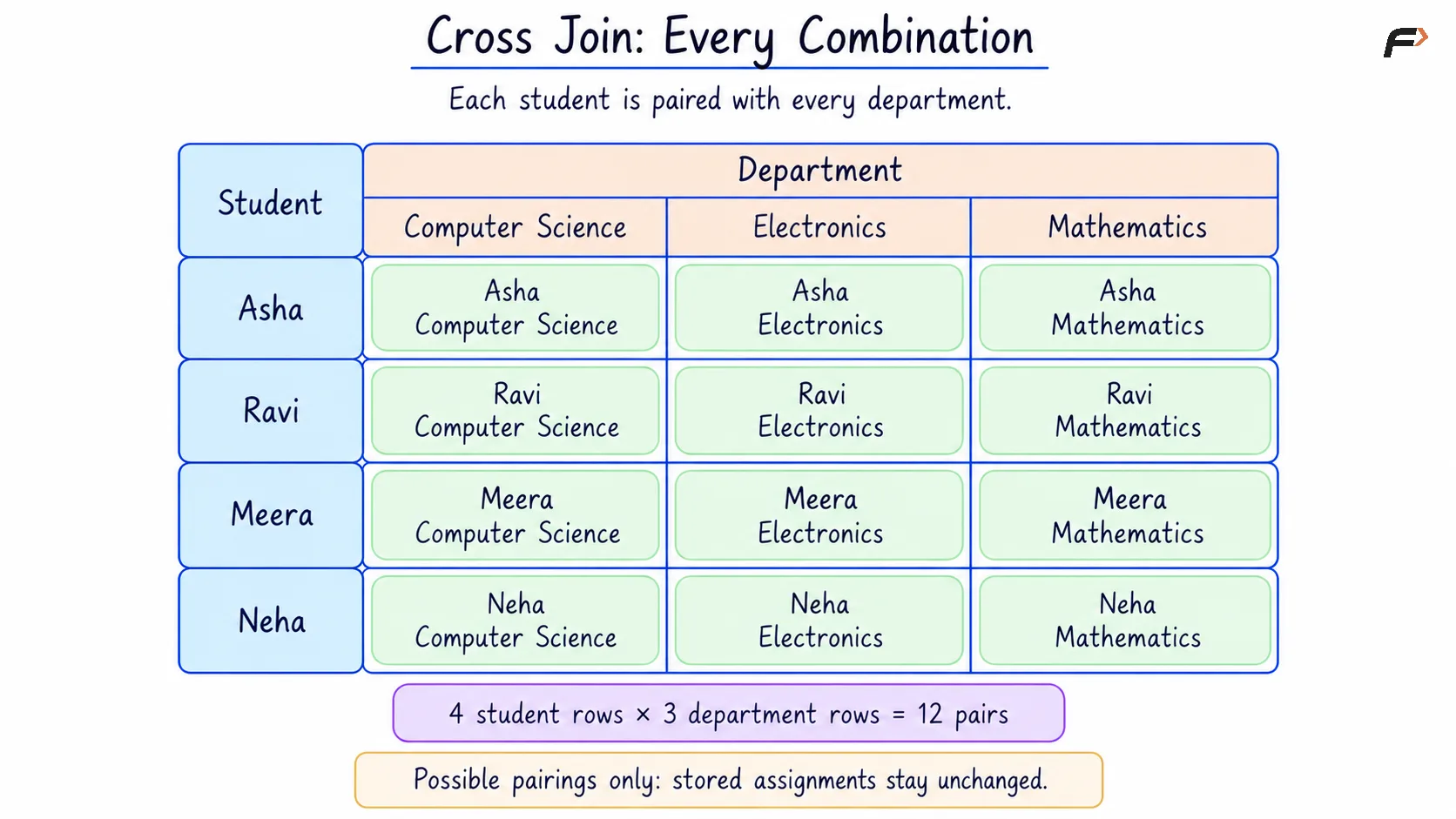
CROSS JOIN : EVERY COMBINATION
SELF JOIN: Connect Rows in the Same Table
A self join joins a table to itself. Different aliases distinguish the roles played by the same table, such as a student and that student’s mentor.
Consider the following queries to display every student with their mentor’s name, including students without a recorded mentor.
SELECT s.StudentID AS student_id, s.Name AS student_name, m.Name AS mentor_nameFROM Student AS sLEFT JOIN Student AS m ON s.MentorID = m.StudentIDORDER BY s.StudentID;Here, AS s names the student role, and AS m names the mentor role. Both refer to the same stored Student table. The condition matches a student’s MentorID with the mentor’s StudentID.
Expected result
student_id | student_name | mentor_name |
|---|---|---|
101 | Asha | NULL |
102 | Ravi | Asha |
103 | Meera | Asha |
104 | Neha | Ravi |
Asha remains in the result because a left join preserves students without a mentor.
There is no separate SELF JOIN keyword. A self join can use an inner or outer join depending on whether unmatched rows should be preserved.
IMPLICIT JOIN: Specify Matches in WHERE
An implicit join lists tables with commas in FROM and places the matching condition in WHERE. For the following example, it expresses the same matching operation as an inner join.
Consider the following queries to retrieve students with their assigned department names using comma-separated table references.
SELECT s.StudentID AS student_id, s.Name AS student_name, d.DeptName AS department_nameFROM Student AS s, Department AS dWHERE s.DeptID = d.DeptIDORDER BY s.StudentID;Here, s and d are aliases for Student and Department. The WHERE condition keeps only pairs with equal department IDs.
Expected result
student_id | student_name | department_name |
|---|---|---|
101 | Asha | Computer Science |
102 | Ravi | Electronics |
103 | Meera | Computer Science |
If the matching condition is omitted, this two-table query returns every student–department combination.
Explicit JOIN ... ON syntax makes the relationship between tables easier to identify by keeping the matching condition beside the join.
NATURAL JOIN: Use Shared Column Names
A plain NATURAL JOIN performs an inner join by comparing all columns whose names appear in both tables. It automatically chooses these matching columns.
In the example relations, DeptID is the only shared column name. Name and DeptName have different names, so they are not automatically compared.
Consider the following queries to retrieve students with matching departments through their shared DeptID
SELECT s.StudentID AS student_id, s.Name AS student_name, d.DeptName AS department_nameFROM Student AS sNATURAL JOIN Department AS dORDER BY s.StudentID;Here, s represents Student, and d represents Department. No ON clause is written because NATURAL JOIN automatically compares the shared DeptID columns for equality.
Expected result
student_id | student_name | department_name |
|---|---|---|
101 | Asha | Computer Science |
102 | Ravi | Electronics |
103 | Meera | Computer Science |
A natural join chooses matching columns by their names, not by declared foreign keys. Adding another same-named column to both tables can therefore change the matching conditions.
If there are no shared column names, a natural join behaves like a cross join. Explicit ON conditions make the intended relationship clearer when table structures may change.
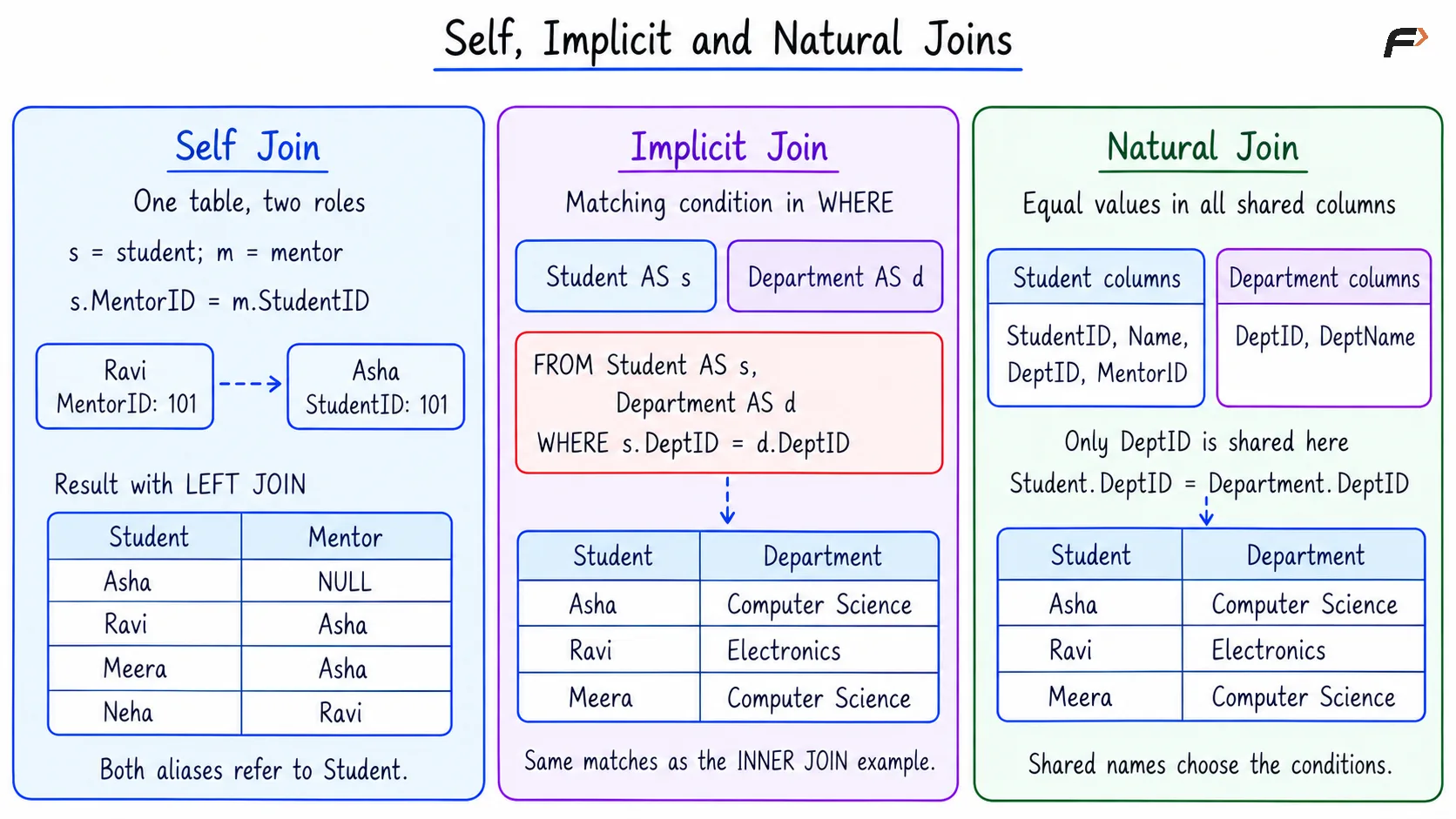
SELF , IMPLICIT AND NATURAL JOINS
ON vs WHERE: Matching and Filtering
ON determines which rows form matching pairs. WHERE filters rows from the joined result. Moving a condition between these clauses can change an outer join’s output.
Clause | Main role |
|---|---|
| Defines the conditions that matching pairs must satisfy. |
| Determines which joined rows remain in the final result. |
Condition in ON
Consider the following queries to keep every student but show department details only when the matching department is Computer Science.
SELECT s.StudentID AS student_id, s.Name AS student_name, d.DeptName AS department_nameFROM Student AS sLEFT JOIN Department AS d ON s.DeptID = d.DeptID AND d.DeptName = 'Computer Science'ORDER BY s.StudentID;Here, s represents Student, and d represents Department. AND requires both conditions to hold: the department IDs must match, and the department name must be Computer Science.
Expected result
student_id | student_name | department_name |
|---|---|---|
101 | Asha | Computer Science |
102 | Ravi | NULL |
103 | Meera | Computer Science |
104 | Neha | NULL |
Every student remains because the query uses a left join. Ravi’s department fails the Computer Science condition, so his department details appear as NULL.
Ravi still belongs to Electronics in the stored data. The missing department name means that no department satisfies this query’s complete matching condition.
Condition in WHERE
Consider the following queries to return only students whose joined department is Computer Science.
SELECT s.StudentID AS student_id, s.Name AS student_name, d.DeptName AS department_nameFROM Student AS sLEFT JOIN Department AS d ON s.DeptID = d.DeptIDWHERE d.DeptName = 'Computer Science'ORDER BY s.StudentID;The aliases still represent students and departments. This time, ON matches department IDs, while WHERE keeps only joined rows whose department name is Computer Science.
Expected result
student_id | student_name | department_name |
|---|---|---|
101 | Asha | Computer Science |
103 | Meera | Computer Science |
Ravi is removed because his department is Electronics. Neha is removed because her NULL department name does not satisfy the comparison.
For an inner join, placing this department-name condition in ON or WHERE produces the same result. With a left join, the placement determines whether students without a qualifying department remain.
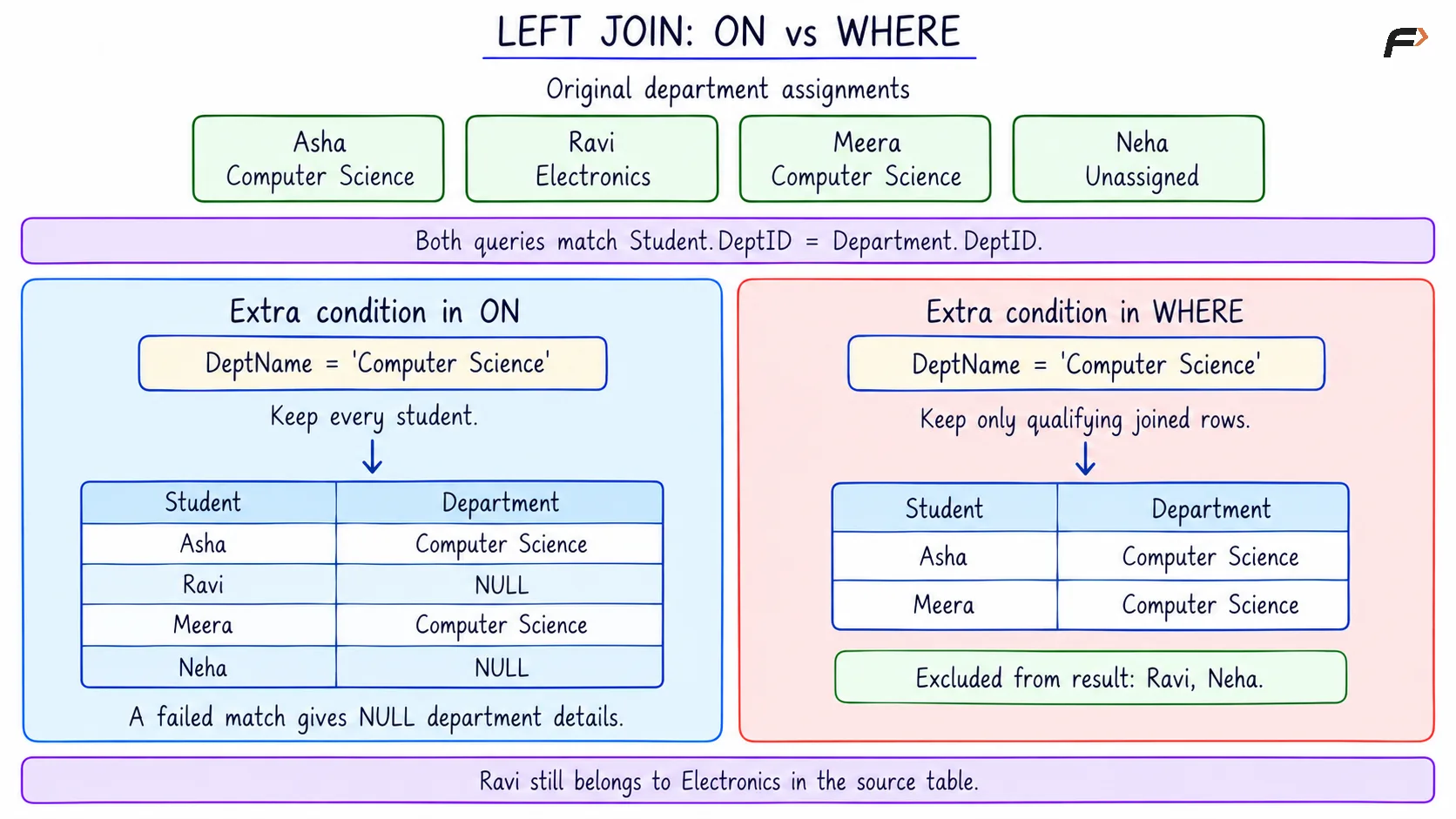
LEFT JOIN : ON VS WHERE
Summary
Joins in DBMS retrieve related information from separate tables or from different rows of the same table. Inner joins return matching pairs, outer joins preserve unmatched rows from selected sides, and cross joins generate every combination. Self, implicit, and natural joins describe other ways to express relationships.
A correct join depends on the matching condition and the records that must remain in the result. ON defines matching pairs, while WHERE filters the joined rows. Clear table roles, appropriate aliases, and careful handling of NULL values make join queries easier to understand.
Be the first to add a comment.