Introduction
Information in a relational database is usually distributed across multiple tables. A student table may store department IDs, while a department table stores department names. Joins bring related information together by matching rows according to a condition.
Extended relational algebra adds operations for tasks such as calculating values, grouping records, summarizing data, and preserving unmatched rows. Together, joins and these extensions connect the mathematical foundation of relational databases with practical SQL queries.
What Joins and Extended Relational Algebra Add ?
The fundamental relational algebra operations can filter rows, choose columns, combine sets, and form Cartesian products. Several useful operations, including inner joins and division, can be derived from these basic operations.
Other requirements need additional capabilities. Calculating an average requires aggregation, while keeping unmatched records requires an outer join. Extended relational algebra introduces these capabilities and, in some formulations, supports duplicate records and ordered results.
These operators describe the required result. The DBMS may use physical techniques such as hash joins or nested loops to compute that result efficiently.
Example Relations
Consider the following two tables.
Student :
StudentID | Name | DeptID | Semester |
|---|---|---|---|
101 | Asha | 10 | 2 |
102 | Ravi | 20 | 4 |
103 | Meera | 10 | 2 |
104 | Kabir | NULL | 2 |
Department :
DeptID | DeptName |
|---|---|
10 | Computer Science |
20 | Electronics |
30 | Mathematics |
Assume that StudentID and Department.DeptID are primary keys. Kabir has no department assigned, and Mathematics currently has no students.
Here, NULL represents missing information for the SQL and extended algebra examples. Classical relational algebra works with sets of tuples and does not include SQL-style NULL values.
Inner Joins: Theta Join, Equijoin, and Natural Join
An inner join combines rows that satisfy a matching condition. Rows without a match are excluded. Joining Student and Department on equal department IDs produces matches for Asha, Ravi, and Meera.
The general relational algebra identity is:
R ⋈θ S = σθ(R × S)This means that a theta join has the same result as forming a Cartesian product and selecting the pairs that satisfy condition θ. It does not require the DBMS to physically generate every pair first.
Join type | Matching rule | Treatment of matching columns |
|---|---|---|
Theta join | Uses a comparison condition, such as equality, inequality, or a range comparison | Retains attributes from both relations |
Equijoin | Uses equality comparisons between attributes | Retains both copies of the compared attributes unless projected out |
Natural join | Matches on every shared attribute name | Includes one copy of each shared attribute |
An equijoin is a special case of a theta join. A comparison using less than or greater than is a non-equijoin.
In the example tables, a natural join matches on DeptID because it is their only shared column name. However, if both tables later acquire another identically named column, that column also becomes part of the natural join condition. Explicit join conditions make the intended relationship clearer.
A join does not require a declared foreign key. It can compare any suitable attributes, and one row can match several rows on the other side.
Outer Joins: Left, Right, and Full
An outer join includes matching rows and preserves specified unmatched rows. When a match is missing, attributes from the missing side receive NULL values.
For the following comparison, Student is the left relation, Department is the right relation, and the matching condition is equality of department IDs.
Join type | Matching rows | Unmatched students | Unmatched departments | Result rows |
|---|---|---|---|---|
Inner join | Included | Excluded | Excluded | 3 |
Left outer join, ⟕ | Included | Included | Excluded | 4 |
Right outer join, ⟖ | Included | Excluded | Included | 4 |
Full outer join, ⟗ | Included | Included | Included | 5 |
The left outer join retains Kabir with a NULL department name. The right outer join retains Mathematics with NULL student attributes. The full outer join preserves both unmatched cases.
“Left” and “right” refer to the positions of the relations in the expression. Reversing the inputs and changing a left join to a right join preserves the same matching and row-preservation logic, although the displayed column order may differ.
PostgreSQL supports FULL OUTER JOIN directly. MySQL 8.4 does not provide native FULL OUTER JOIN syntax, so its equivalent requires a different query construction.
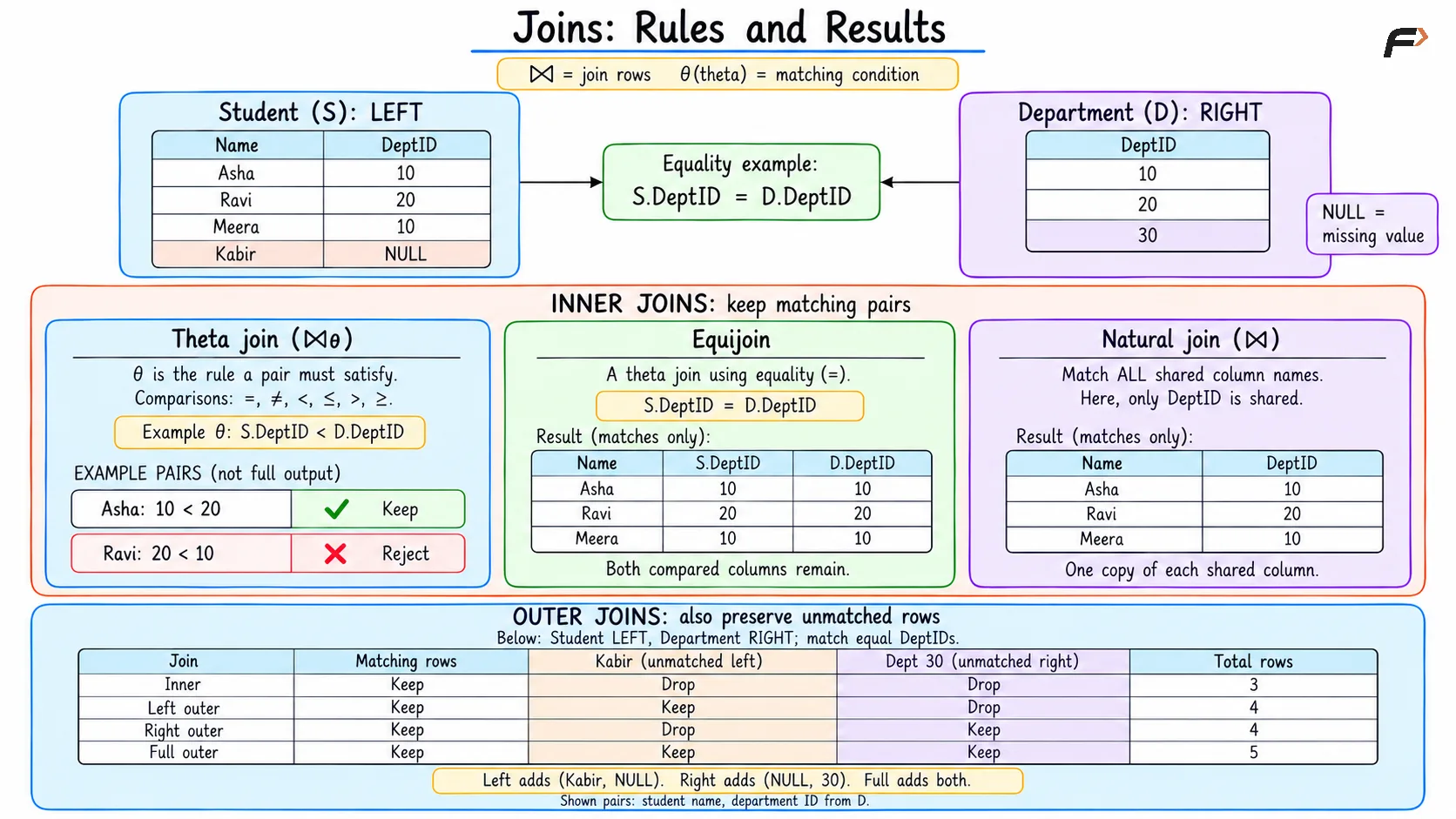
JOINS : RULES AND RESULTS
Cross Joins and Self Joins
A cross join produces every possible pair of rows from two relations. It is the SQL counterpart of the Cartesian product. With four students and three departments, the example produces 4 × 3 = 12 rows, regardless of whether their department IDs match.
A self join uses the same relation in two roles. Each occurrence receives a different alias in SQL, corresponding to renaming in relational algebra.
For example, a self join can find pairs of students from the same department. Matching department IDs and requiring the first student’s ID to be smaller than the second student’s ID produces the pair Asha–Meera. The ID comparison excludes self-pairs and avoids returning the reversed pair again.
A self join is a usage pattern, so it can use inner or outer join behavior depending on the requirement.
Semijoins and Antijoins
Sometimes a query needs to check whether related records exist without adding their columns to the result.
Operation | Which left-side rows survive? | Output columns | Example |
|---|---|---|---|
Left semijoin, ⋉ | Rows with at least one right-side match | Left relation only | Departments that have students |
Left antijoin | Rows with no right-side match | Left relation only | Departments that have no students |
With Department on the left and Student on the right, the semijoin returns Computer Science and Electronics. The antijoin returns Mathematics.
A semijoin checks existence: multiple matching students do not create multiple copies of a department because of those matches. In SQL and PostgreSQL, EXISTS commonly expresses this requirement, while NOT EXISTS expresses the antijoin requirement.
NOT IN is not always interchangeable with NOT EXISTS. If the relevant values contain NULL, their behavior can differ.
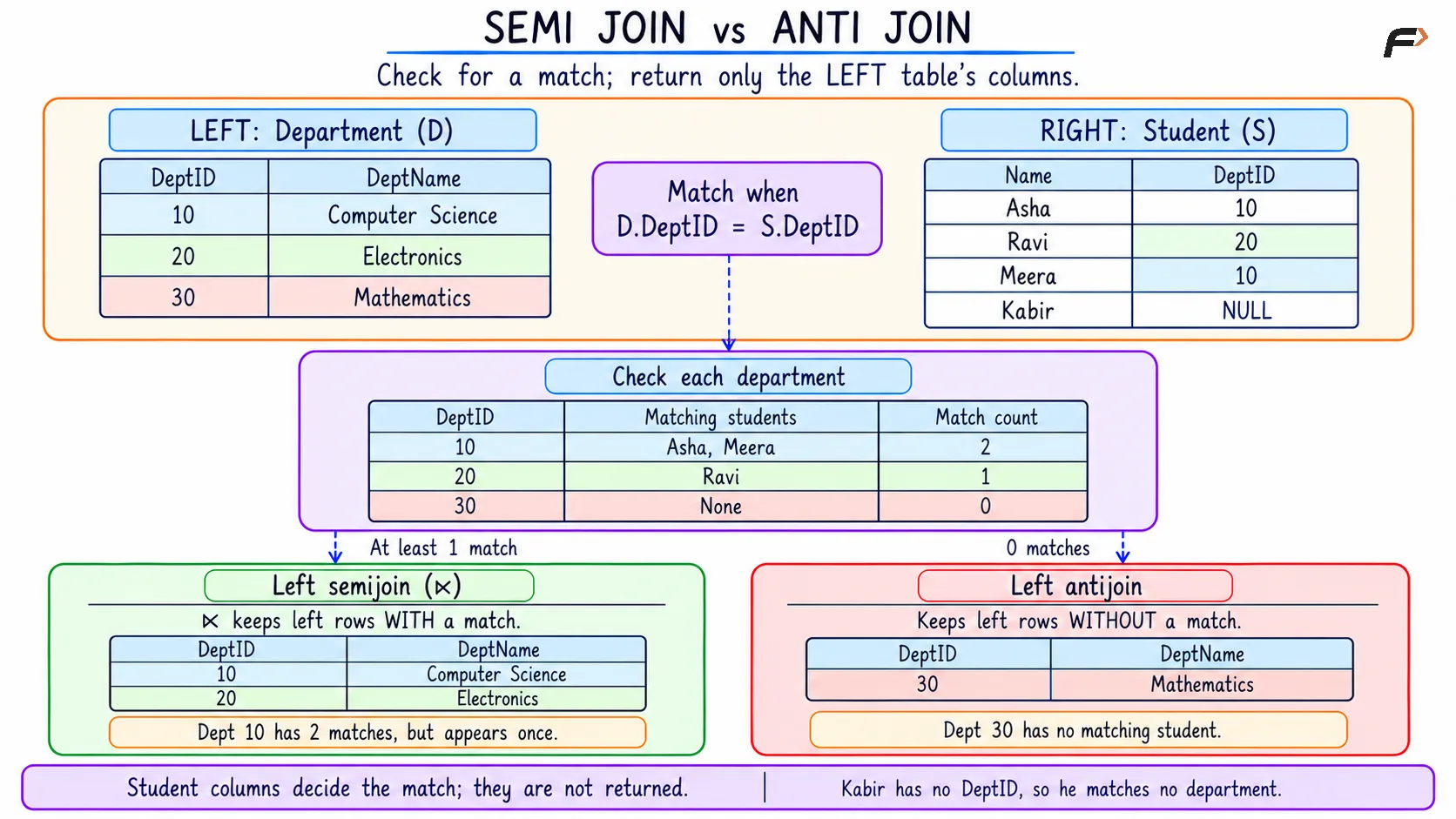
SEMI JOIN VS ANTI JOIN
Generalized Projection
Ordinary projection selects existing attributes. Generalized projection, also called extended projection, allows expressions to calculate output attributes.
For example, projecting StudentID together with a calculated NextSemester value obtained from Semester + 1 would produce 3 for Asha and 5 for Ravi.
Generalized projection can include:
Existing attributes: Carry selected columns into the result.
Calculated attributes: Use arithmetic or other supported expressions to derive values.
Named expressions: Give calculated results meaningful attribute names.
These calculations produce a query result. They do not update the stored semester values.
Aggregation and Grouping
An aggregate function summarizes a collection of values. Common functions include COUNT, SUM, AVG, MIN, and MAX.
Grouping divides rows into groups that share the same grouping values. An aggregate is then calculated separately for each group. The grouping and aggregation operator is commonly written as γ, although notation varies between textbooks.
For example, grouping assigned students by department and counting them gives two students in Computer Science and one in Electronics. A count without grouping summarizes the entire input.
SQL expresses these operations through aggregate functions and GROUP BY. Its two filtering clauses serve different purposes:
Clause | What it filters | Example requirement |
|---|---|---|
| Individual rows before grouping | Include only Semester 2 students |
| Groups after aggregation | Include only departments with at least two qualifying students |
In SQL and PostgreSQL, COUNT(*) counts rows, while COUNT(column) counts non-NULL values in that column. SUM, AVG, MIN, and MAX also ignore NULL inputs. For an aggregate over no input rows, COUNT returns zero, while these other functions return NULL.
Duplicate Elimination and Sorting
Classical relational algebra uses sets, so duplicate tuples do not occur. SQL normally uses bag, or multiset, behavior: duplicate result rows can remain unless an operation removes them.
Operation | Common notation | Purpose | SQL counterpart |
|---|---|---|---|
Duplicate elimination | δ | Keeps one copy of each distinct tuple |
|
Sorting | τ | Arranges tuples by specified attributes |
|
For example, choosing only the department ID from Asha’s, Ravi’s, and Meera’s rows produces the values 10, 20, and 10 under bag projection. Duplicate elimination leaves 10 and 20.
Sorting introduces another distinction: its result is an ordered sequence, rather than an unordered relation or bag. In SQL, use ORDER BY whenever the output must follow a particular order; neither grouping nor duplicate elimination guarantees that order.
Bag behavior also matters for set operations. SQL UNION removes duplicate rows, whereas UNION ALL retains them.
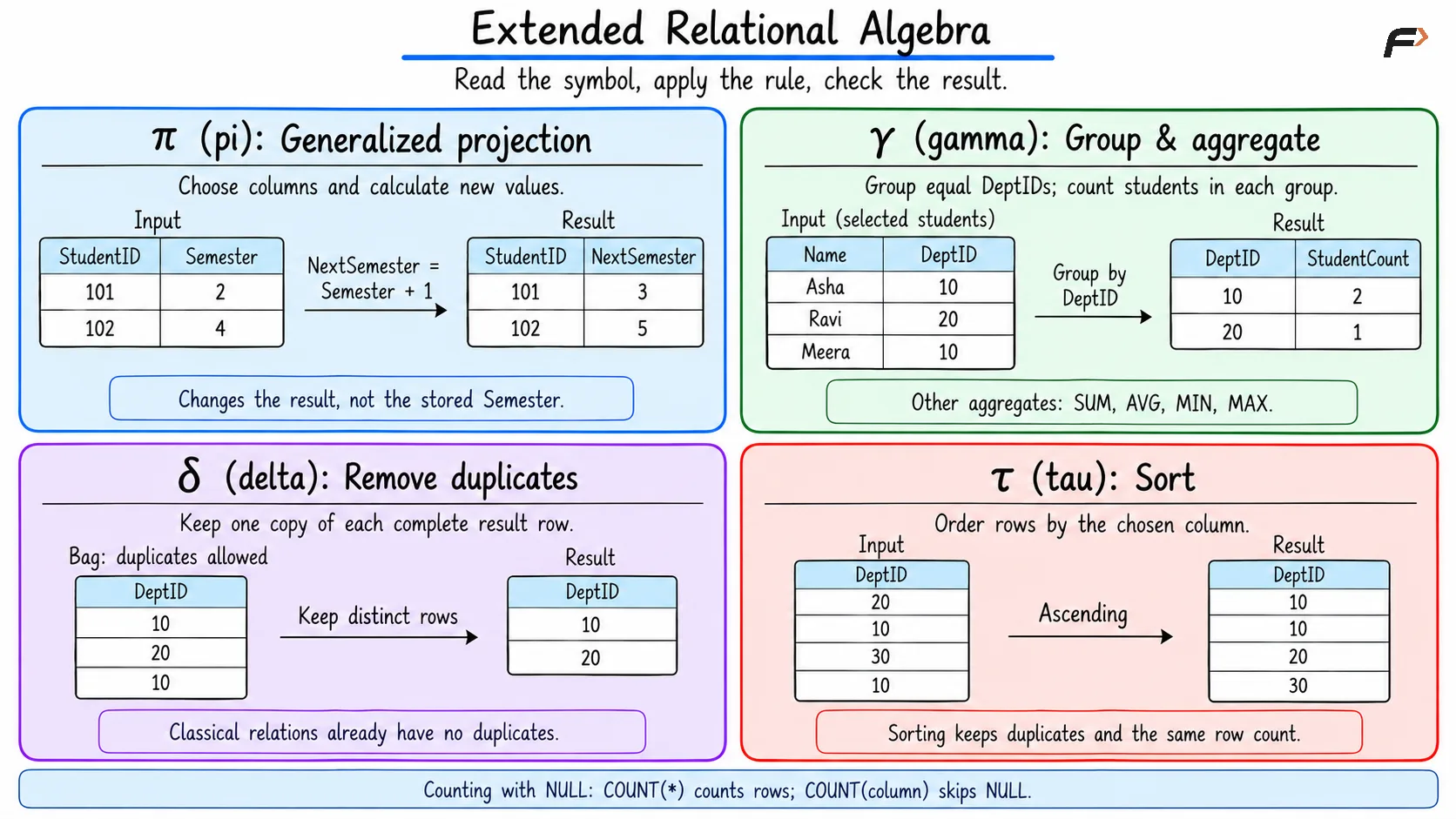
EXTENDED RELATIONAL ALGEBRA
Relational Division: Matching Every Required Value
Relational division answers questions containing “all” or “every.” It is a derived operation that can be expressed using fundamental relational algebra operations.
Suppose an Enrollment relation records student–course pairs, and a RequiredCourse relation contains DBMS and Operating Systems. Division identifies students enrolled in both required courses.
A student enrolled only in DBMS does not qualify. A student enrolled in both required courses plus Networks still qualifies, because additional courses do not violate the requirement.
For compatible schemas R(X, Y) and S(Y), division returns the X values associated in R with every Y value in S. SQL has no general DIVIDE keyword; such conditions are commonly expressed using nested existence checks or carefully constructed aggregation.
Combining Operations Correctly
A useful query often combines joins, filtering, projection, and aggregation. The placement of an operation can change the result.
Outer join filters: An
ONcondition determines which rows match. A laterWHEREcondition can remove the unmatched rows that an outer join preserved.Missing values: Ordinary comparisons with
NULLproduce unknown rather than true. UseIS NULLwhen testing for a missing value.Multiple matches: A join can increase the number of rows. Check the relationship and matching condition before treating repeated values as an error.
Aggregation level: Group by the attributes that identify the intended summary. Grouping only by a department name could combine distinct departments that share that name.
Long relational algebra expressions can also assign names to intermediate results using the assignment symbol ←. This makes expressions easier to read without changing their meaning.
A Compact Example
Requirement: Show every department and its number of Semester 2 students, including departments with no qualifying students.
This combines selection, a left outer join, grouping, aggregation, and sorting.
Extended relational algebra expression
The following is mathematical notation. Here, σ selects rows, ⟕ preserves the left relation, γ groups and aggregates, and τ sorts. COUNT(StudentID) uses the non-NULL counting behavior described above.
τ[Department.DeptID ASC]( γ[Department.DeptID, DeptName; COUNT(StudentID) AS StudentCount]( Department ⟕[Department.DeptID = Student.DeptID]( σ[Semester = 2](Student) ) ))The following PostgreSQL and SQL queries achieves the above mentioned objective.
SELECT d.DeptID, d.DeptName, COUNT(s.StudentID) AS StudentCountFROM Department AS dLEFT JOIN Student AS s ON d.DeptID = s.DeptID AND s.Semester = 2GROUP BY d.DeptID, d.DeptNameORDER BY d.DeptID;Result :
DeptID | DeptName | StudentCount |
|---|---|---|
10 | Computer Science | 2 |
20 | Electronics | 0 |
30 | Mathematics | 0 |
The semester condition belongs in ON because every department must remain in the result. Electronics has a student, but Ravi is in Semester 4. Mathematics has no students. Both therefore receive zero qualifying matches.
COUNT(s.StudentID) ignores the NULL student values introduced for those departments. Using COUNT(*) would count their preserved placeholder rows and incorrectly report one instead of zero. Kabir contributes to no department because his department assignment is missing.
Summary
Joins combine related records according to matching and row-preservation rules. Inner joins retain matches, outer joins preserve specified unmatched rows, and semi- and antijoins test whether related records exist. Cross joins form every pair, while self joins compare different roles within one relation.
Extended relational algebra adds calculated attributes, grouping, aggregation, duplicate elimination, and sorting. Division handles requirements involving every required value. Understanding these operations, along with SQL’s duplicate and NULL behavior, helps produce queries with the intended rows, columns, and summaries.
Be the first to add a comment.