Introduction
Filtering sometimes means checking whether information is available. Other queries need to include or exclude records according to a list of values, such as selected departments or customer identifiers.
SQL provides IS NULL, IS NOT NULL, IN, and NOT IN for these tasks. They serve different purposes, and combining list comparisons with missing values requires particular care.
Understanding the Four Conditions
NULL represents missing or unknown information. It is different from a numeric zero or an empty string in MySQL.
Condition | Purpose | Example |
|---|---|---|
| Finds missing values |
|
| Finds supplied values |
|
| Tests membership |
|
| Negates membership |
|
A WHERE clause retains rows only when its complete condition evaluates to true. False and unknown results are excluded.
The examples below use MySQL-compatible SQL and this table:
student_id | student_name | department | marks |
|---|---|---|---|
101 | Asha | CSE | 85 |
102 | Ravi | ECE | 72 |
103 | Meera | CSE | NULL |
104 | Kabir | ME | 60 |
105 | Nila | NULL | NULL |
IS NULL vs IS NOT NULL
Use IS NULL when a value is missing:
SELECT student_nameFROM studentsWHERE marks IS NULL;This returns Meera and Nila.
Use IS NOT NULL for the opposite requirement:
SELECT student_name, marksFROM studentsWHERE marks IS NOT NULL;This returns Asha, Ravi, and Kabir.
Do not write marks = NULL or marks <> NULL to perform these checks. Ordinary comparisons with NULL produce unknown rather than testing whether a value is missing.
IS NOT NULL does not mean “positive,” “nonzero,” or “nonempty.” A recorded zero is non-null, and an empty string is non-null in MySQL.
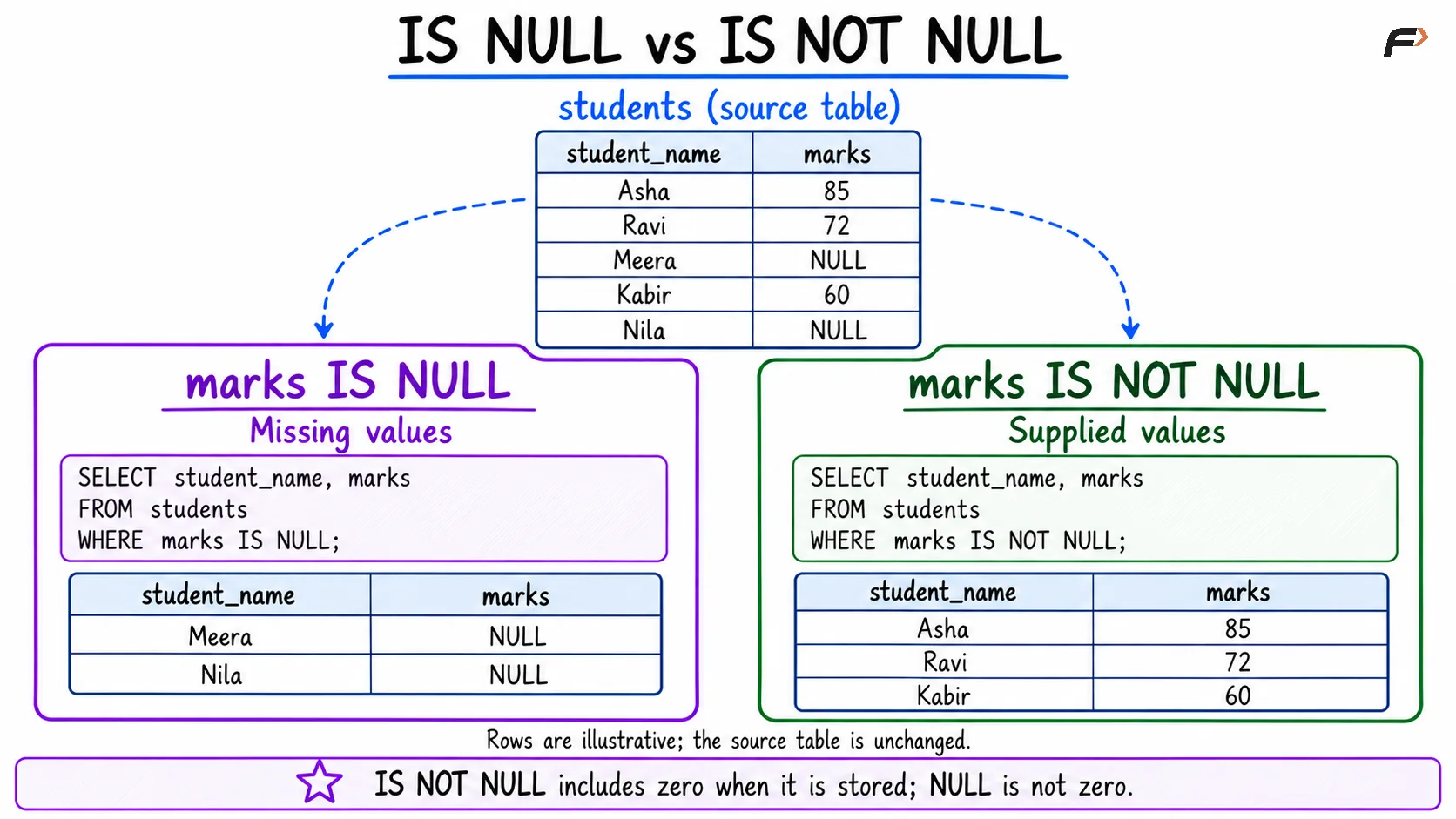
IS NULL vs IS NOT NULL
Matching Values with IN
IN checks whether an expression matches any value in a list.
SELECT student_name, departmentFROM studentsWHERE department IN ('CSE', 'ECE');Asha, Ravi, and Meera qualify. Kabir’s department is outside the list, while Nila’s missing department does not produce a true match.
For this list, the condition is equivalent to:
WHERE department = 'CSE' OR department = 'ECE'IN makes longer lists easier to read. Values should have suitable, compatible data types; use quoted strings for text and numeric literals for numeric identifiers.
Repeating a value in the list does not duplicate matching rows in the result.
Excluding Values with NOT IN
NOT IN negates the membership test:
SELECT student_name, departmentFROM studentsWHERE department NOT IN ('CSE', 'ECE');Only Kabir qualifies. Nila is excluded because her department is unknown, not a known value outside the list.
If missing departments should also qualify, include them explicitly:
SELECT student_name, departmentFROM studentsWHERE department NOT IN ('CSE', 'ECE') OR department IS NULL;This returns Kabir and Nila. The added condition makes the treatment of missing information clear.
The NULL Trap in NOT IN
A NULL inside the exclusion list can prevent otherwise nonmatching values from qualifying.
Consider:
WHERE department NOT IN ('CSE', NULL)For Kabir, the condition behaves like:
'ME' <> 'CSE' AND 'ME' <> NULLThe first comparison is true, but the second is unknown. Their combined result is unknown, so Kabir is excluded.
Department |
|
|
|---|---|---|
CSE | True | False |
ECE | Unknown | Unknown |
ME | Unknown | Unknown |
NULL | Unknown | Unknown |
A matching non-null value still makes IN true. When no match exists and the list contains NULL, the result is unknown; negating it does not turn it into true.
Also, IN ('CSE', NULL) does not select missing departments. Use department IN ('CSE') OR department IS NULL for that requirement.
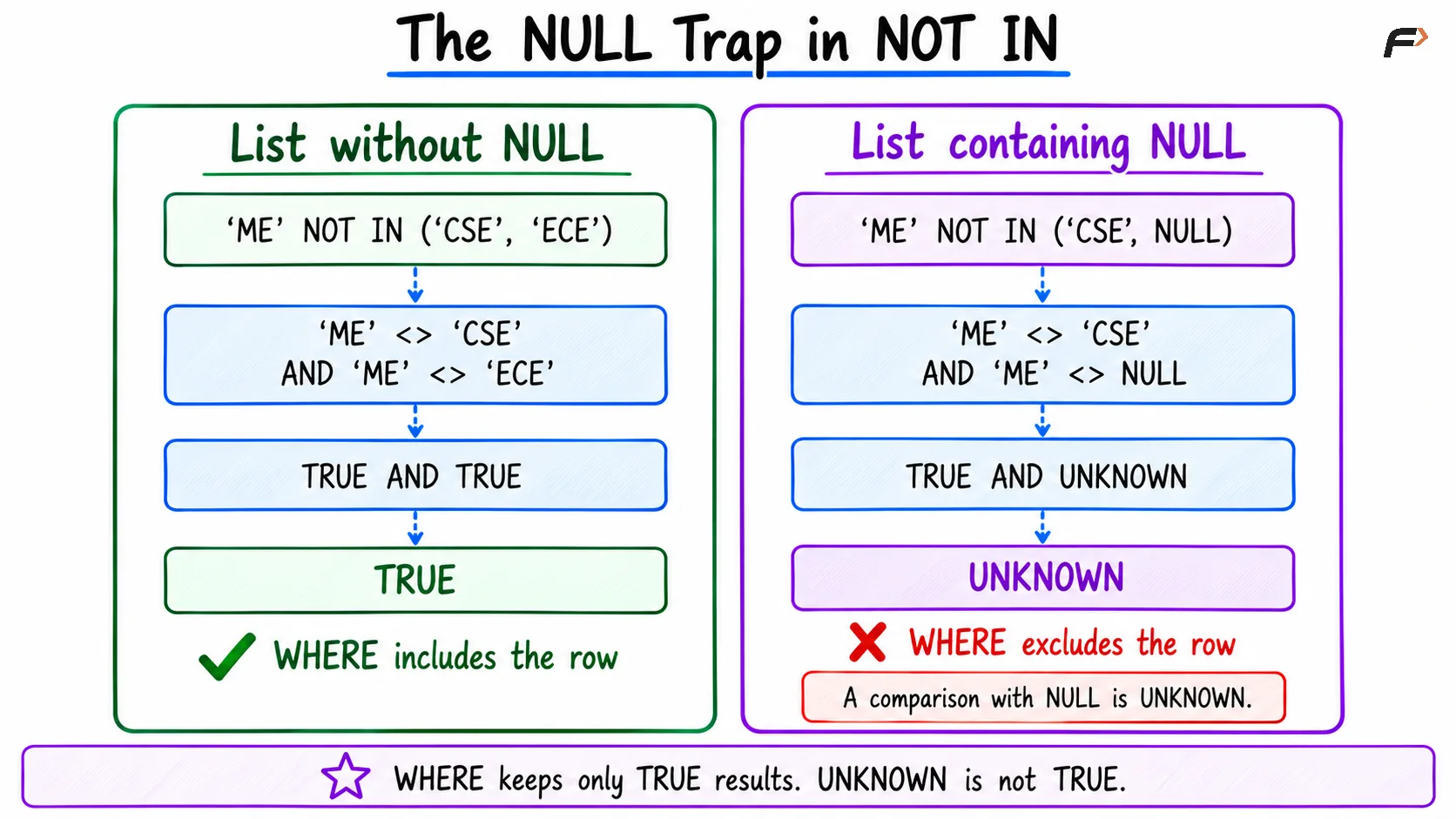
The NULL trap in NOT IN
Using IN and NOT IN with Subqueries
The membership values can come from another query. For example, assume excluded_departments contains a nullable department_name column.
Filter nulls from that subquery before using it as an exclusion set:
SELECT student_name, departmentFROM studentsWHERE department NOT IN ( SELECT department_name FROM excluded_departments WHERE department_name IS NOT NULL)AND department IS NOT NULL;The subquery supplies known department names. The outer IS NOT NULL makes the policy explicit: only students with a known department can qualify.
If missing departments should be included, use an outer OR department IS NULL instead. A correlated NOT EXISTS query is another useful exclusion pattern, but its treatment of missing outer values should also match the intended requirement.
A single-column membership test requires a subquery returning one column. Duplicate values in its result do not change membership.
Common Mistakes
Keep these distinctions clear when building filters:
Testing NULL with equality: Use
IS NULLorIS NOT NULL, rather than= NULL.Expecting NOT IN to include missing values: Add an explicit null condition when required.
Putting NULL in an exclusion list: It can turn nonmatches into unknown results.
Confusing NULL with
'NULL': The quoted version is text.Assuming NOT IN and IN divide every row: Missing values can qualify for neither condition.
Ignoring subquery data: Check whether the membership column can return nulls.
Test matching, nonmatching, and missing values separately. These cases reveal errors that ordinary sample records can hide.
Summary
IS NULL and IS NOT NULL test whether information is missing or supplied. IN and NOT IN test membership and exclusion against listed values or subquery results.
Account for unknown results whenever ordinary comparisons involve NULL. In particular, keep nulls out of a NOT IN exclusion set and state explicitly how missing outer values should be handled.
Be the first to add a comment.