Introduction
Related information is often stored in separate database tables. A query may need to combine that information while including only records that have the required relationships.
INNER JOIN connects matching records from these tables. Understanding its matching condition, treatment of unmatched rows, and handling of multiple matches helps explain which records appear in the result.
What Is an INNER JOIN?
An INNER JOIN combines rows from two tables when the join condition evaluates to true. Each matching pair contributes a row to the result.
Its basic behavior is:
A match exists: Combine the matching rows.
Multiple matches exist: Produce a result row for every matching pair.
No match exists: Exclude the unmatched row.
Unlike an outer join, an inner join does not preserve unmatched rows from either table. If no row pairs satisfy the condition, the result is empty.
In both MySQL and PostgreSQL, writing JOIN without a join-type keyword means INNER JOIN. Writing INNER JOIN explicitly makes the intention clear.
Example Tables
Consider a college database containing two tables.
The Student table stores each student’s identifier, name, assigned department, and semester.
Student
StudentID | Name | DeptID | Semester |
|---|---|---|---|
101 | Asha | 10 | 2 |
102 | Ravi | 20 | 4 |
103 | Meera | 10 | 2 |
104 | Neha | NULL | 2 |
The Department table stores the departments offered by the college, including departments that currently have no students.
Department
DeptID | DeptName |
|---|---|
10 | Computer Science |
20 | Electronics |
30 | Mathematics |
Student.StudentID and Department.DeptID are primary keys. A non-NULL value in Student.DeptID refers to an existing department.
Asha and Meera belong to Computer Science, while Ravi belongs to Electronics. Neha has no assigned department, represented by NULL. Mathematics has no students in the displayed data.
Joining Matching Student and Department Records
Objective: Display students who have a matching department, together with their department names.
Consider the following queries to combine student records with matching department details.
SELECT s.StudentID, s.Name, d.DeptNameFROM Student AS sINNER JOIN Department AS d ON s.DeptID = d.DeptIDORDER BY s.StudentID;AS s and AS d assign temporary aliases, or shorter names, to Student and Department. For example, s.DeptID means the department ID from Student.
The ON condition matches rows whose department IDs are equal. ORDER BY s.StudentID sorts the result by student ID in ascending order.
Expected result
StudentID | Name | DeptName |
|---|---|---|
101 | Asha | Computer Science |
102 | Ravi | Electronics |
103 | Meera | Computer Science |
The result follows the matching condition:
Asha and Meera: Their department ID,
10, matches Computer Science.Ravi: His department ID,
20, matches Electronics.Neha: Her department ID is
NULL, so the equality condition does not produce a match.Mathematics: No student has department ID
30, so the department does not appear.
The department name Computer Science appears twice because it belongs to two different matching student records. These are separate result rows, not an error.
An inner join does not require a declared foreign key to run. The ON condition determines which rows match, while a foreign key constraint separately enforces valid references in stored data.
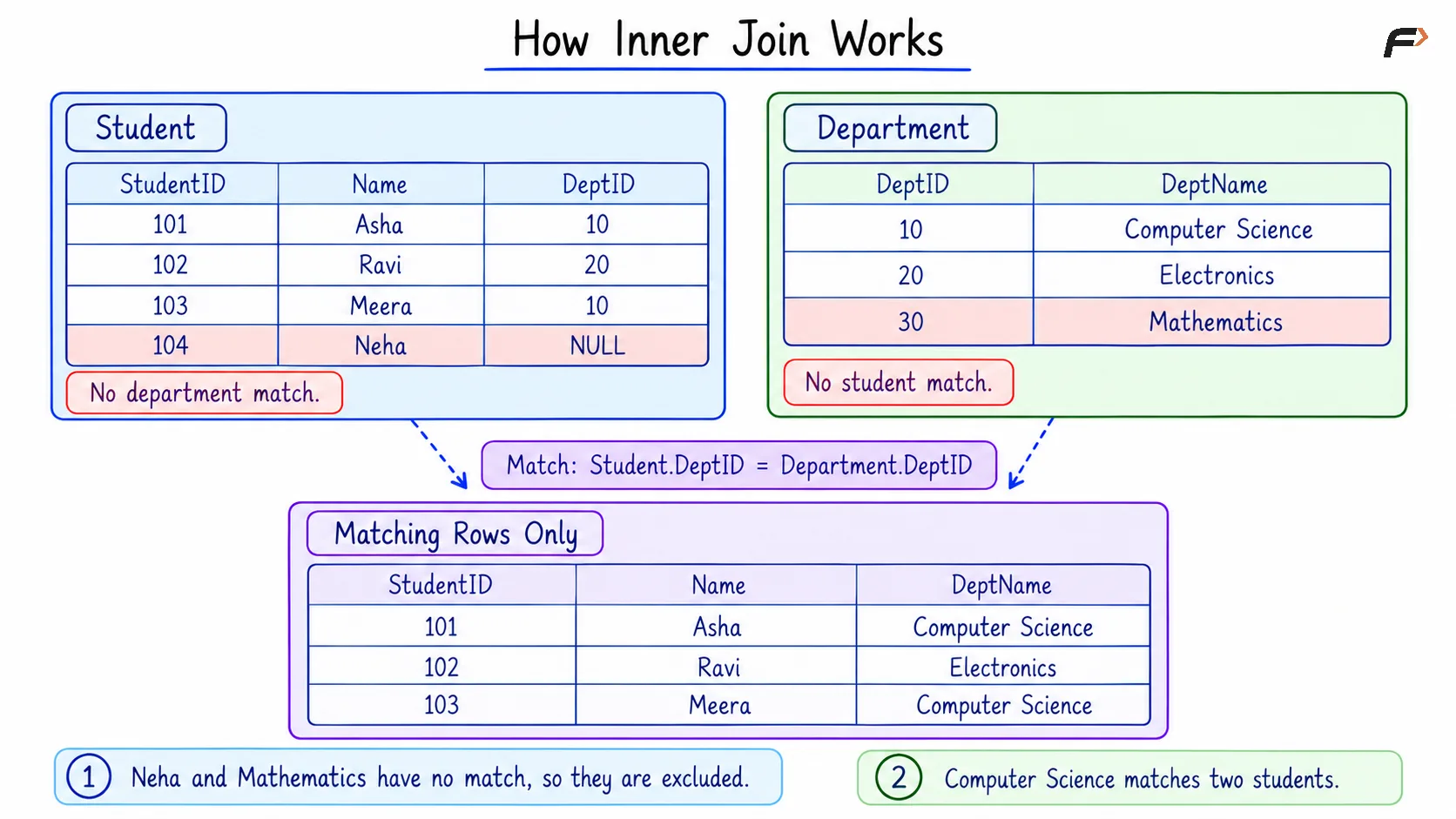
HOW INNER JOIN WORKS
Multiple Matches and NULL Values
An inner join returns every matching pair, rather than selecting only the first match. If one row matches three rows in the other table, it contributes three result rows.
In the previous example, the Computer Science department matches two students. Repeated department values are therefore expected. Similarly, selecting only department names would still return Computer Science twice unless duplicate elimination is explicitly requested.
NULL requires separate attention. An ordinary equality comparison involving NULL does not evaluate to true, so it cannot produce a match through that comparison.
However, an inner join does not automatically remove every row containing NULL. A row with a missing value in an unrelated column can still appear when its join condition is satisfied.
Filtering INNER JOIN Results
The ON clause describes which rows match. A WHERE clause can then restrict the matching records to those required by the report.
Objective: Display students in semester 2 who have a matching department.
Consider the following queries to filter the joined records by semester.
SELECT s.StudentID, s.Name, d.DeptName, s.SemesterFROM Student AS sINNER JOIN Department AS d ON s.DeptID = d.DeptIDWHERE s.Semester = 2ORDER BY s.StudentID;Expected result
StudentID | Name | DeptName | Semester |
|---|---|---|---|
101 | Asha | Computer Science | 2 |
103 | Meera | Computer Science | 2 |
Ravi has a matching department but is excluded by the semester filter. Neha is in semester 2 but has no matching department, so she is excluded by the inner join.
For this inner join, placing the semester condition in ON as AND s.Semester = 2 would produce the same result. AND requires both the department match and the semester condition to be true.
Keeping the table relationship in ON and the additional result filter in WHERE often makes the query easier to read. This equivalence should not be assumed for outer joins, where condition placement can change whether unmatched rows remain.
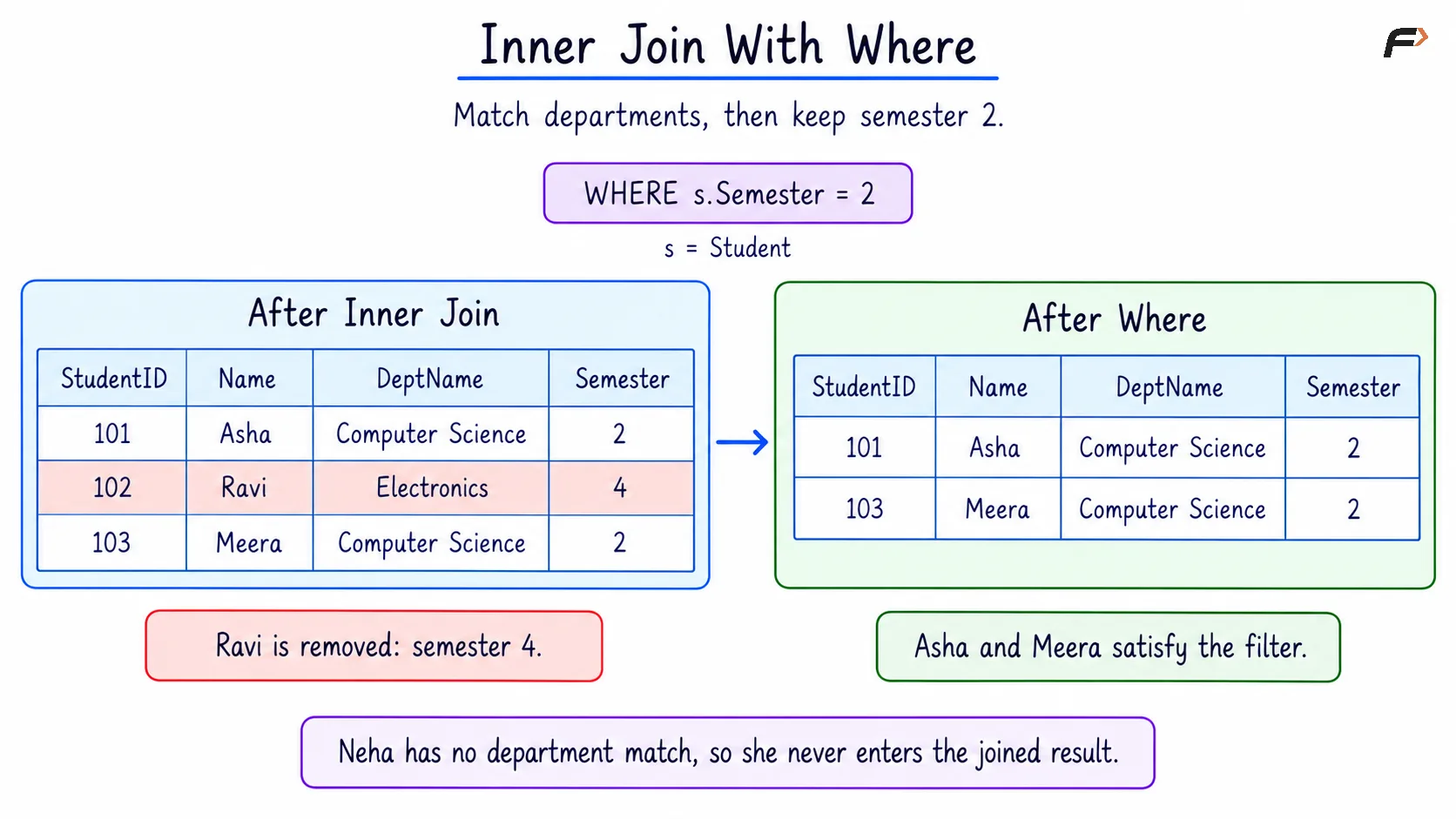
INNER JOIN WITH WHERE
Matching Shared Column Names with USING
When the matching columns have the same name in both tables, USING provides a shorter way to express an equality join.
Here, both tables contain a column named DeptID.
Objective: Produce the same student-and-department report using the shared column name.
Consider the following queries to match the tables with USING.
SELECT s.StudentID, s.Name, d.DeptNameFROM Student AS sINNER JOIN Department AS d USING (DeptID)ORDER BY s.StudentID;Expected result
StudentID | Name | DeptName |
|---|---|---|
101 | Asha | Computer Science |
102 | Ravi | Electronics |
103 | Meera | Computer Science |
USING (DeptID) matches equal DeptID values from the two tables. For these explicitly selected columns, it produces the same result as ON s.DeptID = d.DeptID.
Use ON when the matching columns have different names or when the join needs additional conditions. Matching columns do not need identical names when their relationship is written explicitly in ON.
INNER JOIN Compared with Outer Joins
An inner join includes matching records only. Outer joins additionally preserve unmatched records from a specified side.
Join type | Rows preserved during the join |
|---|---|
| Matching pairs only |
| Every left-table row, with matching right-table data |
| Every right-table row, with matching left-table data |
With Student on the left and Department on the right, an inner join excludes both Neha and the unmatched Mathematics department.
A left join would additionally preserve Neha with NULL department details. A right join would additionally preserve Mathematics with NULL student details. The appropriate join depends on whether the report needs unmatched records.
Summary
INNER JOIN combines records only when their join condition is satisfied. It excludes unmatched rows from either table and produces a separate result row for every matching pair, which can cause values from one table to appear repeatedly.
ON defines the matching relationship, WHERE filters the matching records, and USING offers a shorter equality condition for shared column names. Multiple inner joins can combine several tables, provided each result row satisfies all required join conditions.
Be the first to add a comment.