Introduction
Finding a few records in a large table can require substantial work if the database must examine every row. An index provides an additional access path that can help locate the required information more efficiently.
Indexes are useful, but they also consume space and require maintenance when data changes. Understanding how they work helps identify where an index can improve performance and where it may add unnecessary overhead.
What Is an Index in SQL?
An index is a database structure organized around one or more search columns. It helps the database locate matching records without always scanning the entire table.
A book index offers a useful comparison: it connects a topic to the pages where that topic appears. A database index similarly connects search-key values to the information needed to retrieve records.
Many general-purpose indexes use B-tree structures, which support equality searches, range conditions, and ordered access. Other structures exist for specialized requirements.
Creating an index does not change a query’s meaning or guarantee that the database will use it. The optimizer chooses an access method based on estimated costs.
How Indexing Works
Suppose a students table contains:
student_id | student_name | department |
|---|---|---|
101 | Asha | CSE |
102 | Ravi | ECE |
103 | Meera | CSE |
104 | Kabir | ME |
Consider this query:
SELECT student_id, student_nameFROM studentsWHERE department = 'CSE';Without a suitable index, the database may scan the table and test each row. With an index on department, it gains another possible access path.
The basic idea is:
Search the index for the value
'CSE'.Locate the matching index entries.
Retrieve any required row information not already available in the index.
Return the requested columns.
The result still contains Asha and Meera. Indexing changes the possible retrieval method, not which records satisfy the condition.
This small table illustrates the mechanism. For only four rows, scanning the table may be cheaper than using an index.
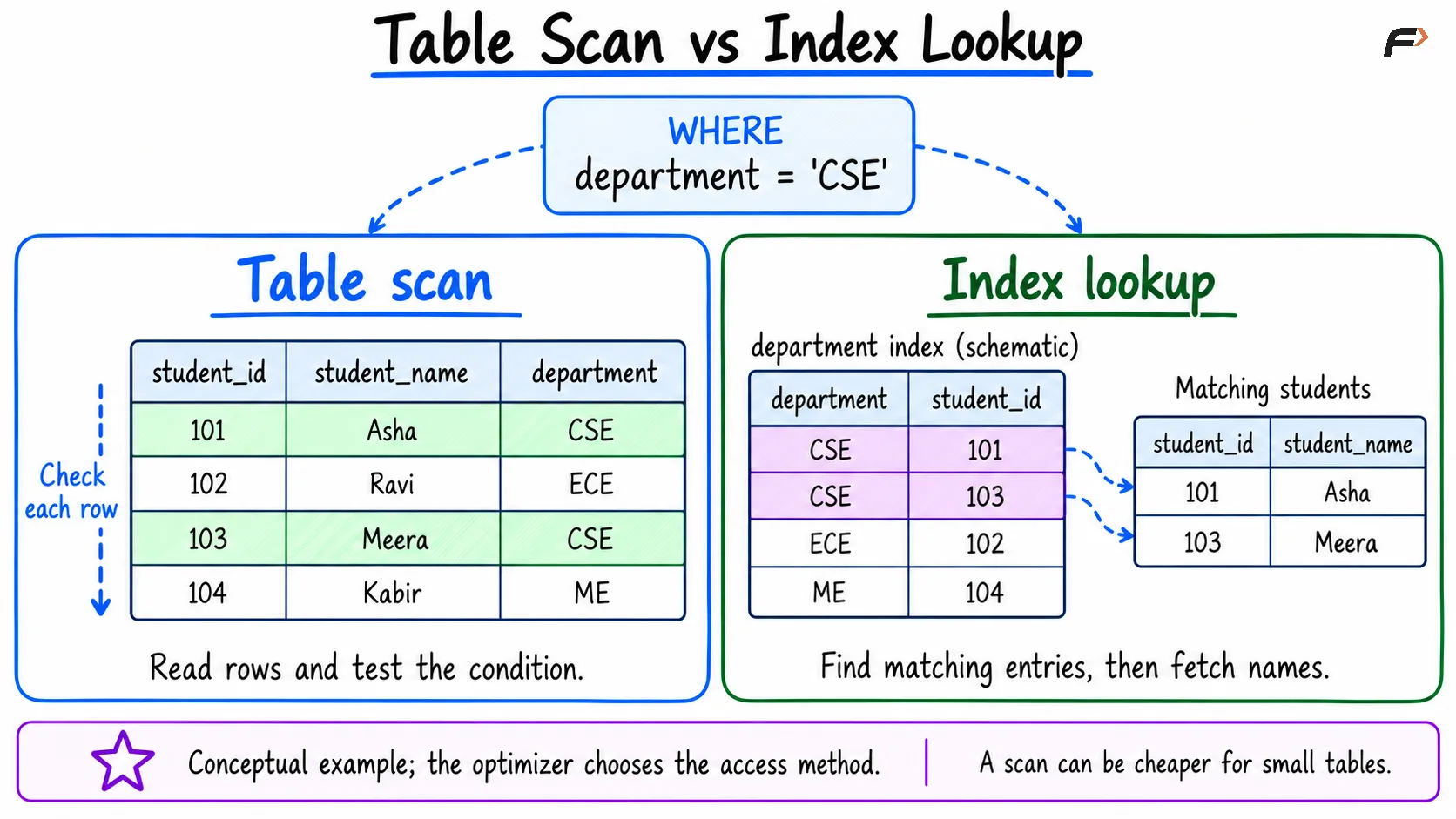
Table scan vs Index lookup
Creating and Removing an Index
The following index-creation statements work in both MySQL and PostgreSQL. They assume that the students table already exists.
Create an index on the department column:
CREATE INDEX idx_students_departmentON students (department);The query does not need to name this index. The optimizer considers it automatically when planning suitable statements.
Inspect the table’s indexes with:
SHOW INDEX FROM students;Remove the index when it is no longer needed:
DROP INDEX idx_students_departmentON students;Dropping this secondary index removes the access structure, while retaining the table and its records. Constraints and dependencies can restrict removal of indexes needed to enforce rules.
Single-Column, Composite, and Unique Indexes
These descriptions refer to different index characteristics. A unique index, for example, can contain either one column or several.
Index description | Meaning | Example |
|---|---|---|
Single-column | Uses one column as its search key |
|
Composite | Uses multiple columns in a defined order |
|
Unique | Enforces uniqueness of indexed key values | A unique email index |
Create a composite index with:
CREATE INDEX idx_students_dept_nameON students (department, student_name);For ordinary B-tree lookups, column order matters. This index supports searches starting with department, including conditions on both department and name.
It is not generally equivalent to an index beginning with student_name. A condition on the name alone does not provide the same direct lookup opportunity, although the optimizer may have other index-based strategies.
A unique index can be created on an existing email column:
CREATE UNIQUE INDEX idx_students_emailON students (email);Existing data must satisfy the uniqueness requirement. In MySQL, nullable unique columns can contain multiple NULL values.
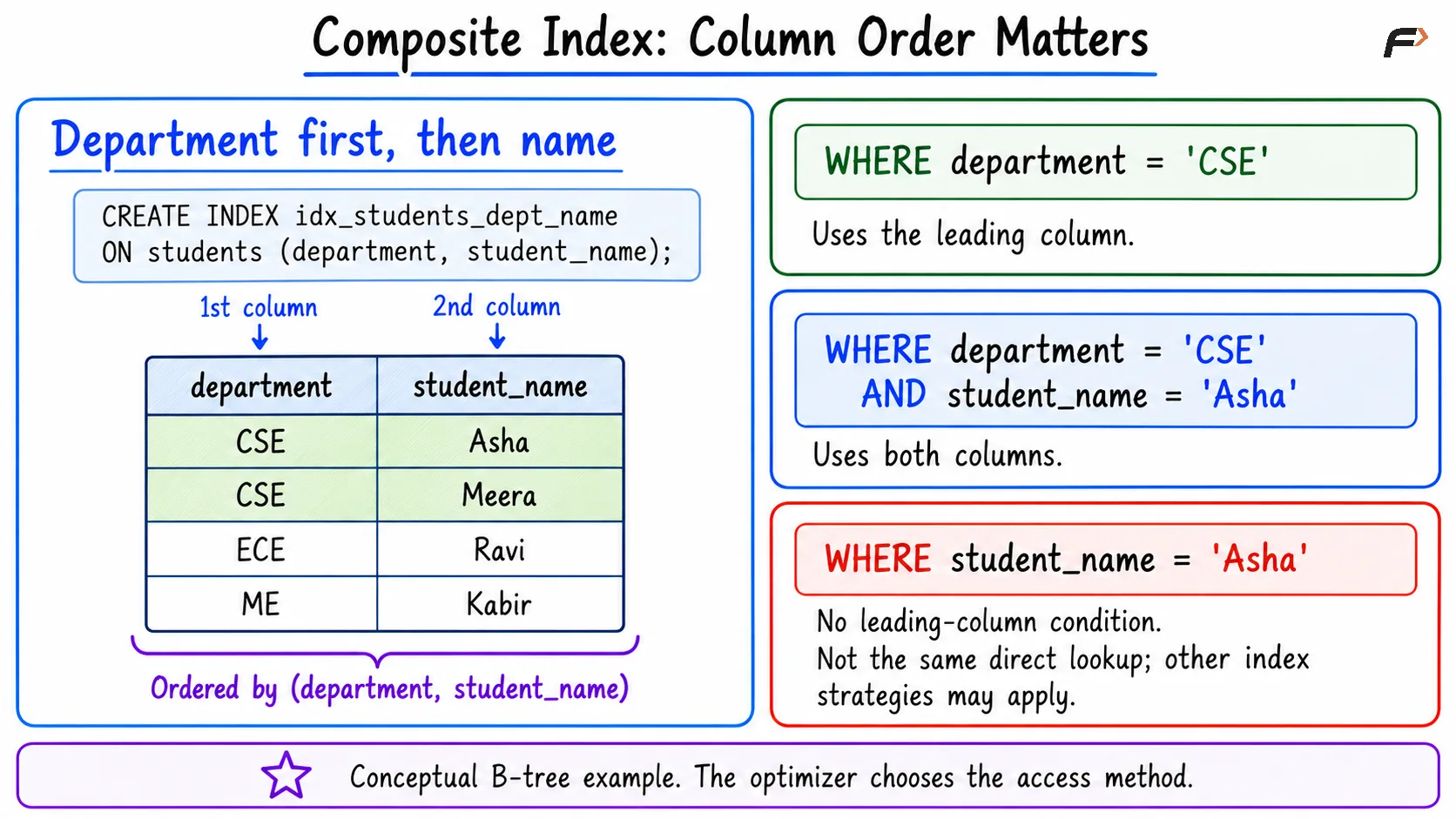
Composite index
Clustered and Secondary Indexes
Indexes also differ in how they relate to stored rows. This behavior depends on the database engine.
In MySQL InnoDB, the clustered index contains the row data. An explicitly declared primary key is used as the clustered key.
A secondary index contains its indexed values together with the primary key values needed to locate rows in the clustered index. Retrieving additional columns can therefore require a further lookup.
When an index already contains all the columns needed by a query, it may serve as a covering index for that query. This can avoid additional row lookups.
Do not assume that every database stores table rows in the same way or automatically clusters them by primary key.
When Indexes Help and What They Cost
Indexes are often useful when queries repeatedly retrieve a relatively small portion of a large table. Suitable indexes can also support joins, range searches, and ordering.
However, their value depends on the workload:
Filtering: An index can help locate matching rows, especially when conditions narrow the result substantially.
Joins: Indexes on relevant join columns can support efficient matching.
Ordering: A suitable index may reduce sorting work, but not every
ORDER BYbenefits.Storage: Each additional index consumes space.
Writes: Inserts, deletes, and relevant updates require index maintenance.
Broad queries: A scan may be cheaper when many rows are needed.
Adding an index to every column is therefore not a sound default. Choose indexes around frequent, meaningful queries and check whether they provide a measurable benefit.
Checking Index Usage with EXPLAIN
Use EXPLAIN to inspect how MySQL plans a query:
EXPLAINSELECT student_id, student_nameFROM studentsWHERE department = 'CSE';The output includes information about candidate indexes, the chosen access method, and estimated rows examined. An available index may still be ignored when the optimizer estimates that a scan will cost less.
Compare plans using representative data. Estimates alone do not prove a performance improvement; runtime measurements help confirm whether an index benefits the actual workload.
Summary
An SQL index provides an additional access path that can improve filtering, joins, and ordering. Its usefulness depends on the query, data distribution, index structure, and optimizer’s choices.
Balance faster retrieval against storage and write-maintenance costs. Select appropriate columns, consider composite-index order, and inspect execution plans before deciding that an index is effective.
Be the first to add a comment.