Introduction
An index provides an additional way to locate database records without examining every row. However, indexes can differ in their organization, contents, and the queries they support.
Index classification helps describe these differences. Index design uses that understanding to choose useful indexes while controlling the extra storage and work required when data changes.
How Indexes Are Classified
An index can belong to several classifications at once. For example, an index may be secondary, unique, composite, and tree-based.
Each label describes a different property:
Classification | Main question |
|---|---|
Primary or secondary | How does the index relate to the file’s ordering? |
Clustered or nonclustered | How are records organized relative to the index? |
Dense or sparse | How completely does the index represent search-key values? |
Single-column or composite | How many columns form the search key? |
Unique or non-unique | Can indexed key values repeat? |
Tree-based or hash-based | Which structure supports lookups? |
Here, a search key means the column or combination of columns used for indexing. It does not necessarily mean a primary key.
Primary, Clustering, and Secondary Indexes
These terms describe how an index relates to the ordering of stored records.
Primary Index Example
In traditional ordered-file terminology, a primary index uses the unique key that orders the data file.
Suppose student records are stored in student_id order:
Data page | Records: student_id, student_name |
|---|---|
Page 1 | 101, Asha; 102, Ravi |
Page 2 | 103, Meera; 104, Kabir |
A simplified primary index could contain:
student_id | Page reference |
|---|---|
101 | Page 1 |
103 | Page 2 |
To find student 104, follow the entry for 103 to Page 2, then locate 104 within that page. The index can use selected entries because the records are ordered by student_id.
Clustering Index Example
A clustering index uses an ordering field whose values can repeat.
Suppose records are grouped by department:
Data page | Records |
|---|---|
Page 1 | Asha, CSE; Meera, CSE |
Page 2 | Ravi, ECE; Nila, ECE |
Page 3 | Kabir, ME |
A simplified clustering index points to the beginning of each group:
department | First page of group |
|---|---|
CSE | Page 1 |
ECE | Page 2 |
ME | Page 3 |
To find CSE students, follow the CSE entry and read the matching group. A group may occupy several pages.
Secondary Index Example
A secondary index supports searches on a field that does not determine the data file’s ordering.
Return to the file ordered by student_id. A separate index on student_name could contain:
student_name | Record location |
|---|---|
Asha | Page 1, record 101 |
Kabir | Page 2, record 104 |
Meera | Page 2, record 103 |
Ravi | Page 1, record 102 |
To find Kabir, search the name index and follow its locator to record 104 on Page 2. The stored records remain ordered by ID.
These examples use traditional ordered-file terminology. An index supporting a SQL PRIMARY KEY constraint is not automatically the same as this textbook primary index.
Clustered and Nonclustered Organization
This classification describes where the records sit relative to the index.
Clustered Organization Example
In a clustered organization, the data records themselves follow the index key’s order. In a clustered B+ tree, leaf pages contain the records.
For a table clustered by student_id, the leaf level might contain:
Leaf page | Stored records |
|---|---|
Leaf 1 | 101, Asha; 102, Ravi |
Leaf 2 | 103, Meera; 104, Kabir |
To find 104, the database follows the index to Leaf 2, where Kabir’s record is stored.
A table has one underlying clustered organization. This does not guarantee query output order; use ORDER BY when order matters.
Nonclustered Index Example
A nonclustered index stores its entries separately from the table’s records.
For example, a name index might contain:
student_name | Row locator |
|---|---|
Kabir | student_id 104 |
Finding Kabir involves two conceptual steps:
Search the name index to obtain the locator for student
104.Follow that locator to retrieve Kabir’s stored record.
A table can have several nonclustered indexes, such as indexes on name, department, and email. Locators may be physical record references or clustered key values, depending on the database.
If an index already contains every value requested by a query, an additional record lookup may be unnecessary.
Dense and Sparse Indexes
A dense index represents every search-key value in the data. For repeated values, an entry may refer to multiple matching records.
A sparse index represents only selected search-key values, often one entry per data page. It relies on the data being ordered by the search key.
Consider three pages ordered by student_id:
Data page | Student IDs |
|---|---|
Page 1 | 101, 102, 103 |
Page 2 | 104, 105, 106 |
Page 3 | 107, 108, 109 |
A sparse index could contain:
101 → Page 1
104 → Page 2
107 → Page 3
To find 105, the database follows the entry for 104 to Page 2 and searches within that page.
Sparse indexes use fewer entries, but secondary indexes generally need dense coverage because the records are not ordered by their search key.
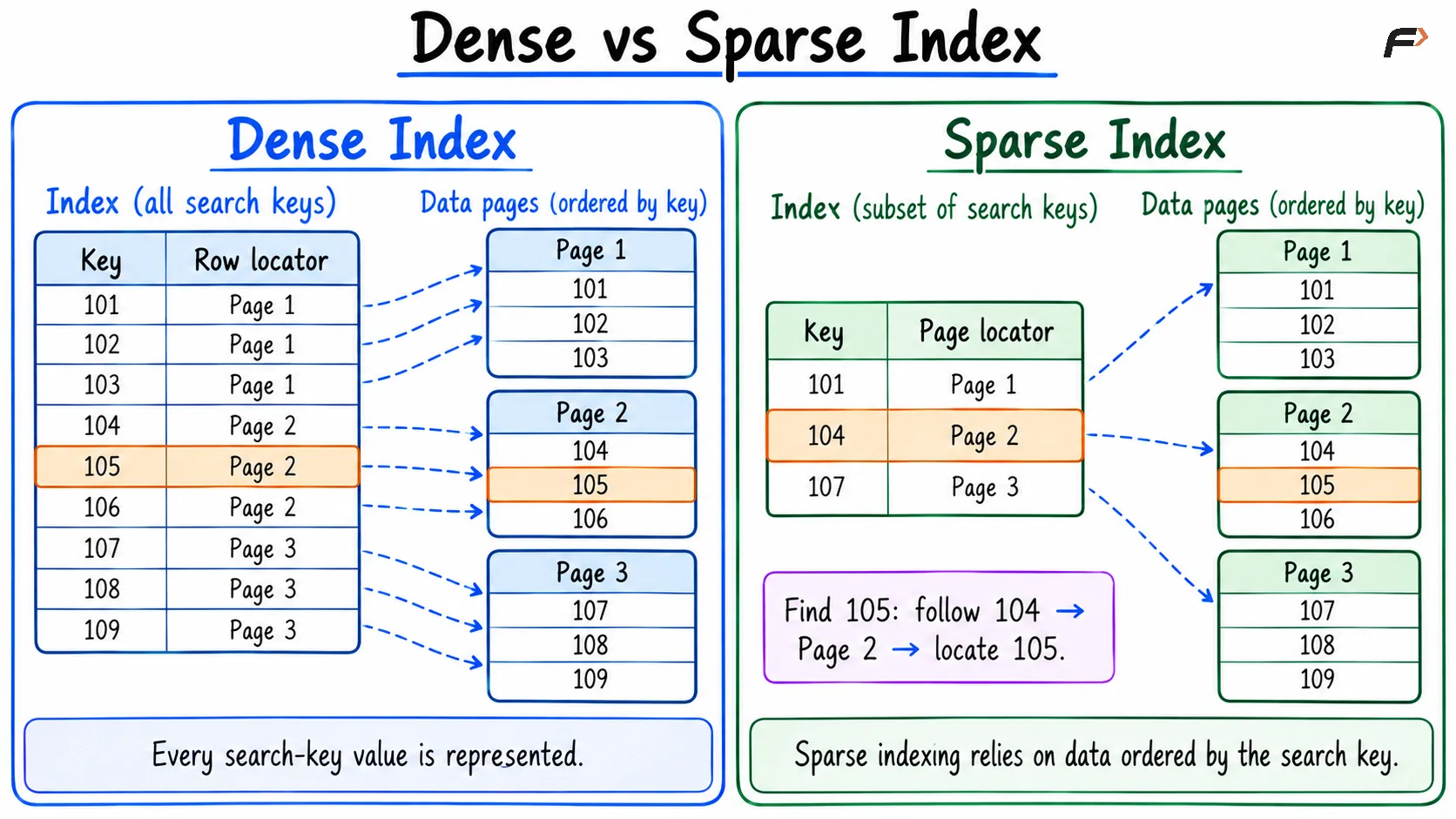
Dense vs Sparse Index
Single-Column, Composite, and Unique Indexes
A single-column index uses one column:
CREATE INDEX idx_students_departmentON students (department);A composite index uses multiple columns:
CREATE INDEX idx_students_department_marksON students (department, marks);This index orders entries by department first, then by marks within each department.
It is a useful candidate for:
SELECT student_id, marksFROM studentsWHERE department = 'CSE' AND marks >= 80;For a typical ordered composite index, leading columns matter. An index on (department, marks) generally supports department-based searches more directly than searches on marks alone. Some databases have additional optimizations, so this is a design guideline rather than an absolute restriction.
A unique index prevents duplicate indexed key combinations:
CREATE UNIQUE INDEX idx_students_emailON students (email);Treatment of NULL values in unique indexes varies by database. Uniqueness and the number of indexed columns are separate properties.
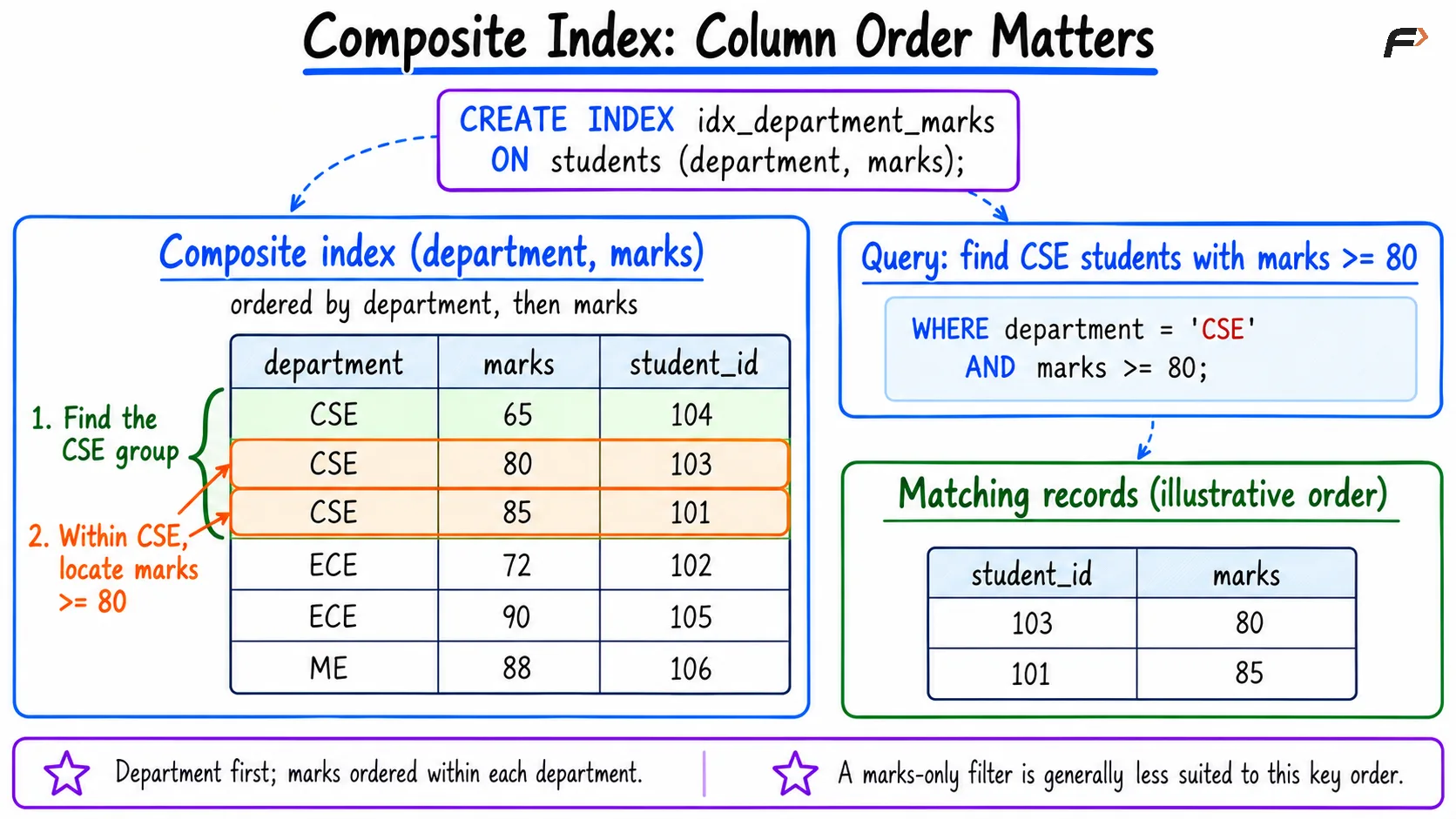
Composite index : column order matters
Tree-Based and Hash-Based Indexes
Structure | Typical strength |
|---|---|
Balanced tree, commonly B+ tree | Equality searches, ranges, and ordered access |
Hash index | Equality searches |
A tree index can support a condition such as marks BETWEEN 70 AND 90. A hash index does not naturally arrange keys in order, so it is generally unsuitable for range searches.
Available index structures and their exact capabilities depend on the database.
Practical Index Design
Start with frequently executed queries rather than indexing every column.
Inspect filters, joins, and sorting. These reveal useful access patterns.
Choose composite column order deliberately. Equality filters followed by a range column are often a useful starting point.
Consider selectivity. An index that narrows a query to a small part of a table is often more useful than one matching most rows.
Keep indexes focused. Wider keys and extra indexes consume storage and memory.
Account for writes. Inserts, deletes, and changes to indexed values require index maintenance.
Check the execution plan. The optimizer may prefer a table scan when an index offers little benefit.
An index is covering for a query when it contains all the values that query needs. This can reduce additional table access, although the exact behavior depends on the database.
Avoid creating indexes that duplicate existing ones without a demonstrated benefit.
Summary
Indexes can be classified by file organization, entry coverage, indexed columns, uniqueness, and lookup structure. These classifications overlap and describe different aspects of an index.
Good index design follows the workload. Choose keys and column order that support important queries, then verify the benefit while considering storage use and write overhead.
Be the first to add a comment.