Introduction
Database design requires clear rules about which information identifies a record and which information determines other values. Functional dependencies and keys express these rules and help a relational database represent its data correctly.
These concepts provide the foundation for identifying records, detecting unnecessary repetition, and organizing related information into suitable tables. They also connect theoretical database design with practical constraints such as primary keys, unique constraints, and foreign keys.
What Is a Functional Dependency?
A functional dependency, or FD, is a constraint between sets of attributes in a relation. It states that whenever two rows agree on one set of attributes, they must also agree on another set.
The notation X → Y means X functionally determines Y. Here, X and Y represent sets of attributes, and the arrow → means “determines.”
Determinant: The attribute set on the left,
X.Dependent: The attribute set on the right,
Y.
A determinant may contain one attribute or several attributes together. It does not have to identify the entire row; it may determine only some of the relation’s attributes.
This notation describes a rule about valid data. It is not an executable SQL query.
An Example Relation
Consider a college database that stores student and department details together in a relation named StudentDepartment. Each row represents one student and includes the name of that student’s department.
StudentDepartment : initial data
StudentID | Name | DeptID | DeptName | |
|---|---|---|---|---|
101 | Asha |
| 10 | Computer Science |
102 | Ravi |
| 20 | Electronics |
103 | Meera |
| 10 | Computer Science |
The example follows these business rules:
Student identifiers: Each student has a unique, mandatory
StudentID.Email addresses: Each student has one mandatory email address, and no two students share an email address.
Department membership: Each student belongs to exactly one department.
Department details: Each
DeptIDidentifies one department with one current name.Names: Student names and department names are not required to be unique.
These rules establish the following functional dependencies:
StudentID → Name, Email, DeptID: A student identifier determines that student’s name, email address, and department identifier.Email → StudentID: An email address identifies exactly one student under the stated uniqueness rule.DeptID → DeptName: A department identifier determines its department name.
Commas on the right side list the attributes determined together. For example, the first dependency includes both StudentID → Name and StudentID → Email.
Checking Whether a Dependency Is Valid
To check a proposed dependency against stored data, compare rows that have the same determinant values. If those rows disagree on any dependent attribute, the data violates the dependency.
In the example, Asha and Meera both have DeptID = 10, where = means “equals.” Both rows therefore need the same department name. If one row contained Computer Science and the other contained Mathematics, DeptID → DeptName would be violated.
However, a small sample cannot establish a rule for every valid database state. The displayed student names happen to be unique, but the business rules allow different students to share a name. Therefore, Name cannot be treated as a student identifier merely because this sample contains no repeated names.
Dependencies also have a direction. StudentID → DeptID holds, but the reverse dependency does not: department 10 contains both student 101 and student 103.
A dependency does not mean that values can never change. A department can be renamed, provided its current name remains consistent wherever that department is represented.
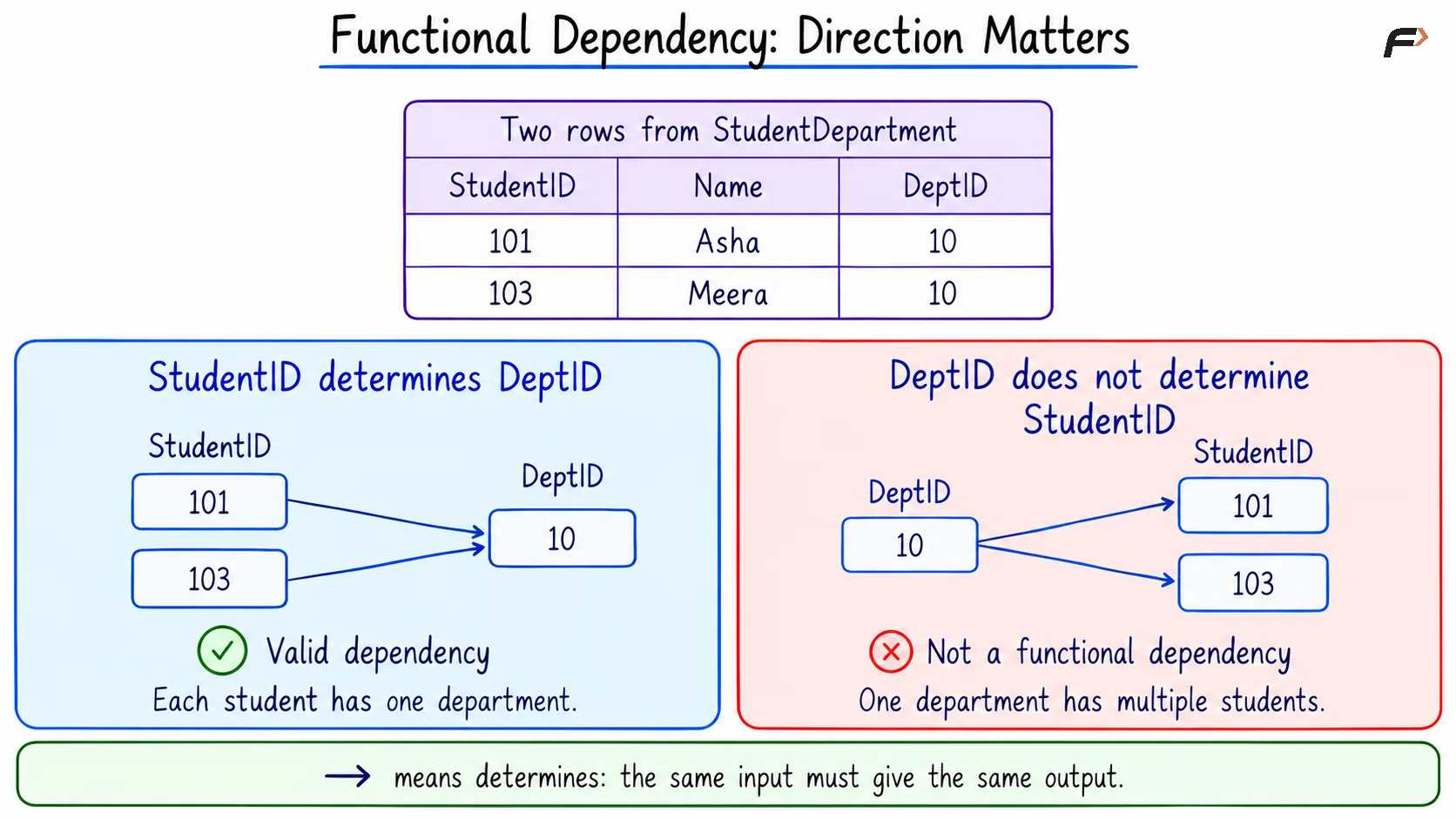
FUNCTIONAL DEPENDENCY : DIRECTION MATTERS
Trivial and Non-Trivial Dependencies
Dependencies can be classified according to whether the right-side attributes already appear on the left. In the examples below, braces such as {StudentID, Name} group attributes into a set.
Dependency type | Meaning | Example |
|---|---|---|
Trivial | Every right-side attribute already appears on the left. |
|
Non-trivial | At least one right-side attribute does not appear on the left. |
|
Completely non-trivial | The two sides have no attributes in common. |
|
A trivial dependency always holds because knowing a group of values includes knowing its individual parts. A completely non-trivial dependency is also non-trivial; these categories are not all mutually exclusive.
Full, Partial, and Transitive Dependencies
Full and partial dependencies become clearer when a determinant contains multiple attributes. Consider an additional relation named Enrollment, which records course enrollments within one academic term.
Each student can enroll in several courses, each course can have several students, and each student–course combination has one recorded grade.
Enrollment : initial data
StudentID | CourseID | StudentName | Grade |
|---|---|---|---|
101 | DBMS | Asha | A |
101 | OS | Asha | B |
103 | DBMS | Meera | B |
The combination {StudentID, CourseID} identifies an enrollment. A student identifier also determines the student’s name.
Full functional dependency: A dependency is full when no attribute can be removed from its determinant while preserving the dependency. Here,
{StudentID, CourseID} → Gradeis full: neither the student identifier nor the course identifier alone determines the grade.Partial dependency: A dependency is partial when a smaller part of its determinant is sufficient. Here,
{StudentID, CourseID} → StudentNameis partial becauseStudentID → StudentNamealready holds.Transitive dependency: A dependency can follow through an intermediate attribute set. In
StudentDepartment,StudentID → DeptIDandDeptID → DeptNametogether implyStudentID → DeptName.
Partial dependencies and certain transitive dependencies help explain why storing different kinds of facts together can create redundancy. They are important when evaluating normal forms.
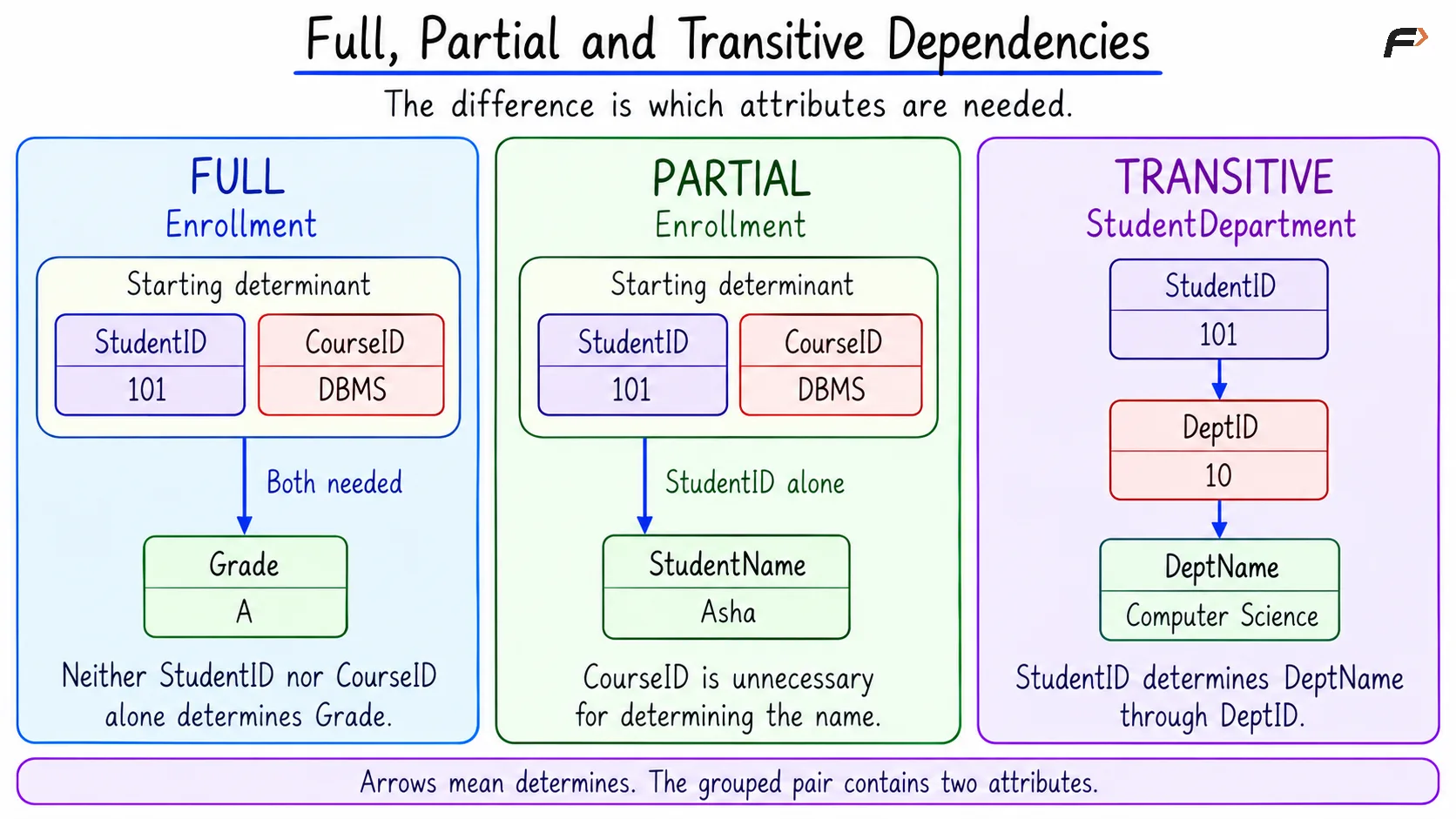
FULL , PARTIAL AND TRANSITIVE DEPENDENCIES
Superkeys, Candidate Keys, and Primary Keys
A superkey determines every attribute in a relation and therefore uniquely identifies a row. A candidate key is a minimal superkey: removing any attribute from it would destroy that identifying ability.
Using the established business rules, the key types can be distinguished as follows:
Key type | Meaning | Example |
|---|---|---|
Superkey | Identifies a row but may contain unnecessary attributes. |
|
Candidate key | Identifies a row without unnecessary attributes. |
|
Primary key | The candidate key selected as the main row identifier. |
|
Alternate key | A candidate key that was not selected as the primary key. |
|
Composite key | A key formed from multiple attributes. |
|
Minimal does not mean the fewest attributes among all possible keys. It means that no attribute can be removed from that particular key. Different candidate keys can contain different numbers of attributes.
Key status also depends on the relation. StudentID identifies a row in StudentDepartment, but it does not identify an Enrollment row because a student can enroll in multiple courses.
An attribute belonging to at least one candidate key is a prime attribute. In StudentDepartment, StudentID and Email are prime attributes; Name, DeptID, and DeptName are non-prime attributes under the stated rules.
Keys may also be described by their origin. A natural key comes from meaningful business data, such as the required unique email address in this example. A surrogate key is an artificial identifier introduced for identification, such as a generated student identifier with no additional business meaning.
Dependencies, Foreign Keys, and Database Design
In StudentDepartment, DeptID → DeptName determines department information, but DeptID is not a superkey of the whole relation. Consequently, the department name is repeated for every student in that department.
A more suitable design separates the two kinds of facts:
Relation | Attributes | Selected primary key |
|---|---|---|
Student | StudentID, Name, Email, DeptID | StudentID |
Department | DeptID, DeptName | DeptID |
A foreign key connects columns in one relation to a referenced primary or unique key. In this design, DeptID in Student references DeptID in Department, ensuring that each recorded department reference is valid.
The foreign key does not need to be unique in Student. Asha and Meera can both reference department 10 because each row records a different student’s membership.
The department name is now stored once per department. The primary key of Department enforces its identifying dependency, while the primary and alternate keys of Student identify students.
Adding a unique constraint to DeptID in the original combined table would not be an appropriate substitute. It would incorrectly prevent multiple students from belonging to the same department.
A Compact Example
For reference, the starting information is shown again below. The SQL example stores these facts in the separate Student and Department tables introduced above.
Starting information
StudentID | Name | DeptID | DeptName | |
|---|---|---|---|---|
101 | Asha |
| 10 | Computer Science |
102 | Ravi |
| 20 | Electronics |
103 | Meera |
| 10 | Computer Science |
The example implements three rules:
Primary identification:
StudentIDuniquely identifies a student.Alternate identification:
Emailis mandatory and unique.Valid membership: Every student references an existing department.
The following query looks up a student using the alternate key, Email.
In the code, INT stores integers, and VARCHAR(n) stores text up to the specified length n. The = symbol in WHERE tests whether the email matches the supplied value.
CREATE TABLE Department ( DeptID INT PRIMARY KEY, DeptName VARCHAR(60) NOT NULL);CREATE TABLE Student ( StudentID INT PRIMARY KEY, Name VARCHAR(60) NOT NULL, Email VARCHAR(120) NOT NULL UNIQUE, DeptID INT NOT NULL, FOREIGN KEY (DeptID) REFERENCES Department(DeptID));INSERT INTO Department (DeptID, DeptName)VALUES (10, 'Computer Science'), (20, 'Electronics');INSERT INTO Student (StudentID, Name, Email, DeptID)VALUES (101, 'Asha', 'asha@example.com', 10), (102, 'Ravi', 'ravi@example.com', 20), (103, 'Meera', 'meera@example.com', 10);SELECT StudentID, Name, DeptIDFROM StudentWHERE Email = 'asha@example.com';Expected result
StudentID | Name | DeptID |
|---|---|---|
101 | Asha | 10 |
Only one row matches because Email is unique. The constraints also reject a duplicate StudentID, a duplicate email address, a NULL email address, or a department identifier that does not exist in Department.
The combination UNIQUE and NOT NULL matters for the alternate key. Under their default unique-constraint behavior, both MySQL and PostgreSQL permit multiple NULL values in a nullable unique column. NOT NULL ensures that every student has an actual email value.
SQL constraints enforce the declared rules, but they do not determine whether an attribute set is logically minimal. Selecting candidate keys still requires understanding the business rules and functional dependencies.
Summary
Functional dependencies describe which attributes determine other attributes in a relation. A superkey determines the entire row, a candidate key does so without unnecessary attributes, and a primary key is the candidate key selected as the main identifier.
Attribute closure and Armstrong’s axioms help derive dependencies and identify keys systematically. Combined with suitable table design, primary keys, required unique values, and foreign keys, these concepts support consistent data and reduce unnecessary repetition.
Be the first to add a comment.