Introduction
Combining related tables often requires more than retrieving matching records. A report may also need records that exist in one table without a corresponding record in the other.
A FULL OUTER JOIN includes both matching and unmatched records. This makes it useful for complete reports, comparing datasets, and identifying missing relationships between tables.
What Is a FULL OUTER JOIN?
A FULL OUTER JOIN combines rows that satisfy a join condition and preserves unmatched rows from both tables.
Its result contains:
Matching rows: Related values from both tables appear together.
Unmatched left rows: Values from the left table appear with
NULLin the right table’s columns.Unmatched right rows: Values from the right table appear with
NULLin the left table’s columns.
Here, NULL indicates a missing value. The join does not change the stored records; it produces a result table.
PostgreSQL supports FULL OUTER JOIN directly. The shorter form, FULL JOIN, has the same meaning. MySQL 8.4 does not provide this join directly, but an equivalent result can be produced using outer joins and UNION ALL.
Example Tables
Consider a college database with two tables.
The Student table stores each student’s identifier, name, department assignment, and semester.
Student
StudentID | Name | DeptID | Semester |
|---|---|---|---|
101 | Asha | 10 | 2 |
102 | Ravi | 20 | 4 |
103 | Meera | 10 | 2 |
104 | Neha | NULL | 2 |
The Department table stores each department’s identifier and name. A department can exist even when no students belong to it.
Department
DeptID | DeptName |
|---|---|
10 | Computer Science |
20 | Electronics |
30 | Mathematics |
Assume that Student.StudentID and Department.DeptID are primary keys. Student.DeptID may contain NULL when a student has not been assigned to a department.
In this data:
Asha and Meera belong to Computer Science.
Ravi belongs to Electronics.
Neha has no department assignment.
Mathematics has no students.
These last two cases show why preserving unmatched rows from both tables can be useful.
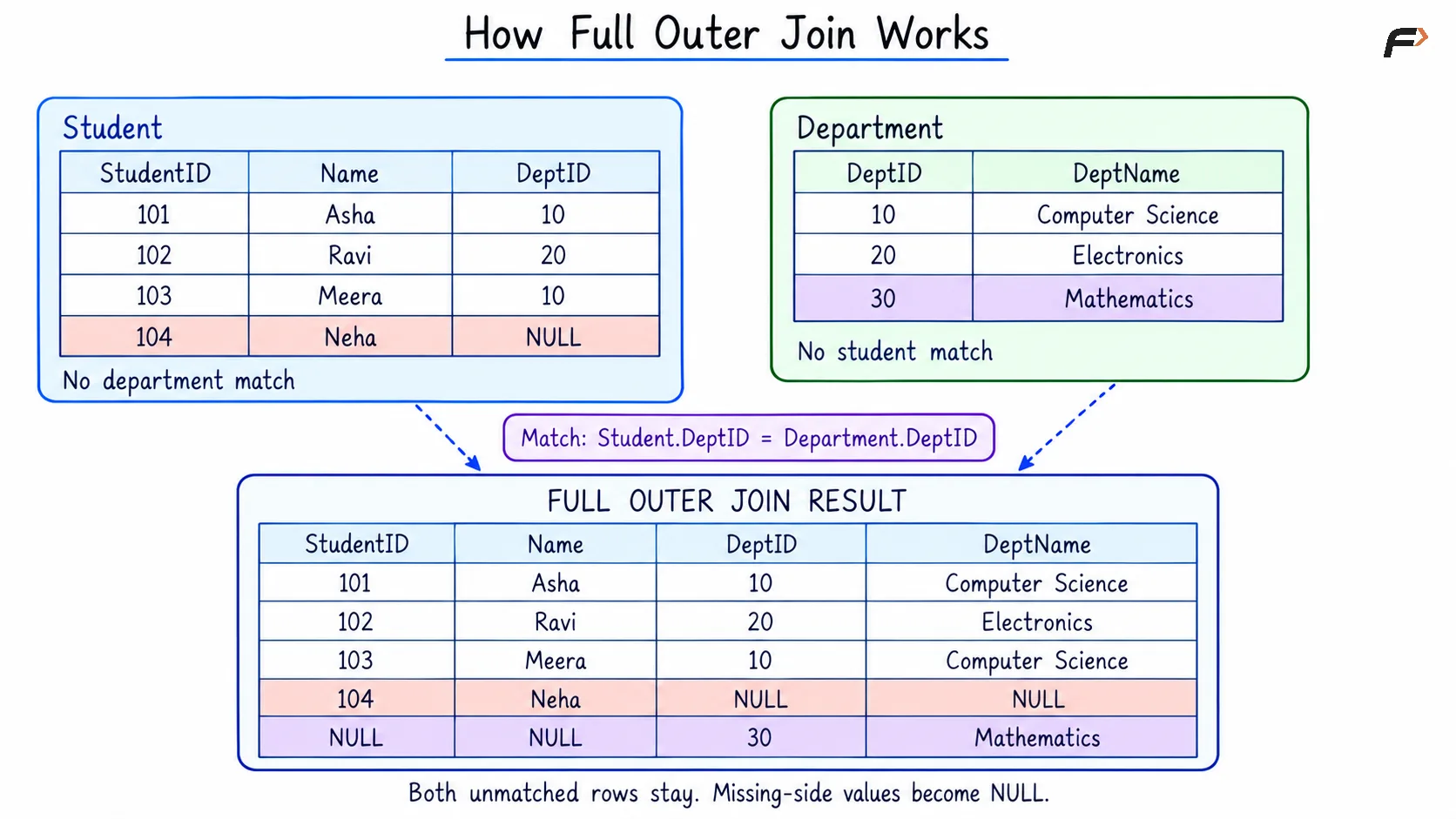
HOW FULL OUTER JOIN WORKS
Retrieving Matching and Unmatched Records
Objective: Display every student with their department details, while also including departments that have no students.
Consider the following queries to retrieve matching records and unmatched records from both tables.
MySQL Query:
SELECT StudentID, Name, DeptID, DeptNameFROM ( SELECT s.StudentID, s.Name, d.DeptID, d.DeptName FROM Student AS s LEFT JOIN Department AS d ON s.DeptID = d.DeptID UNION ALL SELECT s.StudentID, s.Name, d.DeptID, d.DeptName FROM Student AS s RIGHT JOIN Department AS d ON s.DeptID = d.DeptID WHERE s.StudentID IS NULL) AS combinedORDER BY StudentID IS NULL, StudentID, DeptID;Here, s and d are table aliases. AS combined names the result inside the parentheses so that the outer query can select and sort it.
The query builds the result in three parts:
LEFT JOINreturns matching records and students without a matching department.RIGHT JOINwithWHERE s.StudentID IS NULLreturns only departments without a matching student.UNION ALLplaces these two sets of rows into one result.
The second part excludes matching student records because they already appear in the first part.
UNION ALL preserves repeated result rows when they legitimately occur. Plain UNION removes identical result rows, which can change the result of a join.
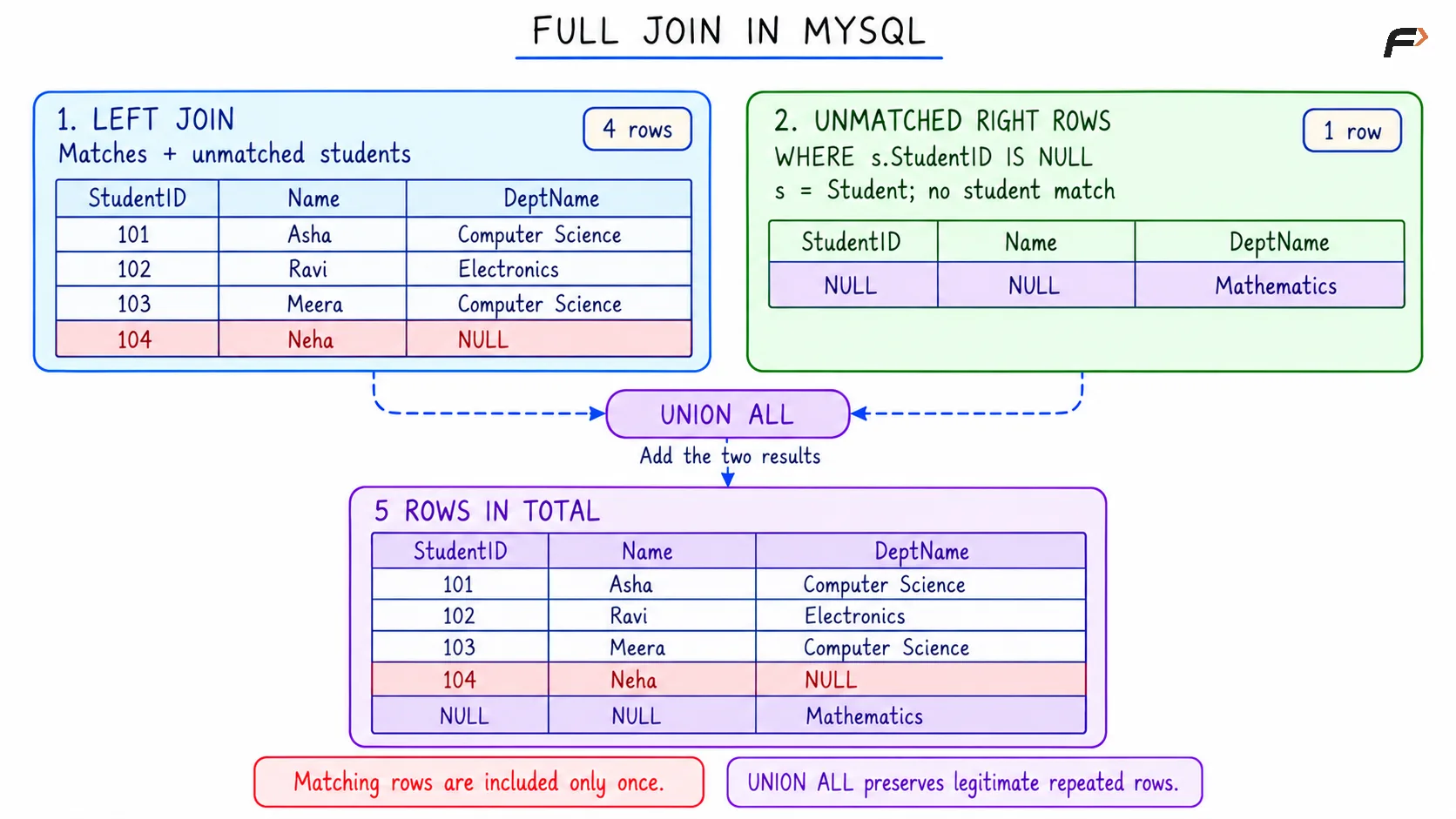
FULL JOIN IN MYSQL
PostgreSQL Query:
SELECT s.StudentID, s.Name, d.DeptID, d.DeptNameFROM Student AS sFULL OUTER JOIN Department AS d ON s.DeptID = d.DeptIDORDER BY s.StudentID IS NULL, s.StudentID, d.DeptID;AS s and AS d give the tables shorter names called aliases. For example, s.DeptID refers to the department identifier stored in Student.
The ON condition matches rows whose department identifiers are equal.
In ORDER BY, s.StudentID IS NULL places rows with a student ID before rows without one. The remaining expressions sort by student ID and then department ID. This controls the display order; it does not remove rows.
Expected Result
Both queries return:
StudentID | Name | DeptID | DeptName |
|---|---|---|---|
101 | Asha | 10 | Computer Science |
102 | Ravi | 20 | Electronics |
103 | Meera | 10 | Computer Science |
104 | Neha | NULL | NULL |
NULL | NULL | 30 | Mathematics |
Asha, Ravi, and Meera have matching departments, so their rows contain information from both tables.
Neha remains in the result despite having no matching department. Mathematics also remains, even though it has no matching student.
The displayed DeptID comes from the Department table.
Understanding NULL Values and Multiple Matches
A full outer join does not create a match simply because both compared values are NULL. With an ordinary equality condition such as s.DeptID = d.DeptID, a match requires the comparison to be true.
To check for a missing value, use IS NULL, not = NULL.
When identifying an unmatched row, test a column that cannot be NULL in a real record. In this example, the primary keys provide reliable checks:
Condition | What it identifies in the joined result |
|---|---|
| A department without a matching student |
| A student without a matching department |
A full outer join can also produce several rows for one record. Computer Science appears twice because it matches two different students: Asha and Meera. Each matching pair produces a result row.
Preserving every record therefore does not mean that each record appears exactly once.
Filtering a FULL OUTER JOIN with WHERE
The ON clause determines which rows match. The WHERE clause filters the joined result.
This distinction matters because a WHERE condition can remove unmatched rows that the full outer join initially preserved.
Objective: Display semester 2 students, including those without a department, and retain departments that have no students at all.
Consider the following queries to filter students by semester while keeping departments without students.
MySQL Query:
SELECT StudentID, Name, DeptID, DeptNameFROM ( SELECT s.StudentID, s.Name, s.Semester, d.DeptID, d.DeptName FROM Student AS s LEFT JOIN Department AS d ON s.DeptID = d.DeptID UNION ALL SELECT s.StudentID, s.Name, s.Semester, d.DeptID, d.DeptName FROM Student AS s RIGHT JOIN Department AS d ON s.DeptID = d.DeptID WHERE s.StudentID IS NULL) AS combinedWHERE Semester = 2 OR StudentID IS NULLORDER BY StudentID IS NULL, StudentID, DeptID;The aliases s and d identify the source tables. combined names their combined result.
Semester is included inside combined so that the outer WHERE clause can filter it. It does not need to appear in the final selected columns.
PostgreSQL Query:
SELECT s.StudentID, s.Name, d.DeptID, d.DeptNameFROM Student AS sFULL OUTER JOIN Department AS d ON s.DeptID = d.DeptIDWHERE s.Semester = 2 OR s.StudentID IS NULLORDER BY s.StudentID IS NULL, s.StudentID, d.DeptID;Here, s refers to Student, and d refers to Department.
The condition keeps a row when the student is in semester 2 or the row represents a department without a matching student.
Expected Result
StudentID | Name | DeptID | DeptName |
|---|---|---|---|
101 | Asha | 10 | Computer Science |
103 | Meera | 10 | Computer Science |
104 | Neha | NULL | NULL |
NULL | NULL | 30 | Mathematics |
Asha, Meera, and Neha remain because their semester is 2. Mathematics remains because its row has no student ID.
Ravi is removed because his semester is 4. Electronics does not reappear as an unmatched department: it already matched Ravi, and WHERE filters that joined row afterward.
Without OR s.StudentID IS NULL in PostgreSQL, or its equivalent in MySQL, Mathematics would also be removed.
Moving the semester condition into ON would have a different meaning. It would change which students match departments, but a full outer join would still preserve students such as Ravi as unmatched rows.
Summary
A FULL OUTER JOIN returns matching rows and preserves unmatched rows from both tables. Missing-side columns contain NULL, and multiple matches can produce several result rows for one source record.
PostgreSQL supports full outer joins directly. MySQL can produce the equivalent result by combining a left join with unmatched rows from a right join using UNION ALL. Correct join conditions, careful WHERE filtering, and primary-key checks with IS NULL make the results easier to interpret.
Be the first to add a comment.