Introduction
Related information is often stored in separate tables. A college database might keep student details in one table and course enrollments in another, with a student identifier connecting the records.
A foreign key ensures that this connection remains valid. It prevents an enrollment from referring to a student who does not exist and defines how certain changes to referenced records should be handled.
What Is a Foreign Key?
A foreign key is a column or group of columns whose values reference a key in another table or the same table. It enforces referential integrity, keeping references between records consistent.
The table containing the referenced key is commonly called the parent table. The table containing the foreign key is the child table.
Consider these two tables:
students (parent table)
student_id | student_name |
|---|---|
101 | Asha |
102 | Ravi |
103 | Meera |
enrollments (child table)
enrollment_id | student_id | course_id |
|---|---|---|
1 | 101 | 10 |
2 | 101 | 20 |
3 | 102 | 10 |
Here, enrollments.student_id references students.student_id. Student 101 appears in two enrollments, which is valid because foreign key values do not have to be unique.
The main rules are:
Matching reference: A non-null foreign key value must match an existing referenced key value.
Repeated values: Multiple child rows can reference the same parent.
Optional NULL: A foreign key column can contain
NULLif its definition permits it.Multiple relationships: A table can have several foreign key constraints.
A foreign key usually references a primary key, but it can also reference an appropriate unique key. Simply giving columns the same name does not enforce a relationship.
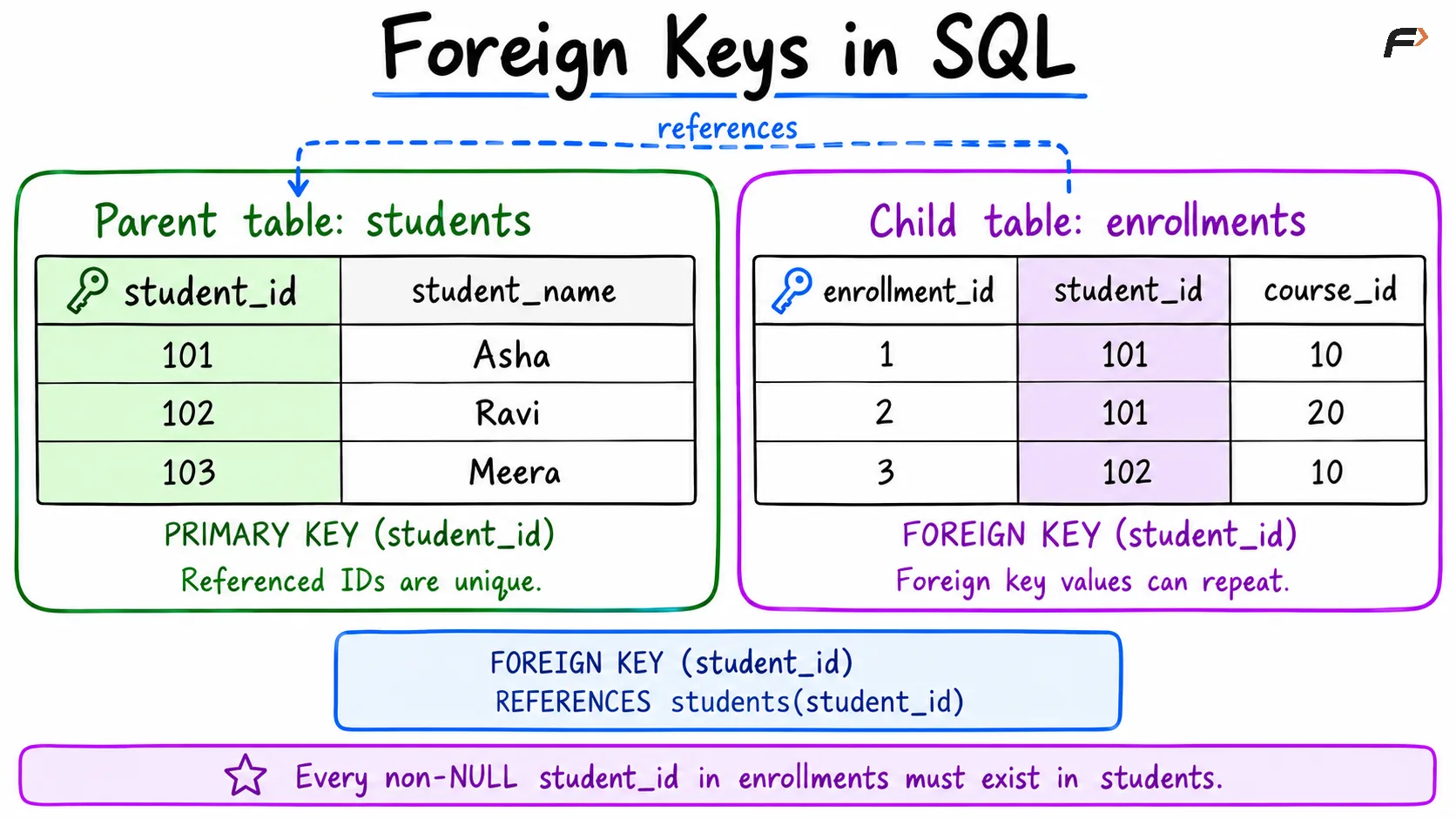
Foreign key
Creating a Foreign Key in SQL
The following example uses MySQL . Create the parent table first so its referenced key is available:
CREATE TABLE students ( student_id INT PRIMARY KEY, student_name VARCHAR(100) NOT NULL);Then create the child table with a named foreign key constraint:
CREATE TABLE enrollments ( enrollment_id INT PRIMARY KEY, student_id INT NOT NULL, course_id INT NOT NULL, CONSTRAINT fk_enrollment_student FOREIGN KEY (student_id) REFERENCES students(student_id)) ;FOREIGN KEY identifies the child column, while REFERENCES identifies the parent table and key. The name fk_enrollment_student makes the constraint easier to identify later.
enrollment_id identifies each enrollment independently. The foreign key on student_id serves a different purpose: it validates the student reference.
The corresponding columns must have compatible definitions. In MySQL, integer columns used in this relationship must match in size and sign, such as signed INT on both sides.
How Foreign Key Validation Works
Insert a parent record before adding a child record that references it:
INSERT INTO students (student_id, student_name)VALUES (101, 'Asha');INSERT INTO enrollments (enrollment_id, student_id, course_id)VALUES (1, 101, 10);The enrollment succeeds because student 101 exists. Now consider this separate insert:
INSERT INTO enrollments (enrollment_id, student_id, course_id)VALUES (2, 999, 20);This fails because the parent table has no student with identifier 999. The constraint prevents an orphan record, which is a child record referencing a missing parent..
The constraint also applies when an existing child reference is updated. It does not automatically retrieve student details; a query using a join can combine information from the two tables.
Handling Parent Updates and Deletes
Deleting a referenced student or changing their identifier can affect existing enrollments. Referential actions define how the database handles those operations.
Action | Effect on related child records |
|---|---|
| Rejects the parent change when matching child records exist |
| In MySQL InnoDB, behaves like |
| Propagates the parent-key update or deletes matching child rows |
| Sets the child foreign key columns to |
For MySQL , omitting the action has the same restrictive effect as NO ACTION.
For example, the constraint definition could include:
CONSTRAINT fk_enrollment_student FOREIGN KEY (student_id) REFERENCES students(student_id) ON DELETE CASCADE ON UPDATE CASCADEThis is an alternative definition for the constraint in the earlier CREATE TABLE statement. With it, deleting a student also deletes their enrollments, while changing a student’s identifier updates matching child references.
Choose actions according to the relationship’s meaning. Automatic deletion may suit dependent records, but historical records may require a different design.
Adding or Removing a Foreign Key
If enrollments already exists without this constraint, add it using ALTER TABLE:
ALTER TABLE enrollmentsADD CONSTRAINT fk_enrollment_student FOREIGN KEY (student_id) REFERENCES students(student_id);Existing records must satisfy the relationship. References to missing students need correction before the constraint can be added.
To remove the named constraint in MySQL:
ALTER TABLE enrollmentsDROP FOREIGN KEY fk_enrollment_student;This removes enforcement of the relationship. It does not remove the column or its stored values.
A foreign key can also contain multiple columns. For a composite foreign key, the columns correspond in order to the referenced composite key. A self-referencing foreign key works similarly. For example, an employee’s manager_id can reference another row’s employee_id in the same table.
Primary Key vs Foreign Key
Primary and foreign keys often work together, but they enforce different rules.
Feature | Primary key | Foreign key |
|---|---|---|
Purpose | Identifies each row | Validates a reference |
Duplicate values | Complete key values must be unique | Repeated references are allowed |
NULL values | Not permitted in any key column | Permitted when the column definition allows |
Constraints per table | One primary key constraint | Multiple foreign key constraints allowed |
Example |
|
|
A column can participate in both a primary key and a foreign key. In that case, the primary key’s non-null requirement still applies.
Summary
A foreign key maintains valid references between related records. It allows repeated references while preventing non-null values from pointing to missing parent keys.
Define the referenced key, use compatible columns, and choose update and delete actions deliberately. These rules preserve relationships as records are inserted, changed, and removed.
Be the first to add a comment.