Introduction
A database can contain many records, while a query may need only those meeting particular requirements. A student portal might display selected departments, restrict marks to a range, or exclude names matching a pattern.
Filtering combines these requirements into SQL conditions. Understanding the main filtering tools makes it easier to translate a written requirement into a precise query.
Filtering Rows with WHERE
The WHERE clause specifies which rows qualify for an operation. In a SELECT query, it retains rows whose complete condition evaluates to true.
SELECT column1, column2FROM table_nameWHERE condition;SELECT chooses the output columns; WHERE chooses eligible rows. Filtering can use columns that are not displayed in the result.
The examples below use MySQL-compatible SQL and this table:
student_id | student_name | department | marks |
|---|---|---|---|
101 | Asha | CSE | 85 |
102 | Ravi | ECE | 72 |
103 | Meera | CSE | 91 |
104 | Kabir | ME | 60 |
105 | Nila | ECE | NULL |
For example:
SELECT student_name, marksFROM studentsWHERE marks >= 80;Asha and Meera qualify. Nila’s missing mark does not produce a true comparison.
Choosing the Right Filtering Tool
Match the operator to the requirement rather than forcing every condition into the same form.
Requirement | Tool | Example condition |
|---|---|---|
Exact match |
|
|
Different value |
|
|
Numeric threshold |
|
|
Inclusive range |
|
|
Listed alternatives |
|
|
Text pattern |
|
|
Missing value |
|
|
Supplied value |
|
|
For exclusions, use NOT BETWEEN, NOT IN, or NOT LIKE as appropriate. Missing values still require separate consideration.
Text comparisons depend on the database’s collation. Avoid assuming that uppercase and lowercase values are always treated identically.
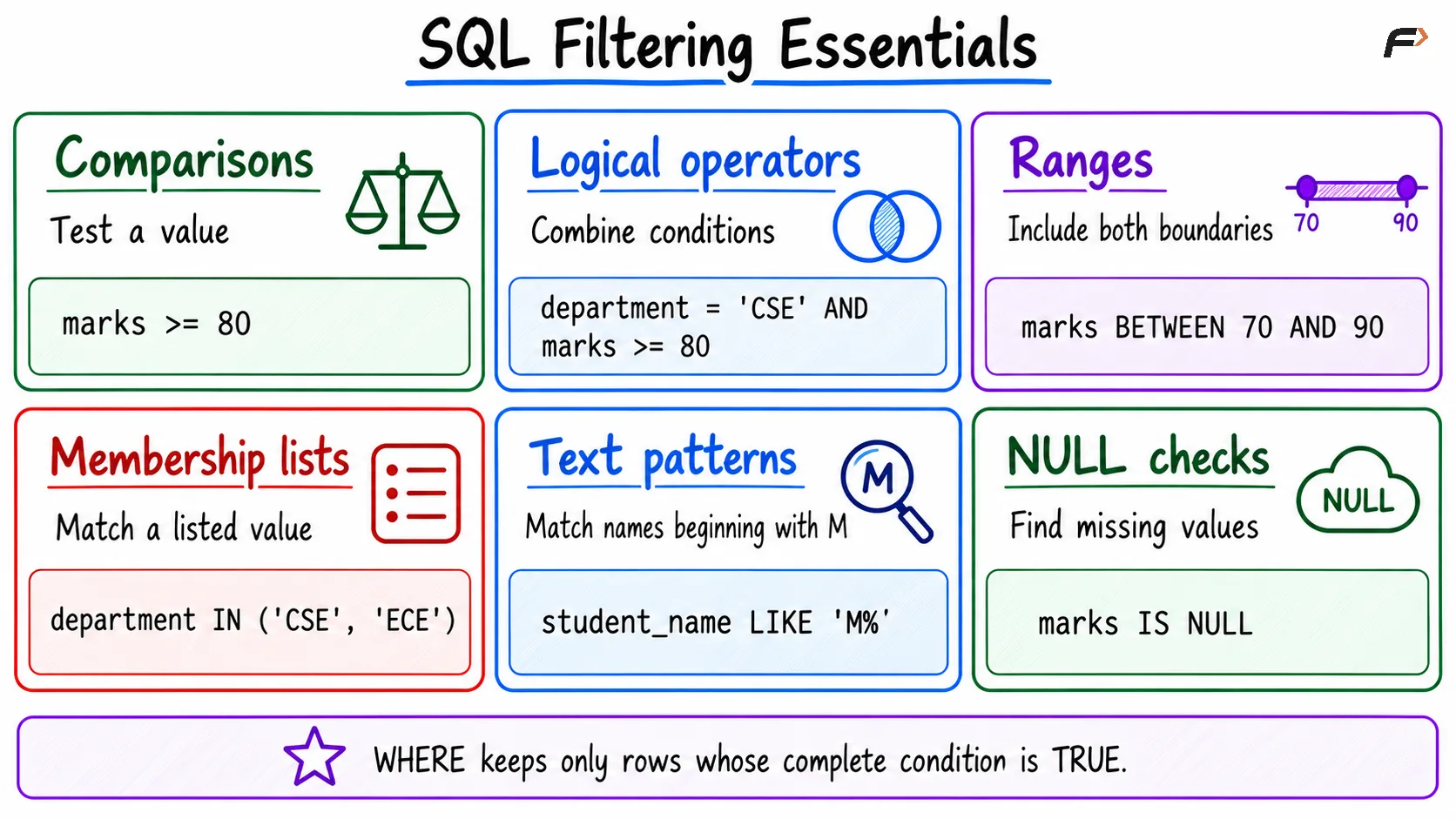
SQL filtering essentials
Combining Conditions Clearly
Use logical operators to express relationships between conditions:
AND: Every connected requirement must be true.
OR: At least one condition must be true.
NOT: Negates a condition; unknown remains unknown.
For example, select CSE or ECE students with marks of at least 80:
SELECT student_name, department, marksFROM studentsWHERE (department = 'CSE' OR department = 'ECE') AND marks >= 80;Asha and Meera qualify.
Parentheses group the department alternatives before combining them with the marks requirement. Without this grouping, AND takes precedence over OR, potentially changing which students qualify.
You can express the alternatives more compactly:
WHERE department IN ('CSE', 'ECE') AND marks >= 80Ranges, Lists, and Patterns
These filters answer different questions.
BETWEEN 70 AND 90 accepts every comparable value from 70 through 90, including both endpoints. IN (70, 80, 90) accepts only the three listed values.
For text patterns:
'M%': Begins with M.'%a': Ends with a.'%ee%': Contains ee.'_a%': Has a as its second character.
The % wildcard matches zero or more characters, while _ matches exactly one.
For example:
SELECT student_nameFROM studentsWHERE student_name LIKE 'M%';This returns Meera. Use NOT LIKE 'M%' to retain known names that do not match that prefix.
When excluding multiple patterns, join the exclusions with AND if a retained value must avoid all of them.
Handling NULL Explicitly
SQL conditions can evaluate to true, false, or unknown. A WHERE clause excludes both false and unknown results.
Use IS NULL to retrieve Nila’s missing mark:
SELECT student_nameFROM studentsWHERE marks IS NULL;Do not use marks = NULL. Similarly, marks < 80 does not include missing marks automatically.
To include both lower marks and missing values:
SELECT student_name, marksFROM studentsWHERE marks < 80 OR marks IS NULL;Ravi, Kabir, and Nila qualify.
Be especially careful with NOT IN: if the exclusion list contains NULL, nonmatching values can produce unknown rather than true. Check nullable subquery results before using them as exclusion sets.
A Combined Filtering Example
Suppose the requirement is:
“Return CSE or ECE students with marks between 70 and 90, excluding names beginning with R.”
SELECT student_id, student_name, department, marksFROM studentsWHERE department IN ('CSE', 'ECE') AND marks BETWEEN 70 AND 90 AND student_name NOT LIKE 'R%';Evaluate each record:
Student | Department allowed? | Marks in range? | Name passes exclusion? | Returned? |
|---|---|---|---|---|
Asha | Yes | Yes | Yes | Yes |
Ravi | Yes | Yes | No | No |
Meera | Yes | No | Yes | No |
Kabir | No | No | Yes | No |
Nila | Yes | Unknown | Yes | No |
Only Asha qualifies.
This is a logical walkthrough of the condition, not a guaranteed physical evaluation sequence. The database optimizer can choose how to carry out the work.
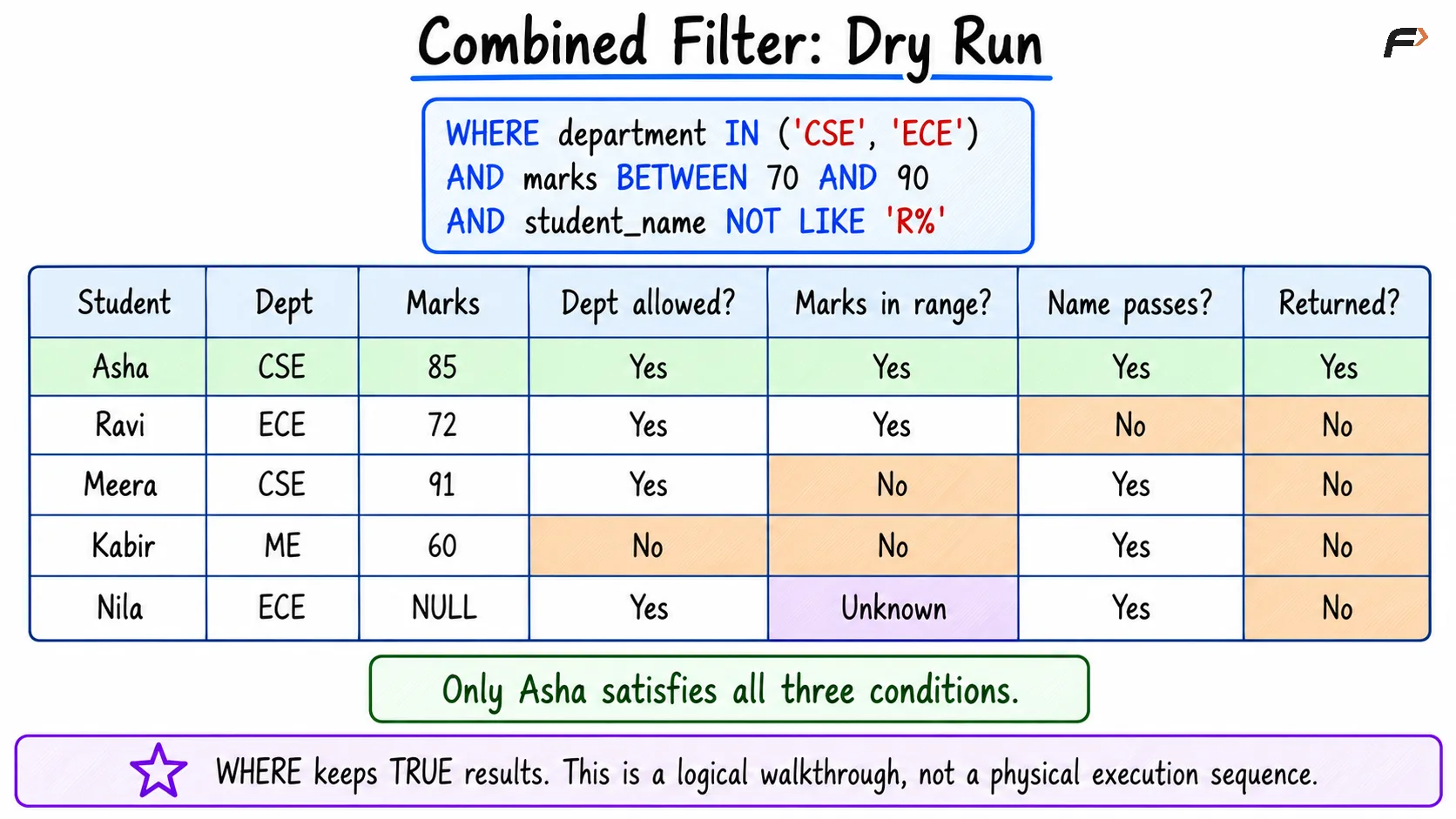
Combined filter dry run
Filtering, Sorting, and Limiting
Filtering determines eligibility. Sorting and limiting serve different purposes.
Clause | Responsibility |
|---|---|
| Select qualifying rows |
| Define result order |
| Restrict the number returned in MySQL |
For example:
SELECT student_name, marksFROM studentsWHERE marks >= 70ORDER BY marks DESC, student_id ASCLIMIT 2;The query returns Meera and Asha. LIMIT 2 alone would not identify the highest-scoring students.
WHERE also controls eligible rows in UPDATE and DELETE. Inspect the matching records before applying changes, especially because omitting the condition can affect every row.
Summary
SQL filtering uses WHERE with comparisons, logical conditions, ranges, lists, patterns, and missing-value checks. Choosing the appropriate tool makes a query easier to read and verify.
Group conditions clearly and test boundary, matching, nonmatching, and null cases. Keep filtering separate from sorting and limiting so each part of the query expresses its intended responsibility.
Be the first to add a comment.