Introduction
A college database records students, courses, and enrollments. Before choosing tables or writing SQL, the designer must identify what each object represents and which details need to be recorded about it.
Entities represent distinguishable objects or concepts. Attributes describe their properties. Understanding both helps turn real requirements into a clear database model.
SetsEntities, Entity Types and Entity Sets
An entity is a distinguishable object or concept about which the system stores information. It can represent something physical, such as a student, or conceptual, such as a course.
Three related terms describe different levels of the model:
Entity type: Defines a category of similar entities and their attributes. STUDENT might define StudentID, Name, and DateOfBirth.
Entity instance: One particular entity, such as student S1 named Asha.
Entity set: The collection of entities of that type recorded at a particular time.
The following diagram separates the definition from its current members.
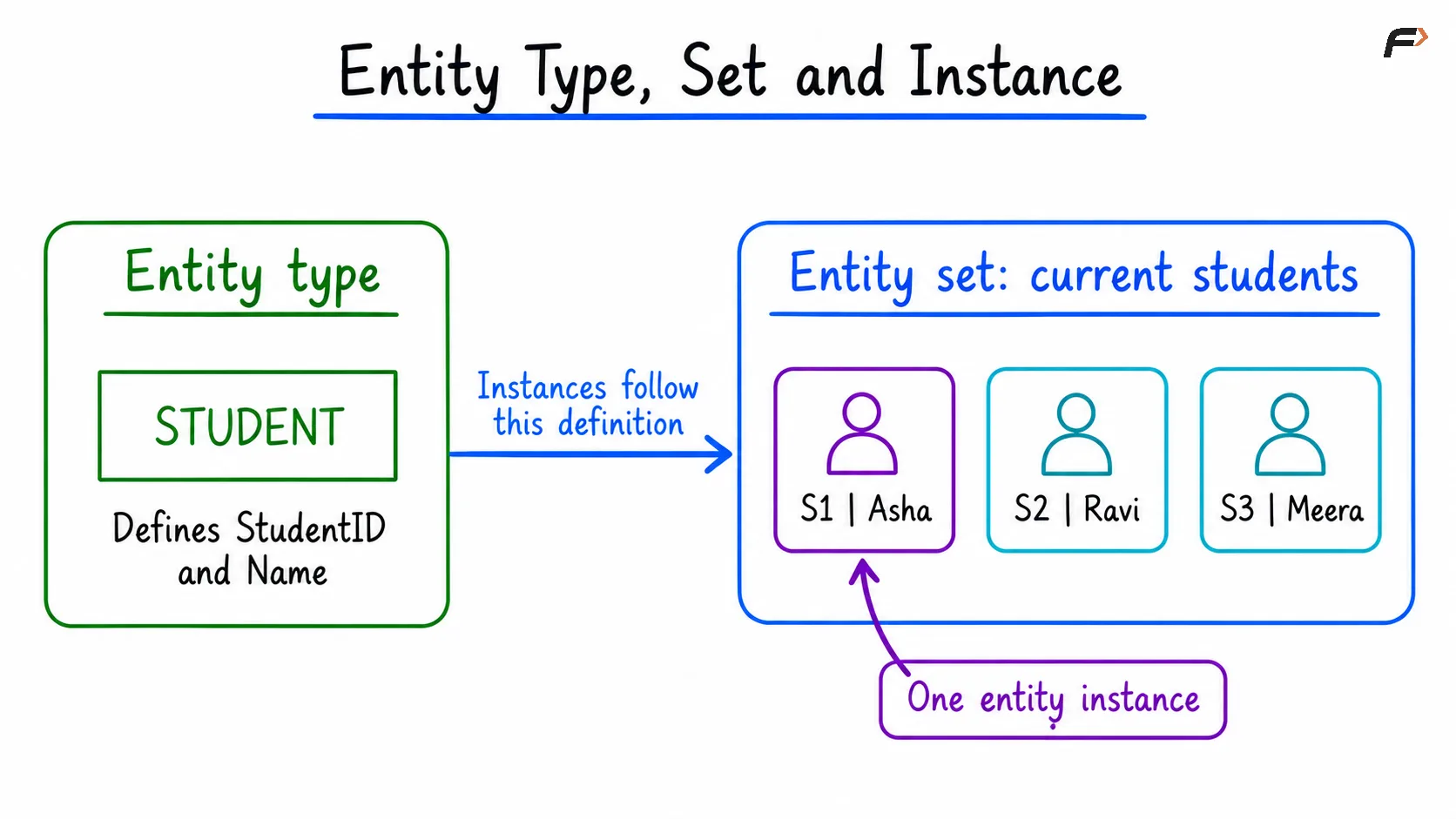
Entity Type, Set and Instance
In Chen ER notation, a rectangle represents an entity type. During relational mapping, an entity type commonly becomes a table, while its instances are represented by rows. The conceptual entity and its table representation are related ideas, rather than identical definitions.
Strong and Weak Entities
A strong entity type has an identifying key of its own. A weak entity type needs an owner’s identity as part of its identification.
For example, RoomNo 101 may identify a room only within a particular building. BuildingID and RoomNo together identify the room. A mandatory relationship alone does not make an entity weak; identification dependence is the important distinction.
Attributes, Values and Domains
An attribute is a named property used to describe an entity. An attribute value is the particular value recorded for one instance.
For student S1:
Attribute | Example value |
|---|---|
StudentID | S1 |
FirstName | Asha |
LastName | Rao |
DateOfBirth | 2004-06-15 |
StudentID, FirstName, LastName, and DateOfBirth are attributes, while S1, Asha, Rao, and 2004-06-15 are their corresponding values.
An attribute also has a domain, meaning its permitted values. A data type provides part of that definition, while additional rules may narrow it. For example, an integer type permits many values, but a course-credit rule might permit only a specified positive range.
Entity or Attribute
The choice depends on the information the application needs.
Use an attribute for a descriptive value: If the system only needs a student’s preferred contact number, a phone attribute may be sufficient.
Consider a separate entity when the concept has its own details: If each contact number needs a type, verification status, and validity period, a related contact record may express those requirements more clearly.
Keep relationship facts with the association: A grade describes a student’s enrollment in a particular course. It does not describe the student or course independently.
Simple, Composite, Single-Valued and Multivalued Attributes
Attribute classifications answer different questions. Simple versus composite concerns internal structure. Single-valued versus multivalued concerns how many values an entity can have.
The diagram below compares these dimensions separately.
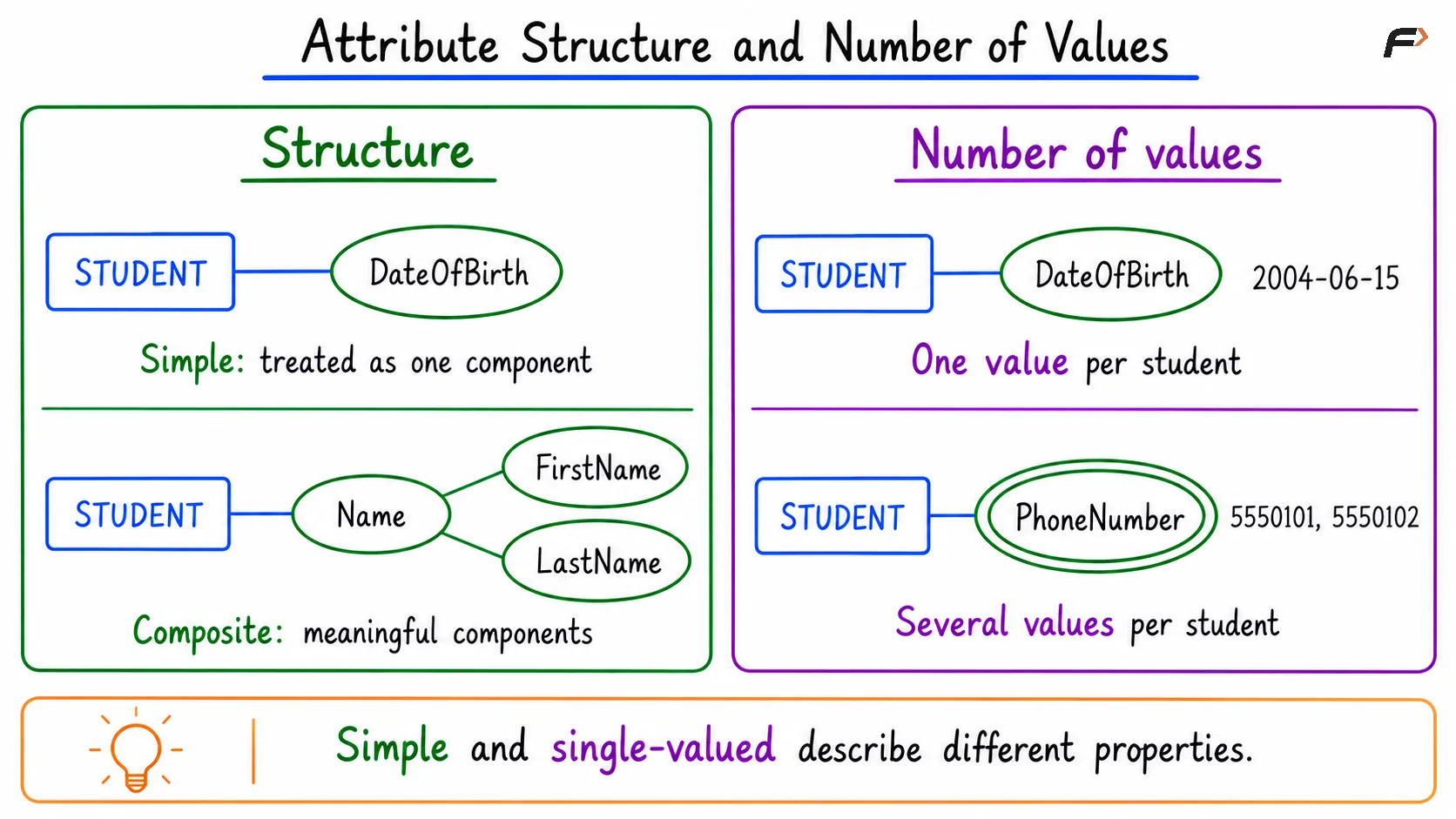
Attribute Structure and Number of Values
Simple and Composite Attributes
A simple attribute is treated as one component in the model. DateOfBirth can be a simple date value even though a database can extract its year, month, and day.
A composite attribute contains meaningful components. Name might be modeled as FirstName and LastName when the application needs those components separately.
The appropriate breakdown follows the requirements. A name model for an international application may need more flexibility than a compulsory two-part structure.
Single-Valued and Multivalued Attributes
A single-valued attribute has one value for an entity, such as a recorded DateOfBirth.
A multivalued attribute permits several values, such as multiple phone numbers. Chen notation uses a double oval for this case.
These classifications can overlap. A name can be composite and single-valued, while a collection of addresses can be both composite and multivalued.
In a conventional normalized relational design, multiple phone numbers belong in a related STUDENT_PHONE table. A comma-separated list makes individual values harder to validate, search, and reference.
Key, Stored and Derived Attributes
Attributes can also be classified by their identifying role and how their values are obtained.
The following diagram shows the corresponding Chen symbols.
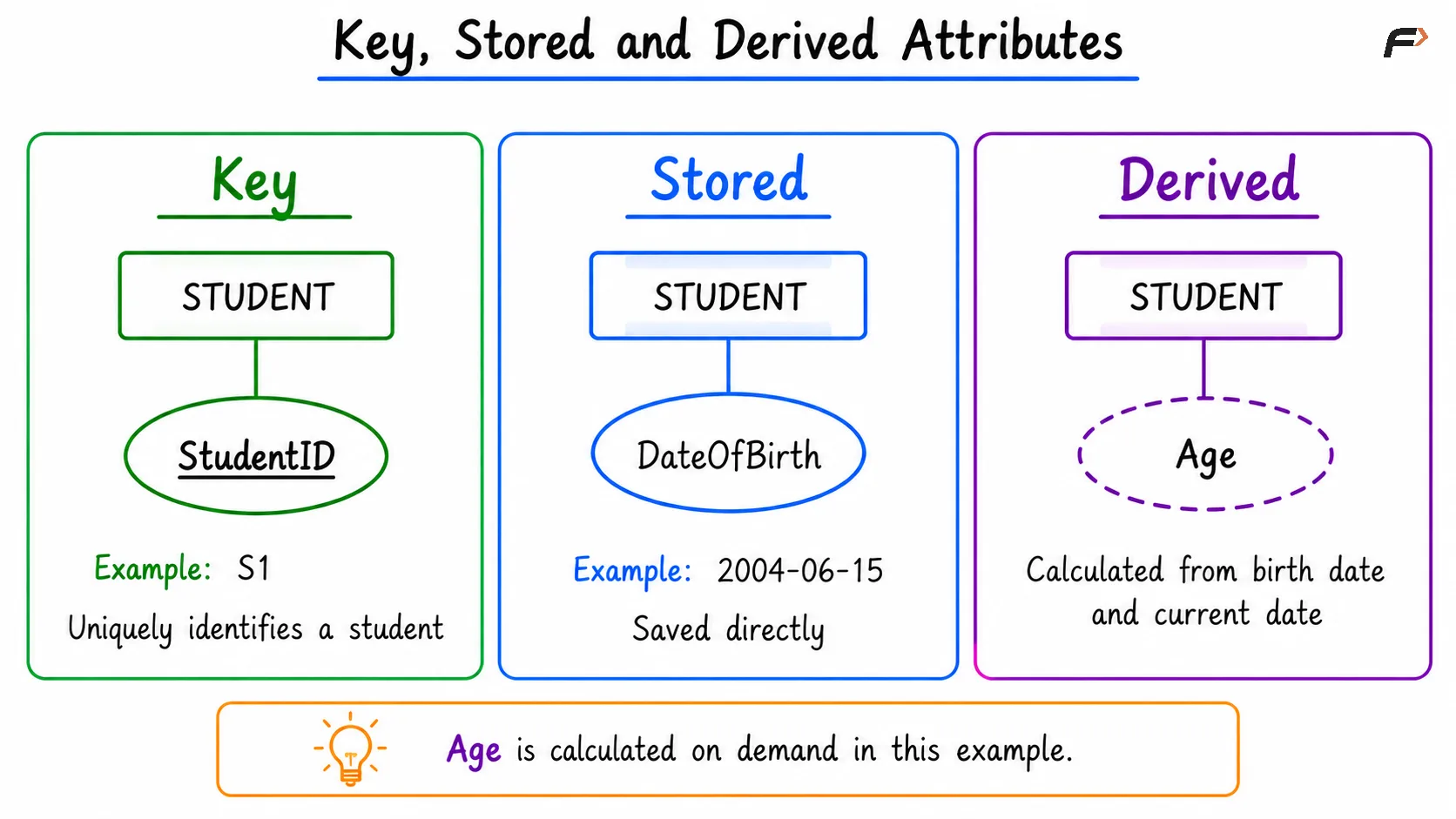
Key, Stored and Derived Attributes
Key Attributes
A key uniquely identifies an entity within its entity set. StudentID can distinguish two students who share the same name.
A key may contain one attribute or several attributes together. In Chen notation, the names of identifying key attributes are underlined.
A composite attribute and a composite key describe different properties. The first has meaningful components; the second uses multiple attributes together for identification.
Stored and Derived Attributes
A stored attribute has its value explicitly saved. DateOfBirth is a typical example.
A derived attribute is calculated from other information. Age can be calculated from DateOfBirth and the date on which the calculation is performed. Chen notation represents a derived attribute with a dashed oval.
An application can explicitly store a derived value, but must then maintain it when its inputs change. Age also changes as time passes.
In this example, Age is not a stored attribute because it is calculated from DateOfBirth and the current date rather than stored directly in the database.
Optional Attributes
An optional attribute may lack a recorded value. SQL commonly represents missing information using NULL, which is different from zero or an empty string.
An optional phone number can therefore be absent without inventing a placeholder such as 0000000. Optionality should be documented explicitly; it does not require a special ordinary-attribute oval.
Implementing Entities and Attributes in SQL
The following example represents a simplified STUDENT entity as a table. Each row describes one student, and each column stores an attribute value.
The composite Name attribute is represented through FirstName and LastName. DateOfBirth is stored directly, while Age is calculated when needed.
StudentID: An automatically generated numeric identifier and primary key.
FirstName and LastName: Required components of the student’s name in this simplified model.
DateOfBirth: A required date value.
The code below creates the table, inserts one student, and retrieves the stored attributes.
CREATE TABLE student ( student_id BIGINT AUTO_INCREMENT PRIMARY KEY, first_name VARCHAR(100) NOT NULL, last_name VARCHAR(100) NOT NULL, date_of_birth DATE NOT NULL);INSERT INTO student (first_name, last_name, date_of_birth)VALUES ('Asha', 'Rao', '2004-06-15');SELECT student_id, first_name, last_name, date_of_birthFROM studentORDER BY student_id;For a newly created table with default identifier settings, the result is:
student_id | first_name | last_name | date_of_birth |
|---|---|---|---|
1 | Asha | Rao | 2004-06-15 |
The primary key uniquely identifies the student. The remaining columns describe that student. The numeric identifier serves the same identifying purpose as the illustrative S1 labels used in the diagrams.
In this example, Age is not a stored attribute because it is calculated from DateOfBirth and the current date rather than stored directly in the database.
Summary
Entities represent distinguishable objects or concepts, while attributes describe their properties. Entity types define categories, instances represent individual members, and entity sets contain current members. Attribute classifications distinguish structure, number of values, identification, and calculation. These distinctions guide clear ER diagrams and appropriate relational table designs.
Be the first to add a comment.