Introduction
Removing selected records, clearing an entire table, and removing the table itself are different tasks. SQL provides DELETE, TRUNCATE, and DROP to handle these situations.
Choosing the correct command depends on what should remain afterward. This article compares their effects using a shared example, followed by important differences in transaction and database behavior.
One Table, Three Different Results
Suppose the students table contains:
student_id | student_name | department |
|---|---|---|
101 | Asha | CSE |
102 | Ravi | ECE |
103 | Meera | ME |
Each example below starts with this same table independently. Do not execute them as a sequence.
DELETE: Remove Records
To remove only the ECE student:
DELETE FROM studentsWHERE department = 'ECE';Asha and Meera remain in the table. Its columns and other definitions remain available.
Without a condition, DELETE removes every row:
DELETE FROM students;Both statements preserve the table. The WHERE clause determines whether selected rows or all rows are removed.
TRUNCATE: Empty the Table
To remove all student records:
TRUNCATE TABLE students;The table becomes empty, but its definition remains available for new records. TRUNCATE does not support a WHERE clause.
In MySQL, it resets an AUTO_INCREMENT counter and generally empties large tables faster than deleting rows individually.
DROP: Remove the Table
To remove the table entirely:
DROP TABLE students;Both its records and its definition are removed. A subsequent query against students fails because the table no longer exists.
You must create the table again before inserting new records.
Key Differences at a Glance
The following comparison applies to MySQL :
Feature | DELETE | TRUNCATE | DROP |
|---|---|---|---|
Command category | DML | DDL | DDL |
Main purpose | Remove records | Empty a table | Remove a table |
Supports | Yes | No | No |
Table definition remains | Yes | Yes | No |
Ordinary rollback | Possible before commit, inside a transaction | No | No |
| Not reset by ordinary deletion | Reset to starting value | Removed with the table |
DELETE triggers | Execute for deleted rows | Do not execute | Do not execute; table triggers are removed |
These distinctions follow MySQL’s documented behavior; other database systems can have different transaction and identity rules.
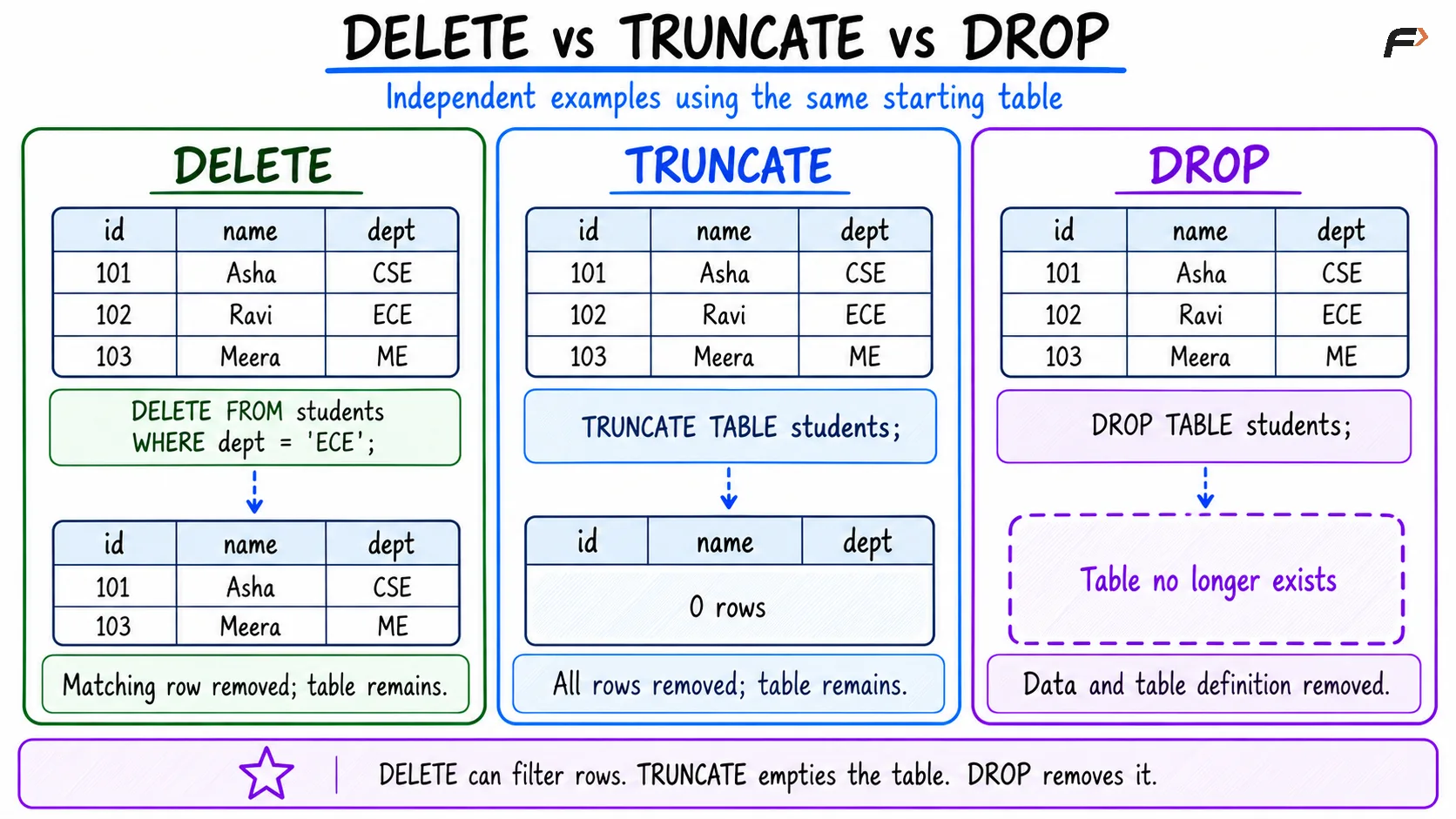
DELETE vs TRUNCATE vs DROP
Understanding Rollback
For a table, you can place a DELETE inside an explicit transaction:
BEGIN;DELETE FROM studentsWHERE department = 'ECE';ROLLBACK;Here, ROLLBACK undoes the deletion. Replacing it with COMMIT makes the deletion permanent.
If autocommit is enabled and no explicit transaction is started, a successful standalone DELETE is committed automatically. A later rollback cannot undo that committed change.
In MySQL, TRUNCATE TABLE and ordinary DROP TABLE cause implicit commits. Wrapping them in START TRANSACTION does not make their effects reversible with ROLLBACK.
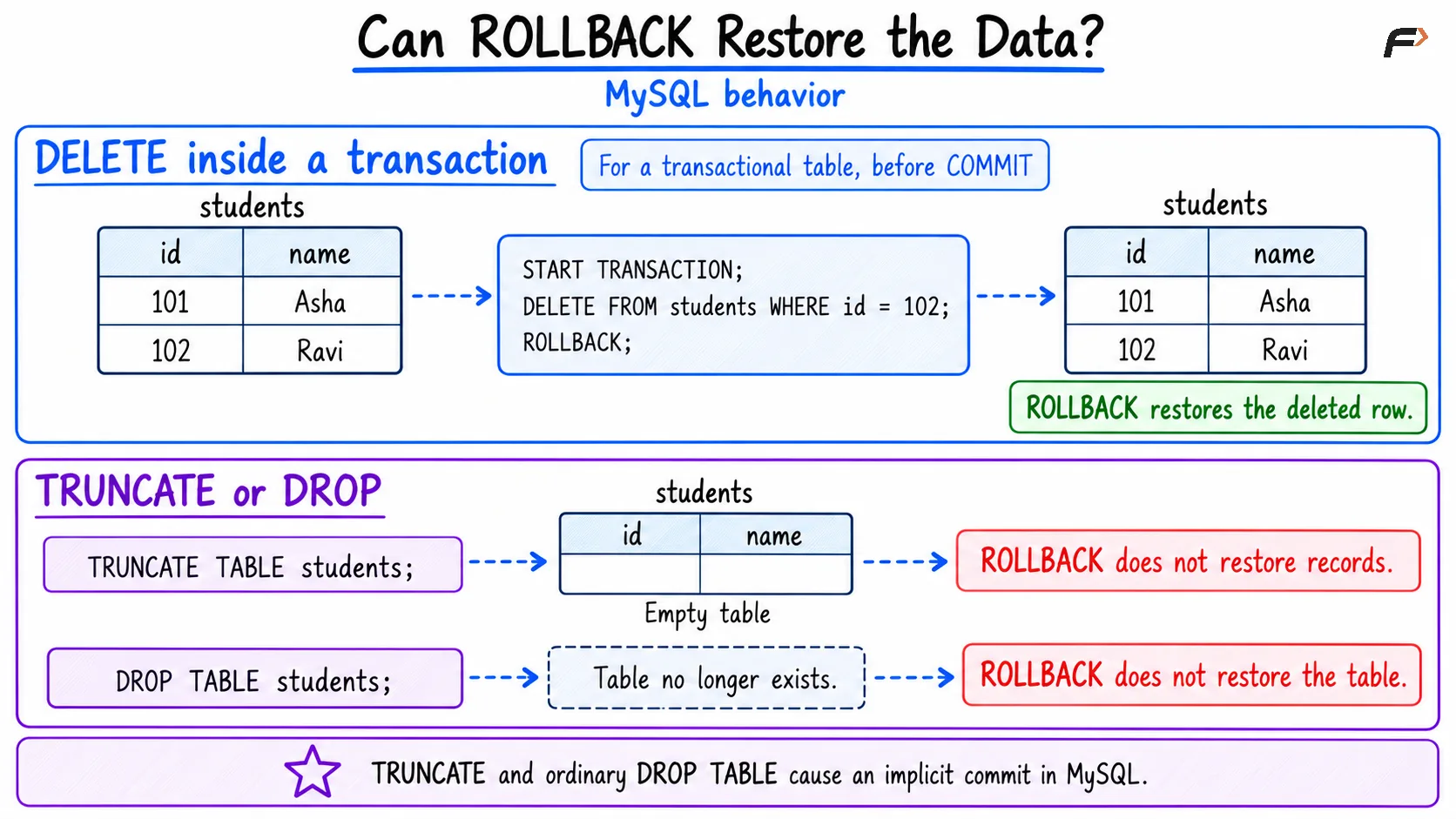
Can ROLLBACK restore data
Foreign Keys and Dependencies
Relationships between tables can restrict these operations.
With foreign-key checks enabled, rejects TRUNCATE when another table has a foreign key referencing the target table. Emptying the referencing table does not remove that constraint.
For related data, check the foreign-key rules before deleting records or removing tables. Do not assume that a command will automatically clear dependent records or repair application queries.
Choosing the Right Command
Choose based on the result you need:
DELETE: Remove particular records, or remove rows with transaction control.
TRUNCATE: Clear all records from a reusable table when its restrictions are acceptable.
DROP: Remove a table that is no longer required.
For a conditional deletion, preview the matching records first:
SELECT *FROM studentsWHERE department = 'ECE';Then use the same condition in DELETE. Before any destructive operation, confirm the database, table name, and data you intend to remove.
Summary
DELETE removes records, TRUNCATE empties a table, and DROP removes the table itself. The main decision is whether you need selected rows removed, all rows removed, or the entire table removed.
Transaction behavior also matters. In MySQL, an uncommitted deletion can be rolled back, while truncating or dropping an ordinary table cannot be undone with a normal rollback.
Be the first to add a comment.