Introduction
A primary key can uniquely identify a product, but it cannot prevent that product from having a negative price. A foreign key can confirm that a referenced record exists, but it cannot ensure that a discount is smaller than the price.
Declarative integrity handles such requirements by defining rules in the database schema. The database checks those rules when data changes, helping different applications follow the same requirements.
What Is Declarative Integrity?
Declarative integrity means stating which data is valid without writing a separate sequence of steps to check every change.
For example:
CHECK (Price >= 0)Here, >= means “greater than or equal to.” The rule prevents a negative price.
The database performs the check when a relevant row is inserted or updated. Application validation remains useful for friendly messages, but database constraints protect data even when changes come from another application or a direct SQL statement.
Example Table and Business Rules
Consider a Product table containing product identifiers, names, prices, discounts, and stock quantities.
Product: reference data
ProductID | ProductName | Price | Discount | Stock |
|---|---|---|---|---|
101 | Notebook | 100.00 | 20.00 | 10 |
102 | Pen | 20.00 | 0.00 | 0 |
Discount is a monetary amount, not a percentage.
The table follows these rules:
ProductIDuniquely identifies each product.ProductNamemust be present and must not be empty or contain only ordinary spaces.Price,Discount, andStockmust be present and non-negative.Discountcannot exceedPrice.An omitted
DiscountorStockreceives a default value of zero.
The primary key handles identification. The remaining requirements need other declarations.
Data Types: The First Boundary
A data type defines the basic kind of value a column stores.
For this example:
Column | Suitable type | Purpose |
|---|---|---|
ProductID |
| Stores an integer identifier. |
ProductName |
| Stores a product name within the declared length. |
Price |
| Stores an exact amount with two decimal places. |
Discount |
| Stores an exact discount amount. |
Stock |
| Stores a whole-number quantity. |
However, an integer type alone does not prevent negative stock. A decimal type alone does not prevent a discount larger than the price.
Data types and constraints therefore work together.
NOT NULL: Require a Value
NOT NULL prevents a column from containing NULL.
NULL represents missing or unknown information. It is different from zero and from an empty string.
For example, declaring ProductName as NOT NULL prevents a missing name, but it does not reject '', an empty string.
A separate check can reject empty names and names containing only ordinary spaces:
CHECK (CHAR_LENGTH(TRIM(ProductName)) > 0)TRIM removes spaces from both ends, CHAR_LENGTH counts the remaining characters, and > means “greater than.”
This check does not claim to reject every possible whitespace character, such as tabs.
CHECK: Restrict Allowed Values
A CHECK constraint tests a condition against the row being inserted or updated.
Examples for Product include:
CHECK (Price >= 0)CHECK (Discount >= 0)CHECK (Stock >= 0)Each rule rejects negative values.
Other common conditions include:
BETWEENfor an inclusive range.INfor a permitted list of values.ANDwhen multiple conditions must hold.ORwhen at least one condition may hold.
For example, Stock BETWEEN 0 AND 1000 would permit both endpoints, including 0 and 1000.
CHECK: Compare Columns in the Same Row
A check can also compare multiple columns:
CHECK (Discount <= Price)<= means “less than or equal to.”
Price | Discount | Result |
|---|---|---|
100.00 | 20.00 | Accepted: the discount is below the price. |
100.00 | 100.00 | Accepted: the discount equals the price. |
100.00 | 120.00 | Rejected: the discount exceeds the price. |
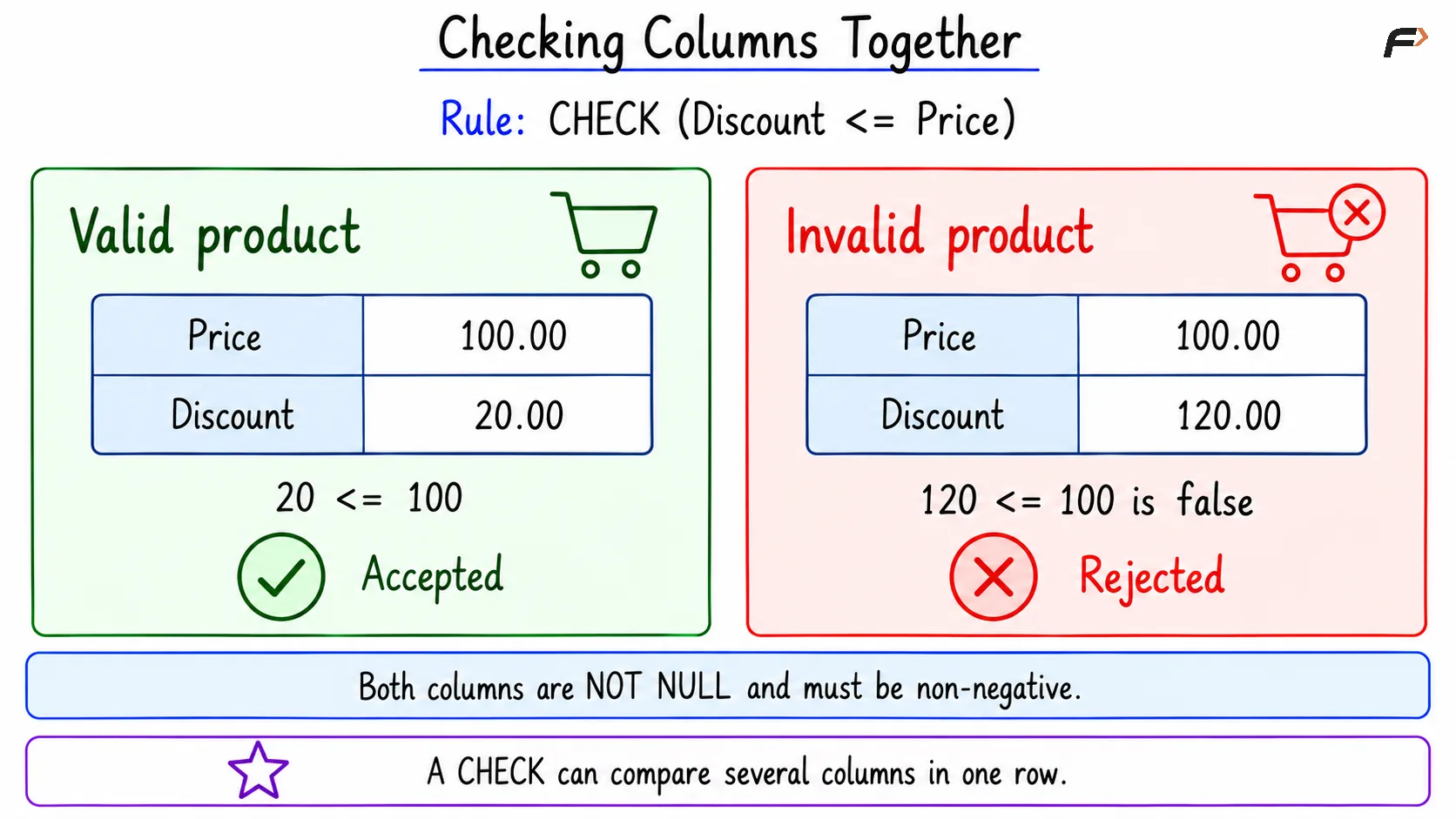
Checking columns together
A check involving multiple columns is normally written as a table-level constraint. “Table-level” describes where it is declared, not permission to inspect every row in the table.
Why CHECK Alone Does Not Reject NULL
SQL conditions can evaluate to TRUE, FALSE, or UNKNOWN.
A CHECK constraint rejects a row when its condition is FALSE. It permits TRUE or UNKNOWN.
Consider CHECK (Price >= 0) by itself:
Price | Condition result | Outcome of this CHECK |
|---|---|---|
100.00 | TRUE | Passes |
-10.00 | FALSE | Rejected |
NULL | UNKNOWN | Passes |
Comparing an unknown price with zero produces UNKNOWN.
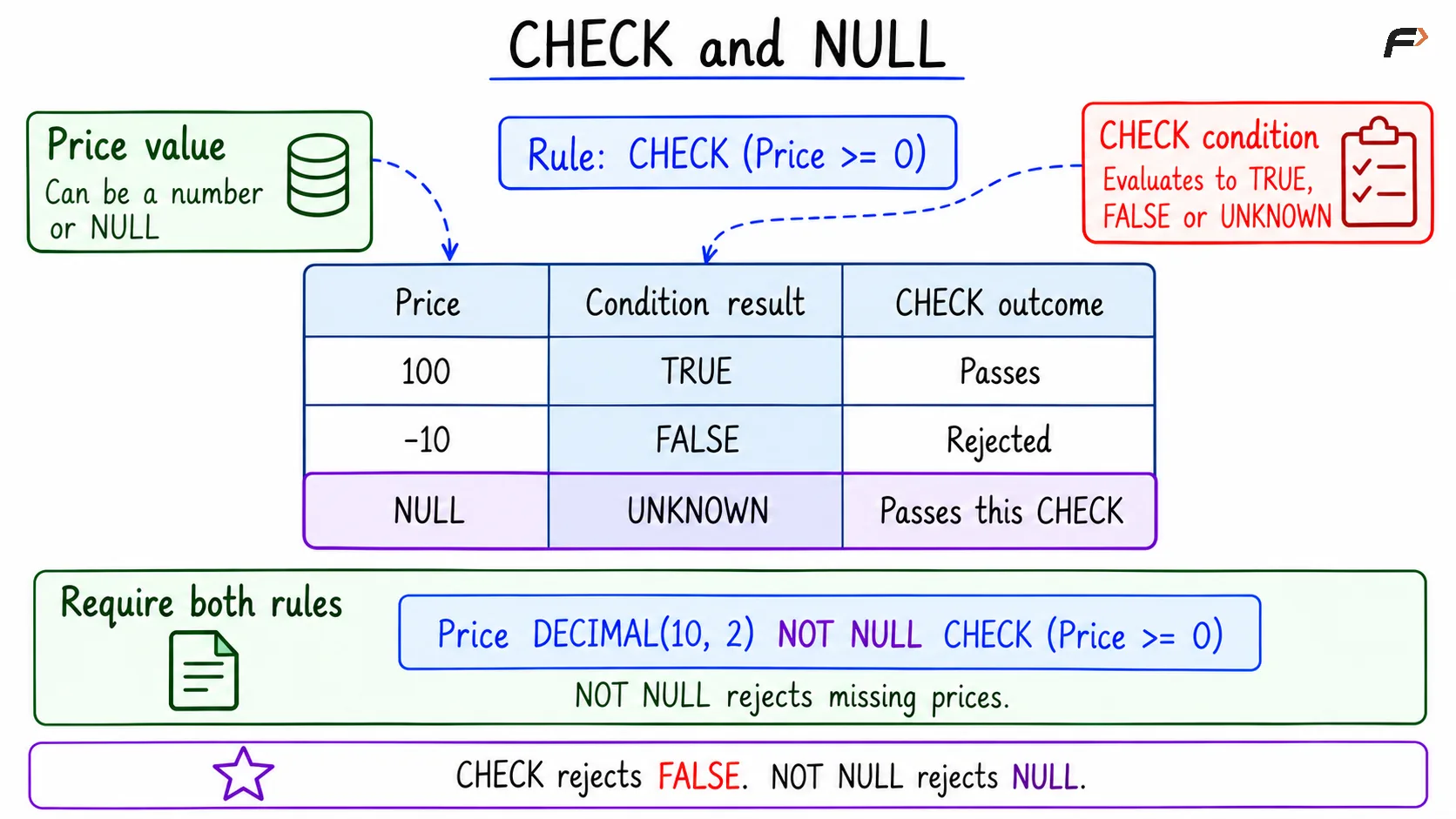
CHECK and NULL
Therefore, a required non-negative price needs both:
Price DECIMAL(10, 2) NOT NULL CHECK (Price >= 0)NOT NULL rejects the missing value. CHECK rejects the negative value.
The same reasoning applies to Discount <= Price: if either value can be NULL, that comparison alone may not reject the row.
DEFAULT: Supply an Omitted Value
A DEFAULT supplies a value when an insert omits a column or explicitly requests its default.
For example:
Stock INT NOT NULL DEFAULT 0If an insert omits Stock, the database supplies zero.
However, a default is not a validation rule:
It does not stop an explicitly supplied negative value.
It does not replace
NOT NULL.Supplying
NULLis different from omitting the column.
For this example, Stock needs a default, a NOT NULL constraint, and a non-negative check.
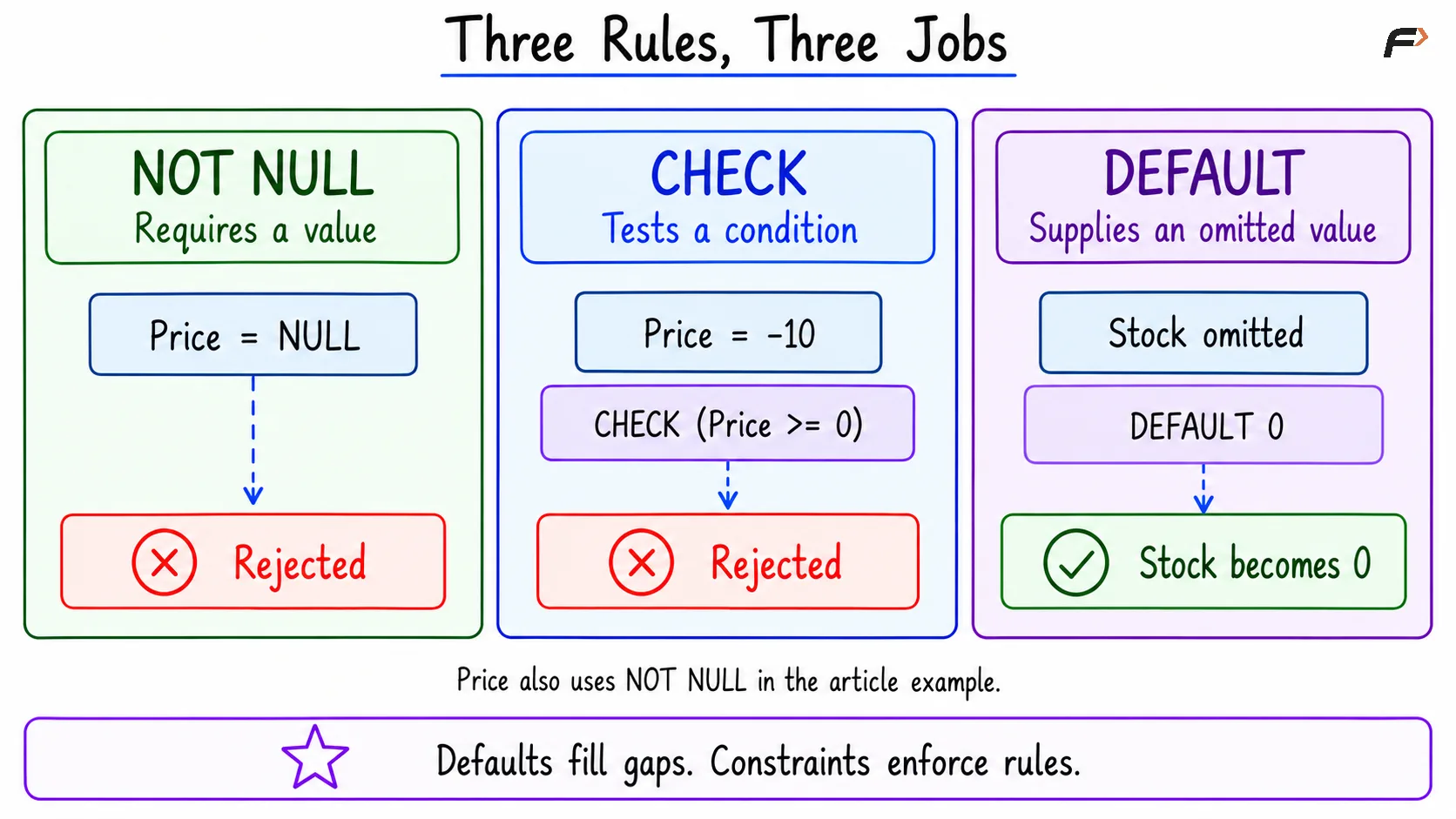
Three rules three jobs
A Compact SQL Example
The examples use enforced checks in MySQL and PostgreSQL. The MySQL examples assume strict SQL mode and ordinary statements without IGNORE.
1. Create the Table with Its Rules
Objective: Define the product rules once in the schema.
Consider the following queries to create Product.
CREATE TABLE Product ( ProductID INT PRIMARY KEY, ProductName VARCHAR(80) NOT NULL, Price DECIMAL(10, 2) NOT NULL, Discount DECIMAL(10, 2) NOT NULL DEFAULT 0, Stock INT NOT NULL DEFAULT 0, CONSTRAINT chk_product_name CHECK (CHAR_LENGTH(TRIM(ProductName)) > 0), CONSTRAINT chk_product_price CHECK (Price >= 0), CONSTRAINT chk_product_discount CHECK (Discount >= 0 AND Discount <= Price), CONSTRAINT chk_product_stock CHECK (Stock >= 0));CONSTRAINT assigns a readable name to a rule. These names help identify which rule an invalid change violates.
DECIMAL(10, 2) and NUMERIC(10, 2) provide exact numeric storage with two decimal places.
Expected outcome: The empty table is created successfully.
2. Insert Valid Products and Use Defaults
Objective: Insert the reference data and let defaults supply the pen’s discount and stock.
Consider the following queries to insert and display the products.
INSERT INTO Product (ProductID, ProductName, Price, Discount, Stock)VALUES (101, 'Notebook', 100.00, 20.00, 10);INSERT INTO Product (ProductID, ProductName, Price)VALUES (102, 'Pen', 20.00);SELECT ProductID, ProductName, Price, Discount, StockFROM ProductORDER BY ProductID;Expected result
ProductID | ProductName | Price | Discount | Stock |
|---|---|---|---|---|
101 | Notebook | 100.00 | 20.00 | 10 |
102 | Pen | 20.00 | 0.00 | 0 |
The second insert omits Discount and Stock, so both receive their declared defaults.
3. Reject Invalid Changes
Objective: Verify that the database protects the rules during updates.
Consider the following queries to test a missing price, an excessive discount, and negative stock.
Each statement below is a separate test. Executing them individually with autocommit enabled, outside an explicit transaction block, because each is expected to fail.
MySQL:
-- Test 1: A price is required.UPDATE ProductSET Price = NULLWHERE ProductID = 101;-- Test 2: The discount cannot exceed the price.UPDATE ProductSET Discount = 120.00WHERE ProductID = 101;-- Test 3: Stock cannot be negative.UPDATE ProductSET Stock = -1WHERE ProductID = 102;PostgreSQL:
-- Test 1: A price is required.UPDATE ProductSET Price = NULLWHERE ProductID = 101;-- Test 2: The discount cannot exceed the price.UPDATE ProductSET Discount = 120.00WHERE ProductID = 101;-- Test 3: Stock cannot be negative.UPDATE ProductSET Stock = -1WHERE ProductID = 102;Expected outcomes
Test | Violated rule | Outcome |
|---|---|---|
Price becomes NULL |
| Update rejected. |
Discount becomes 120.00 while Price is 100.00 |
| Update rejected. |
Stock becomes -1 |
| Update rejected. |
These statements return constraint errors rather than result tables. Error wording differs between databases.
After the failed tests, the stored rows remain:
ProductID | ProductName | Price | Discount | Stock |
|---|---|---|---|---|
101 | Notebook | 100.00 | 20.00 | 10 |
102 | Pen | 20.00 | 0.00 | 0 |
Reusable Rules with Domains
A domain is a reusable type definition that can include constraints.
For example, a non-negative monetary domain could be used for both prices and discounts. Each column would still need its own NOT NULL declaration when a value is mandatory.
PostgreSQL supports CREATE DOMAIN. MySQL does not provide the same SQL domain feature, so equivalent rules are usually declared on individual columns.
A domain can enforce “this amount cannot be negative.” Comparing a product’s discount with its price still requires a rule involving those two columns.
Rules Beyond a Single Row
An ordinary row-level CHECK is not suitable for rules such as:
The total stock across all products must not exceed 10,000.
That rule depends on several rows. MySQL and PostgreSQL do not allow a subquery inside a CHECK constraint to calculate that total.
SQL defines assertions for broader database-wide conditions, but MySQL and PostgreSQL do not implement CREATE ASSERTION.
Some databases offer specialised declarative features. For example, PostgreSQL exclusion constraints can prevent conflicting values across rows, such as overlapping reservations.
When no suitable constraint exists, a rule may need a trigger or controlled transaction logic. That logic must handle concurrent changes correctly. Checking a total first and updating later without coordination can allow two transactions to violate the rule together.
Adding Constraints to Existing Data
Constraints are easiest to define when a table is created. They can also be added later, but existing rows must be considered.
For example, adding a non-negative stock check can fail if the table already contains negative stock.
A sound approach is to:
Identify existing violations.
Correct them according to the business rule.
Add and validate the constraint.
Keep the constraint enforced for future changes.
A declared constraint should not be assumed to protect data if it has been disabled or configured as not enforced.
Summary
Declarative integrity extends beyond row identification and references. Data types define the basic value format, NOT NULL requires a value, and CHECK enforces conditions. Defaults supply omitted values but do not validate explicitly supplied data.
These features work best together. Row-level rules can compare several columns, while reusable domains and specialised constraints cover additional needs. Rules involving totals or other rows require a supported database feature or carefully coordinated transaction logic.
Be the first to add a comment.