Introduction
A dashboard shows four orders for a customer who has placed only three. The SQL runs without errors, but the number is wrong. Debugging correctness means checking whether a query returns the intended rows and values. Understanding what each row represents, how tables match, and how conditions handle NULL helps explain results that initially look confusing.
Define the Expected Answer
Start by writing the requirement in plain language. “Count every order belonging to user 1” is different from “Count orders that contain at least one item” or “Count item records.” Each question can produce a different answer from the same data.
An aggregate such as COUNT summarizes the rows supplied to it. It does not know which business entity you intended to count. Before changing a query, decide what should be counted and which records must be included.
Fix Counts After a JOIN
Consider a shop with these records. Each order_id uniquely identifies an order, and each order_item_id uniquely identifies an item record. This example permits an order to exist before its items are added.
orders
order_id | user_id |
|---|---|
101 | 1 |
102 | 1 |
103 | 1 |
order_items
order_item_id | order_id |
|---|---|
1001 | 101 |
1002 | 101 |
1003 | 101 |
1004 | 102 |
Order 101 has three item records, order 102 has one, and order 103 has none. The expected count of all orders for user 1 is 3.
An Inflated Order Count
Suppose we join the tables and count the resulting rows:
SELECT COUNT(*) AS order_countFROM orders AS oJOIN order_items AS oi ON oi.order_id = o.order_idWHERE o.user_id = 1;Output
order_count |
|---|
4 |
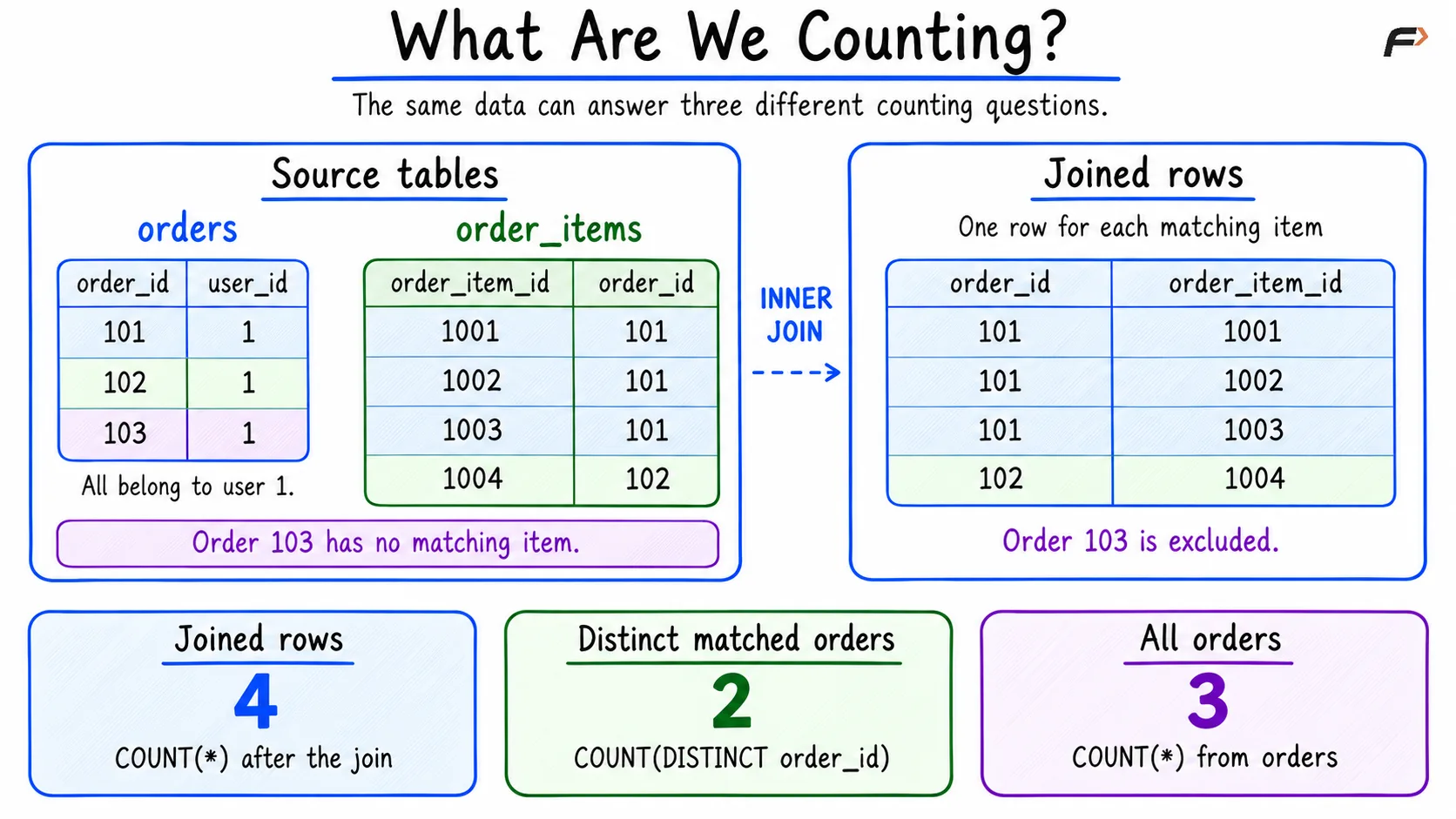
COUNT(*) counts all four rows produced by the join. That is a valid count of matching item records in this example, but it does not answer our question about all orders.
Inspect the Rows Before Counting
Temporarily remove the aggregate and select the identifiers from both tables. Seeing the individual matches makes the counting mistake easier to diagnose.
SELECT o.order_id, oi.order_item_idFROM orders AS oJOIN order_items AS oi ON oi.order_id = o.order_idWHERE o.user_id = 1ORDER BY o.order_id, oi.order_item_id;Output
order_id | order_item_id |
|---|---|
101 | 1001 |
101 | 1002 |
101 | 1003 |
102 | 1004 |
Order 101 appears three times because it matches three item records. Order 102 appears once. Order 103 has no matching item, so the inner join excludes it.
The repeated order IDs are expected in a one-to-many relationship. Replacing COUNT(*) with COUNT(o.order_id) would still return 4 because every repeated order ID is non-NULL.
The diagram shows how the same records produce three different counts, depending on what the query measures.
What Are We Counting?
Count Distinct Orders That Have Items
If the requirement is to count orders with at least one item, count distinct order identifiers from the join:
SELECT COUNT(DISTINCT o.order_id) AS orders_with_itemsFROM orders AS oJOIN order_items AS oi ON oi.order_id = o.order_idWHERE o.user_id = 1;Output: orders_with_items = 2.
COUNT(DISTINCT o.order_id) counts order 101 once and order 102 once. It removes repeated identifiers from the count, but it cannot restore order 103 after the inner join has excluded it.
Count All Orders Directly
For our original requirement, every order is already represented once in the orders table. Count from that table:
SELECT COUNT(*) AS order_countFROM ordersWHERE user_id = 1;Output: order_count = 3.
This includes order 103. The choice of query follows the requirement: all orders, orders with items, and item records are different measures.
Handle NULL in Exclusion Queries
Now suppose the shop wants to list users whose IDs do not appear in a fraud blacklist.
users
user_id | |
|---|---|
1 | |
2 | |
3 |
fraud_blacklist
entry_id | user_id |
|---|---|
1 | 2 |
2 | NULL |
The users.user_id column is a primary key and cannot be NULL. The blacklist deliberately contains a NULL user_id to demonstrate the problem.
Why NOT IN Returns No Rows
SELECT u.user_id, u.emailFROM users AS uWHERE u.user_id NOT IN ( SELECT fb.user_id FROM fraud_blacklist AS fb)ORDER BY u.user_id;Output: no rows.
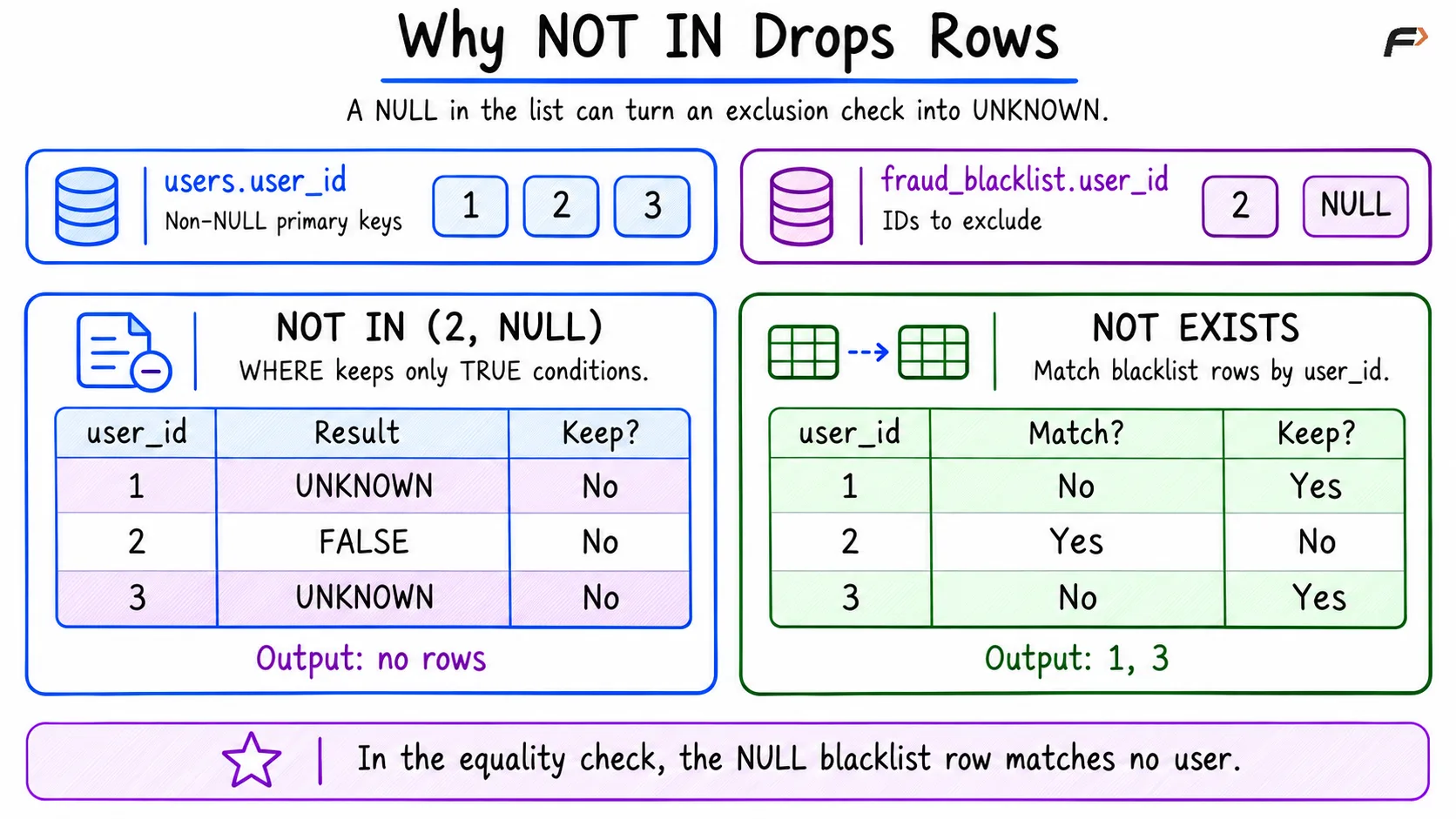
User 2 has a definite match in the blacklist, so NOT IN is FALSE for that user. For users 1 and 3, there is no definite match, but the NULL value makes the condition UNKNOWN.
NULL represents a missing or unknown value. For user 1, SQL can establish that 1 differs from 2, but it cannot establish that 1 differs from the unknown value represented by NULL. The exclusion condition therefore cannot be confirmed as TRUE.
WHERE keeps only rows for which its condition is TRUE. It discards both FALSE and UNKNOWN. This is SQL’s three-valued logic, so the query runs successfully while returning an unexpected result.
The comparison below shows why checking for a matching blacklist row produces the intended result for these non-NULL user IDs.
Why NOT IN Drops Rows
Use NOT EXISTS to Check for a Match
Express the requirement directly: keep a user when no blacklist row has the same user_id.
SELECT u.user_id, u.emailFROM users AS uWHERE NOT EXISTS ( SELECT 1 FROM fraud_blacklist AS fb WHERE fb.user_id = u.user_id)ORDER BY u.user_id;Output
user_id | |
|---|---|
1 | |
3 |
The NULL blacklist value does not satisfy the equality condition for any user. User 2 has a matching row and is excluded; users 1 and 3 have none and are included. SELECT 1 is a placeholder because EXISTS checks whether a row is returned.
Alternatively, Filter NULL Before Using NOT IN
When retaining NOT IN, exclude NULL values from the subquery explicitly:
SELECT u.user_id, u.emailFROM users AS uWHERE u.user_id NOT IN ( SELECT fb.user_id FROM fraud_blacklist AS fb WHERE fb.user_id IS NOT NULL)ORDER BY u.user_id;This returns the same two users, 1 and 3. Use IS NOT NULL to keep non-NULL values; ordinary comparisons with NULL do not provide that test.
The two corrections agree here because users.user_id cannot be NULL. With a nullable outer column, NOT EXISTS using equality may keep NULL-valued rows. Decide explicitly whether those rows should be included.
Validate Results Before Tuning Performance
Check the corrected query against cases you can verify by hand: several matches, no match, NULL in the compared data, and an empty input. Compare the actual identifiers as well as the count, because two different result sets can have the same size.
The aggregate queries above deliberately omit GROUP BY because they request one total. They return one count, including 0 when no rows match.
Once the result is correct, investigate speed. In MySQL, EXPLAIN FORMAT=TRADITIONAL displays an execution plan in table form. EXPLAIN ANALYZE runs the query and adds actual execution measurements. These tools help explain execution, but they cannot decide whether the intended metric was orders or items.
An index may improve how rows are found. It does not correct an unsuitable join, an inflated count, or an exclusion condition that handles NULL incorrectly.
Summary
Debugging SQL correctness starts with a clear expected result. Inspect individual join matches before aggregating, and choose a count that measures the intended entity. COUNT(DISTINCT) avoids counting repeated identifiers, while counting directly from orders includes orders without items. For exclusion queries, account for NULL explicitly with a filtered NOT IN or a suitable NOT EXISTS condition. Validate the returned rows before investigating performance.
Be the first to add a comment.